Is Opera GX safe? Security, privacy, and data review



Opera GX is a Chromium-based browser designed for gamers and power users who want more control over their browsing experience and more accessible privacy features. Some users prefer it to alternatives like Google Chrome or Microsoft Edge because of features like an ad blocker and tracker blocker.
In this post, we explore whether Opera GX is safe, how it stacks up against Google Chrome, its privacy and security features, and how reliable it is for everyday use.
What is Opera GX, and who is it for?
Opera GX is an official Opera browser variation designed for gamers and power users. It provides many gamer-oriented features like a GX Control dashboard to keep track of CPU, RAM, and network usage, as well as gaming platform integrations (like Twitch and Discord). The gaming browser is known for its high levels of customizability (including themes and live wallpapers) and gamer-centric design.
Opera, the parent company, is owned by the China-based consortium Kunlun Tech as the majority shareholder, though it’s publicly traded and headquartered in Norway. This means it’s developed under European jurisdiction and must comply with EU data protection laws like the General Data Protection Regulation (GDPR), although some data processing may involve global infrastructure. The company also has offices in Spain, Ireland, Scotland, Sweden, and Poland.
Is Opera GX safe to use?
Opera GX is generally safe to use, offering decent protection against common threats like malware and software vulnerabilities. With 34 million monthly users as of the last quarter of 2025, the browser remains a popular choice for users (gamers in particular), as it implements several privacy-friendly features like a native virtual private network (VPN) and an ad blocker.
However, Opera GX may not be a good fit for users who want to limit their data exposure. The browser collects similar types of usage data to other Chromium-based browsers like Google Chrome or Microsoft Edge.
As such, it may not be the best choice for environments where strict data minimization, privacy controls, or compliance requirements are a priority. For individual users or organizations who prioritize minimizing data collection, there are more privacy-focused browsers to consider, with stronger privacy defaults and greater control over telemetry.
Opera GX security features
Opera GX stands out from other browsers thanks to several browser security features that aim to provide reliable protection against online threats.
Built-in VPN
Opera GX offers a native VPN option that you can enable from the browser’s settings. This will add a VPN badge next to the search bar. Activating it will provide a virtual location and IP address, masking your IP address.
The VPN encrypts your data as it travels between your device and its servers, helping protect your traffic from local network monitoring, similar to a browser-based VPN feature. However, the free version of the VPN only protects traffic inside the Opera GX browser, and it doesn’t encrypt system-wide traffic from other apps or the entire device.
Opera also offers a paid VPN Pro service, which is powered by ExpressVPN infrastructure and uses the Lightway protocol, an efficient VPN protocol designed for speed and stability. However, Opera VPN Pro remains a separate product with its own apps, features, and policies.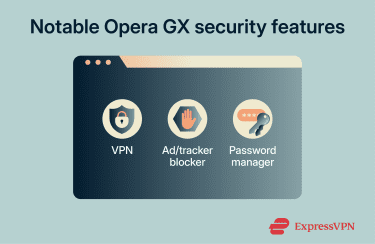
Ad blocker and tracker blocking
Ads and trackers often make regular internet browsing a slower or more cluttered experience, which is why many people use ad blockers to improve their experience. Opera GX provides native ad and tracker blocking, with customizable exceptions and lists you can personalize:
- Ad blocker: Blocks many types of ads, including scripts that display ads and those used for cryptocurrency mining. One of the default filter lists is the NoCoin (Cryptocurrency Mining Protection) list, which helps prevent cryptojacking.
- Tracker blocker: Reduces tracking from scripts, pixels, and cookies that collect data (for analytics, profiling) rather than showing ads.
Both features allow you to add custom blocklists, which can significantly boost the browser’s ability to block malicious trackers and ads that may harvest your data or install unwanted software on your device.
Password manager
Opera GX offers a limited password manager feature in the browser, letting you import passwords with a CSV file or add new entries. You can add a username, password, the corresponding site, and an optional note.
However, Opera GX’s password manager doesn’t have any of the security features you’ll typically find in a standalone password manager like ExpressKeys, which also has a password health checker, breach monitoring, two‑factor authentication (2FA) code generation and management, and payment card storage.
What data does Opera GX collect?
Opera GX’s Privacy Policy outlines in detail Opera’s data collection practices.
The desktop Opera GX browser is available for Windows, Mac, and Linux. Users can create an Opera account, which requires an email address and username. The company retains user data for up to seven days after requesting account deletion.
Other types of data collected while using the Opera GX browser include:
- Personalized content: Features like the News Feed and Shopping Corner can collect data on the articles you read and your general location for personalization and monetization.
- Browser extensions: Extensions provided by third parties through the Opera add-ons page may collect user data outside Opera’s control.
- AI chat: Opera GX’s chatbot is powered by OpenAI and Google and logs your chat prompts and open websites or tabs. Depending on your request, the chatbot may also share your country and IP address with third-party partners. Chat sessions, which include URLs, chats, and tab names, are stored locally on your device and on Opera’s servers.
- Cashback: Using the Cashback program and visiting the supported sites means Opera GX can collect merchant URLs, a list of purchased items, IP addresses, and transaction amounts. The company will retain the data for up to five years to meet regulatory requirements.
- GX Cloud: This includes credentials from the Opera account, plus the date of birth and an active payment account, which may include your name, full address, phone number, and card ID. This data will be retained for up to five years.
- Usage statistics: Your random browser ID collects data on your machine ID, hardware specifications (like model and release date), operating system, environment configuration, and feature usage data. These data points can contribute to what is known as a browser fingerprint.
- Browser assistant: Opera GX on Windows includes a browser assistant that promotes the browser’s features, and it can collect data about your device’s battery, hard disk space, Wi-Fi networks, and other browsers installed. It retains this data for up to four years.
- Personalized ads and profiling: Based on your user ID, IP address, and general location (country or city), Opera GX serves personalized ads. Other data collected as part of this process can include categories of websites you search and visit, device information, and categories of ads you previously clicked.
- Promotions and marketing: Optional promotional Opera campaigns, contests, or surveys may collect your name, email, phone number, and postal address. Agreeing to receive marketing information will share your email and phone number with Opera.
- Third-party partners: Third parties that collaborate with Opera GX and that may collect your data include payment service providers like PayPal and Stripe, technology providers like OpenAI, Zendesk, and Google, and third-party features like Google Ads, Safe Browsing, Geolocation API (Windows only), and Firebase analytics.
The Opera GX mobile browser shares most data collection practices with the desktop browser. It can collect more data through the numerous third-party technologies used across the app types for different devices.
How Opera GX handles user data
According to its privacy policy, Opera (and by extension Opera GX) adheres to GDPR regulatory requirements when processing data, even in contexts that apply to affiliated companies outside of the EU.
The GDPR is considered to be one of the most stringent privacy regulations in the world, establishing detailed obligations for data controllers and processors, including rules on lawful processing, transparency, purpose limitation, data minimization, and security. It also grants users specific rights over their personal data, such as access, correction, deletion, and portability, with significant penalties for noncompliance.
Note that Opera GX may retain your data for up to several years, depending on the type of data collected and the regulatory requirements surrounding it.
Privacy controls and settings
A significant portion of the data collected by Opera GX is optional and relies on opt-in services, which means no data is collected if you don’t interact with these features. This includes the Opera account, Cashback, AI chat, and any promotional or marketing content you can choose to interact with or not.
You can also actively opt out of other data collection methods that are enabled by default (like feature usage information, crash reports, and promotional notifications and campaigns) through the browser’s Privacy & Security settings.
Note, however, that some essential data collection can’t be fully disabled, as it’s required for the browser to function securely.
Opera GX vs. Chrome: Which is safer?
Both Opera GX and Google Chrome are safe browsers. Most security incidents that occur during regular browsing tend to happen when visiting unsafe websites or downloading malicious extensions, and not because of any inherent browser-based vulnerabilities.
The two browsers distinguish themselves in several aspects:
- Google Chrome’s Safe Browsing mode, which alerts you when accessing potentially malicious websites, is considered more comprehensive than Opera GX’s anti-phishing and anti-malware blockers (which use Phishtank and Yandex).
- Opera GX has a VPN integration. Google Chrome lacks this feature entirely.
- Opera GX has an in-built ad-blocker, unlike Google Chrome.
Overall, Opera GX may be more convenient for users who want built-in tools like ad blocking without installing extensions (like on Google Chrome). However, Chrome provides a larger, more mature extension ecosystem, frequent security updates, and more granular privacy controls, giving users the flexibility to customize their protections. That said, Chrome collects significant usage and browsing data by default, and users should consider this when evaluating privacy.
Is Opera GX safe for gaming and everyday use?
Opera GX is generally considered safe for gaming and everyday use, offering built-in security features and customization options. However, like most browsers, its privacy protections depend on your settings and usage.
Opera GX’s ad blocker, VPN, and tracker blocking features improve internet safety and privacy during personal browsing, helping reduce exposure to many malicious sites and scripts. The ability to add custom ad and tracker blocklists can be especially useful in making your browser more restrictive toward potentially harmful sites.
For instance, you can download custom ad blocker lists from GitHub. These are .txt files or web pages that show entries like “||example.com^” and that you can upload to Opera GX’s ad blocker.
However, Opera GX doesn’t have parental controls. Unlike with other browsers like Google Chrome, parents aren’t able to blacklist specific sites, filter out mature content, or set screen time limits. In fact, Opera GX has a Panic Button that lets users hide all active tabs, replace them with harmless ones (like YouTube or Wikipedia), and mute all audio instantly. This is privacy-friendly but could also be used by younger users to hide inappropriate activity.
Overall, this means Opera GX is not the best choice for parents who want some oversight over what their children are doing online.
FAQ: Common questions about Opera GX safety
Is Opera GX safer than Chrome?
Nullam interdum sapien nec neque egestas auctor?
Does Opera GX collect your data?
Is Opera GX owned by China?
Is Opera GX spyware?
How does Opera GX VPN work?
Take the first step to protect yourself online. Try ExpressVPN risk-free.
Get ExpressVPN