IoT infrastructure: Components, architecture, and best practices


For every smart gadget, there’s a complex system working quietly in the background to connect it, move its data, and keep everything running.
That hidden system is the Internet of Things (IoT) infrastructure. It’s the mix of hardware, networks, cloud services, and software platforms that let devices talk to each other, send data, and turn it into something useful.
In this guide, we’ll break down how IoT infrastructure works: its key components, common architecture patterns, and best practices for keeping it scalable, reliable, and secure.
What is IoT infrastructure?
IoT infrastructure is the foundation that lets connected “things” work. It’s the mix of physical and digital components (like cabling, wireless networks, data centers, and software platforms) that link devices, move their data, and keep services running smoothly.
It isn’t a single product but a system designed to grow. Good IoT infrastructure can start small and then scale as you add more devices, users, and analytics. In practice, that often means using a mix of wired and wireless technologies so the network stays flexible, resilient, and ready for future needs.
Why IoT infrastructure matters in modern systems
A connected sensor or device on its own doesn’t change much. It’s when that device sits on top of a solid IoT infrastructure that it becomes genuinely useful. Infrastructure is what lets you collect data reliably, process it in (near) real time, and feed it into the tools people actually use to make decisions.
IoT infrastructure already underpins many everyday systems. Transport providers use it to track entire fleets in real time, monitor fuel and engine health, and adjust routes on the fly. Manufacturers connect machine sensors to analytics platforms so they can spot abnormal readings early and fix equipment before it fails.
Hospitals rely on networked medical and environmental sensors to monitor critical equipment, cold storage, and ward conditions around the clock. City authorities deploy connected sensors for traffic control, smart lighting, and infrastructure monitoring to improve safety and reduce congestion.
Because all of this depends on the underlying network and platform design, IoT infrastructure architecture matters a lot. Decisions like how to split work between edge and cloud, how to design the network, and how to secure devices and APIs all affect reliability, security, and scalability. These choices determine whether the system can move from a small pilot to thousands or millions of devices without being redesigned from scratch.
Core components of IoT infrastructure
To understand how IoT systems work, it helps to start with their main building blocks and what each one does.
1. IoT sensors and edge devices
IoT systems start with the “things” in the field: devices that can sense what’s happening and, in many cases, act on it. Sensors measure conditions like temperature, motion, location, light, or air quality and turn those readings into digital data. Actuators then use that data to trigger physical changes; for example, opening a smart lock, closing a valve, or moving a robotic arm.
Alongside these, more capable edge devices (such as industrial controllers, smart cameras, or small gateways) sit close to the sensors. They collect data from nearby devices, run quick checks or basic analytics locally, and send only the relevant information on to cloud or data-center systems for deeper processing.
2. IoT network infrastructure
The data from sensors needs a way to travel. This is the job of the IoT network infrastructure. It’s not a single network but a mix of wired and wireless technologies chosen for each use case. Together, these links form the IoT connectivity layer.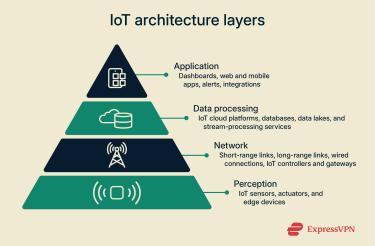
3. IoT controllers and gateways
In most IoT setups, it’s neither efficient nor realistic for every sensor to connect straight to the internet. Instead, devices usually talk to controllers or gateways first.
Controllers manage a group of sensors and actuators locally. They read sensor values, apply simple rules (for example, “turn the fan on above 86°F”), and send commands to actuators without involving the cloud each time.
Gateways bridge the local environment to the wider network. They collect data from many nearby devices (for example, dozens of Bluetooth sensors in a factory) and send it to the cloud or a data center over a single uplink such as Wi-Fi. Gateways often translate between different protocols, apply basic filtering or preprocessing, and add a layer of security before data leaves the local network.
4. IoT cloud services and platforms
IoT cloud platforms are the main processing hub of many IoT systems. They collect, store, and analyze the data coming in from gateways and edge devices.
Major cloud providers like Amazon Web Services (AWS) and Microsoft Azure offer managed IoT services you can use as a ready-made platform rather than building everything from scratch. These platforms typically handle tasks such as:
- Secure device connectivity and management: Registering devices, authenticating them, and keeping track of their status and configuration.
- Scalable data storage: Using cloud databases and data lakes to store readings from thousands or millions of devices.
- Rules and automation: Coordinating responses across many devices, sites, and cloud services.
- Integration with other services: Connecting IoT data to messaging, monitoring, analytics, and incident-response tools across the cloud environment.
5. IoT analytics and visualization tools
Collecting data is only useful if you can make sense of it. That’s where analytics and visualization tools come in.
An analytics engine processes raw data from devices and gateways, looking for trends, anomalies, and useful patterns. The results are then shown in dashboards, charts, or maps or sent out as alerts or data feeds for other systems.
This is usually the part people see and use day to day; for example, a mobile app that shows your home’s energy use or a web dashboard that lets a factory manager monitor the performance and status of a production line.
How is IoT infrastructure managed?
A system with thousands or millions of devices can’t be managed by hand. You need centralized platforms, automation, and clearly defined lifecycle processes to make sure devices are securely provisioned, monitored, updated, and retired when needed. That requires both good tooling and solid operational practices.
Infrastructure management practices
At the infrastructure level, the goal is to keep the whole system healthy, available, and scalable. That usually means:
- Having a single view of key metrics across networks, gateways, and cloud services.
- Automating routine tasks like scaling resources, rotating logs, or restarting unhealthy services.
- Planning capacity so the system can handle peak loads without wasting resources.
- Keeping energy use and operating costs under control.
- Using data and analytics for predictive maintenance, so you can fix issues before they cause outages.
Specialized monitoring tools like Datadog or Amazon CloudWatch can give you a high-level view of your infrastructure’s health in near real time and raise alerts when something drifts out of normal ranges.
Many IoT platforms publish metrics directly into these tools, so you can see device, gateway, and cloud behavior in one place instead of juggling separate dashboards.
IoT device management approaches
Device management deals with the physical devices deployed in the real world: how you onboard, configure, monitor, update, and retire them at scale. If you have 10,000 smart light bulbs in a city, you need to treat them as a fleet. An IoT device management system does this by handling the main stages of each device’s lifecycle.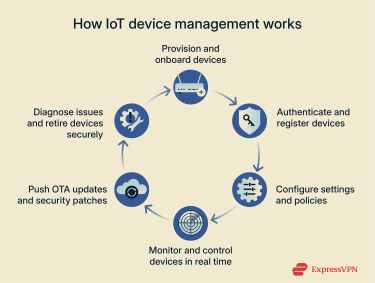
- Provisioning: Adding a new device to the environment and registering it in a central device registry.
- Configuration: Setting how the device behaves (for example, which network it uses, how often it sends data, and which thresholds trigger alerts).
- Monitoring: Tracking device health and status: battery level, online/offline state, last contact time, error codes, and firmware version.
- Updating: Sending over-the-air (OTA) firmware updates to fix issues or add features, often in controlled waves with the ability to roll back if something goes wrong.
- Decommissioning: Retiring a device when it’s old or broken by removing it from the registry and preparing it for disposal or reuse.
Learn more: Read our detailed guide on IoT device management.
Security in IoT infrastructure
Connecting huge numbers of devices to the internet also creates a large number of potential entry points for attackers. Security can’t be treated as an add-on. It has to be part of the IoT infrastructure design from the start: from device hardware and firmware through to networks, gateways, and cloud services.
Below are some of the most common security issues and how to address them.
Common IoT security challenges
Many weaknesses repeat across sectors and device types, and they’ve already been abused in large-scale IoT attacks on both consumer and industrial systems.
- Weak credentials: Devices often ship with default usernames and passwords like “admin” that users never change. This pattern helped IoT botnets like Mirai spread rapidly across insecure home devices.
- Unencrypted data: Some devices still send data in plaintext, so anyone on the same network can intercept and read it.
- Insecure networks: A poorly secured Wi-Fi or local network makes it easier for attackers to get close and probe devices.
- Lack of updates: Many manufacturers either stop providing security updates early or never release them at all. Even when updates exist, users often don’t enable automatic updates or forget to apply them regularly. As a result, known vulnerabilities remain unpatched on devices that stay connected to the network for years.
How to secure IoT networks
A secure IoT deployment relies on layers of defense. If one control fails, others should still limit what an attacker can do. In practice, that means addressing the network, the devices, and the data at the same time.
VPN solutions for IoT security
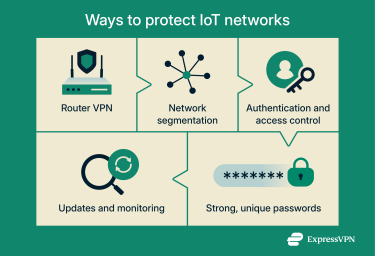
A virtual private network (VPN) can strengthen IoT security, but it is only one layer. Many IoT devices, such as smart plugs or connected thermostats, run locked firmware and can’t install VPN apps. In these cases, the usual approach is to run the VPN on the router rather than on each device.
With a VPN on the router, you don’t need a client on every device. The router creates an encrypted tunnel to the VPN service, and all outbound traffic is sent through that tunnel. From the internet’s perspective, your devices sit behind the VPN server, and observers along the path see only encrypted packets.
It’s important to understand what this does and does not protect. The VPN encrypts traffic between the router and the VPN server. It doesn’t encrypt the local link between each device and the router.
That segment is protected (or exposed) by your Wi-Fi settings, wired connections, and network design. If an attacker can already reach your local network, they may still be able to probe or intercept traffic there unless you use strong Wi-Fi security and segmentation.
Used correctly, a router VPN helps in several ways:
- Data encryption in transit: The link between your router and the VPN server is encrypted, making it harder for your internet service provider (ISP) or other transit providers to inspect your device traffic.
- Protection on untrusted networks: If a gateway or travel router connects over public Wi-Fi, attackers on that hotspot can see the VPN tunnel but cannot read its traffic.
- IP and location privacy: External services see the VPN server’s IP address instead of your home IP address, making direct probing of your network from the internet more difficult.
Network segmentation and hygiene
A well-structured network limits how far an attacker can move if they compromise one device.
- Segment the network: Use a separate Wi-Fi or virtual local area (VLAN) network for IoT devices. If a smart toaster is compromised, it’s much harder for an attacker to reach laptops, phones, or internal servers.
- Use strong Wi-Fi security: Enable Wi-Fi Protected Access 3 (WPA3) where possible. If devices don’t support it, use WPA2 with a strong, unique password. WPA2/WPA3 are modern Wi-Fi security standards that encrypt your wireless traffic, making it much harder for attackers to snoop or break in. Avoid older, broken standards like Wired Equivalent Privacy (WEP), which can be cracked quickly.
- Disable unused services: Turn off features you don’t need, such as remote web access on a camera or Universal Plug and Play (UPnP) on a router. Fewer exposed services mean fewer attack paths.
Authentication and access control
Weak or reused credentials are still one of the most common ways attackers get in.
- Eliminate default passwords: Replace all factory-set credentials as soon as devices are installed. Use strong, unique passwords or passphrases for each device and account.
- Use multi-factor authentication (MFA): Where supported, add MFA to cloud dashboards, admin panels, and management consoles.
- Use digital certificates at scale: In larger deployments, use device certificates for identity instead of shared keys or passwords. This makes it easier to verify that a device is genuine and to revoke access for a single device if needed.
Encryption protocols
Data must remain unreadable to unauthorized parties from the moment a device collects it until an application uses it. That means protecting data in transit with strong, modern encryption protocols, such as Transport Layer Security (TLS), which underpins HTTPS web traffic, and VPN tunnels for remote links. It also means protecting data at rest with encryption on databases and storage systems.
In high-risk deployments, sensitive fields can also be encrypted at the application layer so that even if an attacker reaches the database, they cannot interpret the raw values.
Ongoing management and auditing
Security depends on continuous maintenance, not a one-time setup. Build security checks into your existing monitoring and device management so you can spot IoT vulnerabilities early. Schedule regular firmware updates, run periodic vulnerability scans on exposed gateways and services, and review logs and access rights for unusual patterns.
The goal is to catch misconfigurations and suspicious behavior quickly, using the same tools you already rely on to keep the IoT infrastructure healthy.
Learn more: Find out more in our in-depth articles on IoT device security and IoT cybersecurity.
Implementing IoT infrastructure
Getting started with IoT can feel like a massive project. The key is to start small, focus on a real problem, and follow a clear plan. That’s how you reach the point where the infrastructure starts delivering visible benefits.
Benefits of implementing IoT infrastructure
Building IoT infrastructure takes effort, but the upside can be substantial:
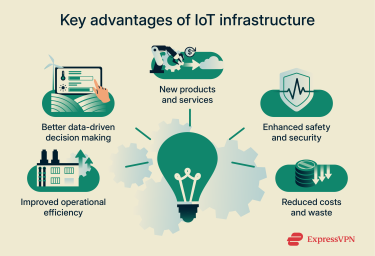
- Improved operational efficiency: Machine sensors let a factory spot when a part is likely to fail and schedule maintenance before it breaks. This kind of predictive maintenance reduces unplanned downtime and cuts repair costs.
- Better data-driven decision making: IoT data gives teams a real-time view of what’s happening instead of relying solely on occasional spot checks. That makes it easier to choose the right time to adjust settings, schedule maintenance, or allocate resources, reducing waste and improving results.
- New products and services: By adding connectivity and sensors, companies can turn one-off products into ongoing services, charging for availability, performance, or usage, and bundling in monitoring and maintenance over time.
- Enhanced safety and security: Connected devices can protect people as well as equipment. For example, wearable heart monitors can keep an eye on remote patients between checkups, while “man-down” sensors can alert a team immediately if a worker in a hazardous area stops moving or takes a fall.
- Reduced costs and waste: Better visibility often translates directly into savings. Smart-grid systems help utilities balance demand and reduce energy waste, and real-time fleet tracking in logistics supports shorter routes and smarter scheduling, cutting fuel use and operating costs.
Planning and implementing IoT infrastructure
A successful IoT project usually follows a clear, staged path:
- Define the problem: Rather than opening with “we need IoT,” the emphasis should be placed on the underlying objective, such as reducing energy waste, improving asset visibility, or cutting unplanned downtime. The business problem should come first.
- Start small (proof of concept): Pilot your IoT infrastructure design on a small scale: one machine, one production line, one building, or one field. Use this to validate assumptions and uncover practical issues.
- Choose components: Select sensors, gateways, and network technologies that fit the problem: range, power use, data volume, and environment all matter.
- Select a platform: Decide whether to build your own backend or use a managed IoT platform from a cloud provider. Consider integration, cost, and how it supports your longer-term IoT infrastructure scalability.
- Plan for security: Think about device identity, updates, network segmentation, and data protection from day one, even if your first deployment is small.
- Scale and integrate: Once the proof of concept is stable, expand gradually and integrate IoT data into existing tools like maintenance systems and analytics platforms, so it becomes part of everyday workflows.
Key considerations before deployment
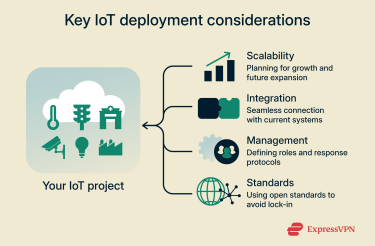
Before you commit budget and time, it helps to answer a few key questions:
- Scalability: Will the architecture continue to function effectively with 10,000 or even 100,000 devices? Is there a clear approach to scaling IoT infrastructure both technically (storage, networking, compute) and operationally (support, monitoring, updates)?
- Integration: How will the IoT system interact with existing business software and processes? Relevant touchpoints may include maintenance tools, customer relationship management (CRM), billing, analytics, and reporting.
- Management: Who is responsible for day-to-day IoT infrastructure management? For instance, who is contacted if a gateway fails at 3 am, and which team determines when to deploy a firmware update?
- Standards: Are open, widely supported protocols and formats being used, or does the design rely on a single vendor? Adhering to established IoT infrastructure standards generally provides greater flexibility for future changes.
Common mistakes to avoid
- Focusing on the devices themselves instead of the infrastructure: Buying gadgets without a plan for how their data will be collected, processed, and used.
- Ignoring security: Assuming a deployment is “too small” to be interesting to attackers and skipping basic protections as a result.
- Creating data silos: Capturing useful data but leaving it stranded in a standalone dashboard instead of connecting it to other business systems.
- Underestimating lifecycle management: Deploying devices with no plan for provisioning, updates, monitoring, or retirement.
IoT infrastructure readiness checklist
Use this quick list to check whether you’re ready to move ahead:
✅ We have a clear business problem we want IoT to help solve.
✅ We have a plan for securing devices, networks, and data.
✅ We have a strategy for IoT infrastructure scalability as the deployment grows.
✅ We have chosen an IoT device management system or have a concrete plan for handling updates and configuration.
✅ We understand ongoing costs, including cloud usage, connectivity, maintenance, and support.
FAQ: Common questions about IoT infrastructure design
What are the four types of IoT networks?
Internet of Things (IoT) networks are often grouped into four broad types: short-range networks (such as Bluetooth or Zigbee), local area networks (like Wi-Fi), cellular networks (such as 4G and 5G), and low-power wide-area networks (LPWAN), including technologies like long-range wide area network (LoRaWAN) and Narrowband Internet of Things (NB-IoT), which are designed to send small amounts of data over long distances using very little power.
Should I enable Internet of Things (IoT) on my home router?
Your router doesn’t have a special “IoT mode.” Any smart device you connect to its Wi-Fi is already part of your home network. To secure that network for IoT, change the router’s default admin password, use a strong Wi-Fi Protected Access 3 (WPA3) Wi-Fi password, and create a separate guest network for IoT devices.
For stronger protection, use a router that supports VPN connections so all traffic from your devices is encrypted as it leaves your home.
How can I choose the best IoT platform for my project?
To choose an Internet of Things (IoT) infrastructure platform, focus on scalability, security, protocol support, cost, and tools. Check that it can grow from small pilots to very large fleets, supports modern encryption and authentication, works with your devices and gateways, has a clear pricing model, and either includes the analytics and dashboards you need or integrates cleanly with the ones you already use.
Take the first step to protect yourself online. Try ExpressVPN risk-free.
Get ExpressVPN















 Support Center
  FAQ
FAQ  VPN Setup Tutorials


