Instagram scams: How to spot the biggest red flags and protect your account


Instagram scams are common and take on many forms. They might appear as ads, interesting posts, urgent DMs, or tempting giveaways. Some are easy to spot, while others pressure users to act quickly and can lead to serious consequences.
Learning how Instagram scammers operate is one of the most effective ways to stay safe. This guide explains common scam formats, the red flags that often reveal them, and ways to better protect your Instagram account.
What is an Instagram scam?
Instagram scams are attempts to trick users into giving away money, sensitive information, or account access. While Instagram isn’t inherently unsafe, its large user base makes it a popular target for scammers. In fact, Meta said that in 2025, it removed over 159 million scam ads across Facebook and Instagram.
Scams on the platform may begin as direct messages, comments, posts, or profiles that look legitimate at first glance. Some scams stay within Instagram, while others redirect targets to external sites or apps.
How Instagram scams work
On Instagram, many scams don’t happen in a single step. They often follow a familiar pattern, with each stage designed to push the target closer to a risky action.
Often it starts with a simple interaction. The cybercriminal may create a fake profile and wait for targets to engage or reach out through comments or direct messages.
From there, a scammer’s goal is to build trust. Depending on the scam, this may happen through an extended conversation or through a profile or message that appears convincing at first glance.
When the time comes, the scammer may create a sense of urgency and pressure the target to act quickly. The aim is often to get the user to click a link, open or install something, share personal information, or send money.
If the target complies, the scammer may use what they gained to steal accounts, commit fraud or identity theft, or pass stolen information to other criminals.
Learn more: How dark web monitoring works.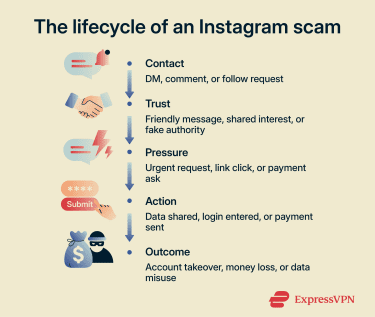
Who Instagram scammers usually target
Scammers on Instagram don’t focus on one type of person. Different groups may be targeted with distinct tactics, and almost anyone can be a potential target.
Some groups may face particular risks depending on the scam. For example, data from the Federal Trade Commission (FTC) suggest that younger adults are more likely than older adults to report losing money to certain types of fraud, including online shopping scams that often begin on social media. Users who publicly follow a celebrity or brand may also be targeted by impersonators posing as that figure.
Similarly, influencers or business owners can be appealing targets because their accounts may have commercial value. Scam messages may also seem more believable when they resemble brand outreach, partnership offers, or other business-related contacts.
How does Instagram protect its users against scams?
Instagram uses several measures to help protect users from scams, including:
- Removing content that violates Instagram’s Community Guidelines.
- Allowing users to report suspicious posts, profiles, messages, and sellers.
- Providing guidance on how to recognize phishing attempts and other common scams.
- Offering account-security features such as two-factor authentication (2FA), login request alerts, and recovery tools for compromised accounts.
- Allowing users to report impersonation accounts directly.
Even so, most Instagram scams depend on social engineering. That's why user awareness still plays a critical role.
The most common Instagram scams
Most Instagram scams fit a few common formats. The details vary, but the core tactics are often similar.
Phishing message scams
Instagram phishing scams often start with a message that looks urgent and official. In some cases, it may imitate legitimate messages from Instagram or another platform.
These messages often include links to fake login or payment pages or suspicious attachments. The goal is to get the recipient to enter information that can be stolen by the scammer.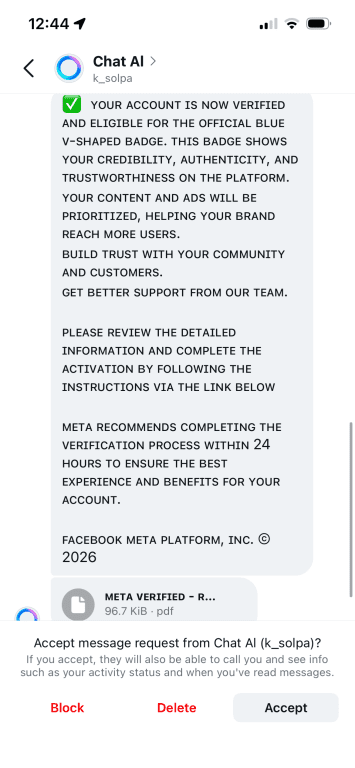
Scammers on Instagram use different tactics to convince users to tap phishing links. A common tactic is to impersonate support and claim there’s an issue with the target’s account. Instagram says it will never send you direct messages about your account in the Instagram app, and users can review Recent emails from Instagram in Settings.
Another strategy is to send fake links tied to other platforms. These might promise cheap deals on Amazon or funny videos on TikTok, for example. In either case, the scammer may try to steal login credentials or other sensitive information from anyone who enters details on the page.
Fake giveaway scams
Legitimate businesses and creators sometimes run promotions and giveaways on Instagram. Scammers may take advantage of this by creating fake prize offers. A public post may advertise a sweepstakes, or private messages could claim the user has been selected to win a gift card or branded merchandise.
After the initial message, the target is asked to take a small step to claim the reward. They may be sent a link or asked for personal information, but the scam often leads to a request for money.
Usually, the target is told they must pay a small fee to claim their prize. Like Nigerian prince scams, these fake Instagram giveaways are a form of advance-fee fraud: the scammer asks for money up front in exchange for a reward that never arrives. If the victim pays, they won't receive any prize, and the scammer may even demand additional fees.
Fake influencer and impersonation scams
Scammers may find more success posing as known figures than by using anonymous or generic accounts. By impersonating influencers, celebrities, or brands, they can quickly appear more trustworthy to Instagram users.
In some cases, scammers may also impersonate everyday users, such as someone the target already knows. This can make the account seem more credible and lower the target’s guard.
Impersonation can also serve as an opening move in several types of scams, including phishing, job scams, and other fraud.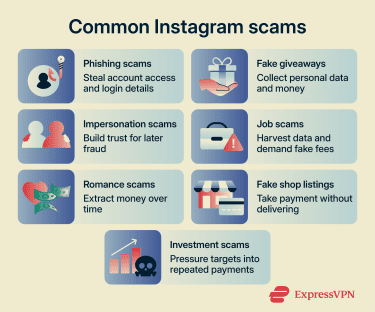
Fake job offer scams
Fake job scams on Instagram often begin with an unexpected DM or comment that offers an easy way to earn money or to work with a known brand. In some cases, the approach may be more subtle, such as content designed to make a money-making opportunity look legitimate.
Ultimately, the offer may involve promoting products, posting content, or taking on a simple remote role. Targets are usually told to click a link or continue the conversation in DMs to learn more.
As the conversation continues, the scammer may request excessive personal information or demand payment to cover training, materials, or other work-related costs. Instead of getting a real job, the target may end up handing over sensitive information or money.
Romance scams
Romance scams are another common danger on Instagram. A stranger may directly message a user or create a public post or story encouraging contact. If the user replies, the scammer may try to quickly build trust and form a strong emotional connection.
Eventually, the scammer will try to persuade the target to do something risky. This may involve sharing sensitive information, clicking a suspicious link, or, in many cases, sending money. The excuse may be a personal emergency or a travel expense, so the two can supposedly meet in person.
These scams may continue for a long time, with the victim repeatedly asked to send money. In some cases, the scam later overlaps with a fake investment or crypto scheme. Romance scams may overlap with impersonation scams.
Investment and crypto scams
Instagram has many users interested in making money. While some people use the platform for legitimate business, creator, or brand opportunities, scammers also use it to promote get-rich-quick schemes.
As with other scams, crypto and investment schemes may begin with an unsolicited message or a post touting an opportunity to make money. The scammer may claim to have access to a system, platform, or insider strategy that can generate unusually high returns.
Victims may be directed to a website or app that appears to track active investments. The dashboard is designed to look convincing and may show fake growth to pressure victims into sending real money. In some cases, scammers may also use fake crypto wallet apps to reinforce the illusion that the investment is real.
Later, the scammer may claim that a fee is required to withdraw profits, unlock features, or access earnings. Along the way, they may also ask for sensitive personal information.
In these cases, the portfolio and reported profits are fake, and victims may be unable to withdraw funds. Some of these schemes are known as pig-butchering scams, especially when the scammer first builds trust through an online relationship before introducing a fake investment opportunity.
Fake product and shop scams
Instagram is an active commercial platform. Businesses use the app to communicate with customers, run ads, and build brand recognition. Instagram also hosts storefronts where users can buy items directly. As on many large platforms, scammers may try to misuse these features to target users.
In most cases, the scheme is fairly simple: bad actors create ads, posts, or product listings for misleading, counterfeit, or nonexistent products. Instead of delivering what was advertised, the seller may send a low-quality or counterfeit item. Alternatively, the customer receives nothing or is asked to pay more to cover bogus fees.
If the purchase is made through eligible on-site checkout on Instagram, the buyer may be eligible for Meta’s Purchase Protection process. Unfortunately, scammers often direct victims to fake shopping websites, where those protections may not apply.
How to recognize Instagram scams
Though some scammers can be very subtle, certain behaviors often distinguish legitimate users from those using Instagram to find victims.
Staying safe means knowing the red flags to look out for. The key is to slow down and verify details before taking action, especially when a message feels urgent or too good to be true.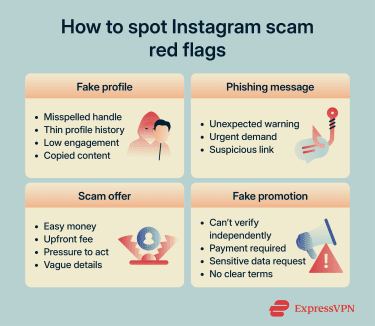
How to identify fake profiles
On Instagram, a “fake” profile may be an account created solely for scams or one that impersonates a real person, brand, or organization. Some warning signs apply to scam accounts in general, while others are more specific to impersonation. When reviewing a profile, you should look for these red flags:
- Username inconsistencies: Slight misspellings, extra characters, or added words like “official” or “backup.”
- Profile history gaps: Very few posts, a recently created account, or sudden spikes in activity may suggest an account that didn’t grow organically.
- Follower mismatch: A high follower count with very low engagement or followers that seem random, inactive, or unrelated.
- Copied content: Reused photos, stolen bios, or identical posts taken from another account may suggest impersonation.
It’s also possible to review an account’s history. By tapping About this account, you can view the account creation date and see how many times the username has been changed. These details may reveal suspicious activity that contradicts the profile’s outward claims.
If the account appears to represent a famous person or brand, check other official channels to help confirm whether it's genuine. Many public figures and companies link to their social media accounts from their official websites.
Verified badges can also help confirm authenticity, but they are not a guarantee that an account is safe. An account can still be compromised, and the absence of a badge doesn't automatically mean a profile is fake.
How to spot phishing links and messages
Not every spam message is a phishing attempt, but you should be cautious about unsolicited DMs and emails. Look for warning signs commonly associated with phishing attempts, including:
- Unexpected claims: Messages about account issues, violations, or opportunities without prior interaction.
- Pressure to act fast: Warnings that immediate action is required to avoid suspension or loss of access.
- Suspicious links: Prompts insisting that an issue must be resolved by clicking a link instead of using Instagram’s app or official account tools.
Be cautious before following any link, even if the message comes from someone you know. If a link leads to a page asking for account details right away, treat it as suspicious.
It also helps to consider whether a login request makes sense on that device. Many people stay signed in on familiar devices, so sudden prompts to re-enter credentials can be a warning sign.
Warning signs of a scam offer
Scammers use both incentives and pressure to make their schemes work. Promises of easy rewards draw you in, while urgency can push you into acting before verifying the details. Common warning signs include:
- Suspicious contact behavior: Messages that arrive unexpectedly, claim to come from support, or try to move conversations off-platform.
- Lucrative rewards: Claims of easy money, guaranteed returns, or exclusive opportunities with minimal effort.
- Upfront payment requests: Demands for fees or deposits before access to rewards, jobs, or services is granted.
- Urgency: Deadlines that feel intentionally short and discourage verification.
- Missing details: Inconsistent or vague information about what's being offered or who's behind it.
How to tell if an Instagram promotion is legitimate
Many brands run genuine promotions on Instagram, so separating real offers from scams can be difficult. Before acting on a deal advertised on Instagram, you should:
- Verify the offer independently: Check the company’s official website or other official channels.
- Check payment requirements: Legitimate prizes or promotions generally don’t require winners to pay to claim them.
- Consider what's being requested: Promotions may ask for basic details such as a name but usually shouldn't require highly sensitive information.
- Review the terms and conditions: Legitimate contests generally explain prizes, rules, and how winners are selected.
- Check for proper disclosure: Partnerships should clearly explain the relationship between the promoter and the product.
What to do if you’ve been scammed on Instagram
The best immediate response depends on what the scammer was able to access. If you entered your Instagram login details, start by securing your account. If you shared payment information or made a purchase through a suspicious shop, it may make sense to focus on limiting the financial damage first.
Secure your account immediately
If you shared your Instagram login details on a phishing page or believe your account may have been compromised by other means, start by trying to regain control of your account.
Change your Instagram password
One of the first steps towards securing your account is to change your Instagram password. If a scammer has already changed your account details, you may need to use Instagram's recovery tools instead.
If you can still access Instagram, below is how to change your password. The path is similar on phone and desktop, but menu names and layout may vary slightly.
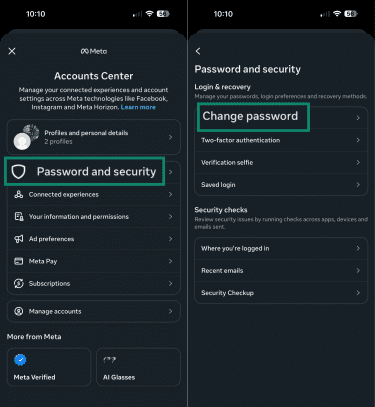
- Open Instagram and tap the Profile icon in the bottom-right corner. Then, tap the menu (three horizontal lines) in the top-right corner and select Accounts Center.
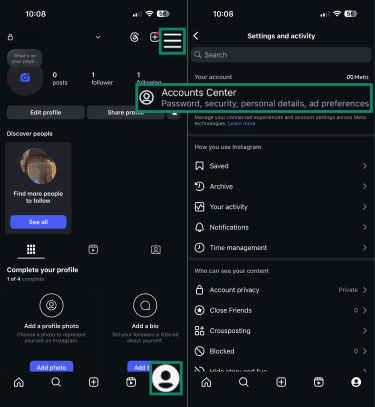
- Tap Password and security. On the next page, tap Change password.
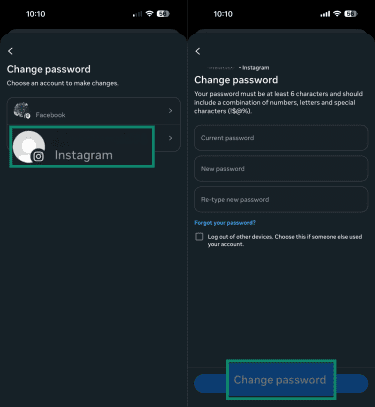
- Select your Instagram account, enter your current password, choose and confirm a new password, then click Change password.
Enable two-factor authentication
Protecting your account with 2FA adds another layer of security. In addition to a password, anyone attempting to access the account will need a second factor, such as a text message code or an authentication app code.
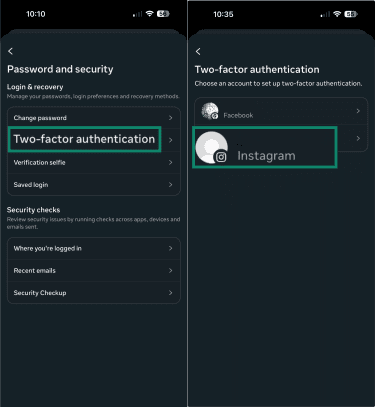
- To enable 2FA, go to the Password and security section and tap Two-factor authentication. Select the Instagram account you want to protect.
- Choose the method you want to use, then follow the on-screen instructions. If you use an authentication app, tap Copy key, then select Next.
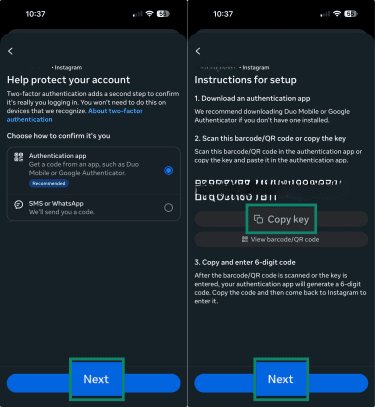
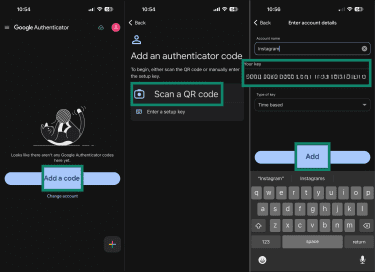
- Open your chosen authenticator app and follow the instructions to connect a new account. This will usually require entering the key you just copied to the clipboard. The example below shows Google Authenticator, but the process is similar in other apps.
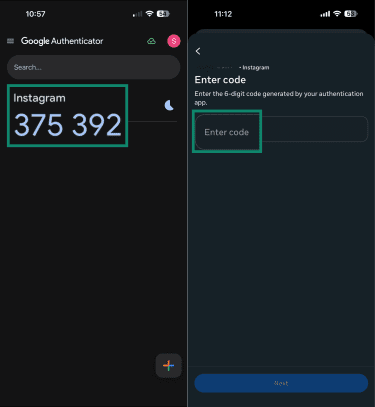
- Go back to Instagram and tap Next on the page where you copied the key. Instagram will ask you to enter the code from your authenticator app. To find this, open your 2FA app and find the temporary code associated with Instagram. Memorize the code or copy it to your phone’s clipboard, then return to Instagram and paste it in. Finally, tap Next to complete the process.
Check login activity and devices
Reviewing your login activity helps you spot devices or sessions you don’t recognize. This can help remove unwanted access, especially when combined with a password change and 2FA.
- Navigate to the Accounts Center and open Password and security.
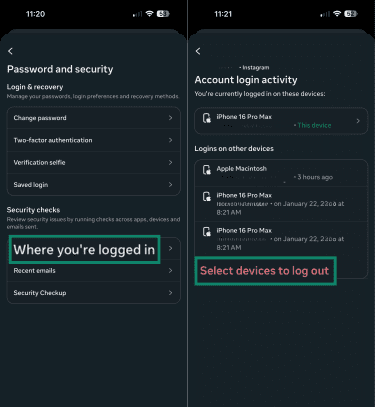
- Tap Where you’re logged in and select the profile you want to manage. You’ll see recent sign-in activity. Review the devices and locations carefully.
- If you see a session you don’t recognize, tap Select devices to log out and tick the boxes next to any that you don’t recognize. Once done, press Log out.
Recover your Instagram account
If scammers change your password and lock you out, use Instagram’s recovery options.
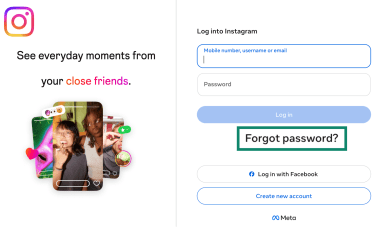
- On the login screen, tap Forgot password? Your device may prompt you to grant Instagram certain permissions.
- Enter your phone number, username, or email address, then tap Continue.
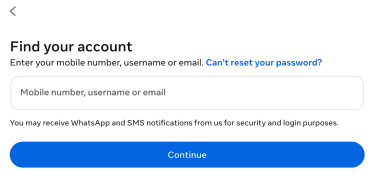
- Follow the instructions in the recovery email or text message from Instagram to reset your password.
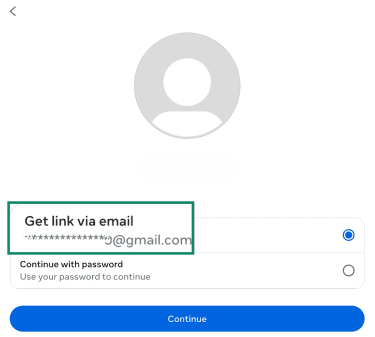
If that doesn’t work, try Instagram’s additional recovery options. In some cases, Instagram may ask you to confirm your identity, including with a video selfie or other account-related information.
Protect your financial information
If you have reason to believe that the scam exposed your credit card number or other financial information, take steps quickly to reduce the risk of further loss.
Contact your bank or card issuer to report the issue and ask about replacing or freezing a compromised card. The exact process varies by financial institution, and any reimbursement will depend on that institution’s policies.
If you bought a mislabeled or fraudulent product through eligible onsite checkout on Instagram, the best next step may be different. Meta says many purchases made through onsite checkout on Facebook or Instagram may be covered by Purchase Protection.
In those cases, users can contact the shop or Instagram for help with the order and report the seller using Instagram’s reporting tools.
Monitor your accounts for suspicious activity
If you’ve recently been the victim of an Instagram scam, watch for signs that your information is still being misused. If the scam had a financial impact or affected accounts outside Instagram, your monitoring should extend beyond the app.
Be on the lookout for the following:
- Unrecognized login activity: Sessions or locations you don’t recognize.
- Unauthorized transactions: Charges or withdrawals you didn’t make.
- New accounts or activity: Accounts opened or actions taken in your name.
- Account alerts: Unexpected notifications about logins, changes, or activity.
It’s also worth considering whether your information may have been exposed in a broader data breach. If so, that may increase the risk of future scam attempts or identity misuse.
To prepare for that possibility, it can help to understand what information may have been exposed. Depending on the situation, monitoring may also include data breach alerts or identity theft protection tools, such as ExpressVPN's Identity Defender, which is currently available only to new U.S. customers on Advanced and Pro plans.
Report the scam to Instagram
Instagram encourages users to report suspected scams. You can report accounts, messages, posts, and sellers directly in the app. Reporting helps Instagram review content and take action against accounts or posts that violate its rules.
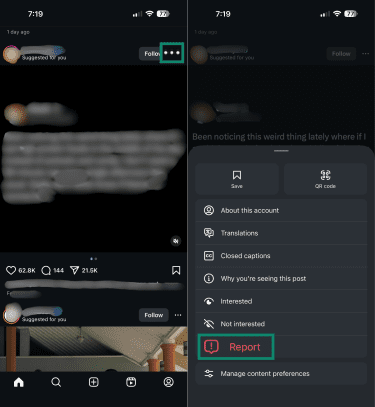
To report a post, take the following steps:
- Find the post you want to report and tap the three dots next to the offending content. Select Report in the pop-up menu.
- Select a reason for the report and tap Done on the next page. There are also Other steps you can take, including blocking or restricting content from the profile behind the post.
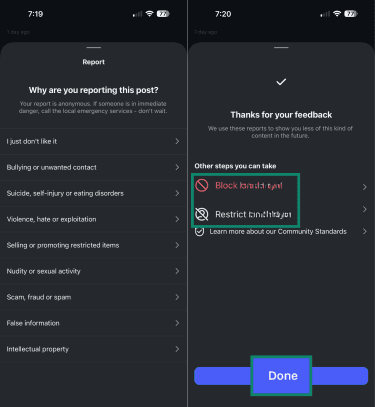
The process for reporting accounts, messages, and sellers can vary slightly by device. To report a message or chat in Instagram Direct, open the conversation, tap and hold the message you want to report, then select Report and follow the prompts. Sellers and profiles can also be reported from their profile pages.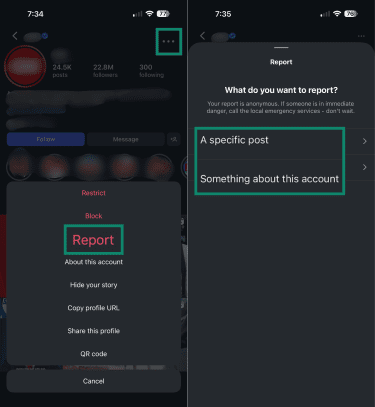
You can also check the status of some reports after submitting them. In Instagram, go to Settings and scroll down until you find the Help button (alternatively, jump to it using the search function). Next, select Support requests and tap Reports.
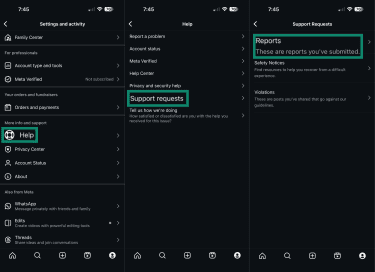 Select a report to see whether it's still pending or has already been addressed. Not every report will appear there. In some cases, Instagram may also let you request a review of a decision.
How to protect yourself from Instagram scams
To avoid falling victim to Instagram scams, users need to exercise caution and use the available tools and settings. Generally, that means doing the following:
- Keep account details up to date: Make sure your Instagram account has your current email address and phone number so account recovery and security features, such as login alerts and 2FA, work properly.
- Understand social engineering: Realize that scams rely on emotional manipulation to encourage users to act first rather than stop, think, and verify.
- Use strong, unique passwords: Avoid reusing passwords across services to prevent a breach on one site from affecting your Instagram and other accounts.
- Enable 2FA: Secure your account by requiring a second factor when there’s a login attempt from a device Instagram doesn’t recognize.
- Avoid suspicious links and downloads: Make it a habit to refrain from clicking unknown links or opening attachments until they’ve been verified.
- Use built-in message filtering tools: Keep Instagram’s message filtering tools, such as Hidden Words and hidden message request filtering, active so suspicious messages are more likely to be separated from your main inbox.
- Verify messages that appear to come from Instagram: If a message or email claims to be from Instagram, avoid clicking links or attachments until it has been verified through Instagram’s official channels.
FAQ: Common questions about Instagram scams
Can Instagram scams lead to identity theft?
Can a scammer hack my account without my password?
How do I know if a message from Instagram is real?
Can I get my money back after an Instagram scam?
Regardless of whether compensation is forthcoming, scam victims should take steps to protect their money.
Take the first step to protect yourself online. Try ExpressVPN risk-free.
Get ExpressVPN