What to do if your Discord account is hacked


When a Discord account is hacked, an unauthorized user can quickly take control. They might change your server roles or ownership and access your private messages. And, even though they can’t view your full payment details, they can use any saved payment method to make unauthorized Nitro purchases or gift subscriptions.
This guide walks through what to do as soon as you suspect a compromise: how to confirm the breach, recover your account, and protect your devices to reduce the risk of further hacking.
How to tell if your Discord account is hacked
A compromised Discord account rarely comes with a single, obvious warning. Instead, it usually shows up as a pattern of unusual logins, messages, or settings changes.
Common signs of a compromised account

Suspicious login activity
Unexpected login alerts are one of the most obvious signs that something is wrong. You might receive emails about logins from unfamiliar locations or devices, failed login attempts you didn’t initiate, or security codes for two-factor authentication (2FA) that you never requested. If the attacker has already changed your email or password, you may also see notifications saying your credentials were updated without your action.
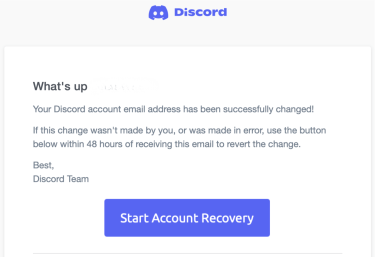
When your Discord account email changes, Discord sends a “Discord Email Address changed” message. If you received this email but didn't make this change, treat your account as compromised. Use the link in the message to change your email temporarily, then start the recovery steps.
Messages you didn’t send
Compromised accounts often send phishing links, fake Nitro (Discord’s paid subscription) offers, “test my game” links, or other spam to your friends. These messages usually copy patterns from common online scams, such as fake prize notifications, impersonation of trusted brands, or “urgent” security alerts that push you to click quickly.
If your message history includes links, invitations, or conversations you don’t remember sending, treat it as a strong indication that someone else is using your account.
Server activity you don’t recognize
Cybercriminals often use compromised accounts to join or promote scam servers. You might see new servers in your sidebar, missing servers you were part of, or invitations sent on your behalf. Any server activity you can’t explain is a warning sign, especially if it appears alongside suspicious logins or unknown messages.
More ways to tell if someone hacked your Discord account
Even if your login and messages look normal, attackers often leave more minor traces that reveal they still have access. These quiet changes can be just as dangerous:
- Unknown authorized apps: The Authorized Apps section in Discord shows which third-party apps can access your account. If you see apps you don’t recognize, it may mean someone used your account session or token to gain access.
- Profile or friend list changes: A different username, avatar, or bio; missing friends; or deleted DM history without your input can indicate that someone else is trying to hide their activity or fully take over the account.
- Unfamiliar purchases or billing emails: Unexpected Nitro or server boost purchases, or billing emails from Discord for transactions you don’t remember making, can signal that someone used a payment method linked to your Discord account for unauthorized purchases.
Common methods used by attackers
Many Discord scams start long before you notice anything is wrong. Attackers rely on well-tested techniques that exploit how users log in, install software, or trust external tools. Knowing these methods helps you prevent a breach before it happens.
Phishing links in DMs or servers
As mentioned above, attackers often send DMs or server posts with links to fake Discord login pages, “security checks,” or giveaways. These rely on social engineering: they mimic official branding or urgent alerts and trick users into entering their email, password, or 2FA codes on a site controlled by the attacker.
Token grabbers
Some “free Nitro” sites, giveaway tools, game mods, cheats, cracked software, and “performance boosters” bundle token grabbers: malware that looks for your Discord authentication token in the browser, client, or local files and sends it to the attacker. With a stolen token, someone can access your account without your password or 2FA, as long as the token remains valid.
Fake bots with excessive server permissions
Discord bots can’t access your personal account (like some OAuth apps can), but when you invite a bot to a server, it can request powerful server permissions. Some malicious bots ask for permissions like manage_roles or administrator, which can later be used to take over the server or send mass scam messages.
Browser extensions that inject malicious code
Unofficial extensions can intercept Discord’s web session data, capture tokens, or modify login flows without being immediately detected.
Clipboard-monitoring malware
Some malware monitors your clipboard during logins, replaces URLs with spoofed Discord pages, or captures 2FA codes you copy during account recovery attempts.
Immediate steps to take after a Discord hack
If you still have access to your account, act quickly. The steps below are for users who can still log into Discord. Your goal now is to lock the attacker out, limit the damage, and secure anything connected to your account.
If you can’t log into your account, skip to recovering your Discord account.
Change your Discord password immediately
Reset your password first. Open User Settings (a cogwheel icon), go to My Account, then click Change Password and set a long, unique password (or a passphrase) that you don’t use anywhere else.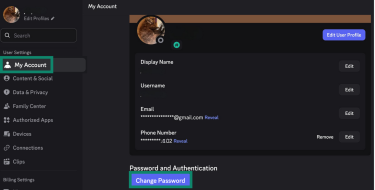
Note: On mobile, tap your avatar in the bottom-right corner, then tap the cogwheel icon in the top-right to open the settings. The options are mostly the same, though some names might differ slightly (for example, “Account” instead of “My Account”).
If you reused your Discord password elsewhere, update those accounts immediately, starting with the email address linked to your Discord account. Review any external services linked under User Settings > Connections and make sure each account uses a strong, unique password with 2FA enabled.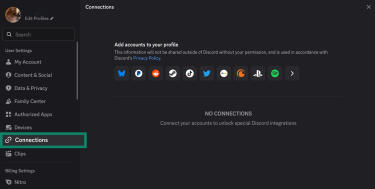
Enable two-factor authentication (2FA)
Turning on 2FA adds a second verification step beyond your password and is one of the most effective ways to block unauthorized access. To set it up, go to Settings > My Account > Enable Authenticator App.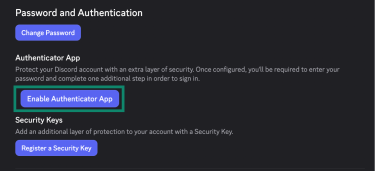
Discord will show a QR code that you scan with an authenticator app, and then you enter the generated code to activate 2FA. You’ll also get a 32-character recovery key you can use as a last resort if you lose access to your device or email. Save this key in a secure, offline location so you can still access your account if something goes wrong.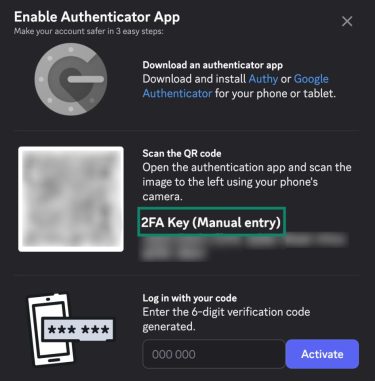
Learn more: If you don’t already use an authenticator app, check out how to set 2FA up securely.
Discord also supports passkeys, hardware security keys, and SMS as additional verification methods. Using multiple forms of multi-factor authentication (MFA) further reduces the risk of account compromise.
Change your email address
If someone is trying to access your account, they already know the email linked to it. Changing that address can make it harder for them to keep targeting your login. To do this, open User Settings > My Account and click Edit next to the email address field.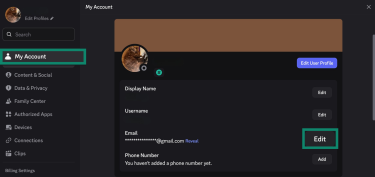
A window will open asking to verify your email. Click Send Verification Code, check your inbox for the message from Discord, enter the code in the field provided, and click Next.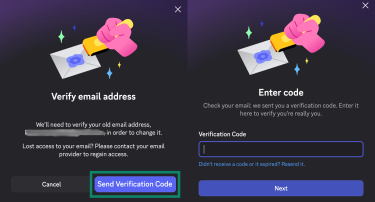
Discord will ask why you’re changing your email. Select a reason and click Continue. Next, enter your new email address and your current password, then click Done to finalize the change.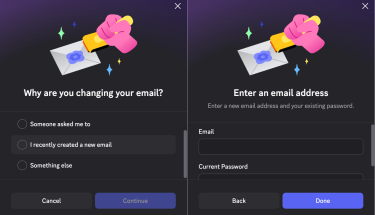
Log out from all devices
Go to User Settings > Devices. Review the list of recent logins and use the Log Out All Known Devices option to close all other active sessions. Treat any device, location, or login time you don’t recognize as unauthorized access.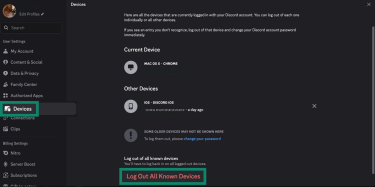
Regularly audit connected applications
Authorized applications can access parts of your Discord account as long as they remain approved. You can view them under the Authorized Apps menu in your account settings and remove any app you no longer use or recognize through the Deauthorize button.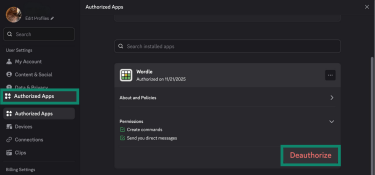
Notify friends and server admins
Tell your recent contacts and server admins that your account was compromised so that they can ignore or delete any suspicious messages sent from it. If you help run servers, ask admins to:
- Review recent activity and audit logs.
- Remove suspicious bots or webhooks (automated message integrations).
- Revert any unwanted role or permission changes made during the breach.
Run a malware scan
If your account was compromised, at least one of your devices might be infected with token grabbers or Discord-related malware. As such, it’s best to update and scan every device you use Discord on (not just your main PC or phone) for malware. Update your operating system and antivirus definitions, then run full scans with a reputable security tool.
Check for unauthorized purchases
If you have payment methods linked to your Discord account, review your billing history and recent emails from Discord for unfamiliar charges. If you spot transactions you didn’t approve, it’s safest to remove the stored payment method. You can also contact your bank or payment provider to dispute the charges and request a new card if needed.
How to recover your Discord account
If an attacker has changed the email on your Discord account and you can’t log in anymore, you might still be able to recover it.
Recover using the “Start Account Recovery” email
When your account’s email is changed, Discord automatically sends a security message to your previous email address. If you received this email, you can use it to recover your account.
- Look for an email from Discord titled something like “Email Changed” or “Discord Email Changed.” Open it and click Start Account Recovery. This link is only sent once and is valid for 48 hours. If your account recovery link has expired, the Discord support team won’t be able to send you a new one.
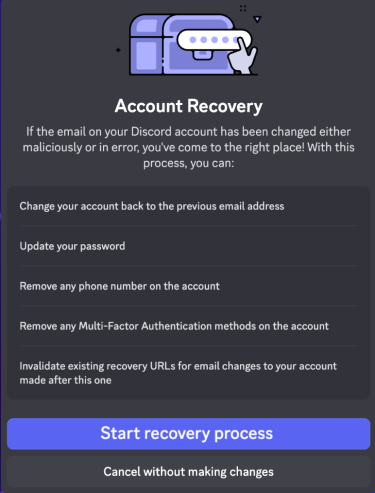
- A recovery panel will appear explaining what will happen next. Discord will change the account back to your previous email address (the one that received the email), remove any phone numbers and MFA methods, and sign out active sessions. Click Start recovery process.
- You’ll be prompted to create a new password for your account. Enter a strong, unique password and click Recover my account. After this, you’ll be able to log back in using your restored email and new password.
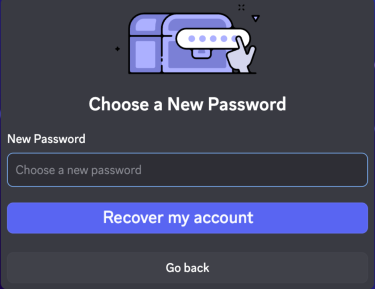
- The recovery flow always reverts your account to the previous email address. You can’t choose a different email inside the Account Recovery screen, and Discord will only send the recovery message to that old email. If your email account is still secure, you can simply complete the recovery and continue using it.
If your email account was compromised, the attacker changed your Discord email to one you don't control, or your email security is weak, you should change your Discord email after regaining access to your Discord account.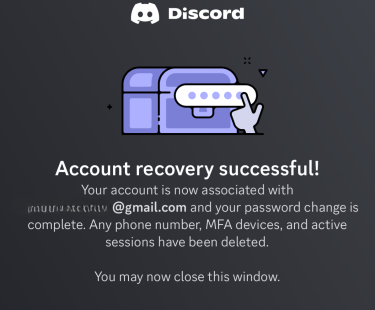
Submit a ticket to Discord support
If your account recovery link has expired, submitting a ticket on Discord’s Help Center is the only option to recover your account:
- Visit Discord’s Help Center and sign into your Support account. This uses separate credentials from your Discord app account, so you might need to create a Support account first.
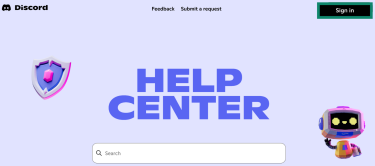
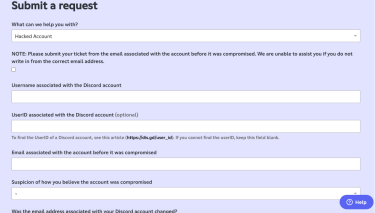
- Click Submit a request at the top of the page. From the What can we help you with? drop-down menu, choose Hacked Account.
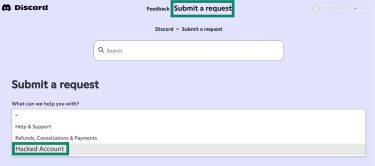
- Fill in the form with as much detail as you can. Make sure you include your exact Discord username (with the correct tag or handle), the email address linked to the account before the hack, and a clear description of what happened. You can also attach screenshots or other relevant files. When you’re done, click Submit.
There’s no guarantee that Discord can restore a compromised account after a ticket is submitted. The support team reviews each case individually, and the response time can vary. Avoid sending multiple tickets for the same issue, as this can slow down the process rather than speed it up. If you no longer control the original email associated with the account, recovery becomes more difficult.
Should you create a new account?
Creating a new Discord account should be a last resort. A new account won’t have access to your old messages, servers, purchased subscriptions, or roles, so it will feel like starting from scratch. However, this doesn’t delete your original account or its data. If you later recover the old account, your servers, roles, and purchases will be restored when you sign back in with the recovered account.
Because of that, it’s best to try every recovery option first and only move to a fresh account if you genuinely can’t regain access.
How to protect your Discord account from future hacks
If you’ve regained access to your original account or created a new one, take the time to secure it properly so it’s much harder to compromise again.
Learn more: Read our detailed security review to find out if Discord is safe to use.
Secure your email account
The email linked to your Discord account should be treated like a “master key.” As mentioned before, make sure it uses a strong, unique password and that 2FA/MFA is enabled. Beyond that, check that your recovery options (backup email and phone number) are up to date and remove anything you don’t recognize.
Where possible, consider using email masking or aliases for sign-ups so your primary address is exposed in fewer places and harder to target directly.
Learn more: Read our detailed guide on how to protect your email.
Avoid suspicious bots and links
Many scams start with DMs from strangers or bots, so it helps to limit who can contact you and let Discord filter risky messages before you see them.
You can do this in your settings, under Content & Social. Under Direct Message spam, choose Filter from non-friends or Filter all for stricter protection, so Discord automatically flags suspicious DMs.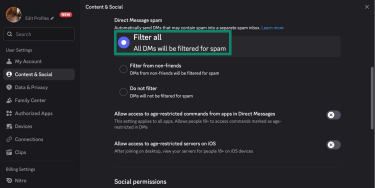
In the same section of your settings, you can also adjust sensitive content filters, message permissions, and who’s allowed to send you friend requests. Tightening these options reduces the frequency with which random accounts can contact you in the first place.
Phishing links, fake giveaways, and impersonation are among the most common entry points for account theft. Treat any unexpected link, file, or request for personal information with caution, especially if it promises free Nitro, game rewards, or “verification” outside of official Discord flows.
When adding bots, review the authorization prompt carefully. Bots can only act within the permissions you grant them, and influential roles like Administrator give broad control over channels, roles, and server settings. Only approve bots you trust, and give them only the permissions they need to work.
Use a virtual private network (VPN) to secure your Discord sessions
Discord states that it encrypts your traffic in transit using HTTPS/TLS, protecting it from being read by others on the same network.
A VPN adds another layer of encryption to your entire internet connection before it leaves your device, not just Discord traffic. This makes it harder for anyone on the same network (for example, on public Wi-Fi) to see which services you’re using or intercept your traffic.
Using a VPN for Discord also masks your real IP address from the sites and services you connect to, which reduces simple IP-based tracking or identification when you follow links from Discord and browse the web.
Learn more: Read our detailed guide on the Discord end-to-end encryption (E2EE) for calls.
FAQ: Common questions about a Discord account being hacked
Is Discord responsible for my account being hacked?
No. According to Discord’s Terms of Service, users are responsible for keeping their accounts secure. If you think your account has been compromised, you should contact Discord as soon as possible. If you don’t properly secure your account and it’s taken over, Discord may not be able to help you recover it.
How do I contact Discord support about a hack?
You can report a hacked account by submitting a ticket on Discord’s Help Center. Include as many details as possible to help prove ownership, such as past email addresses, device information, or billing history. Discord may not be able to restore access if you can’t provide enough evidence that you’re the legitimate account owner.
Can a cybercriminal access other apps linked to my Discord?
Stealing session tokens is one way a cybercriminal can access your Discord account. If this happens, they can use any third-party apps you’ve previously authorized through Discord, but only within the open authorization (OAuth) scopes you granted initially. This access doesn’t extend to your external accounts or services outside Discord, and they don’t gain any additional permissions beyond what you approved.
How secure is two-factor authentication (2FA) on Discord?
2FA reliably secures your Discord account by adding a one-time code that changes every few seconds and can’t be reused or guessed. Even if someone gets your password or steals your session token, they still can’t log in without that code.
Will Discord notify me if my account is breached?
Discord alerts you to security-critical events by email, such as a change to your email address or a password reset request. However, it’s not guaranteed that you’ll be notified in every breach scenario. For instance, if someone gains access using a stolen session token or through an already-active session on another device, there won’t be a “new login” event to trigger an alert.
Should I delete my Discord account after a hack?
Not necessarily. If you can regain control of the account, there’s usually no need to delete it. In many cases, a properly cleaned and secured account is safe to keep using.
You can only delete your account yourself if you’re able to log back in. If you can’t regain access, contact Discord Support and request that the account be disabled or deleted. However, Discord will only do this if you can provide enough information to prove you’re the legitimate account owner.
Take the first step to protect yourself online. Try ExpressVPN risk-free.
Get ExpressVPN











 Support Center
  FAQ
FAQ  VPN Setup Tutorials


