How to delete a Roblox account (official steps)


You can delete a Roblox account, but there isn’t a built-in delete option in the app to do it. Roblox handles deletions through its Data Privacy Request system, specifically the Right to Be Forgotten (RTBF) category. You'll need to submit a request, and they'll verify your identity before processing it.
This guide covers the official deletion method, what happens to your data and purchases, and how to delete a child's account. We also cover alternative options, like deactivating or securing your account.
What to know before deleting your Roblox account
Before submitting a deletion request, it's worth understanding what you'll lose and how the process works.
Is Roblox account deletion permanent?
Yes. Once a deletion request is processed, the account is removed, and Roblox doesn’t offer a recovery process for deleted accounts.
If you're not ready to permanently delete the account, Roblox also offers deactivation as a reversible option.
What happens to your data and purchases?
Deleting your account removes the data associated with it. This includes your username, Robux balance, inventory, friends list, and any experiences you've created. According to Roblox’s Privacy and Cookie Policy, some information may be retained as required by law or for fraud prevention and compliance purposes.
Roblox doesn't offer refunds on completed Robux purchases. Deleting your account doesn’t refund any remaining balance or purchases. Any items, currency, or subscriptions tied to the account are permanently lost and can’t be transferred to another account.
How long does it take Roblox to delete an account?
Roblox doesn’t publicly publish a fixed timeline for deletion requests. After you submit the form, you’ll receive an automated email confirming that your request was received.
Deletion doesn’t begin immediately. You must reply to that email to acknowledge the requirements, and Roblox may request additional verification before proceeding.
The overall timeline depends on how quickly you complete those steps and how long the review takes. If you don’t receive the initial email, check your spam or junk folder. If there’s still no response, contact Roblox support.
How to delete your Roblox account (official method)
The process below works on any device with a web browser, including phones, tablets, and computers. You can’t delete your account directly in the Roblox app.
To avoid any issues with account deletion, take these steps before you start:
- Unlink connected accounts: If your account is linked to Xbox or PlayStation, unlink it before submitting the deletion request, as linked platform accounts can complicate or delay account removal.
- Cancel Roblox Premium: If you have an active Roblox Premium subscription, it’s best to cancel it before requesting deletion. If you subscribed directly through Roblox, you can cancel from your account settings. However, subscriptions purchased through Apple or Google Play are managed by those platforms, and you’ll need to cancel through your device settings.
To request the account deletion:
- Go to roblox.com/support in a web browser to open the Contact Us form.
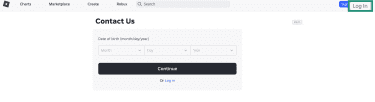
- Provide the email address linked to your account and your Roblox username.
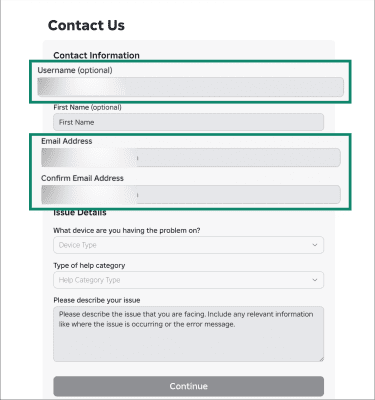
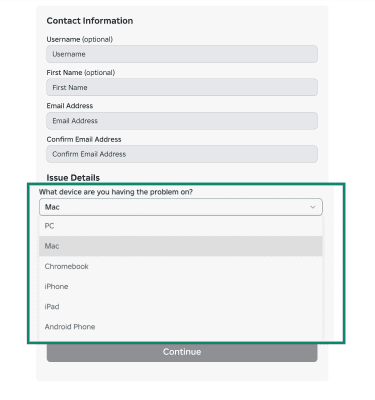
- Select the device you use from the dropdown under What device are you having the problem on?
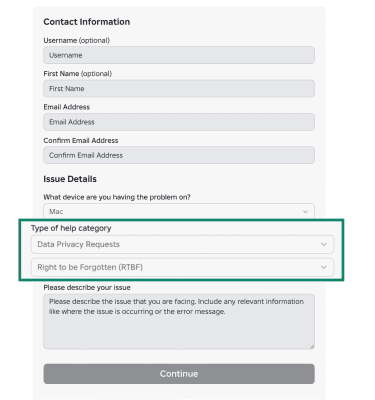
- Under Type of help category, select Data Privacy Requests, then choose Right to be Forgotten (RTBF).
- In the message box, state clearly that you want your account permanently deleted.
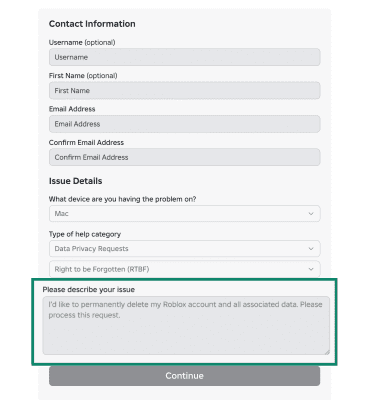
- Click Continue to send the request.
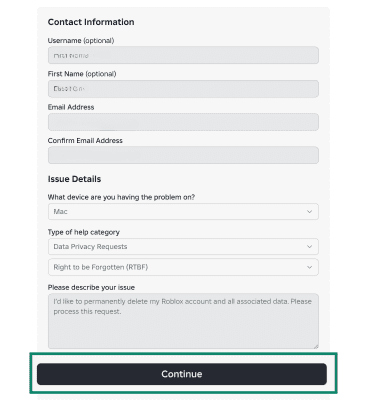
- Check your inbox for an automated email response. Reply to confirm that you understand the account will be permanently deleted.
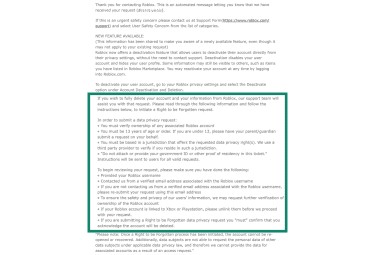
- Roblox may take additional steps to verify account ownership before processing the request.
Related: How to delete your online accounts
How to confirm your Roblox account is deleted
Once Roblox processes your deletion request, try logging in with your previous credentials. If the account no longer exists, you won't be able to sign in or reset your password. If you're still unsure about the status, contact Roblox support.
How to delete a child’s Roblox account
If the account is registered to a user under 13, a parent or legal guardian must submit the deletion request using the support form.
Accounts for users under 13 are subject to child data protection laws, including the Children's Online Privacy Protection Act (COPPA) in the U.S. Because of these requirements, Roblox will only process deletion requests for those accounts after verifying that the request came from a parent or guardian.
When submitting the form, use the email address linked to the child's account or a verified parental contact on file. Using a different email can delay the request or trigger additional verification.
For more ways to manage your child's online safety, see our guide to internet safety for kids.
Can't access your account? Deletion options
The deletion process changes depending on how much access you still have to your account credentials.
How to delete a Roblox account without a password
The support form at roblox.com/support doesn’t require you to log in. You can submit a deletion request without your password, as long as you have access to the email address linked to the account. Roblox uses this email, along with other account details if needed, to verify ownership before processing the request.
What to do if you can't access your email or phone
You can still submit the form, but Roblox may not be able to process the request without a way to verify you own the account. Include your username and any details that help identify the account. Roblox will follow up if additional verification is possible, but deletion is not guaranteed in this scenario.
Why can't I delete my Roblox account?
Deletion requests can stall for several reasons, most of which relate to verification. Common reasons a request may not go through:
- Wrong email address: The request must come from the verified email linked to the account. If it doesn't match, Roblox will ask you to resubmit from the correct address.
- Missing username: Including your Roblox username helps Roblox locate the account and speeds up the process.
- Console accounts still linked: If your account is linked to Xbox or PlayStation, you must unlink them before deletion can proceed.
- Acknowledgment not sent: After submitting the form, you must reply to the automated email confirming you understand the deletion is permanent. Without that reply, the request won't move forward.
What to do if Roblox support doesn't respond
If you haven't heard back after submitting your request and completing verification, check your spam and junk folders first. If there's nothing there, submit a new request through the support form referencing your original submission date.
Users in the EU have the right to request the deletion of their data under the GDPR, which requires a response within one month. In certain cases, that timeline may be extended as permitted by law.
California residents have similar rights under the CCPA, which requires a response within 45 calendar days.
Can you temporarily deactivate a Roblox account?
Yes. Roblox offers deactivation as a reversible alternative to permanent deletion. Deactivation disables the account and hides the profile, but it keeps all your data, friends list, Robux, and inventory intact. You can reactivate at any time by logging back into Roblox.com.
To deactivate your account:
- Log into your Roblox account and open Settings.
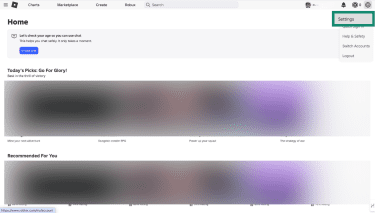
- Select Privacy & content restrictions and choose Account deactivation & deletion.
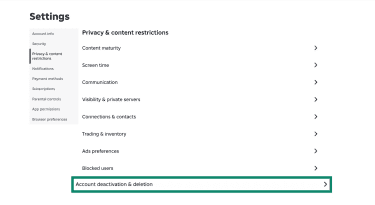
- Click Deactivate and confirm when prompted.
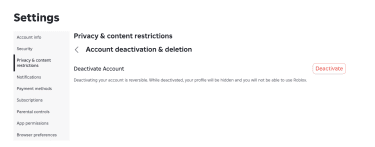
Some information, such as items listed on the Roblox Marketplace, may still be visible to others while the account is deactivated.
Related: Guide to popular kids’ video games
How to limit or secure an account instead of deleting it
If your concern is security or how the account is being used, you don’t have to delete it. To secure any account against unauthorized access:
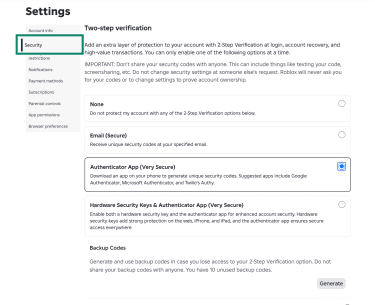
- Enable two-step verification: This adds a second layer of login protection. After you enter your password, Roblox asks for a one-time code sent to your email or generated by an authenticator app. Turn it on from Settings > Security.
- Password update: Use a strong, unique password that you don’t reuse on other sites. A password manager like ExpressKeys can generate and store complex passwords for you, so you don’t have to remember them.
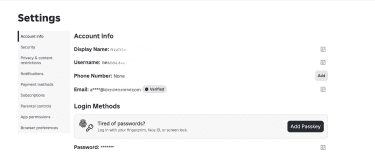
- Email and phone verification: Confirm your email and phone (if added) are up to date from Settings > Account Info so you can recover the account if needed.
How to secure a child’s account
For parents managing a child’s account, Roblox lets you link your own account to your child’s and control their experience directly. To set this up, go to Settings > Parental Controls > Add parent on your child’s account. For step-by-step instructions, see our guide on whether Roblox is safe for kids. Once linked, you can manage:
- Screen time limits: Set a daily time limit. Once your child reaches it, Roblox blocks access for the rest of the day.
- Content maturity: Use a slider to control which types of experiences your child can access, from Minimal (mild content) to Restricted (17+ only).
- Chat and party controls: Choose who your child can text chat with in experiences, and whether they can join parties. Users under 9 need parental consent for experience chat, and users under 13 need consent for direct chat.
- Spending limits: Set a monthly cap on how much your child can spend on Robux or experience subscriptions. The limit resets at the end of each calendar month.
- Blocked experiences: Block specific experiences by name, regardless of their maturity level.
- Connections list: View, block, and report users on your child's connections list directly from your parent dashboard.
Related: How to put parental controls on iPhone
FAQ: Common questions about deleting a Roblox account
Can I recover a deleted Roblox account?
Does Roblox automatically delete inactive accounts?
Can Roblox permanently terminate an account?
How do I contact Roblox support for account deletion?
Will deleting the Roblox app delete your account?
Take the first step to protect yourself online. Try ExpressVPN risk-free.
Get ExpressVPN