13 common cybersecurity myths and misconceptions debunked


Cybersecurity myths can create a false sense of security or unnecessary fear, leading to gaps in security practices. Misconceptions such as “small businesses aren’t targets” or “antivirus software alone is enough” may lead to risky decisions and overlooked vulnerabilities. In reality, cybercriminals routinely try to exploit weak passwords, outdated software, and human error.
This article examines common cybersecurity myths and misconceptions, explains why they are misleading, and outlines practical steps to reduce risk. By separating fact from fiction, you can make informed decisions and adopt safer online practices to better protect your data, finances, and operations.
Myth 1: AI will replace cybersecurity jobs
AI is transforming cybersecurity jobs, rather than replacing them. It can scan massive amounts of data, detect unusual behavior, and flag potential threats much faster than a human team. But with all these capabilities, AI still requires human oversight.
Security systems powered by AI can generate false alarms by flagging normal activity as suspicious. Similarly, they can also miss subtle threats if attackers use techniques the system hasn’t seen before. AI works by recognizing patterns, so if the data it was trained on is incomplete or outdated, its decisions may be inaccurate.
Finally, cybercriminals also use AI, creating scenarios where defensive algorithms face offensive algorithms specifically designed to evade them. Consequently, human expertise is still essential to interpret alerts, investigate incidents, and make judgment calls that software can’t handle on its own.
How to improve human and AI collaboration
AI performs best when it supports skilled professionals rather than working alone. Before adopting AI tools, organizations should clearly define which tasks automation will handle and which will require human review.
To strengthen collaboration:
- Use AI to filter large volumes of alerts so security teams can focus on serious threats.
- Regularly review and fine-tune AI systems to reduce false positives.
- Provide ongoing training so staff understand how AI tools make decisions.
- Encourage communication between technical teams and leadership to align expectations.
Myth 2: Security software slows down business operations
Some business owners worry that installing security tools will slow down systems or interrupt daily work. While older hardware could have trouble running current software, most modern devices are designed to run software efficiently. Moreover, today’s tools often use cloud processing, meaning heavy analysis takes place on remote servers rather than on local devices.
Security software can improve system performance by blocking malicious programs that would otherwise consume resources. Furthermore, it may minimize downtime resulting from cyberattacks or prevent data corruption that disrupts operations.
How to create a smoother software implementation
Before deployment, assess current systems to ensure compatibility with new tools. A smooth rollout reduces frustration and avoids unnecessary slowdowns.
A structured approach helps:
- Test software in a limited environment before rolling it out company-wide.
- Schedule updates and installations outside peak business hours.
- Ensure systems and applications are updated to support the new software.
- Provide short training sessions so employees understand new features.
Myth 3: Strong passwords ensure complete safety
Strong passwords are important, but one of the most common misconceptions about passwords is that they guarantee complete security. In reality, even a strong password alone can’t provide total protection. Even complex passwords can be exposed through phishing, data breaches, or malware.
For example, attackers may use automated tools to brute-force passwords or steal login details in phishing attacks. Attackers can also take advantage of reused passwords by testing stolen credentials from previous data breaches across multiple accounts, a technique known as credential stuffing.
How to prevent password attacks
Improving password security requires more than just creating longer or more complex phrases. A layered approach that combines strong passwords with additional safeguards provides much stronger protection against unauthorized access.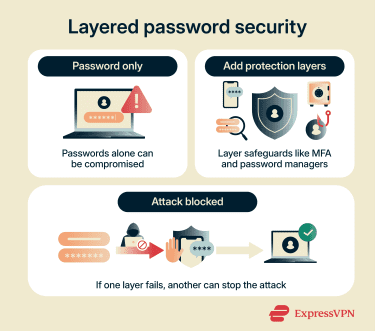
A layered approach works best, so start by:
- Enabling multi-factor authentication (MFA), which requires an additional verification step, such as a code or biometric scan.
- Employing a password manager to generate and store unique passwords for each account.
- Monitoring accounts for suspicious login activity.
- Educating employees about phishing tactics so they can recognize fake login pages.
Myth 4: Antivirus software and firewalls are enough
Antivirus software and firewalls aren’t complete protection. Antivirus programs scan for known malicious files, while firewalls control incoming and outgoing network traffic. They form a strong foundation, but some attacks use brand-new malware that antivirus tools don’t yet recognize. Others rely on stolen login details or social engineering attacks to get access. In these cases, basic defenses may not detect anything unusual because the activity appears legitimate.
How to strengthen security posture
A stronger cybersecurity posture means building layers of protection that work together. No single tool can stop every threat. Antivirus software and firewalls are important, but additional safeguards should support them.
Organizations can improve protection by taking these steps:
- Combine antivirus and firewalls with additional monitoring and detection tools.
- Use a virtual private network (VPN) to secure remote connections and sensitive communications on untrusted networks.
- Keep software and systems updated to fix known vulnerabilities.
- Limit user access so employees only see what they need for their roles.
- Regularly review system logs for unusual activity.
Myth 5: You will know right away if you’ve been breached
It’s common to assume that a cyberattack will cause obvious disruption. In reality, many breaches remain undetected for weeks or even months. Attackers often try to stay hidden, so instead of immediately damaging systems, they may quietly collect data or monitor activity.
Because there’s no dramatic system failure in many cases, the organization may continue operating as usual while the attacker maintains access to the network.
In some cases, the first sign of a breach comes from an external source, for example, a customer complaint or a third-party notification. This delay can increase financial and reputational damage.
How to improve threat detection and response
Early detection limits harm. Improving visibility across systems makes it easier to spot unusual behavior. A structured response plan also ensures that incidents are handled quickly and calmly.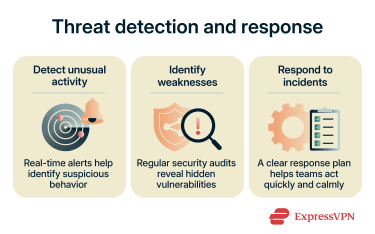
Below are common measures an organization may employ:
- Enable real-time alerts for suspicious logins or unusual data transfers.
- Conduct regular security audits to identify hidden weaknesses.
- Create a clear incident response plan that outlines roles and responsibilities.
- Run practice scenarios, so teams know how to react during a real event.
Myth 6: Cybersecurity is only the IT department’s responsibility
While IT teams manage technical controls, they can’t oversee every action taken within an organization. Many security incidents begin with simple mistakes, including clicking a malicious link or sharing sensitive information without verification. In 2023, the Cybersecurity and Infrastructure Security Agency (CISA) found that 8 out of 10 organizations had at least one individual who fell victim to a phishing attempt.
Cybersecurity isn’t just about software. It also involves daily decisions made by employees, managers, and leadership. If staff members ignore basic security practices, even the strongest technical controls have weaknesses.
How to build shared accountability
Shared accountability starts with clear communication; everyone should understand their role in protecting company data.
Organizations can strengthen accountability by:
- Providing regular security awareness training for all employees.
- Setting clear policies for handling sensitive information.
- Encouraging staff to report suspicious activity without fear of blame.
- Including security goals in leadership discussions and planning.
Myth 7: Cyber threats only come from the outside
External attackers receive most of the attention, but internal risks are just as serious. Insider threats don’t always involve malicious intent. In many cases, employees accidentally expose data through misdirected emails, weak passwords, or improper file sharing.
There are three main types of insider risk:
- Malicious insiders who intentionally misuse access for personal gain or revenge.
- Unintentional insiders who make mistakes that create vulnerabilities.
- Compromised insiders who are unaware that their legitimate credentials have been stolen and used by attackers.
These scenarios can lead to data loss, financial impact, or regulatory penalties.
How to reduce insider threats
Reducing insider risk requires balancing trust with control. Organizations shouldn’t assume employees will act maliciously, but they also shouldn’t rely on blind trust. Structured guidance, such as the National Institute of Standards and Technology (NIST) Cybersecurity Framework, can help organizations manage these risks.
The NIST Cybersecurity Framework provides standards and best practices for protecting, detecting, responding to, and recovering from security incidents. Effective steps include:
- Applying the principle of least privilege, meaning employees only access what’s necessary for their role.
- Monitoring for unusual account activity, like large data downloads.
- Offering clear guidance on secure data handling practices.
- Conducting exit procedures that promptly remove access when someone leaves the organization.
Myth 8: It’s easy to spot phishing
Phishing attacks are designed to trick victims into giving away sensitive information, such as passwords, credit card numbers, or account access. Unlike obvious scams, many phishing messages look genuine. They often mimic banks, payment services, or coworkers and can appear in email, text messages, or social media.
Attackers use logos, formal language, and familiar email addresses to gain trust. Even experienced users can be fooled, making it clear that vigilance is necessary.
How to verify messages safely
To improve phishing detection and reduce risks, verification is essential. Phishing attacks often look convincing, using familiar logos, official language, and seemingly legitimate sender addresses. Without careful checks, even experienced users can be tricked into revealing sensitive information.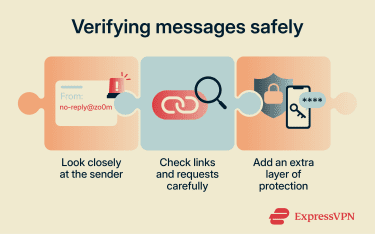
A few practical steps help ensure messages are safe:
- Check the sender’s email address carefully; small typos may indicate a fake account.
- Avoid clicking links directly in messages; type the website address manually.
- Look for unusual requests like urgent demands for credentials or financial transfers.
- Enable MFA to add a layer of protection even if credentials are exposed.
Note: When a user receives a phishing message or accidentally clicks a malicious link, several steps can help mitigate potential phishing harm.
Myth 9: Apple devices can’t be hacked
Apple devices, including Macs and iPhones, have strong security features, but no device is completely immune. Attackers can exploit software vulnerabilities, trick users into installing malicious apps, or use phishing to steal login credentials.
For example, a pop-up may appear legitimate and prompt the victim to download a malicious file. In some cases, an infected Mac may show warning signs such as slower performance, unfamiliar apps, unexpected pop-ups, or changes to browser settings.
Even devices with up-to-date operating systems can be compromised if security warnings are ignored or software is downloaded from untrusted sources. Believing Apple products are invulnerable can lead to relaxed security habits, which increases overall exposure to threats.
How to secure Macs and iPhones
Improving iPhone and MacBook security requires a combination of built-in protections and responsible user behavior.
Effective steps include:
- Keeping the operating system and apps updated to patch vulnerabilities.
- Downloading apps only from trusted sources, such as the App Store.
- Enabling device encryption and strong passcodes.
- Turning on features like Find My to locate or remotely wipe lost devices.
Myth 10: My data isn’t valuable
Even seemingly minor information can be useful to cybercriminals. Personal details like email addresses, phone numbers, or social media profiles can be sold on the dark web, used for identity theft, or combined with other data to launch targeted attacks.
Businesses may also face legal and financial consequences if customer or financial data is exposed. Regulations like the General Data Protection Regulation (GDPR) in the European Union and the California Consumer Privacy Act (CCPA) in the U.S. allow authorities to impose significant fines for failing to protect personal data.
In addition to regulatory penalties, organizations may deal with lawsuits, customer churn, and reputational damage. Assuming that data is worthless can lead to careless handling and storage, making it easier for attackers to exploit.
How to protect personal data
Protecting personal data requires a combination of technical safeguards and mindful user behavior.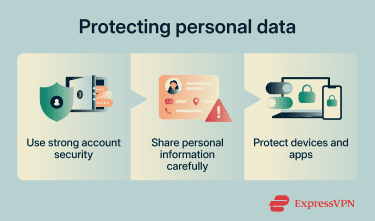
Steps to reduce exposure include:
- Limit sharing of personally identifiable information (PII) on social media and public platforms.
- Secure devices with encryption and regular backups.
- Be cautious about granting app permissions that access contacts, location, or files.
Myth 11: Only large companies are targeted
Many people assume that cybercriminals only go after large corporations with massive resources. In reality, small businesses are often easier targets because attackers may assume that security measures are underdeveloped.
At the same time, smaller companies are more likely to lack dedicated security teams, use outdated software, or depend on inadequate personal security practices instead of robust business-level cyberdefenses. This combination lowers the barrier to entry for cyberattacks.
How to implement cybersecurity for your small business
Even a small business can build a strong defense without overcomplicating things. A clear plan helps protect critical data, reduce risk, and ensure the organization can recover quickly if a breach occurs.
Key steps include:
- Identify critical assets, including customer data, financial records, and intellectual property.
- Implement layered security measures, including antivirus software, firewalls, and MFA.
- Train employees on phishing, password hygiene, and safe internet practices.
- Establish a clear incident response plan to quickly handle breaches or suspicious activity.
- Regularly back up important data and test restoration procedures.
Read more: Cybersecurity tips for small businesses
Myth 12: Cybersecurity is too expensive
Many organizations avoid investing in cybersecurity because of perceived high costs. However, the financial and reputational damage caused by a breach may exceed the price of preventive measures. While some security tools and services require upfront investment, many controls can be implemented gradually and scaled based on an organization’s size and risk level.
How to optimize your cybersecurity budget
Effective security doesn’t require unlimited spending, but it does require smart planning and prioritization.
Small businesses can focus on:
- Protecting critical assets and systems first.
- Customizing the budget based on the specific needs of the industry, such as compliance requirements.
- Consolidating security resources into a single platform, like a unified threat manager (UTM), to reduce complexity and attack surfaces.
- Combining automated tools with trained human oversight to maximize efficiency.
- Investing in regular security training programs.
- Regularly reviewing spending to remove unused or redundant tools.
Myth 13: Compliance equals security
Meeting regulatory requirements, like the GDPR, CCPA, or the Health Insurance Portability and Accountability Act (HIPAA), is important, but it doesn’t automatically make an organization secure. Compliance often focuses on minimum standards, while attackers look for gaps beyond those requirements. Relying solely on compliance may leave vulnerabilities exposed and create a false sense of security.
How to go beyond compliance
Organizations should treat compliance as a starting point, not the endpoint.
Steps include:
- Conducting risk assessments to identify threats beyond regulatory requirements.
- Implementing data encryption, MFA, and regular software updates.
- Encouraging a security-aware culture across all departments.
- Continuously monitoring systems and updating policies as new threats emerge.
FAQ: Common questions about cybersecurity myths
What cybersecurity myths should small businesses know?
Why is it important to recognize cybersecurity myths?
How can I enhance cybersecurity at my organization?
What resources can help businesses with cybersecurity education?
Take the first step to protect yourself online. Try ExpressVPN risk-free.
Get ExpressVPN