Protect yourself from AOL phishing email address attacks


Phishing scams targeting America Online (AOL) users have existed since the early days of the internet, and still affect users today. They typically impersonate AOL support, claim there’s an urgent account problem, and try to steal sign-in details or other sensitive information, sometimes leading to account takeovers, financial loss, privacy breaches, or malware infections.
Knowing what to look for helps avoid these traps. This article explains how to spot AOL phishing emails and what to do if you receive one.
What an AOL phishing email looks like
AOL phishing emails often mimic the look and wording of legitimate AOL messages and use urgency (warnings, deadlines, threats of access loss) to push a quick click or reply. A common goal is to route the recipient to a counterfeit sign-in or billing page. Below are some of the most common formats used and how to recognize them.
Common AOL scam email formats
Phishing attempts can vary in approach, but a few common tactics may be used to grab AOL users’ attention and drive them to action. These include:
- Storage limit exceeded: Claims the AOL mailbox is out of space and will stop receiving messages. The message typically pushes them to restore, upgrade, or verify their mailbox via a fake sign-in page (and in some variants, a fake payment page).
- Password reset required: Warns that the password must be changed (or that the account will be locked) and provides a link to a counterfeit login page designed to harvest credentials.
- Terms of Service updated: State that AOL has updated its Terms of Service and instruct the reader to review the new terms to retain access to their account. The "terms" may be delivered through a link to a lookalike site or included as an attachment. Either route can be used to steal credentials or deliver malware.
- Account closure pending: Threatens closure due to inactivity and demands a sign-in via a link. AOL does state that accounts can be deleted after extended inactivity (for example, no sign-in for 12 months) and that inactive mailbox contents may not be recoverable, so phishing emails may exploit a real concern by trying to divert sign-ins to a fake page.
Red flags in an AOL phishing email address
Be cautious with emails claiming to be from AOL and carefully check for suspicious content before clicking links or taking any action. Common red flags include:
- Missing AOL official indicators: In AOL Mail on the web, legitimate account and marketing emails are typically marked with Official Mail or Certified Mail indicators (an icon next to the sender and a banner when the message is opened). If these indicators are missing, treat the message with extra suspicion. Note that these icons may not appear in some third-party mail apps even when the email is legitimate.
- Requests for passwords or credit card details: Messages that ask for passwords or payment details (or push a link to enter them) are a major warning sign. AOL says it doesn’t ask for passwords, and it warns against sharing sensitive info like credit card numbers via email.
- Poor spelling and awkward grammar: Scam emails often contain mistakes or unnatural wording. While occasional typos can happen anywhere, multiple issues are a red flag.
- Look-alike or misspelled domains: Be wary of sender addresses or links that imitate AOL (for example, swapped letters/numbers or extra characters). This is a common typosquatting tactic, where attackers register “almost-right” domains to mimic real brands. The sender may also be a generic or personal-looking address rather than a brand domain. Checking the sender address and linked domains is a useful first check, but it isn’t foolproof; email spoofing can make an address look legitimate.
- Urgent calls to action: Phishing emails often pressure recipients to act immediately (for example, by using “urgent” language or threatening account problems). AOL warns that messages marked “Urgent” are usually fraudulent.
How to respond to a possible AOL phishing email
Because many scams use urgency to pressure for quick action, take a moment to review emails that claim to come from AOL (or another official source) before taking any action.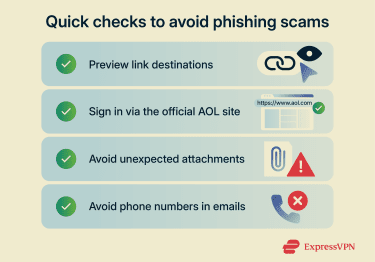
Check links before clicking
Treat suspicious emails as unsafe; avoid clicking links in them. Phishing links can look legitimate at first glance but lead to fake or malicious sites. While no method can guarantee a link is safe, checking the destination can reduce risk.
On a desktop, hovering over a link can reveal the web address it goes to. If the destination looks unrelated to AOL, uses a shortened link, or appears misspelled or unusual, treat the message as suspicious. On mobile, “hover” usually becomes a tap-and-hold (long press). Most mail apps will show a menu that lets you preview or copy the link without opening it.
If the app doesn’t show a preview, copy the link and paste it into a notes app (or a plain text field) to inspect the domain first. This avoids loading the site while still revealing its destination.
Sign into your AOL account manually
Rather than trusting links and claims made in emails, verify account status by navigating to AOL’s official website through the browser directly (for example, typing the address or using a saved bookmark) and checking account activity. AOL provides a Recent activity page (you need to sign in first) for reviewing sign-ins and unusual access.
If nothing looks off in account activity, an email claiming there’s an urgent account issue is more likely to be fake.
Be cautious with email attachments
Email attachments are a common method of malware delivery. If you weren't expecting an attachment, especially in a message that already seems suspicious, avoid opening it. If you need to open a file, save it first and scan it with reputable antivirus software.
Don’t trust phone numbers in emails
Some phishing emails include a phone number and urge you to call to “support.” Those numbers can be used by scammers posing as AOL agents.
Avoid calling numbers in suspicious emails. If you need support, verify contact details via AOL's official contact page.
What to do if you’ve interacted with an AOL phishing email
In many cases, simply opening a phishing email doesn’t cause immediate harm. However, risk increases if you click a link, enter information, or open an attachment. Also, some emails use tracking images (“pixels”) that can signal the message was opened. While this doesn’t automatically compromise your account, it may confirm the address is active.
If you clicked a link but nothing was entered or downloaded, the risk is generally lower, but it isn't zero. Some malicious sites can try to deliver malware or prompt unsafe actions, so it’s still wise to monitor the device and account for unusual activity, run a malware scan, and review account security.
If you entered your AOL login details
Change your AOL password immediately and use a strong password that includes upper- and lowercase letters, numbers, and symbols. Avoid reusing passwords from other sites.
Next, review account security and sign-in activity to confirm nothing has been changed (recovery email/phone, unfamiliar sessions or devices). Also, check whether two-factor authentication (2FA) is enabled.
If you shared payment or financial information
Contact your bank or card provider promptly to report possible compromise and ask about canceling and replacing cards and monitoring for unauthorized activity. It may also help to enable fraud alerts and consider dark web monitoring for signs that personal or financial data has been exposed.
If you downloaded an attachment
Run a full security scan with reputable antivirus software and follow the tool’s instructions to remove any suspicious items. Then update the operating system, browser, and security software to reduce the risk of further compromise.
How to report AOL phishing emails
Reporting phishing emails can help improve filtering and support broader anti-scam efforts. It won’t stop every future scam message, but it can make a difference over time.
Marking the email as spam
AOL Mail uses built-in spam filters, and marking a message as spam moves it to the Spam folder. Future messages from the same sender address are typically delivered to Spam (though scammers may still reach your inbox by switching to new addresses).
Follow these steps to mark an AOL email as spam:
- Open AOL Mail.
- Select the email, then click the Spam icon to move it to the Spam folder.
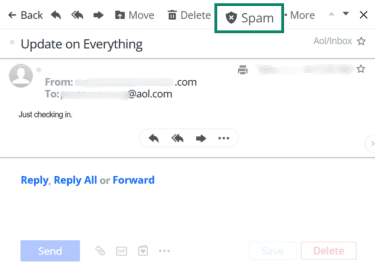
- You should receive a confirmation alert.

Report to your employer (if relevant)
Even when an AOL account isn’t employer-managed, workplace policies may still require phishing to be reported, especially if the address has been used for work-related accounts or communication.
Report via AOL's support channels
AOL’s official guidance for suspicious emails is to delete them or mark them as spam. If more help is needed (for example, after entering details or noticing unusual account activity), AOL also offers official help options, including an email support form. Live phone support may be available, but some options are described as paid/premium support, so you might want to check plan terms before calling to avoid surprise fees.
Report to external authorities
In the U.S., phishing and scams can be reported to the Federal Trade Commission (FTC). Outside the U.S., local reporting options include the UK’s Report Fraud and Australia’s Scamwatch. You can also forward phishing emails to the Anti-Phishing Working Group (APWG).
Protecting yourself from AOL phishing
You can protect yourself from AOL phishing scams by starting with stronger account security, updated software, and tools that can block or detect suspicious activity.
The actions below help lower the chance of falling for an AOL phishing attempt. Even if an attempt succeeds, some of these measures can also limit what scammers can access.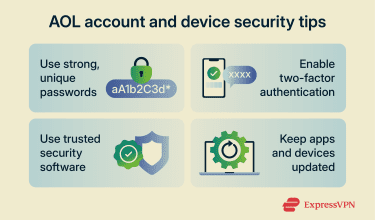
Creating strong passwords
Use a long, unique password (12+ characters is a good baseline). Avoid personal details like a name, AOL ID, or birthday, and don’t reuse the same password across services. A password manager such as ExpressKeys can generate and store strong passwords.
Enabling two-factor authentication (2FA)
Turning on 2FA adds an extra layer of protection. Even if login credentials are stolen, 2FA can help prevent unauthorized access to accounts.
In AOL’s security dashboard (under two-step verification), options include verification codes (including via an authenticator app) and security keys.
Updating all software
Keeping your device's operating system, browser, and apps up to date helps reduce exposure to known security flaws. Updates patch security vulnerabilities that attackers may exploit through malicious links or compromised sites.
Utilizing security tools
Many security tools can help reduce risk from phishing by warning about suspicious sites and scanning downloads. Email spam filters and browser protections can flag risky links, while device security software can scan attachments and downloaded files for malware. Some products also block access to known malicious domains, but these features don’t replace malware scanning.
Staying informed about phishing trends
Keeping up with common phishing tactics can make scam messages easier to spot.
Reviewing AOL’s guidance on identifying legitimate communications (such as Official Mail and Certified Mail indicators, where available) can help confirm when a message is truly from AOL.
For broader updates on evolving phishing tactics, rely on reputable sources that publish current alerts and practical advice, such as the FTC.
FAQ: Common questions about AOL phishing emails
How do I report a phishing email to AOL?
Mark the message as Spam in AOL Mail (this helps AOL’s filters and moves the email to the Spam folder). You can also use AOL’s support options if you need additional help, but note that phone support may be limited to paid/premium customers.
How do I know if an email from AOL is legit?
In AOL Mail on the web, legitimate AOL messages may show an Official Mail or Certified Mail icon next to the sender, and when the email is opened, a banner appears above the message details. In third-party email apps, these AOL icons may not appear even when the email is legitimate.
In many cases, legitimacy can also be checked by opening a new tab, signing into AOL directly, and reviewing account-related notifications or recent activity rather than using links in the email.
How can I recover my AOL account if I think it’s hacked?
There’s no guarantee of recovering a hacked AOL account. If access is still available, change the password and review Recent activity to remove unfamiliar sessions or devices. If the password was changed and sign-in isn’t possible, use AOL’s Sign-in Helper (which relies on your recovery email or phone), or contact AOL support if recovery options aren’t working.
What steps should I take if I clicked on a phishing email?
Next steps depend on what happened. If you didn’t click any links or attachments, the message can be marked as spam. But if you did follow a link and provide a password or payment information, you should change your login details and promptly contact your financial institution. If an attachment was opened or downloaded, run a security scan with a reputable antivirus and monitor your device and accounts for unusual behavior.
How do I set up security for my AOL account?
There are a few ways that AOL customers can enhance their account security. Using two-factor authentication (2FA) alongside a strong, unique password is a great first step. It’s also possible to add an account recovery method.
Take the first step to protect yourself online. Try ExpressVPN risk-free.
Get ExpressVPN