What is angler phishing, and how can you avoid it?


Angler phishing is a social engineering tactic that targets customer support conversations on social media. Understanding the common patterns behind angler phishing makes it easier to recognize these scams and avoid sharing sensitive information.
This article explains how angler phishing works, the risks involved, and the steps you can take to avoid falling for these scams.
What is angler phishing?
Angler phishing is a type of phishing scam in which cybercriminals pretend to be customer service agents on social media. They create look-alike profiles that mimic a real company’s branding and naming conventions to appear legitimate.
These scammers typically target users who publicly ask a brand for help, such as posting a complaint or tagging a company in a support request, and respond quickly with instructions to continue the conversation. The goal is to trick the user into sharing sensitive information, sending payments, or clicking malicious links.
Because these interactions often happen when a user is actively trying to fix a problem, attackers rely on urgency and quick responses to reduce verification steps.
Platforms where angler phishing commonly occurs
Angler phishing can occur on any social media platform where users publicly ask brands for help and where accounts can impersonate customer support. In practice, this means large, high-traffic platforms are more likely to be targeted, since they host a high volume of customer complaints, support requests, and brand interactions.
For instance, reporting has described situations on X where fraudsters set up account names resembling official support and responded quickly to customer complaints, sometimes using verification symbols to appear credible before attempting to trick users into sharing information. Fake verification symbols or badges may be emojis in the username or purchased. In some cases, scammers use messaging platforms like Telegram to continue conversations after making initial contact elsewhere, making it harder for victims to report the scam.
How angler phishing works
Angler phishing typically unfolds in a series of steps. Understanding this process can help you spot these scams more easily.
How cybercriminals set up fake support accounts
In many cases, scammers build usernames that closely resemble real brand handles by combining the company name with support-related terms or minor misspellings that can be easy to overlook.
To reinforce credibility, these impersonator accounts often copy visible branding elements from the real company, including profile photos, logos, bios, and posting style. Some may also include links that appear to direct users to official websites or support pages, making the account seem more authentic on first inspection.
Some angler phishers may create multiple look-alike profiles with different naming variations to increase the chance that at least one account appears legitimate and remains active if others are reported or removed.
How angler phishers find targets
Once an impersonator account is set up, attackers look for people who are actively requesting help from a brand. They do this by monitoring public posts that mention a company’s official account, include product or service complaints, or contain keywords associated with account issues. This monitoring can be done manually through platform search and comment sections, or through tools that track brand mentions and trending conversations.
Techniques used by angler phishers
Angler phishing usually follows a predictable pattern: an impersonator account makes contact, often in a public thread, moves the conversation into a private channel, and then attempts to get the user to share sensitive information or interact with a malicious link. Not every scam includes every step, but these are the most common techniques.
Fake “support” replies on public posts
One common approach is replying directly in the comments under a public complaint or question. These replies are typically written to sound professional and consistent with real support messaging, for example, addressing the user by name, acknowledging the issue, apologizing for the inconvenience, and offering to “help resolve it.”
The message may then ask the user to continue in direct messages or follow a phishing link. The goal is to move the victim off the public forum into a controlled environment where the scammer can attempt to collect sensitive information.
Fraudulent direct messages
After the initial public reply, or sometimes without any public interaction, the scammer may message the user directly. In private DMs, they typically request more specific information, such as an email address, phone number, account identifier, or “verification” details. Scammers may request these details to locate the correct account, make the interaction seem legitimate, and, in some cases, use verification information to complete login or recovery steps. If the goal is credential theft, the conversation often escalates to a link that the scammers ask the victim to visit to “fix” the issue.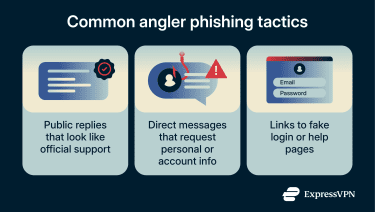
Malicious links to fake help portals
Whether the scam starts in a public reply or a DM, angler phishing often relies on malicious links that lead to what appears to be an official support page or login page.
To make the link seem trustworthy, scammers may hide it behind URL shorteners or misleading text (such as “Verify your account here”). They may also use typosquatting, where the domain name closely resembles the real one but includes small changes that are easy to miss (for example, mybank-support.com instead of mybank.com).
If a user enters login credentials on the spoofed page, the information is sent directly to the attacker. In other cases, the link may lead to a malicious download, such as a fake “support tool” or chat app, intended to install malware. That malware may be used to capture keystrokes or access sensitive data stored on the device.
Why angler phishing is dangerous
Angler phishing scams carry real dangers. If you engage with a fake support account, you could suffer identity theft, financial loss, or account takeovers.
Credential theft and account takeovers
One of the biggest risks of angler phishing is credential theft. If a scammer convinces a user to enter login details into a fake support portal or to share verification codes through direct messages, they may be able to access the account directly.
Once an attacker has control of an account, they can change passwords, lock the user out, and potentially access private data stored inside the account, such as messages, saved payment methods, or account history. Furthermore, many people reuse passwords across sites. If shared passwords are entered on a phishing site, the attacker may be able to access other accounts, too.
Financial and payment data risks
Some angler phishing scams go beyond login credentials and try to get financial information directly. Scammers may ask users to “confirm” payment details, submit a refund request, or provide billing information as part of a fake support process.
In some cases, the goal is to steal card numbers or banking details. In others, the scammer may push the user into sending money directly, such as through a payment app, wire transfer, or cryptocurrency, under the pretense of resolving an issue or unlocking an account.
Privacy and personal data exposure
Angler phishing isn’t limited to stealing passwords or payment details. Scammers may also collect personal information during the “support” conversation, such as an email address, phone number, account identifier, or other details that can be used to confirm identity.
Even if this information doesn’t lead to immediate account access, it can be used for follow-up scams, targeted phishing attempts, or account recovery abuse on other services.
How to avoid angler phishing
The best defense against angler phishing is a mix of awareness and smart online habits. Since these scams rely on impersonation and user error, you can prevent them by staying vigilant and following a few safety practices.
Recognize fake support accounts
The first step is being able to spot a bogus “support” account. Scammers leave plenty of clues if you know what to look for. Here are some key signs of angler phishing attempts:
- Suspicious social media handles: Fake usernames often resemble the legitimate brand but with subtle changes. They might add an extra word or letter, use underscores, or slightly misspell the name.
- Lack of verification badge: Official company accounts on some platforms usually have a verification checkmark next to their name. A fake support page will either have no badge or, in some cases, try to fake it by putting a checkmark emoji in their bio or name. Note that this isn’t foolproof, as some platforms allow you to purchase verification.
- New or incomplete profile: A real company support account typically has been around for a while, likely has a significant follower count, and contains a history of posts or replies. Scammer accounts, on the other hand, get taken down often, so their profiles are typically bare-bones or recently created.
- Generic or stolen content: Many fake support accounts don’t have the usual customer service posts or announcements you’d see on a real page. If they do share posts, it could be content copied from the real brand or random filler material.
Follow safe practices on social media
Beyond spotting fake accounts, you can reduce your exposure by changing how you request support and what information you share publicly. Safe habits include: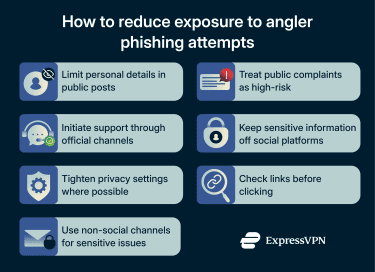
- Limit personal details in public posts: Avoid sharing information like order numbers, account identifiers, email addresses, or phone numbers in a public thread. Even small details can be used to make a scam message feel more convincing.
- Initiate support through official channels: Whenever you need help, start from the company’s official website or app and use the listed support options (in-app support, official chat, verified accounts, or published phone numbers).
- Keep sensitive information off social platforms: Legitimate support teams should not ask for passwords, full card numbers, or one-time passcodes. If a conversation shifts toward these requests, stop responding and switch to an official support channel.
- Tighten privacy settings where possible: Limiting who can reply to your posts or send you messages can reduce unsolicited contact, even though it won’t eliminate risk entirely.
- Check links before clicking: Inspect URLs carefully for look-alike domains, extra words, or subtle misspellings. Be cautious with shortened links or links that don’t clearly match the company’s official domain. Tools like ExpressVPN’s Threat Manager can flag known malicious links.
What to do if you suspect an angler phishing attempt
If you think you’re dealing with an impersonator support account or you’ve already shared information, take the steps below to limit potential damage.
Immediate actions to protect your account
- Stop communicating with the suspected scammer: End the conversation immediately. Don’t click additional links or follow further instructions.
- Document what you can: Take screenshots of the profile, messages, and any links or contact details provided. This can help with reporting.
- Run an antivirus/antimalware scan: If you clicked a link or downloaded a file, run a full scan using reputable security software and follow the recommended remediation steps.
How to report fake support accounts on social platforms
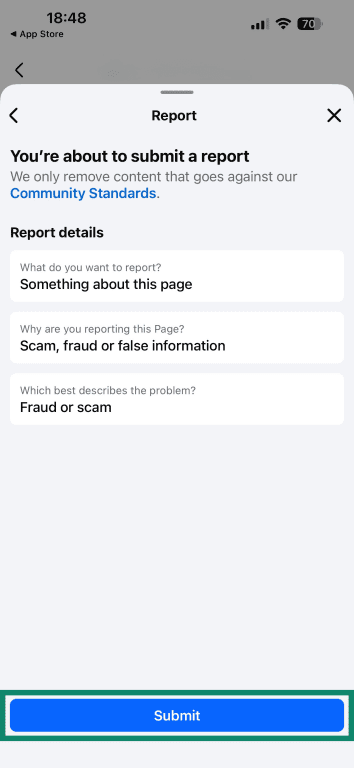
Fake support accounts should be reported as soon as you spot them. Reporting helps the platform investigate and remove impersonators before they trick others. Here’s how to report them on the most commonly targeted platforms:
- Go to the fake account’s Facebook profile and tap the three dots button.
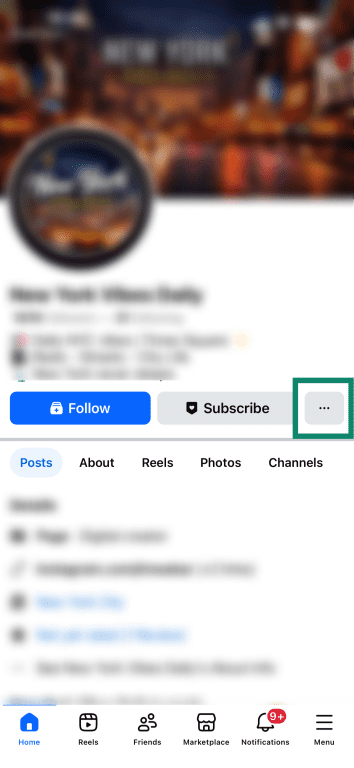
- Select Report Page.
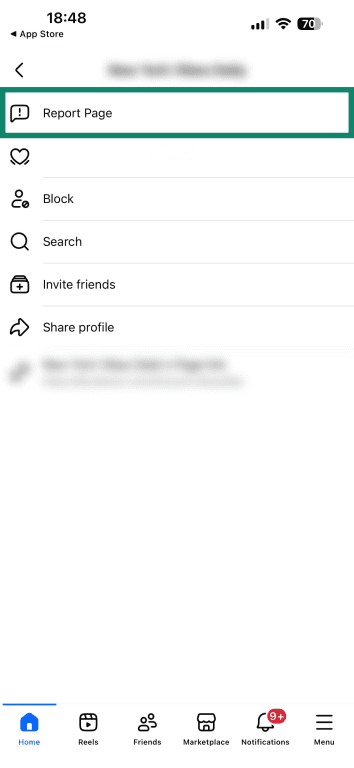
- Choose Something about this page.
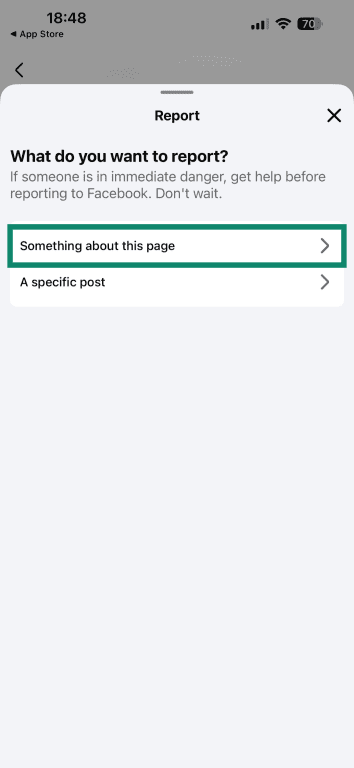
- Pick Scam, fraud, or false information.
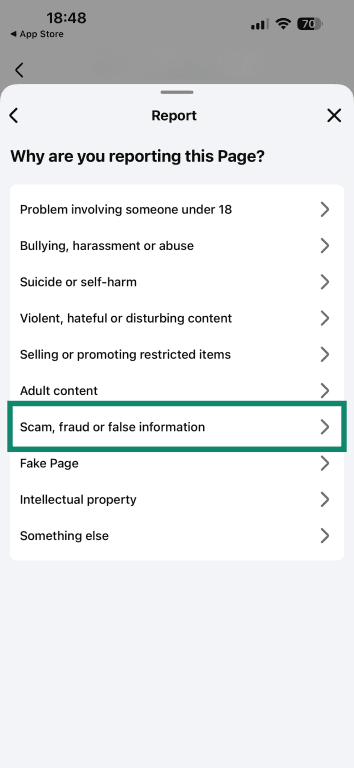
- Choose Fraud or scam. You can also pick Sharing false information.
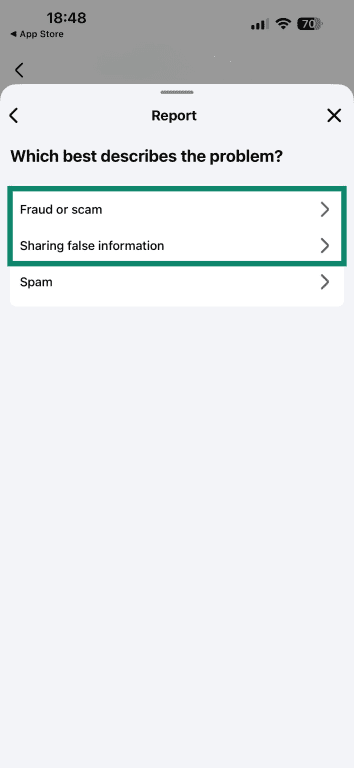
- Finalize by tapping on Submit if prompted.
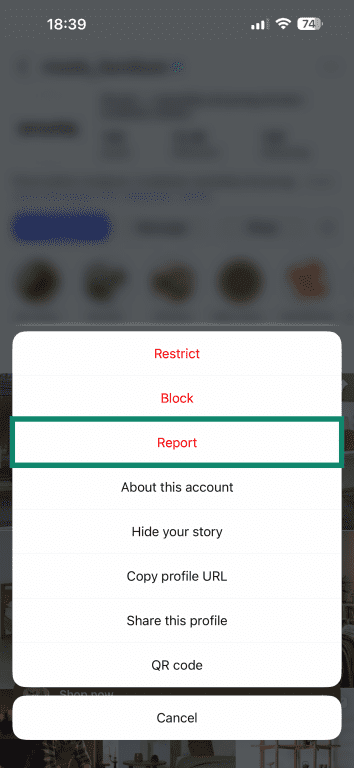
- Visit the fake account’s profile and tap the three dots icon in the top right.

- Select Report.
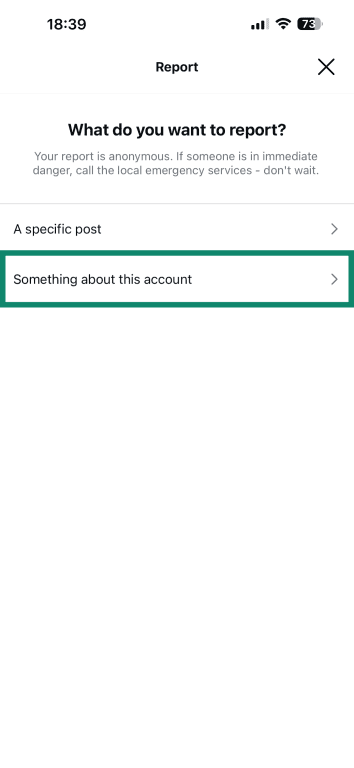
- Choose Something about this account.
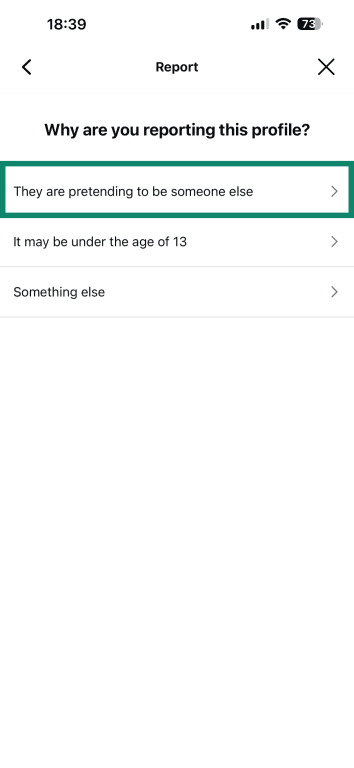
- Tap They are pretending to be someone else.
- Pick Someone else.
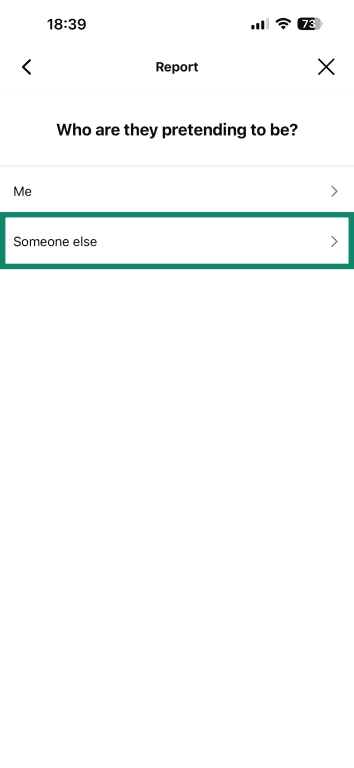
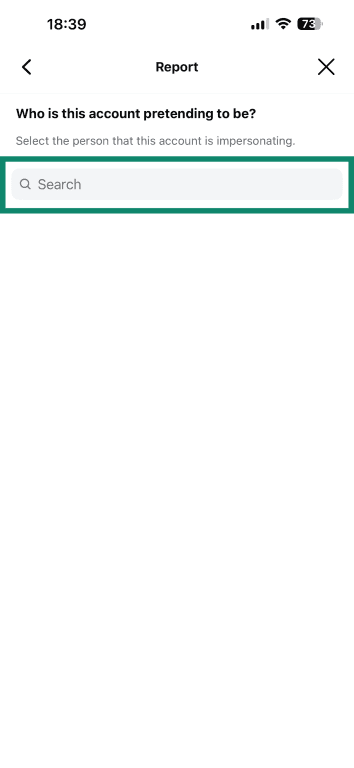
- Select who it’s impersonating (a business or a brand).
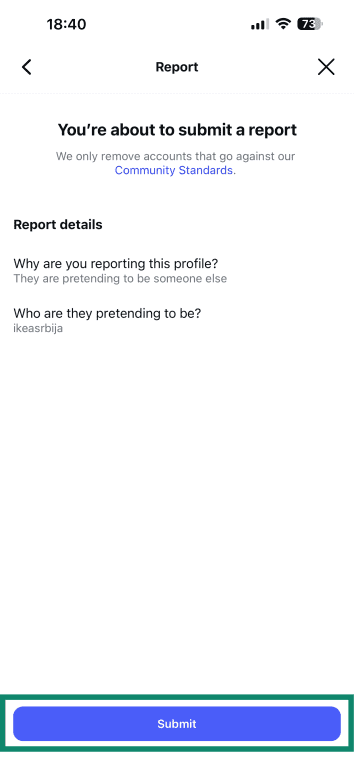
- Finally, tap Submit to file your report.
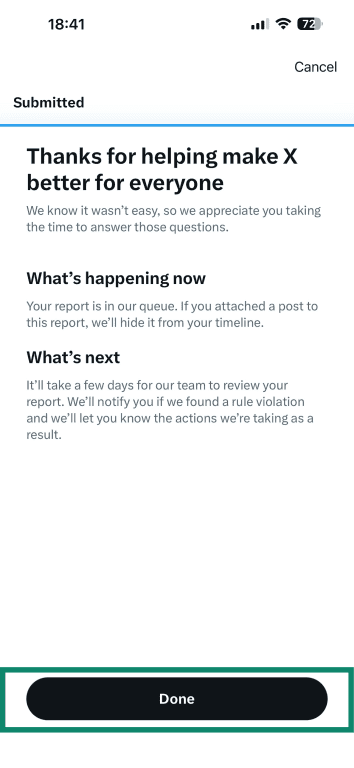
X (formerly Twitter)
- Visit the fake account’s profile and select the three dots icon in the top right.
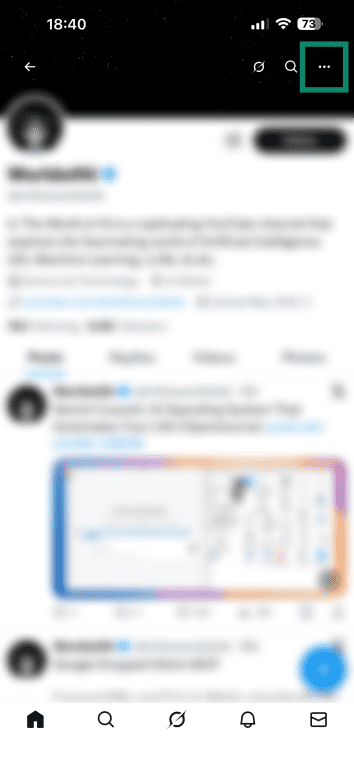
- Choose Report.
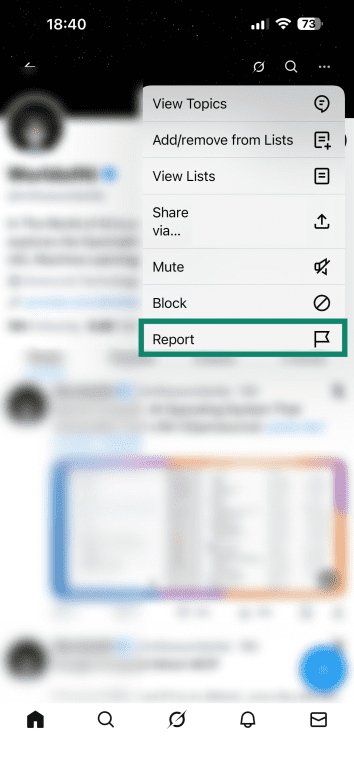
- Scroll down and tap Impersonation, then tap Next.
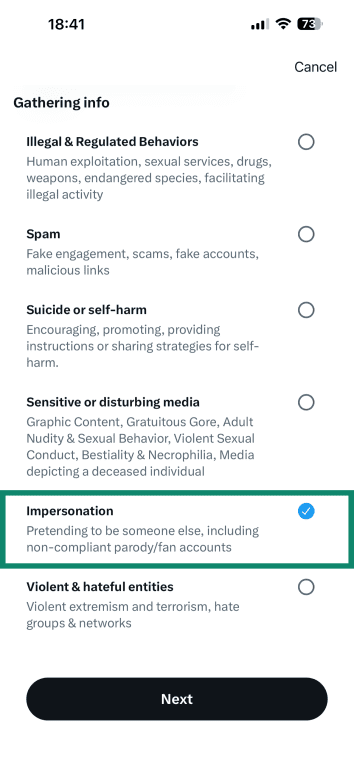
- Select who the account is impersonating.
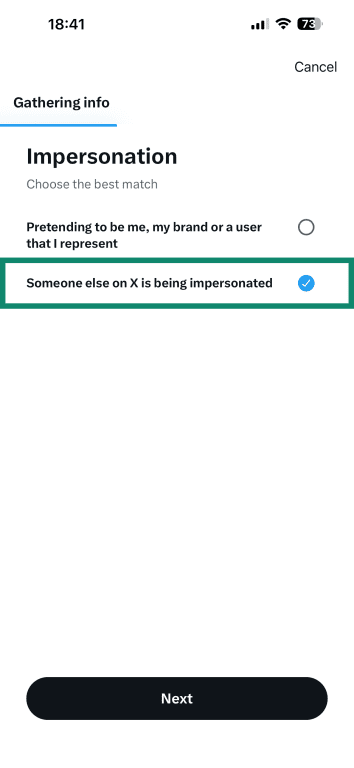
- Pick the account that’s being impersonated and tap Next.
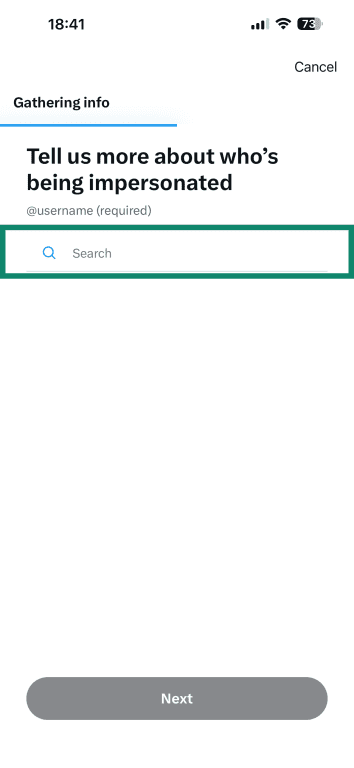
- You can now tap on Done.
TikTok
- Visit the fake TikTok account’s profile and tap the share/arrow button in the top right.

- Pick Report.
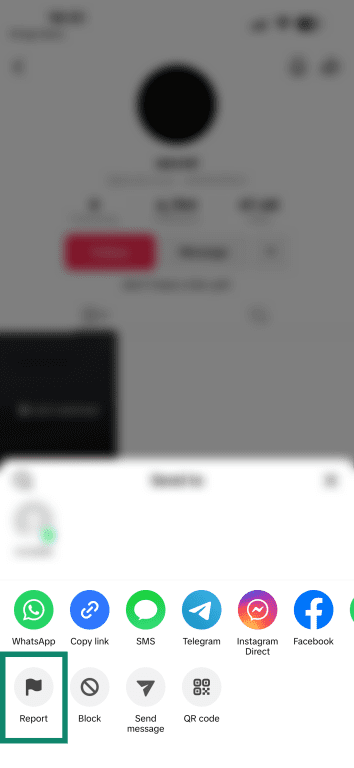
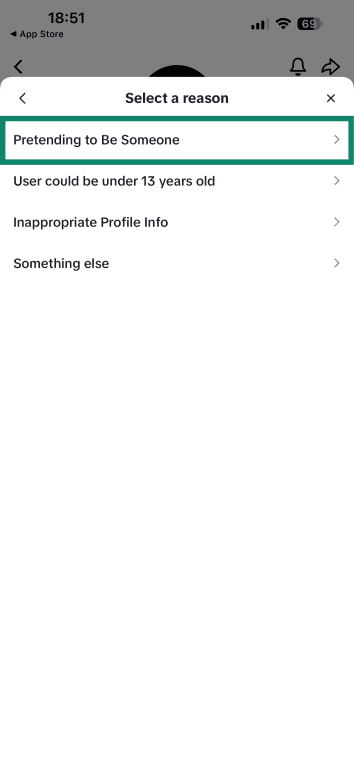
- Choose Report account.

- Tap on Pretending to Be Someone.
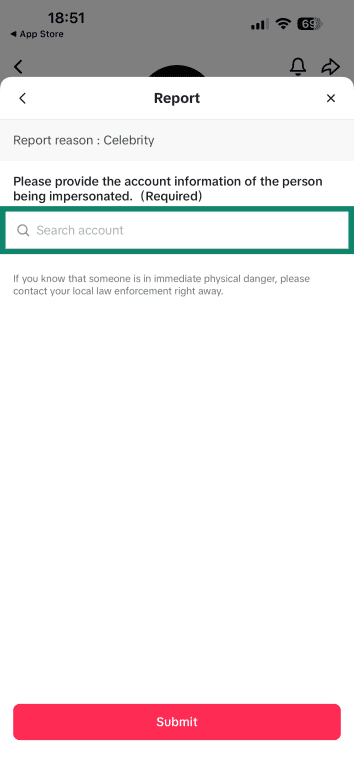
- Go with Celebrity (since the account is impersonating a brand).

- Provide the account that’s being impersonated and tap Submit.
Recovery steps if you shared personal or login information
If you shared sensitive info with the scammer, such as login credentials, credit card numbers, or personal identifying info, you can mitigate the damage by following these steps:
- Secure your email: If the info shared could let them into your email (for example, if you gave away your email password or if your email is tied to the account you gave away access to), securing your email is a priority. Your email is often the recovery method for other accounts. Change that password, and enable two-factor authentication (2FA).
- Contact financial institutions: For any financial information shared, credit or debit card numbers, bank account details, PayPal login, etc., call the relevant bank or company immediately. They might cancel and reissue your card, monitor or freeze your account, or advise additional steps. If money was already taken, ask about filing a fraud dispute.
- Enable fraud alerts or credit freeze: If the scam involved personal data like your Social Security number, ID number, or other info that could be used for identity theft, consider placing a fraud alert or credit freeze with credit bureaus (in the U.S., for example, this can be done via Experian, Equifax, TransUnion).
- Monitor your accounts: Keep a close watch on any accounts that could have been affected. Check bank and credit card statements for any unfamiliar transactions (and report them immediately). Monitor your email for any password reset messages you didn’t initiate (a sign someone is trying to access your stuff).
- Report to authorities or fraud databases: Depending on your country, you may want to file an official report of the scam. In the U.S., for example, you can report scams to the Federal Trade Commission (FTC) at ReportFraud.ftc.gov. For cybercrimes involving significant loss, you can also file with the FBI’s Internet Crime Complaint Center (IC3).
FAQ: Common questions about angler phishing
How does angler phishing differ from traditional phishing?
Angler phishing is a type of phishing that targets people on social media by impersonating customer support accounts, often responding to public complaints. Traditional phishing usually comes through mass emails or texts.
How can organizations protect themselves from angler phishing?
Companies should verify and clearly display their official support accounts, monitor for impersonators on social media, respond quickly to public complaints, and educate customers on how real support operates. Tools for brand protection and fast takedown reporting also help.
What tools can help detect angler phishing attempts?
Browser protections, antivirus software, and password managers can flag phishing sites or prevent autofilling credentials on fake pages. Virtual private networks (VPNs) with threat protection may block malicious domains and make your online activity more private.
What should you do if you suspect an angler phishing attempt?
If you suspect an angler phishing attempt, stop engaging immediately. Don’t click links or share information. Report and block the account, change any affected passwords, enable two-factor authentication (2FA), and run a malware scan if needed.
What are the most common signs of a fake support account?
Common signs of fake support accounts include unusual usernames, lack of verification (or verification that looks fake), new or inactive profiles, urgent language, and requests for sensitive info. Note that verification badges for some social media platforms may be purchased, but real support doesn’t pressure users or ask for passwords or codes.
Can scammers steal login details through angler phishing?
Yes. They often send links to fake login pages or ask for codes sent to your phone. If the users enter information, scammers can take over their accounts.
Take the first step to protect yourself online. Try ExpressVPN risk-free.
Get ExpressVPN













 Support Center
  FAQ
FAQ  VPN Setup Tutorials


