Expressvpn Glossary
Security patch

What is a security patch?
A security patch is an update that fixes vulnerabilities in software, operating systems, firmware, or services and may also include performance improvements or bug fixes.
How does a security patch work?
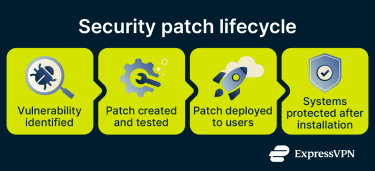
Security patches follow a structured process to identify, fix, and prevent vulnerabilities. This typically includes:
- Vulnerability identification: Researchers, internal teams, or bug bounty programs identify weaknesses that attackers could exploit.
- Patch development and testing: Developers fix the root cause of the weakness and test the update to ensure it works without introducing new issues.
- Patch distribution and deployment: Vendors release the patch through update systems, and users or IT teams install it.
- Confirmation and auditing: Administrators verify the patch is installed and may run scans or ongoing monitoring to confirm the vulnerability is resolved.
Why is a security patch important?
Applying security patches regularly:
- Prevents known attacks: Patches close vulnerabilities that attackers actively exploit, reducing the risk of unauthorized access.
- Protects devices and data: Updates help stop malware and limit the risk of data theft or corruption.
- Reduces breach risk: Regular patching lowers the likelihood of data breaches and their financial or legal impact.
- Supports compliance: Standards like the Payment Card Industry Data Security Standard (PCI DSS) require timely security updates to protect sensitive data.
- Keeps systems resilient: Unpatched systems can malfunction or crash. Security patches fix bugs and ensure systems remain stable and reliable.
- Extends system lifespan: Regular updates help systems stay usable and supported for longer, delaying the need for costly replacements.
Where are security patches applied?
Security patches protect different types of software and devices, including:
- Operating systems: Patches secure core system software by closing vulnerabilities that could affect the entire device.
- Applications: Updates fix security flaws in installed apps to prevent data theft or unauthorized access.
- Browsers and extensions: Patches protect against malicious websites and unsafe code execution.
- Routers and Internet of Things (IoT) devices: Firmware updates secure connected devices and help prevent network compromise or surveillance.
- Security software: Updates fix weaknesses and improve detection so protection tools remain effective.
Risks and privacy concerns
While security patches improve safety, poor patch management or delayed updates can introduce risks, including:
- Unpatched systems attract attackers: Threat actors monitor sources like the Common Vulnerabilities and Exposures (CVE) database and may reverse-engineer patches to exploit systems that haven’t been updated.
- Fake patches spread malware: Attackers can use fake update prompts to trick users into installing malicious software.
- Faulty updates can disrupt systems: Some patches can introduce bugs or compatibility issues that affect normal operation and may require fixes or rollbacks.
- Deployment can cause interruptions: Installing patches may temporarily disrupt services, especially if systems need to restart or encounter conflicts.
Further reading
- Why you shouldn’t ignore "Update Your Device" messages
- Cybersecurity vulnerabilities explained
- Heartbleed vulnerability: Understanding and mitigating risks
- What is a zero-day exploit? Everything you need to know
FAQ
What’s the difference between a patch and an update?
A patch fixes a specific issue, usually a security flaw or bug, while an update delivers broader improvements like new features and performance changes. Updates can include multiple patches, but a patch doesn’t include a full update.
Why should security patches be installed quickly?
You should install security patches quickly because attackers act fast once a flaw becomes public. Delays give hackers time to exploit known weaknesses using automated tools.
Can a security patch fix zero-day vulnerabilities?
A security patch can only fix a zero-day vulnerability once developers have identified the flaw and deliberately included a remedy in the patch. However, once this happens, a vulnerability is technically no longer a zero-day vulnerability.
Are automatic security patches safe?
Automatic security patches are generally safe because vendors test them before release and deliver them through trusted channels. They also help users stay protected without delay.
What happens if security patches are ignored?
Ignoring security patches leaves a system open to attacks and increases the risk of data breaches or malware infections. Attackers often target unpatched systems because they are easy to exploit.




