Expressvpn Glossary
Secure Boot

What is Secure Boot?
Secure Boot is a firmware-based security feature designed to ensure a computer only uses trusted boot components to boot. This helps block unauthorized or malicious programs from running before the operating system (OS) and any security software are active.
How does Secure Boot work?
When most modern devices power on, they rely on the Unified Extensible Firmware Interface (UEFI), a type of system firmware that initializes hardware and launches the OS. Essentially a modernized version of the Basic Input/Output System (BIOS), UEFI is sometimes colloquially referred to as BIOS even though this isn’t strictly accurate.
With Secure Boot enabled, the firmware verifies each critical component involved in starting the system, such as the bootloader, drivers, and OS kernel. It does this by comparing their digital signatures with a list of trusted certificates.
If a signature matches one on the trusted list, the component loads normally. If a file has been altered or is unsigned, Secure Boot blocks it and stops the startup process. Firmware updates can add or revoke certificates to keep the trust list current and accurate.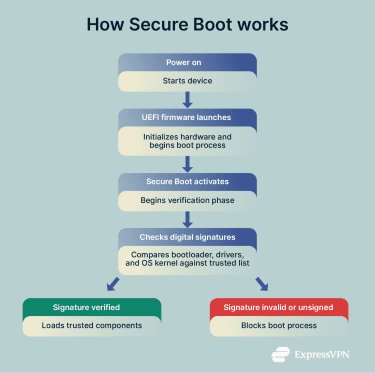
Why is Secure Boot important?
Verifying each component before the OS loads helps prevent malicious software from taking control of the system at a level where traditional security tools cannot operate.
As it’s essential for maintaining a trusted computing environment, Secure Boot has been a core part of all major OSs for many years. Though the newest Mac and iOS devices use a proprietary system rather than UEFI, Apple’s firmware still incorporates Secure Boot as a fundamental security feature.
Where is Secure Boot used?
Secure Boot is now a standard on most platforms:
- Modern computers (Windows, Linux, macOS): Adds a layer of protection during the bootup phase, when other security measures are not yet active.
- Secure enterprise environments: Ensures endpoints meet corporate security requirements before connecting to networks.
- Firmware-level protection for consumer and business devices: Protects against tampering and low-level malware attacks.
- Internet of Things (IoT) and embedded systems: Guards unattended or remote hardware from unauthorized software modifications.
Further Reading
- How to check if your computer has a virus (Windows and Mac)
- Most secure operating systems in 2025 ranked: Secure data today
- ExpressVPN’s new Linux app with GUI
 Support Center
  FAQ
FAQ  VPN Setup Tutorials


