
Expressvpn Glossary
Round-trip time (RTT)

What is round-trip time?
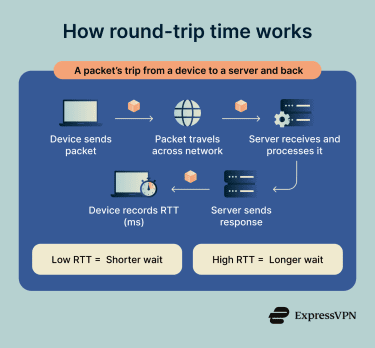
Round-trip time (RTT) measures the total time in milliseconds (ms) a data packet takes to travel from a device to a remote destination and for a response or acknowledgment to return. In networking, RTT captures the full there-and-back delay across the network path.
RTT closely relates to latency and ping. Latency can refer to one-way delay, while RTT measures the full trip there and back. Under symmetric network conditions, one-way latency is roughly half the RTT, but internet traffic can take asymmetric paths, causing the two values to diverge. The ping command measures RTT by sending a test message and waiting for a reply, so “ping time” often refers to RTT. However, ping results may not exactly match the latency experienced by specific apps.
How does round-trip time work?
Loading a webpage usually involves multiple network requests. For each request, a device sends data to a server and receives a response. The total elapsed network time for that exchange is the RTT, and multiple RTTs can add up during a full page load. The route packets take can change between requests, and several variables influence RTT:
- Physical distance: Data crossing continents takes longer to return.
- Routing path: Longer, congested, or less direct paths can increase RTT.
- Network congestion: Overloaded routers cause packets to queue.
- Packet loss: Lost packets can cause timeouts or retransmissions, especially in Transmission Control Protocol (TCP)-based applications.
- Transmission medium and link quality: Fiber, copper, cellular, satellite, and Wi-Fi links can introduce different delays depending on distance, signal conditions, interference, and equipment.
- Local network traffic: Heavy local area network usage can create a bottleneck before data reaches the internet.
- Server or application processing time: This affects overall response time and time to first byte, but it's usually separate from pure network RTT.
Why does round-trip time matter?
RTT shows how responsive a network connection feels. A lower RTT usually means requests and responses move more quickly, while a higher RTT can make online services feel slower.
RTT matters for browsing and streaming because web pages often require several back-and-forth exchanges before they fully load. High RTT can delay page rendering and contribute to video buffering.
It also affects real-time services, such as Voice over Internet Protocol (VoIP) calls, video meetings, and online gaming. When data takes longer to travel between users and servers, conversations can feel delayed, and games can feel less responsive.
RTT is also important for virtual private network (VPN) connections. Routing traffic through a VPN server and adding encryption overhead can increase RTT and slow some connections, depending on the server location, routing path, and network conditions.
For network diagnostics, RTT spikes can help identify congestion, routing issues, or bottlenecks before they affect users more broadly. In security monitoring, unusual RTT patterns can support anomaly detection, though they may also reflect normal network changes rather than suspicious activity.
Where is it used?
RTT applies across a wide range of networking and security contexts:
- Network performance testing: Tools like ping measure RTT to a destination, while traceroute shows hop-by-hop RTTs to help assess network paths.
- Enterprise troubleshooting: Network teams analyze transit spikes to isolate congested infrastructure or failing devices.
- Web browsing and content delivery networks (CDNs): Browsers benefit from low RTTs, while CDNs use edge servers closer to users to reduce latency.
- Real-time communication: Voice, video calls, and online gaming are sensitive to delay. Voice quality is generally best at about 150ms one-way delay or lower (roughly 300ms RTT), while fast-paced games usually feel better with much lower RTTs (50–80 ms).
- Remote desktop services: Low RTT helps keep mouse, keyboard, and screen updates responsive.
- VPN connection analysis: Engineers evaluate VPN server location, routing paths, protocols, and tunnel overhead to maintain performance.
Security risks and privacy concerns
Unusual changes in RTT can help flag possible network problems or suspicious activity, but they need investigation before they can be linked to an attack.
- Route detouring: Routing manipulation or misconfiguration can redirect traffic through unexpected paths. A sudden, unexplained increase in RTT may warrant investigation, but it does not prove the path is unauthorized.
- Denial-of-service (DoS): Attackers overwhelm infrastructure with malicious traffic, increasing RTT, causing packet loss, or blocking legitimate users.
Attackers can also exploit RTT and timing data to their advantage:
- Network fingerprinting: RTT and other timing patterns may help adversaries infer proxy or VPN use, map parts of a network path, or weaken anonymity.
- Falsified metrics: Attackers who compromise monitoring systems or telemetry pipelines may alter RTT or performance data to hide outages, intrusions, or other network issues.
- Wireless wormhole attacks: In wireless ad hoc, mesh, or sensor networks, malicious nodes can capture packets in one location, tunnel them elsewhere, and retransmit them, making distant devices appear closer than they are.
Further reading
- How to lower ping and reduce lag for seamless gaming
- What is network jitter, and how does it impact internet performance?
- What is packet loss? Everything you need to know
- How to test your internet speed: A secure and simple guide
- VPN speed test: How to accurately test and improve your VPN speed







