Expressvpn Glossary
Rogue access point
What is a rogue access point?
A rogue access point (AP) is a physical device or software-configured AP (like a mobile hotspot) that broadcasts a Wi-Fi connection without the network owner’s authorization. Rogue APs may mimic legitimate wireless networks, meaning they can evade or bypass some security and monitoring controls and silently intercept user traffic.
How does a rogue access point work?
Just like legitimate APs, rogue APs broadcast a convincing Wi-Fi network name and accept connections from nearby devices, often relying on auto-connect behavior. Once a device connects, the rogue AP forwards the user’s traffic onward (to an internal network or out to the internet), routing it through an unauthorized path.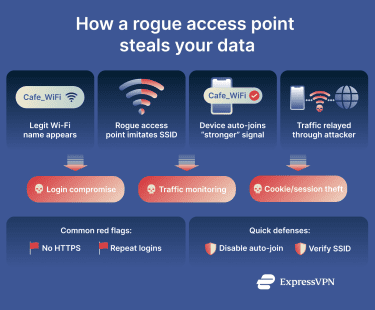 Because these APs can evade network security controls, attackers may be able to monitor traffic, capture credentials, steal data, or manipulate communications.
Types of rogue access points
- Accidental or misconfigured rogue APs: A legitimate device set up without approval from the IT department, such as an employee’s personal Wi-Fi router, a misconfigured guest Wi-Fi bridge, or a laptop with hotspot enabled.
- Malicious rogue APs: An AP deliberately set up by attackers to intercept, monitor, or manipulate traffic.
- Evil twin AP: A specific type of malicious rogue AP that impersonates a legitimate Wi-Fi network by copying its name and attempting to trick users into connecting.
- Software-based rogue AP: Rogue APs created using software features on existing devices, such as smartphone tethering or a laptop hotspot.
- Compromised AP: A legitimate AP that has been taken over by an attacker, who has stolen access credentials or modified its firmware.
Why is a rogue access point important?
Rogue APs are a significant threat because they introduce unauthorized paths into a network, making them a common entry point for security breaches. By allowing devices and traffic to bypass expected authentication, monitoring, or enforcement points, rogue APs can enable attacks.
While networks typically authenticate devices at entry points, monitor traffic at specific points, and assume only approved APs exist, rogue APs can bypass these security measures silently, often without raising any red flags.
Where are rogue access points found?
- Offices, campuses, hospitals, retail stores, warehouses, and schools: Employees may plug in a personal router, or contractors may set up temporary Wi-Fi to complete their work. This can be invisible to IT for long periods and provide direct access to internal systems.
- Public Wi-Fi environments: Attackers set up evil twin networks in venues like hotels, cafés, airports, conference venues, and libraries and impersonate a real Wi-Fi network where users connect voluntarily.
- Home and small office networks, including Internet of Things (IoT) environments: Old routers may be repurposed as APs, guest networks bridged incorrectly, or Wi-Fi extenders misconfigured.
Risks and privacy concerns
Rogue APs pose several serious risks to both individuals and organizations. When users connect to a rogue AP, their sensitive data may be intercepted, including login credentials, session tokens, and other private information. Attackers operating the rogue AP can inspect traffic metadata, redirect users to malicious websites, inject harmful content, or otherwise manipulate network connections.
Additionally, rogue APs can enable device tracking and profiling. By collecting device identifiers and monitoring connection patterns, attackers may infer user behavior and build detailed usage profiles without the user’s knowledge.
Further reading
- How to get free Wi-Fi anywhere (legally and safely)
- What is a Wi-Fi VPN, and why should you use one
- Is hotel Wi-Fi safe? How to browse securely while traveling