
Expressvpn Glossary
Metered connection
What is a metered connection?
A metered connection is a network connection with a defined data limit. Going beyond that limit can result in slower speeds or extra charges.
Operating systems like Windows and Android allow this type of connection to be marked as “metered” on a device. When enabled, this setting reduces automatic background activity to help conserve data.
How does a metered connection work?
When a connection is marked as metered, the device attempts to reduce data usage on that network. System updates, app updates, and cloud syncing may be delayed or paused until the device connects to an unmetered network.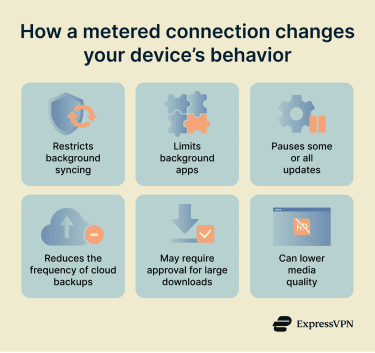
Most actions started by the user, such as opening websites, continue to work normally. However, some metered modes also lower media quality or require approval before beginning large downloads.
The setting typically applies per network. A device can limit one connection, such as mobile data or hotel Wi-Fi, without affecting how it treats other networks.
The name for this feature varies by platform. On Windows, it's called a “Metered connection” and can apply to Wi-Fi, Ethernet, or cellular networks. On Android, individual Wi-Fi networks can be set to “Treat as metered,” while cellular data is treated as metered by default. iOS offers a “Low Data Mode,” which works similarly and can be enabled for specific Wi-Fi networks or for cellular data.
Why is a metered connection important?
Marking a connection as metered provides more control over data consumption:
- Avoids unexpected charges: On metered plans, this helps prevent background activity from pushing data use into overage fees or higher-cost tiers.
- Helps manage data allowances: By controlling how much data apps and system services consume without user input, devices are less likely to exhaust a monthly limit before essential tasks are completed.
- Supports battery life on mobile devices: Reduced background network activity can lower power consumption.
- Useful for travel and roaming connections: Roaming plans often come with stricter limits or higher costs, so tighter control helps keep usage and costs under control.
Where is it used?
- Mobile networks and tethered connections: Phones and hotspots that provide internet access to one or more devices.
- Roaming connections: Networks used when a device connects outside its home region or carrier coverage area.
- Satellite and fixed wireless services: Internet services delivered over radio or satellite links rather than wired infrastructure.
- Pay-as-you-go internet plans: Connections where access is based on measured data use instead of a flat monthly subscription.
- Managed or guest networks: Hotel, campus, and enterprise networks that monitor or restrict usage to manage capacity.
Risks and security concerns
- Delayed security updates: When automatic updates are limited, security patches may not install as quickly. This can leave known vulnerabilities unpatched for longer.
- Reduced backup coverage: Cloud backups and background syncing may pause or run less often. This can increase the risk of data loss if a device is damaged or reset before a full backup completes.
- Uneven app behavior: Not all apps respond to metered settings in the same way. Some may continue to use data in the background, which can make data controls less predictable on a device.
Further reading
- Does a VPN work without Wi-Fi?
- What is bandwidth throttling?
- Are mobile hotspots secure?
- What is a travel router?



