Expressvpn Glossary
Blob storage

What is blob storage?
Blob storage (also known as object storage) is a kind of cloud storage designed for unstructured data; instead of using a traditional file hierarchy, data is stored as Binary Large Objects (blobs) in a flat, non-hierarchical structure. This allows cloud platforms to store and manage very large files or collections of unstructured data efficiently.
How does blob storage work?
Blob storage keeps data as individual objects rather than in a traditional file hierarchy. Each blob includes the data itself, metadata describing its attributes, and a unique identifier that allows applications to retrieve it through web application programming interfaces (APIs) or software development kits (SDKs).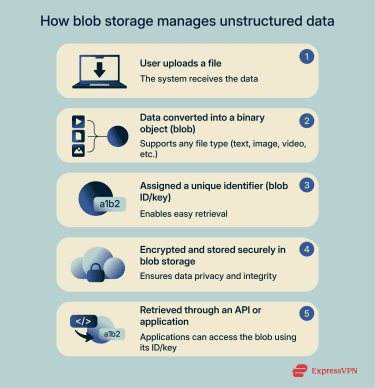
Cloud providers typically replicate blob data across multiple locations, ensuring durability and continuity even if hardware fails. Blob storage systems also encrypt objects during transfer and while stored, reducing the risk of unauthorized access.
Types of blob storage
Some cloud platforms divide blob storage into categories based on how data is written and accessed. Azure Blob Storage uses this model and includes three blob types:
- Block blobs: Optimized for efficiently uploading large files, block blobs can store media files, documents, and backups. The data is stored in blocks up to 190.7 tebibytes (TiB) and can be managed individually.
- Append blobs: Append blobs are designed for workloads that continuously add new data, making them ideal for logs and other append-only scenarios. Each new write operation adds a block to the end of the blob, and existing blocks can’t be modified or removed.
- Page blobs: Built for random read/write operations, page blobs serve as the underlying storage for Azure virtual machine disks. Use cases include operating systems and disaster recovery data.
Why is blob storage important?
Blob storage supports massive volumes of unstructured data without the complexity of managing a traditional file system. It scales quickly as data needs grow, making it well suited for workloads like streaming media, AI pipelines, and long-term archiving.
In practice, many organizations also use blob storage (such as Microsoft Azure Blob Storage, Microsoft’s cloud object storage service) in a similar way to how Amazon S3, AWS’s scalable object storage platform, is commonly used: as an origin for content delivery networks (CDNs). When configured correctly, this allows teams to efficiently store and serve large amounts of static content at scale.
Additionally, some businesses rely on blob storage for backup and disaster recovery, since object storage is typically more cost-efficient than on-premises infrastructure or traditional file storage. This flexibility makes blob storage a core component of modern cloud architectures.
Security and privacy considerations
Blob storage relies on cloud infrastructure, so strong security controls are essential to protect stored objects and limit unauthorized access. Here’s how it’s secured:
- Server-side encryption: Automatically encrypts blob data at rest to prevent exposure if storage hardware is compromised.
- Access control policies: Define who can read, write, or manage specific blobs and containers.
- Multi-factor authentication (MFA): Adds an extra verification step for administrative accounts and management interfaces.
- Encrypted transfer channels: Using HTTPS, SSH File Transfer Protocol (SFTP), or a virtual private network (VPN) helps ensure that blob data remains private while it’s being uploaded or retrieved.
Common use cases
Blob storage is used across many cloud environments, including:
- Media libraries: Ideal for storing videos, images, and audio because blob storage can handle large file sizes and deliver them reliably to applications.
- Cloud backups: Suited for long-term backups thanks to high durability, redundancy, and cost-efficient storage tiers.
- Analytics and AI workloads: Works well for big data pipelines because it can hold massive datasets in a flat structure that analytics tools can process directly.
- Internet of Things (IoT) and application logs: Stores large streams of log files and telemetry data without requiring a fixed schema or directory structure.
Further reading
- Top cloud services to store photos online (free and paid)
- The best way to store your passwords securely
- How to back up files and encrypt them
 Support Center
  FAQ
FAQ  VPN Setup Tutorials


