What are zombie cookies? How they come back and how to block them



Zombie cookies, also known as evercookies or supercookies, are tracking cookies that are designed with persistence in mind. Unlike standard cookies that you can delete from your browser, zombie cookies automatically regenerate themselves after deletion by storing backup copies across multiple locations on your device and recreating themselves if one copy is removed.
This technique attracted significant criticism in the past, and modern browsers and privacy protections have made zombie cookies less common today.
This article covers exactly how zombie cookies work, how you can remove them from your system, and how to block any subsequent zombie cookies from getting on your device.
Understanding zombie cookies
To understand what makes zombie cookies unique, it’s important to know how standard HTTP cookies work. HTTP cookies are small pieces of data created by a web server and placed on a user’s system while they’re using a website. They serve various purposes, such as helping a web server maintain information like a user’s shopping cart details. However, they can also be used to track user activity, like seeing which pages were visited or what buttons were pressed.
The core functionality of zombie cookies is similar to that of HTTP cookies, with the key difference being that they can recreate themselves. Unlike standard HTTP cookies that you can easily clear from your system using a browser’s built-in options, zombie cookies are engineered to remain on your device and replicate themselves via hidden copies.
Today, zombie cookies are mostly discussed in security research or proof-of-concept demonstrations, as modern browsers block many of the techniques used to recreate them.
How do zombie cookies work?
Zombie cookies employ various mechanisms to store backups of themselves on a system, then use these backups to recreate their own copies if deleted.
Zombie cookie storage methods
Zombie cookies can hide in numerous locations across a system.
HTML5
The modern web relies significantly on HTML5, which has various storage mechanisms that can be used for malicious cookie storage. These include session storage (temporary storage for a browser session) or local storage (storage that persists across multiple browser sessions).
Some demonstrations have also used the HTML5 canvas element to help regenerate identifiers or support browser fingerprinting.
HTTP ETags
HTTP ETags are normally used to tell your browser if a specific website resource, like an image, has been updated. However, zombie cookies can abuse this feature by slipping your tracking ID into the ETag header. When you return to the site, your browser checks the ETag to see if anything changed, accidentally handing your tracking ID right back to the server.
Flash LSOs
Flash Local Shared Objects (LSOs), also known as Flash cookies, used to be a prevalent zombie cookie storage mechanism. These LSOs reside outside a browser’s cookie folder to remain available for each browser, meaning they aren’t cleared by standard browser privacy settings.
Zombie cookies exploited this by storing unique identifiers in both browser cookies and Flash cookies, then respawning the browser cookie through the Flash cookie if it was deleted. LSOs aren’t a significant concern nowadays, however, as Flash Player support was officially discontinued in December 2020, and many browsers started blocking Flash content by default after that.
Legacy storage mechanisms
Some other legacy storage mechanisms zombie cookies can exploit include Silverlight’s isolated storage and Internet Explorer’s userData storage, but these are deprecated technologies that don’t pose a significant risk.
How zombie cookies respawn after deletion
When you visit a site that uses zombie cookies, a script checks multiple storage locations where persistent tracking data may be stored. It then compares the values it finds to determine the most consistent tracking ID. This ID is used to rebuild the original cookie across all backup storage systems.
As long as one copy of the tracking data survives, the zombie cookie can restore itself seamlessly. Even if you've deleted cookies, it will clone back into place automatically. This redundancy makes evercookies extremely difficult to eliminate, allowing trackers to maintain persistent monitoring of users.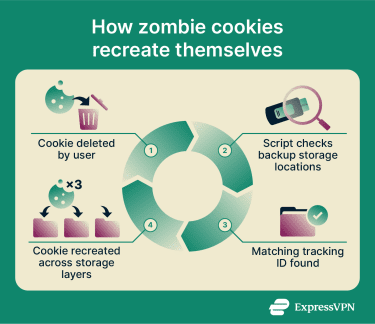
This mechanism can be seen working in proof-of-concept scripts. However, as mentioned, real-world use of zombie cookies is less common today. Modern browsers and privacy extensions also block or limit some of these replication paths, making zombie cookies less effective than they once were.
Tracking techniques involved
Various tracking techniques are used with zombie cookies to collect data about users. A noteworthy example is a technique called cookie syncing, which allows advertisers to link your unique identifier across different websites and build profiles of your browsing behavior.
Browser fingerprinting also often works alongside zombie cookies to enhance tracking capabilities. Unlike cookies, fingerprinting doesn't store anything in your browser and works by recognizing your device's unique characteristics, meaning it remains effective even if all cookies are deleted. It’s now a more common tracking technique than zombie cookies because it doesn’t rely on storing data in the browser.
Privacy implications of zombie cookies
The privacy concerns surrounding zombie cookies are significant, as their persistence undermines user autonomy and consent. When users delete cookies, they typically expect that tracking data has been removed. Zombie cookies circumvent this by recreating identifiers from backup storage locations, allowing tracking to continue even after users attempt to clear their browsing data.
This persistence can make it difficult for people to meaningfully opt out of tracking. Even if a user clears cookies or other site data, the identifier may be reconstructed automatically, allowing websites or advertising networks to continue recognizing the same device or browser across sessions.
Zombie cookies can also reduce transparency in online tracking. Because they rely on multiple storage mechanisms and automated restoration techniques, users may not realize that tracking identifiers are being recreated behind the scenes. As a result, people may have less practical control over how their browsing activity is monitored and linked over time.
For these reasons, zombie cookies have been widely criticized by privacy advocates and have faced increased scrutiny from browser developers and regulators. Modern browsers and privacy tools now restrict many of the techniques used to recreate these persistent identifiers.
How to remove zombie cookies
Deleting zombie cookies involves more than simply clearing cookies using your browser’s built-in option. You must also clear other storage methods, like HTML5 session and local storage.
Browser-specific instructions
Here’s how to remove zombie cookies on Chrome, Edge, and Firefox.
Google Chrome
- Click the three dots at the top-right of your browser and choose the Settings option.
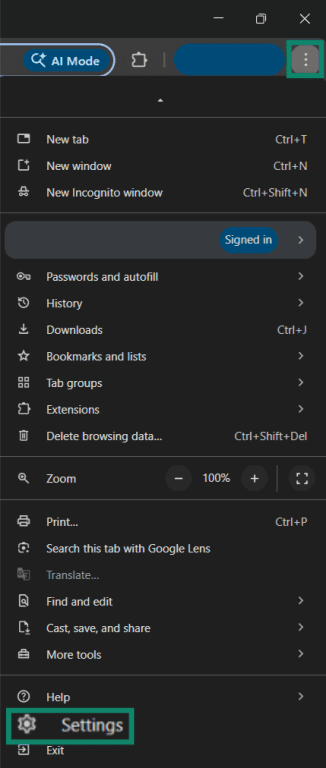
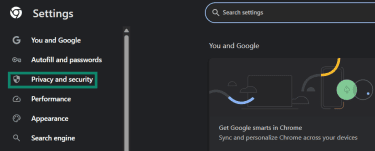
- Click Privacy and security on the left-hand menu.
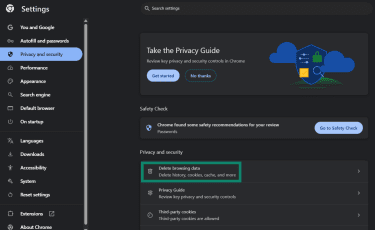
- Click Delete browsing data.
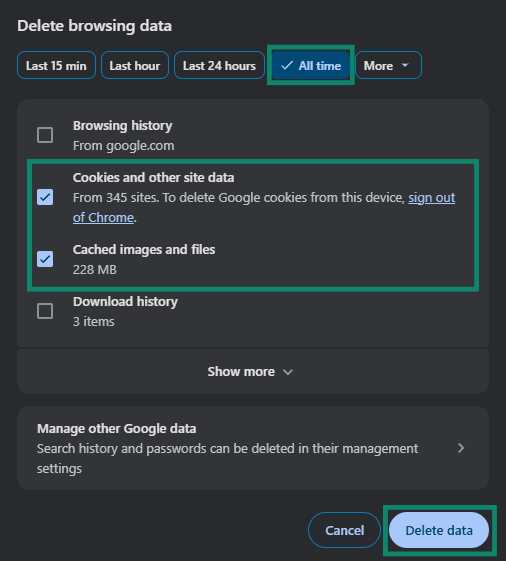
- Check the Cookies and other site data and Cached images and files options. Select the All time option from the time ranges listed above and click Delete data.
- Press F12 to open your browser’s developer tools and click the Application menu at the top.

- Look for the Storage option in the Application menu, expand the Local storage, Session storage, and IndexedDB sections, right-click any entries you find in these sections, and click Clear.

As mentioned earlier, zombie cookies can persist in various locations that aren’t cleared during a standard removal of browser data. This is why clearing places like local storage, session storage, and IndexedDB is important, as it helps remove hidden copies.
Microsoft Edge
- Click the three dots at the top-right of the browser and choose Settings.
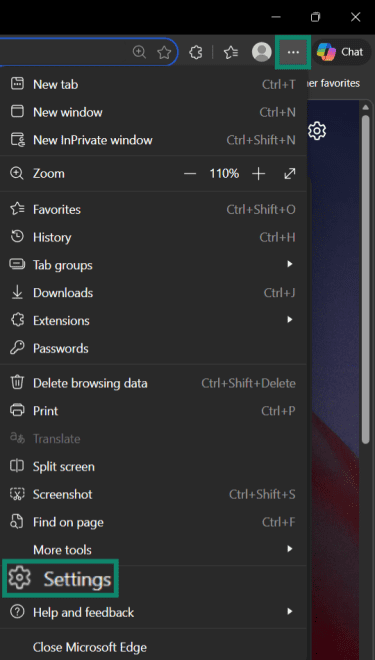
- Click on Privacy, search, and services in the left-hand menu.
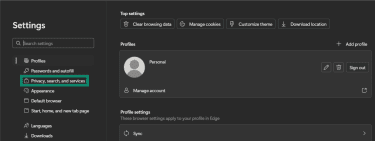
- Click Clear browsing data.
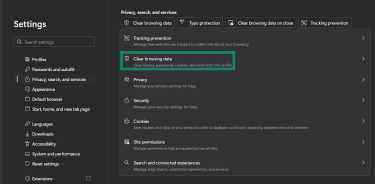
- Click the Choose what to clear option next to Clear browsing data now.
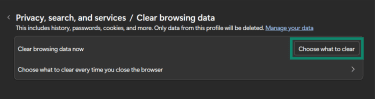
- Click the Time range dropdown menu and select All time. Next, check the Cookies and other site data and Cached images and files boxes and click Clear now.
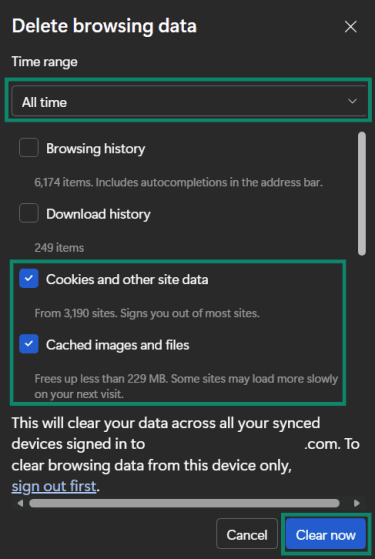
- The next step is clearing Local storage, Session storage, and IndexedDB. The process for doing this on Edge is the same as for Google Chrome shown above.
Mozilla Firefox
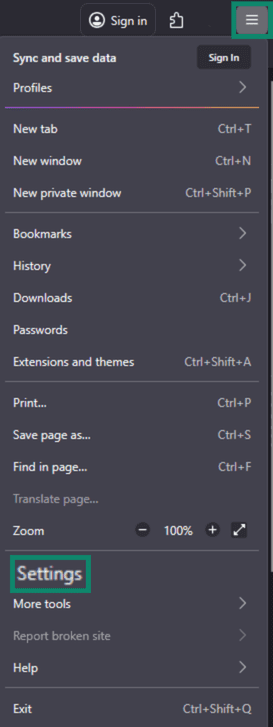
- Click the three lines at the top-right of the browser > Settings.
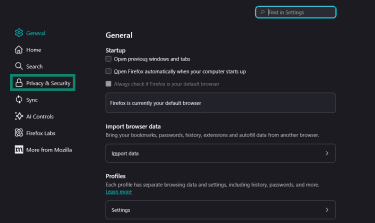
- Click Privacy & Security on the left-hand menu.
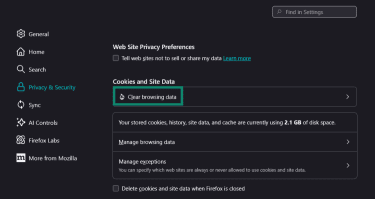
- Click Clear browsing data in the Privacy & Security menu.
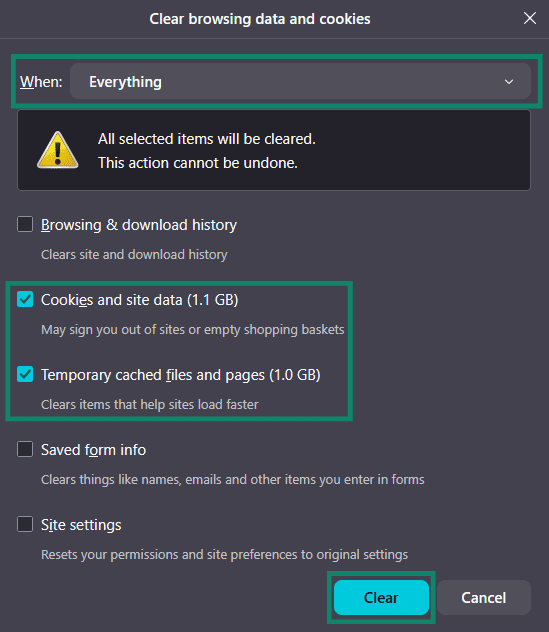
- Click the When dropdown menu and choose the Everything option. Next, choose Cookies and site data and Temporary cached files and pages and click Clear.
- Press the Ctrl + Shift + I keys to open developer tools on Firefox and click the Storage option.

- Expand the Local storage, Session storage, and Indexed DB sections, right-click any entries in these sections, and click Delete All.

Safari
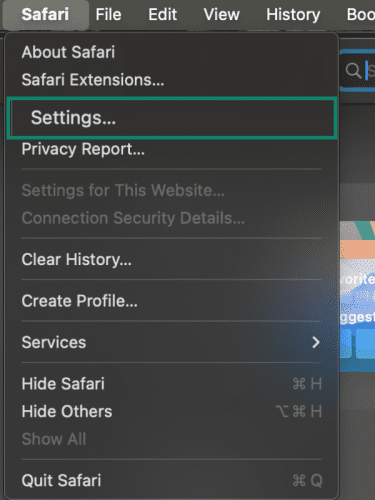
- Choose Settings from the Safari menu.
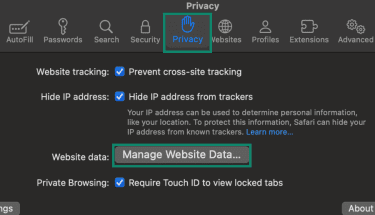
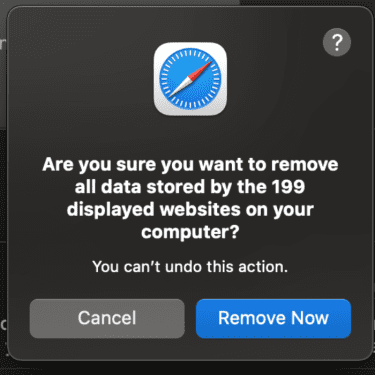
- Select the Privacy tab and click Manage Website Data…
- Select Remove All.
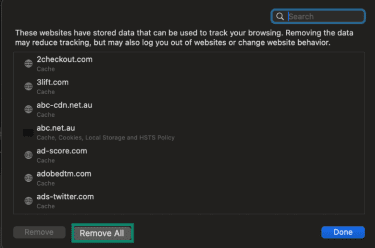
- Confirm your choice.
- Go to the Develop option in the top menu, and select Show JavaScript Console.

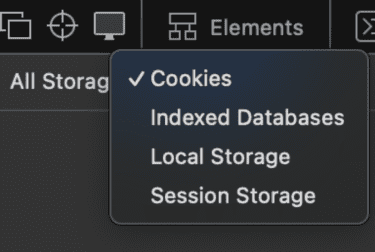
- Choose the Storage tab.

- Here you can select Indexed Databases, Local Storage, and Session Storage from the dropdown and delete any entries you find.
How to block zombie cookies
After removing zombie cookies from your system, you need to set up the mechanisms needed to ensure you can block them in the future.
Block third-party cookies and cross-site tracking
One way to reduce the chances of zombie cookies being used to track you is to block third-party cookies and limit cross-site tracking. Some browsers, such as Safari and Firefox, already block many of these trackers by default. Others, such as Chrome and Edge, let you change these settings manually.
For browser-specific instructions, see our guide on third-party cookies, which explains how to disable them in major browsers and what effect this can have on your browsing experience.
Use privacy extensions
There are various browser extensions and software options that can help you block zombie cookies while surfing the web. uBlock Origin is an open-source utility that blocks trackers across the web using well-known filter lists that maintain records of tracking domains and URLs.
Another example is Privacy Badger, a free browser extension by the Electronic Frontier Foundation (EFF). It detects trackers based on behavior rather than predefined lists, learning as you browse which domains follow you across sites and automatically blocking them.
Alternatively, you could use ExpressVPN’s Threat Manager. It stands out because it works system-wide, preventing apps and websites on your device from communicating with domains known to track user behavior.
Legislative landscape around cookies
The use of cookies on websites is regulated by various data protection laws that aim to give users more control over how their data is collected and used.
Current laws affecting cookie use
The most noteworthy regulation around cookies is the EU’s ePrivacy Directive, also called the Cookie Law. It specifically addresses tracking cookies and requires websites to obtain informed consent before storing cookies on a user’s device, something that goes directly against a zombie cookie’s ability to regenerate without consent even after deletion.
The only exception to this requirement is when a cookie is needed for a website to function, like a cookie that stores user logins. However, since zombie cookies are generally used for tracking purposes, this exception wouldn’t apply to them.
In the U.S., the California Consumer Privacy Act (CCPA) and the California Privacy Rights Act (CPRA) define personal information broadly to encompass identifiers that can be linked to an individual or household. This can include certain cookies when they function as unique identifiers.
Rights of users regarding cookie consent
Depending on where they live, users may have fundamental rights regarding cookies under modern privacy legislation, many of which conflict with how zombie cookies function. For instance, the General Data Protection Regulation (GDPR)’s "right to be forgotten" mandates that companies must honor a user’s request when they ask for their data to be deleted once it’s no longer needed, unless they have a legal obligation to retain it.
Zombie cookies that automatically regenerate directly violate this right by maintaining tracking even after explicit deletion requests.
Steps you can take to enhance online privacy
Managing cookies is only one part of safeguarding your online privacy. There are some other important steps you can take to ensure improved safety, such as the following:
- Use a virtual private network (VPN): A VPN encrypts your traffic and masks your IP address, significantly improving online privacy.
- Switch to privacy-first search engines: Using a privacy-focused search engine like DuckDuckGo reduces how much you’re tracked online.
- Switch to disposable email addresses: Using a service like ExpressMailGuard lets you create aliases to use when signing up for websites you don’t trust, keeping your real email address hidden.
FAQ: Common questions about zombie cookies
How do I get rid of zombie cookies?
What cookies should I avoid accepting?
Are zombie cookies harmful to my computer?
What tools can help manage cookies effectively?
Take the first step to protect yourself online. Try ExpressVPN risk-free.
Get ExpressVPN