What is a point-to-site VPN, and how does it work?



Today, many people work remotely or have a hybrid work arrangement, and teams are often spread across multiple cities or even countries. Therefore, organizations need a way to let employees access internal systems, whether on-premises or in the cloud, from anywhere, while also keeping that access secure. A point-to-site (P2S) virtual private network (VPN) is one possible solution.
In this article, we’ll explore what P2S VPNs do and how they work. We’ll also examine their strengths and weaknesses, the protocols they use, how they compare to site-to-site (S2S) VPNs, and more.
What is a point-to-site VPN?
P2S VPNs are tools used to securely connect a single device to a private network. The “point” refers to the device, such as a laptop or phone, and the “site” refers to an internal network or system. While multiple devices can establish their own P2S VPN connections, each connection is independent and managed individually.
What problem does a point-to-site VPN solve?
A P2S VPN mainly solves the problem of secure remote access. It connects remote workers to an organization’s network, allowing them to access internal systems, files, and apps as if they were in the office. It also protects that connection with an encrypted tunnel, so sensitive data doesn’t fall into the wrong hands.
Who typically uses a P2S VPN?
P2S VPNs are primarily an enterprise tool, and they’re not something a typical consumer would use (consumer VPNs like ExpressVPN are a better pick for general users). They’re best suited for employees or small teams who need occasional or individual access to systems and resources, rather than permanent network-to-network connectivity.
Common users include employees working from home, traveling staff, or contractors who need to access the organization’s resources without being on-site.
Common real-world point-to-site VPN scenarios
Here are some simple scenarios where a P2S VPN might be useful:
- An employee needs to access internal systems from home during an outage or lockdown.
- A salesperson needs to update client records while traveling without exposing sensitive data.
- IT staff need to perform maintenance on servers or cloud resources remotely.
- A developer needs to access cloud-hosted development environments securely from a co-working space.
How does a point-to-site VPN work?
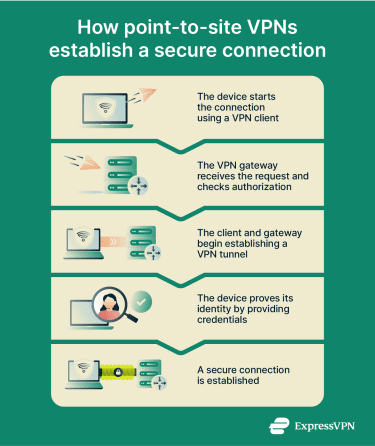
Here’s a step-by-step breakdown of how a P2S VPN establishes an encrypted connection between a user’s device and a private network:
- Device initiates connection: The user’s device contacts the network using a VPN client, an app that manages the VPN connection.
- Gateway checks authorization: The network’s VPN gateway, a server that handles incoming VPN connections, receives the connection request and begins authentication. The device must prove its identity using credentials such as a certificate or a username and password. The gateway may also enforce access policies (e.g., verifying the user’s role or checking whether the device meets security requirements).
- Tunnel creation: Once authentication succeeds, the VPN client and gateway negotiate encryption parameters, agreeing on the cryptographic algorithms and keys that will be used to protect the connection. Then, they establish a secure, encrypted tunnel between the device and the private network.
- Secure access to resources: The connection is established. The device can now safely access files, applications, and other internal resources as if it were directly plugged into the private network.
How is a point-to-site VPN set up?
Setting up a P2S VPN involves preparing both the remote device side and the network side so that individual users can securely connect to an organization’s private network over the internet. Below are the four core areas to understand.
VPN client software and user devices
Each device that will connect over a P2S VPN needs client software configured for the specific VPN technology in use. The client software manages the encrypted tunnel between the user’s device and the network gateway, negotiates encryption parameters, and handles protocols and credentials as required.
In cloud environments, organizations often distribute a preconfigured client profile that contains the necessary connection settings and certificates, simplifying deployment and ongoing management.
VPN gateway or server configuration
On the network side, there must be a VPN gateway or server that accepts incoming P2S connections. This gateway is typically part of a larger VPN infrastructure or cloud service, and it’s configured with settings such as the IP address range to assign to connecting clients, the allowed tunnel types, and routing rules. It also enforces authentication policies, for example, only allowing certain certificates or user groups.
Authentication methods (certificates vs. credentials)
A key part of the setup is deciding how users will prove they’re allowed to connect. Common approaches include certificate-based authentication, where each device presents a cryptographic certificate the gateway recognizes, or user credentials (such as a username and password), possibly tied to an identity service.
Certificates are often used because they can be installed and managed centrally, ensuring that only authorized devices can connect. Credential-based methods, on the other hand, let organizations leverage existing user accounts and authentication systems.
In many modern deployments, these approaches are combined or supplemented with multi-factor authentication (MFA) to provide an additional layer of security. For example, a device might present a valid certificate and require the user to enter a one-time code or approve a login from a mobile app before the connection is allowed.
On-premises vs. cloud-based P2S VPNs
P2S VPNs can be deployed on physical servers within an organization’s own network or as part of a cloud provider’s managed VPN service.
In a cloud-based setup, the provider hosts the VPN gateway and often supplies tools to generate client profiles and manage authentication. Cloud deployments are generally easier to scale and manage: the provider handles software updates and security patches, for example, which reduces operational overhead for the organization. Cloud P2S VPNs are well-suited to organizations that need remote access to cloud-hosted resources or want a quick, low-maintenance solution for a distributed workforce.
In on-premises setups, the organization runs its own gateway software and handles all configuration and maintenance. This gives the organization full control, which can be important for industries with strict data residency or regulatory requirements. However, on-premises P2S VPNs may require more upfront investment, ongoing management, and capacity planning to support additional users or spikes in demand.
Benefits of a point-to-site VPN
There are three main ways a P2S VPN can benefit an organization. It can support flexible work arrangements, enable secure communication over unsecured networks, and provide cost-effective network access for employees.
Flexibility for remote and hybrid work
P2S VPNs allow employees to access internal resources from anywhere, without being tied to a physical office. This flexibility supports remote and hybrid work arrangements, enabling staff to collaborate, access files, and use internal apps whether they’re working from home, traveling, or at off-site locations.
The result is that organizations can maintain productivity and continuity even when employees are distributed across different cities or countries.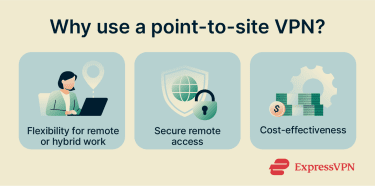
Secure remote access
P2S VPNs solve the problem of remote access security by creating an encrypted tunnel between the individual user’s device and the organization’s network. This tunnel uses strong encryption protocols to scramble data so that even if someone intercepts it while it’s in transit, they can’t read or tamper with the information. Only the VPN endpoints (the user’s device and the network) can decrypt and access the original data.
This is an important feature, as organizations often handle sensitive data such as financial records, customer information, or proprietary documents.
Cost-effective network connectivity
For small organizations, a P2S VPN offers a cost-effective way to provide secure remote access without investing in dedicated network links or complex infrastructure. Because connections are initiated directly from individual devices, organizations only need a centrally managed VPN gateway rather than networking equipment at multiple locations.
This reduces upfront hardware costs and simplifies deployment, particularly for smaller or fast-changing teams. Many P2S VPN solutions are licensed per user or per connection, meaning organizations can scale access up or down and avoid paying for unused capacity.
Operational costs are often lower as well. With fewer network endpoints to manage, there’s less ongoing maintenance compared to solutions like S2S VPNs that require persistent connections between locations.
All this means that P2S VPNs are well-suited to small or growing organizations whose primary requirement is secure remote access rather than permanent network-to-network connectivity.
Point-to-site VPN vs. site-to-site VPN
P2S VPNs and S2S VPNs are used by organizations to provide secure network connectivity, but they’re generally used to solve different problems rather than being competing alternatives.
A P2S VPN can function as a lower-cost alternative to an S2S VPN when the primary need is remote user access. This is because S2S VPNs require additional infrastructure at each location, ongoing management, and typically come with higher recurring expenses.
However, S2S VPNs are a better choice if multiple fixed locations need continuous, reliable connectivity. They’re commonly used to link branch offices, data centers, or cloud networks, allowing systems at each site to communicate automatically without relying on individual user connections.
| P2S VPNs | S2S VPNs |
| Connect a distributed workforce consisting of individual devices or small groups to a network | Connect entire networks (e.g., a branch office network to a headquarters network or two data centers) |
| Connections are initiated by the device on demand, rather than being always on | Connections are persistent, always-on links between networks |
| The main goal is remote user access to internal systems, files, and apps | The main goal is network-level integration, allowing all devices on one network to communicate with all devices on the other network |
Point-to-site VPN vs. consumer VPN services
P2S VPNs and consumer VPN services, like ExpressVPN, serve very different purposes. P2S VPNs are used by organizations to provide authenticated users with secure, controlled access to internal networks and services. Connections are managed by the organization, and access is typically restricted based on user identity, device posture, and security policies.
Consumer VPN services, on the other hand, are designed to encrypt individual users’ internet traffic and mask their public IP address when they’re browsing the web. Rather than granting access to a private network, these services route traffic through the provider’s servers and are primarily focused on personal online privacy.
| P2S VPNs | Consumer VPNs |
| Mainly used within organizations by employees or contractors | Mainly used by individuals for personal reasons |
| Provide secure access to the organization’s internal network | Protect personal data by encrypting internet traffic |
| Connect individual devices to a private network | Connect the user’s device to a VPN server on the public internet |
| Managed by IT teams or network administrators, who control authentication and access | Connection initiated and managed by the individual user (VPN infrastructure controlled by the provider) |
VPN protocols used in point-to-site VPNs
P2S VPNs commonly use OpenVPN, Internet Key Exchange version 2 (IKEv2), or Secure Socket Tunneling Protocol (SSTP) to establish secure, encrypted connections. Below is a quick overview of each VPN protocol.
OpenVPN
OpenVPN uses Transport Layer Security (TLS) to encrypt data between the client and the network. By default, OpenVPN typically runs over User Datagram Protocol (UDP) on port 1194, which is preferred because UDP offers better performance and lower latency. However, OpenVPN can also operate over Transmission Control Protocol (TCP), including TCP port 443 (the same port used for HTTPS), which allows it to blend in with normal web traffic and pass through restrictive firewalls when UDP traffic is blocked.
OpenVPN is highly configurable and supports strong encryption algorithms (such as 256-bit Advanced Encryption Standard or AES-256) and certificate-based authentication. It’s a popular choice for P2S VPNs, especially if they need to connect remote users across varied networks or restrictive environments.
IKEv2
IKEv2 is a key management protocol that’s often used with Internet Protocol Security (IPSec) to form a VPN protocol referred to as IKEv2/IPSec. IKEv2 manages key exchange and session setup while IPsec handles the encryption and integrity of the data.
IKEv2/IPSec is known for its stability and ability to maintain connections when networks change, such as when switching between Wi-Fi and cellular. This makes it especially useful for mobile users who need a reliable connection on the go.
Like OpenVPN, IKEv2 supports strong encryption and authentication methods, including certificates and pre-shared keys. It’s generally easier to configure on modern operating systems.
SSTP
SSTP is a VPN protocol developed by Microsoft that uses TLS to create a secure, encrypted connection between a client and a server. Its main advantage is native support on Windows devices, which simplifies setup and reduces configuration challenges in Windows environments.
SSTP runs over TCP port 443, meaning it is not often blocked by firewalls and affected by proxy restrictions. However, while SSTP provides good security and ease of use, it’s less flexible than OpenVPN or IKEv2 in multi-platform environments.
Limitations and considerations
P2S VPNs offer flexibility and cost savings, but they aren’t without trade-offs. Here are some limitations of P2S VPNs that organizations should be aware of.
Scalability and performance constraints
P2S VPNs are designed for individual devices connecting to a network, not for large-scale simultaneous connections. As the number of users increases, the VPN server or gateway can become a bottleneck, which may result in slower connection speeds, increased latency, or dropped connections.
For this reason, organizations with many employees or multiple offices should consider solutions that can handle larger volumes of traffic more reliably, like a S2S VPN or a leased line.
Security and management challenges
With P2S VPNs, each user connects independently, meaning IT teams have to manage many client devices, ensuring software is up to date, credentials are secure, and configurations are correct. This also increases the number of endpoints that need monitoring, making consistent policy enforcement more challenging.
Additionally, traditional VPN deployments often grant broad network-level access after authentication, unless additional segmentation or access controls are implemented. This means IT teams need to carefully control what each user can access and keep an eye on activity to prevent problems. As more users connect, these tasks grow more complex, increasing the chance of mistakes or gaps in security.
Alternatives such as zero-trust network access (ZTNA) address these issues. Unlike P2S VPNs, ZTNA enforces access on a per-user, per-application basis, so users can only reach the resources they’re authorized for. This reduces the number of endpoints IT teams need to monitor and simplifies policy enforcement.
FAQ: Common questions about P2S VPNs
Is a point-to-site VPN secure?
How is a point-to-site VPN different from a remote access VPN?
Can a point-to-site VPN be used for cloud networks?
Is a P2S VPN suitable for large organizations?
Does a point-to-site VPN require client software?
Is a P2S VPN slower than other VPN types?
Take the first step to protect yourself online. Try ExpressVPN risk-free.
Get ExpressVPN