What you need to know about Locky ransomware


Ransomware incidents are time-sensitive and costly, and Locky is a well-known example of how quickly an infection can encrypt files and disrupt access.
This guide reviews how Locky campaigns have operated and what infections have lookeds like in practice. The article covers common delivery methods, typical behaviors and indicators, likely impacts, and the key steps involved in containment, recovery, and prevention.
What is Locky ransomware?
Locky is a ransomware family that encrypts files on an infected device. Attackers may then demand payment in exchange for a decryption key or recovery instructions, leaving victims unable to access important data.
It became one of the most widely discussed ransomware threats in 2016, and the U.S. government guidance from that period listed Locky among the top ransomware variants affecting U.S. companies and individuals.
Verizon’s 2017 Data Breach Investigations Report also noted a sharp drop in new ransomware samples in late 2016, driven partly by decreases in Locky and CryptoWall variants.
While Locky is generally considered a legacy ransomware family today, security tools may still flag Locky-labeled detections, often reflecting legacy or generic signatures rather than widespread active campaigns.
Learn more: Read our guide on cyber extortion.
Key characteristics of the Locky ransomware family
At its core, Locky operates much like other ransomware threats, but both the original strain and its later variants share several distinguishing features.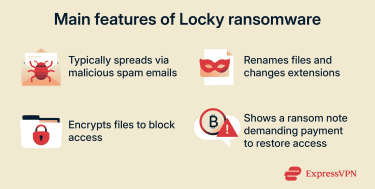
- Ransom demand: Locky is a form of crypto-ransomware that typically leaves a text or image ransom note instructing victims to pay in Bitcoin, via the Tor network.
- Distribution method: Locky most commonly spreads through large-scale email spam and phishing-style malicious attachments, often disguised as routine business documents, such as invoices. In some campaigns, Locky was also delivered through exploit-kit infection chains (including Neutrino and Nuclear), reached via malicious or compromised web infrastructure (such as “gate” campaigns or similar web-based redirects).
- Encryption strength: File recovery is extremely difficult because Locky combines the Advanced Encryption Standard (AES) and Rivest-Shamir-Adleman (RSA) encryption, and no reliable public decryption method is available.
- File naming and extensions: Many Locky infections rename encrypted files using unique hexadecimal-looking filenames and append an extension that changed accross variants. Early campaigns commonly used “.locky,” while later variants used other extensions.
Common variants and file extensions
Locky ransomware has evolved since 2016, with operators changing file extensions and delivery tactics to frustrate detection and tracking. The following are some well-documented Locky variants and the extensions commonly associated with them:
- Original Locky (.locky): This version spread through spam/phishing emails that used malicious Office documents and social engineering (often prompting users to enable macros). Encrypted files were commonly given the “.locky” extension.
- Zepto (.zepto): Many Locky campaigns were distributed via spam emails using script-based downloaders, often zipped JavaScript files, and some variants used tactics that made sandbox analysis harder.
- Osiris (.osiris): Osiris expanded its reach beyond a single machine, including those on shared folders or network shares accessible to the infected system.
- Aesir (.aesir): This Locky-family variant affected a broader set of file types (e.g., hundreds of extensions) and continued to rely heavily on email-based delivery.
These are generally treated as variants within the Locky ransomware family. Other documented Locky-associated extensions include .odin, .thor, and .zzzzz, among others.
Learn more: Check out other notorious ransomware strains, like Bad Rabbit, and read about major ransomware incidents, like Kronos.
How Locky ransomware works
Locky typically infects a device when a user opens a malicious attachment (or runs an attached script). Those attachments often trigger a download-and-execute routine that installs the Locky ransomware on the system.
Once running, Locky communicates with an external command-and-control (C2) server to report the infection and obtain encryption-related data such as encryption keys and a unique victim identifier. The encryption occurs on the victim device; attackers generally retain the private key needed to decrypt it.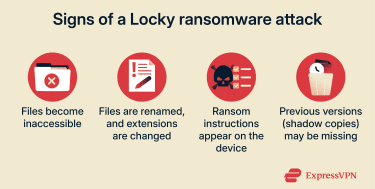
Infection process overview
Locky’s ransomware infection process typically involves a few core operations:
- Initial delivery: Often arrives via spam emails containing malicious Microsoft Office documents (macro-based) or compressed/script attachments (e.g., zipped JavaScript). Some campaigns also used exploit kits (e.g., Neutrino/Nuclear).
- Execution trigger: Opening the attachment and enabling macros (or running the script) can trigger a download-and-run routine that installs the ransomware on the device.
- C2 communication: Locky may use hardcoded C2 addresses and generate domains for C2 communication using domain generation algorithms (DGAs). After contacting C2, it receives information used for encryption and victim-specific instructions/IDs.
- File encryption: Locky targets a large list of file types (including documents, media, archives, source code, and other critical files). Encrypted files are commonly renamed with unique hex-like filenames and (in early campaigns) the “.locky” extension.
- Recovery disruption: It attempts to delete volume shadow copies (VSS), making local recovery harder.
- Ransom demand: Locky drops ransom instructions (text/images) and may change the desktop wallpaper. Instructions typically direct victims to pay in Bitcoin, often using victim-specific IDs/wallet details.
This general sequence is common across many Locky incidents, though delivery methods and some behaviors varied across campaigns and variants.
How to protect against Locky ransomware
Locky has been delivered through multiple routes, so multi-layered security practices are among the most effective ways to reduce risk.
Using antivirus and anti-malware tools
Antivirus and anti-malware tools help detect and block known threats, including malicious attachments and links used to deliver ransomware. However, ransomware evolves quickly, and variants may use evasion techniques to bypass some defenses. For that reason, antivirus software is best treated as one layer in a broader protection plan.
Hardening browser applications
It starts with keeping browsers and related components up to date and reducing exposure to risks. Security features like sandboxing, phishing/malware warnings (safe browsing), and pop-up controls can help reduce drive-by download risk, but they’re not foolproof.
Additional measures:
- Enable automatic updates for the browser and OS.
- Regularly review and minimize browser extensions.
- Remove or replace legacy plugins, such as Flash, which are end-of-life.
- Prefer extensions that are actively maintained and compatible with current browser standards.
Learn more: Read our guide on browser isolation.
Restricting scripts and macro execution where possible
Because Locky campaigns have frequently relied on macro-enabled Office documents and script-based attachments, restricting these features helps reduce risk. Disabling macros by default and blocking common script attachment types (for example, .js) at email gateways or endpoints is widely recommended.
Limiting exposure
Ransomware can encrypt files, shared folders, and network drives accessible by the infected device, and it may also affect removable media or other reachable systems. Limiting permissions, segmenting networks, and reducing broad access can help contain the spread and reduce the impact.
Applying least-privilege access and segmenting networks helps contain the spread and reduces the blast radius if a device is compromised. In business environments, a zero-trust approach (explicitly verifying access and minimizing implicit trust between systems) supports the same goal by limiting lateral movement. For personal use, syncing highly sensitive files across multiple devices should be limited to cases where it’s genuinely necessary.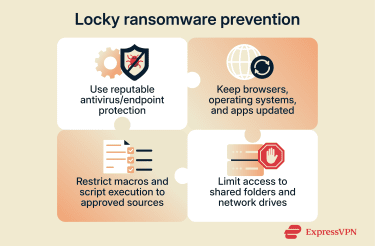
Importance of regular software updates
Keeping software up to date is a simple yet effective way to fix known vulnerabilities. Updates patch potential security gaps in browsers, operating systems, or applications, strengthening weak points that attackers could otherwise exploit.
Security updates are particularly important for reducing the risk of exploit kits and drive-by-style infections by patching vulnerabilities that attackers may target. Enabling automatic updates helps ensure patches are installed promptly, thereby reducing the window of exposure.
Employee awareness and phishing training
Like most ransomware attacks, Locky relied heavily on email spam, phishing, and other social engineering to get recipients to open attachments and enable macros or run scripts.
Training users to recognize suspicious messages, unexpected attachments, and unusual permission prompts reduces the chance of an initial infection. In businesses, simulated phishing and clear reporting processes add an additional layer of defense when technical controls miss something.
Backup best practices
Reliable backups are one of the most important safeguards for recovering from ransomware. While security tools can help detect and remove malware, restoring access to encrypted data often depends on having clean, usable backups.
- Maintain multiple backup copies: A common guideline is the 3-2-1 approach, which suggests keeping at least 3 copies of important files, stored on two different types of media, with one copy kept offsite. Many ransomware-focused extensions of this rule recommend keeping at least one copy offline/air-gapped or immutable so attackers can't delete or encrypt it.
- Limit backup access: Store backups using separate accounts/credentials and tightly controlled access (ideally with separate administration paths) so that a compromise of the primary environment doesn’t automatically expose backups.
- Maintain backups long enough to cover dwell time: In some cases, ransomware can remain undetected for weeks or months. Keeping multiple restore points over a longer retention window (for example, several months to a year) increases the chance you’ll have a clean version to restore. Avoid relying only on very recent backups.
- Update and test backups regularly: Backups should be kept current and tested periodically to verify they’re recoverable when you need them.
How to recover files after a Locky infection
Recovering after a Locky infection is a multi-phase process that combines risk reduction measures, careful recovery steps, and, in some cases, legal reporting and considerations.
Immediate steps to take after infection
Stopping further damage is essential before attempting recovery. Isolating the system helps prevent Locky from encrypting additional files, especially on shared folders, network drives, or synced storage that the device can access. The following are the most common steps to address a ransomware infection:
- Recording the incident: Important details to note include encrypted file extensions, ransom notes, affected files and systems, and other observed device activity (e.g., unknown processes running in the memory, unrecognized IP addresses, strange outbound network traffic). These records help document the scope of the infection and can be valuable for law enforcement and IT specialists.
- Isolating the infection: If encryption appears to still be running, disconnect the device from the internet, Wi-Fi, or other networks. If you can’t disconnect it from the network (or the situation is escalating), powering down may be considered.
- Inspecting security: Existing security logs from antivirus and firewall tools may uncover compromise from previous malware infections. For companies with broad networks, unusual account history can indicate hidden malicious activity (e.g., newly created admins, anomalous logins, or accounts with escalated privileges). In cloud environments, changes in permissions and security settings are also noteworthy.
- Removing the ransomware: For eradication, some organizations ultimately rebuild affected systems from known-good images. However, avoid wiping or re-imaging too early, preserve what you need for investigation and recovery planning first, because the infected system may be important if other recovery avenues fail. The second option is to reboot into Safe Mode and run a portable antivirus tool to detect and remove the malware. Note that this won’t unlock the files.
- Contacting law enforcement: Consider reporting the incident to the relevant national cyber agencies and the appropriate authorities, for example, the FBI or Internet Crime Complaint Centre (IC3) in the U.S. Reporting can support broader tracking and disruption efforts and may provide additional guidance during the response.
Should you pay the ransom?
Authorities strongly discourage paying the ransom, as there is no guarantee that paying will restore access to your files. Microsoft warns that payment does not guarantee recovery, and U.S. authorities note cases in which victims paid but were never given working decryption keys.
In practice, paying can also increase future risk. The U.S. Department of Justice notes that some victims have faced additional demands after paying or were targeted again later.
Decrypting Locky files: Available tools
Recovering files after a Locky infection can be difficult. In many cases, the practical options are limited to restoring from protected backups, checking whether local snapshots survived, and verifying whether any trusted decryptor exists for the specific strain.
External backups
Offline or otherwise protected backups remain the most reliable recovery method. Guidance from the Cybersecurity and Infrastructure Security Agency (CISA) emphasizes maintaining offline/protected backups and regularly testing restoration.
Restoration can be straightforward when backups are well-managed and tested, but only after the infected system has been contained and cleaned to prevent re-encryption.
Shadow copies and snapshots
Some environments maintain point-in-time copies that can be used for restoration if they still exist after the incident, for example, VSS on Windows devices. However, Locky is known to delete VSS copies (for example, via vssadmin), so this option is often unavailable, though some systems may still have usable restore points depending on how the infection and environment behaved.
Similarly, macOS users may be able to restore clean versions using Time Machine if backups or snapshots exist from before the infection. On Linux, recovery may be possible if filesystem or backup snapshots (e.g., Timeshift/Btrfs/LVM snapshots) were configured before the attack.
Decryption tools
Decryptors can work for some ransomware families, but typically only when keys are recovered or the malware contains an implementation flaw.
A practical place to check is the No More Ransom project, which maintains a repository of decryptors and supporting guidance. If no tool exists for the specific ransomware/variant, recovery generally falls back on backups and any local snapshots that survived.
FAQ: Common questions about Locky ransomware
How does Locky ransomware spread?
Locky ransomware primarily spreads through phishing-style spam emails that deliver malicious attachments, often Microsoft Word documents that prompt “enable macros” or compressed/script-based attachments. These messages often pose as invoices or urgent business documents.
When a user enables macros or runs the attached script, the downloader typically fetches and executes the Locky payload. In some campaigns, Locky was also delivered via compromised or malicious websites, exploiting exploit-kit infection chains that targeted unpatched software.
How can I recognize a Locky ransomware infection?
Signs of Locky (and many other ransomware infections) include files becoming inaccessible, ransom instructions appearing in affected folders, and encrypted files being renamed with new extensions.
What should I do if I get infected with Locky ransomware?
Containing the incident is the priority once Locky is detected. Disconnect the affected device from networks and detach external devices to reduce the chance of additional encryption, especially across shared folders or synced storage that the device can access. Paying the ransom is widely discouraged as it doesn’t guarantee data recovery and can encourage further demands or future targeting.
Can Locky ransomware be decrypted?
Usually not. Locky typically encrypts files using attacker-controlled, server-side keys, so decryption generally isn’t possible without a trusted decryptor or recovered keys. It’s still worth checking reputable resources like No More Ransom to see whether a decryptor exists for the specific ransomware strain involved.
How do I prevent Locky ransomware in the future?
Preventing Locky ransomware means following established cybersecurity best practices, such as keeping all operating systems and applications patched and up to date to reduce exploitable vulnerabilities. Using and maintaining antivirus software, firewalls, and email filtering can help detect and filter common ransomware delivery attempts.
Regular, isolated backups stored offline or otherwise protected, and routinely tested for restore, help you recover data if an attack succeeds. Awareness of social engineering and phishing tactics further reduces the likelihood of an initial compromise.
Take the first step to protect yourself online. Try ExpressVPN risk-free.
Get ExpressVPN
















 Support Center
  FAQ
FAQ  VPN Setup Tutorials


