Is Voice.ai safe? What you should know before using it


Trying any voice-changing app means you’re installing software that interacts closely with your audio devices, and you may be uploading or generating content that could be sensitive. That makes it worth doing a quick safety check before you commit.
This article focuses on what matters for a practical decision when considering Voice.ai: the realistic risks linked to AI voice technology, what Voice.ai’s own Privacy Policy and Terms say about data collection and user-submitted inputs, and a few simple steps you can take to enhance your overall online privacy.
Please note: This information is for general educational purposes and not legal advice.
What is Voice.ai, and how does it work?
Voice.ai is an AI voice technology platform focused on creating and using synthetic speech. It offers consumer-facing voice experiences, such as a real-time desktop voice changer, and business-oriented AI voice agents that can handle inbound and outbound phone calls.
Beyond this, Voice.ai provides tools for real-time and browser-based voice changing, voice cloning, text-to-speech, and a large community library of user-generated voices. It also offers audio utilities, a soundboard app, and AI voice agents designed for automated phone calls.
Voice.ai works across Windows, macOS, iOS, and Android, though some features, like the real-time voice changer, are limited to desktop platforms. Most tools are free or free to start, while advanced AI voice agent capabilities are available through custom enterprise plans.
Is it safe to use Voice.ai?
“Is Voice.ai safe?” isn’t a yes-or-no question, because “safe” can mean different things to different people. For some users, it’s about whether the service protects their account and communications from misuse. For others, it’s about how voice recordings and generated audio are collected, stored, and used. And for many, it’s simply whether installing and running Voice.ai could negatively affect their device, performance, or system security.
In this section, we’ll look at Voice.ai from all three angles. We’ll explain what security protections are in place, how the service handles user data and voice inputs, and whether using it can pose risks to your device or operating system (OS).
What security protections does Voice.ai have?
Voice.ai’s Privacy Policy outlines several general measures for protecting user data and complying with privacy laws.
- Data security measures: It states that personal information is safeguarded using commercially acceptable means to prevent loss, theft, and unauthorized access, disclosure, copying, use, or modification. It also acknowledges that no online system is completely secure.
- Privacy-law compliance: Voice.ai states that it follows applicable data protection laws. The policy includes sections referencing both the General Data Protection Regulation (GDPR) and the California Consumer Privacy Act (CCPA), describing related rights for users in those regions.
- Data retention and deletion: Personal data is retained only as long as necessary for providing services or meeting legal obligations. Users can request access, correction, or deletion of their data, and personal information is deleted within 90 days of account termination, though public or cached data may persist elsewhere.
On its enterprise pages, Voice.ai lists additional protections for business customers, including end-to-end encryption (E2EE) and a “zero-retention” mode (positioned as not storing data on its servers), along with compliance and controls such as Service Organization Control 2 (SOC 2), GDPR, Health Insurance Portability and Accountability Act (HIPAA), International Organization for Standardization (ISO), EU data residency, private cloud options, and strict access controls.
How does Voice.ai handle your data?
Voice.ai describes two broad categories of information it collects in its Privacy Policy: data you provide and data collected automatically when you use its products and services.
For automatic collection, Voice.ai may record standard website “log data,” including your IP address, browser details, pages visited, timestamps, and time spent on pages. It may collect basic device details (such as device type and OS) and error information, including technical details about your device and what was happening when a crash or error occurred.
For the information you provide, the policy covers contact details collected when you subscribe to a newsletter or get in touch, such as your name, email, phone number, and mailing address. It also references “transaction data,” described as information generated through use of the service, such as transaction records, stored files, user profiles, analytics data, and other usage metrics.
The Privacy Policy notes that personal information may be shared with affiliates and third-party service providers involved in operating the service (for example, hosting, analytics, error logging, marketing, and payment processing). Examples listed include Google Analytics, Hotjar, SendinBlue, PayPal, Stripe, Discord, and GitHub.
Cookies are used to track activity on the site, and the policy indicates it does not respond to browser “Do Not Track” signals.
Voice.ai’s Terms of Service cover any content users upload or submit. It’s worth noting that, by submitting input (voice recordings, text prompts, and other content), users grant Voice.ai a perpetual, irrevocable, worldwide license to use it to run and improve the service, including training and refining its AI models and developing new features, services, or products, but excluding commercialization without explicit consent. The terms also note that any voice users upload may be publicly available.
Learn more: Read our article on protecting your creative work from AI training.
Will Voice.ai slow down your computer?
It can, especially if you use Live Mode, which processes your voice in real time. Voice.ai’s own documentation suggests Live Mode performance depends heavily on your hardware and may draw on the same system resources other apps need.
It lists Windows 8 or later and at least 4GB of RAM as minimum requirements, but it notes these specs are only enough for the app to run, not to ensure low latency.
For smoother Live Mode performance, Voice.ai points to several mid-range or higher GPUs that it says worked well for their users, including Nvidia GTX 980, GTX 1070 Ti, RTX 2060, RTX 3050, and AMD RX 580, RX 5700XT, or R9 Fury series.
Is Voice.ai legal to use?
The software itself is legal to use, but, as with many other services, the legality depends heavily on what you use it for. The company’s own Terms of Service state the product is intended for “lawful and ethical” use and explicitly prohibit impersonating real people (living or deceased) if the goal is to deceive, defraud, or mislead. Acceptable use is described as using your own voice, having explicit legal authorization for other people’s voices, or uses permitted by law, such as parody and satire.
Separately, Voice.ai’s Brand Use Guidelines state the tool is intended for personal and non-commercial use unless you obtain explicit written permission. Anyone who wants to monetize the content created using Voice.ai or use it for business should contact the company to discuss licensing.
Common misconceptions and myths about Voice.ai
There are several misconceptions surrounding Voice.ai:
Is Voice.ai a virus or malware?
Voice.ai is not malware. The company states that it reports that it regularly submits builds for scanning to confirm it contains no malicious code. It also points users to a VirusTotal overview as supporting evidence.
Bitcoin miner accusations
The idea that Voice.ai secretly mines cryptocurrency appears to stem from how the app uses system resources. Voice-changing and voice-generation tools rely on intensive local processing, which can cause noticeable CPU or GPU usage and, in some cases, trigger antivirus or anti-malware alerts. This has led some users to assume the software is performing hidden background tasks, such as cryptocurrency mining.
In practice, the platform describes this behavior as part of its optional distributed computing features, which are used to help generate voices, train AI models, and process audio tasks, particularly for users with less powerful devices.
Does Voice.ai sell or share my data?
Based on its Privacy Policy, Voice.ai does not sell personal data in the sense of transferring ownership of user information for unrestricted third-party use. Instead, it collects personal information for defined operational purposes, such as providing core features, processing transactions, improving the service, and communicating with users.
The policy states that Voice.ai may share personal information with third parties that help run the service, including analytics providers, payment processors, hosting services, and technical support tools. These disclosures are framed as necessary for operating, maintaining, and improving the platform rather than for selling user data as a standalone product.
Like many online services, Voice.ai also uses data for advertising and marketing purposes and may share relevant information with marketing partners or service providers. However, the policy presents this as controlled data sharing tied to business operations, not open resale of personal information.
Is Voice.ai always listening?
Voice.ai is not designed to continuously listen to or record users in the background by default. Voice-changing and voice-generation apps only process audio when they are actively running and given permission to access a microphone.
Like other audio-based applications, Voice.ai relies on OS-level microphone permissions. This means the app can only access your microphone if you have explicitly allowed it to do so, and your device settings control when that access is available. If the app is closed or microphone permissions are disabled, it cannot capture audio.
Learn more: Does Facebook listen to you? Read our detailed article about data, microphones, and tracking.
How to use Voice.ai safely
A few practical habits can help limit privacy, security, and performance issues when using AI voice tools.
Best practices for safe usage
- Use only the official Voice.ai download links; treat third-party installers as high risk.
- Manage microphone access through your OS; allow mic access only when using live voice transformation.
- Avoid uploading or training voices that include personal, financial, or otherwise sensitive details. Assume uploaded audio could be reused or shared.
- Keep your OS, audio drivers, and streaming apps updated, since compatibility issues often come from outdated components.
- Monitor CPU and GPU usage while Voice.ai is open. On Windows, press Ctrl + Shift + Esc to open Task Manager; on Mac, open Activity Monitor (Applications > Utilities). If usage stays high while you are not actively using it, review in-app settings for optional background features.
- If minimizing data exposure risk is a priority, compare Voice.ai’s workflow with options that process audio locally rather than through cloud-based services.
Should you use a VPN with Voice.ai?
A virtual private network (VPN) can help with the network side of using Voice.ai. It encrypts your internet traffic between your device and the VPN service, which matters most on public Wi-Fi because unsecured or poorly secured networks make it easier for third parties to intercept or tamper with data in transit. A VPN can also hide your real IP address from Voice.ai by showing the VPN server’s IP instead.
However, a VPN doesn’t control microphone access, stop Voice.ai from collecting data inside the app, or change what Voice.ai can do with audio you upload under its Privacy Policy and Terms of Service. It’s also not a malware scanner and can’t confirm whether an installer is safe.
How to delete your Voice.ai account
If you have decided to delete your Voice.ai account, the process is straightforward. These steps apply to the voice.ai browser version.
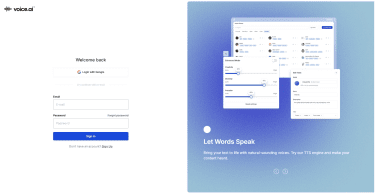
- Log into your Voice.ai account.
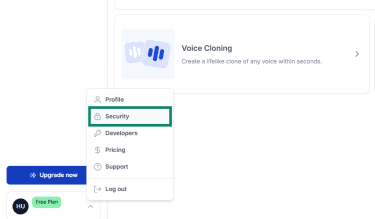
- Open your profile settings by selecting your profile icon in the bottom-left corner of the interface. A menu will appear. Choose Security to access account-level controls.
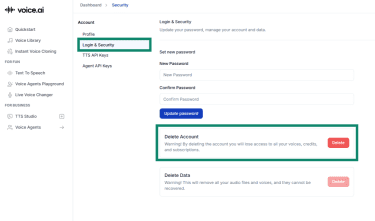
- Click Login & Security. Here, you will find a Delete Account option. Click on the Delete button.
- A confirmation prompt will appear saying, Are you absolutely sure? Review the warning, then click Yes, delete my account. After confirming, your Voice.ai account will be removed from the platform.
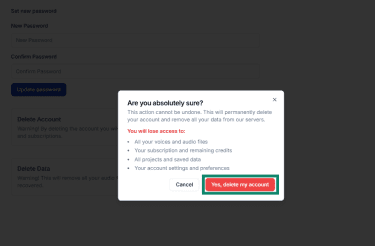
Note: Deleting your account does not automatically erase all personal data or voice samples Voice.ai may still hold, although, as mentioned above, the company will generally remove your personal data from its servers 90 days after account deletion. To request complete data deletion, contact Voice.ai directly and request removal in accordance with the rights provided by your region’s privacy laws. This includes any stored audio, metadata, or account information retained for operational or legal purposes.
Alternatives to Voice.ai
If you are looking for alternatives to Voice.ai, the main distinction from a privacy and security standpoint is whether the tool runs primarily on your device (local desktop software) or whether it is a cloud service (audio sent to a provider’s servers for processing).
For a local-first approach, Real-Time Voice Cloning (SV2TTS) is an open-source project you run on your own machine, built for real-time voice cloning experiments.
If you want a cloud alternative, ElevenLabs is explicitly cloud-first, and its documentation states that submitted voice data can be used to improve models, with an account setting to stop new submissions from being used for training.
Learn more: Check out 35+ free AI tools to boost your productivity.
FAQ: Common questions about Voice.ai
Is Voice.ai free or paid?
Voice.ai offers both free and paid options. A paid tier is available through Voice.ai Pro subscription. Some solutions and features, like AI voice agents, are also offered under paid custom enterprise plans.
Can Voice.ai be used for streaming safely?
Voice.ai’s voice changer is a legitimate tool that can be used in real time for gaming and streaming on platforms like Twitch and YouTube. However, it’s still smart to treat it like any other streaming audio tool: keep microphone permissions under control, double-check that the correct input device is selected before going live, and close Voice.ai fully when you are done (not just the window).
Is Voice.ai safe for beginners to use?
It’s easy to use, but it's recommended to follow basic precautions: download only from the official source, limit microphone permissions, avoid uploading recordings that include personal or financial information, opt out of distributed training, and monitor system load.
Take the first step to protect yourself online. Try ExpressVPN risk-free.
Get ExpressVPN
















 Support Center
  FAQ
FAQ  VPN Setup Tutorials


