Is Tubi safe? A complete guide for secure streaming



If you’re trying to cut down on subscription costs, a free streaming option can be appealing. At the same time, it’s reasonable to ask how a free service is funded and what that could mean for your online privacy and security.
This guide explains what to consider when using Tubi, what data it may collect, and the practical steps you can take to stream more securely.
What is Tubi?
Tubi is a streaming service where you can watch movies, shows, and live TV channels for free. It offers a large content library that includes about 300,000 movies and TV episodes, along with a growing lineup of Tubi Originals. Tubi is available to viewers in the U.S., Canada, Mexico, Puerto Rico, Costa Rica, Ecuador, El Salvador, Guatemala, Panama, the U.K., and Australia.
Learn more: See a list of the best streaming services.
How does Tubi work?
Tubi uses an ad-supported video-on-demand (AVOD) model. Instead of charging a subscription fee, it funds the service by showing ads during playback. When you choose something to watch, Tubi streams it over the internet like other platforms, but you’ll see periodic ad breaks. Those ads help cover licensing costs and keep the service free to use.
The ad-supported streaming model
Tubi’s ad-supported system goes beyond standard commercial breaks by following a defined ad schedule across its programming. According to official Tubi advertising information, ads account for about 4–6 minutes per hour of viewing, appearing roughly every 12–15 minutes in clusters of 3 to 5 ads. This structure is designed to balance viewer experience with advertiser visibility.
To support this model, Tubi uses collected information to deliver ads, measure their performance, and limit how often the same ad is shown.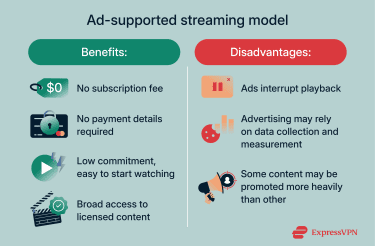
Is Tubi legal and trustworthy?
Tubi is a legal business owned by U.S.-based media and entertainment company Fox Corporation, which acquired the streaming service in 2020. The platform has over 100 million monthly active users.
Tubi expands its catalog through licensing agreements and distribution partnerships with content owners. According to the company’s press releases, these include deals with global media and entertainment company Warner Bros. Discovery that add licensed films, TV shows, and branded free ad-supported streaming TV (FAST) channels, VICE Media Group for documentary programming; and U.S.-based sports entertainment company World Wrestling Entertainment (WWE) for the distribution of WWE EVOLVE (a professional wrestling streaming television program).
Is Tubi TV safe to use?
Concerns about the safety of streaming services like Tubi TV typically relate to privacy and data practices. As a free, ad-supported streaming platform, Tubi collects certain information to operate the service, personalize content, and support advertising.
This section outlines what Tubi’s privacy policy says about data collection, information sharing, and user controls, so you can understand the practical privacy implications of using the platform.
How Tubi handles user data
Tubi’s Privacy Policy states that information collected through the service may be used for operational purposes (running and maintaining the service), personalization, and advertising-related purposes, including delivering more relevant ads and measuring advertising performance.
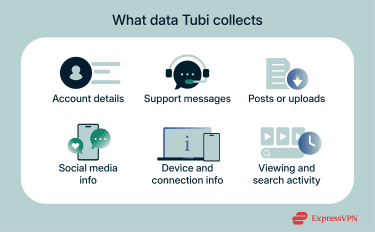
Specifically, Tubi may collect:
- Registration and profile details: Details provided when creating an account, subscribing to communications, or entering promotions, such as name, email address, gender, ZIP code, and birthday.
- Customer support and feedback information: Information submitted through support requests, surveys, polls, or other communications.
- User content and posts: Content uploaded or posted through the service, including public posts that may appear outside the platform (for example, in search results).
- Social media information: Information received when a social media account is used to access the service or connected to it, such as a user ID or username, and other information provided through the social platform.
- Activity and device information: Details such as IP address, browser type, other software or hardware information, and device identifiers, and may also include non-precise geolocation in certain circumstances.
- Cookie and similar technology data: Information collected through cookies and similar tracking technologies (such as pixels, beacons, and local storage), including pages visited, search history, and viewed content.
 The policy also states that Tubi may supplement information it collects with data from other sources, such as publicly available information, advertising technology providers, business partners, or affiliated companies, where permitted by law.
Information sharing with third parties
Tubi may share certain information with third parties in two main situations:
- Co-branded services and promotions: If you choose to take part in a contest, sweepstakes, or similar feature run together with another company, the information you provide may be shared with that partner. How the partner uses that information is covered by the partner’s own privacy policy.
- Advertising and measurement: Because Tubi is an ad-supported service, it and its service providers may use and share certain information to show ads and measure how well they perform. This can include sharing details such as a device advertising ID, IP address, or a hashed identifier with advertising and measurement partners. In some cases, those partners may assign an online ID that Tubi stores (for example, in a cookie) and uses to support interest-based advertising across devices or services.
Besides, Tubi states that it doesn’t currently respond to “Do Not Track” (DNT) browser signals, noting it is awaiting the development of standards for how the signal should be interpreted. In practical terms, this means that enabling DNT in a browser isn’t treated as a setting that changes how Tubi collects or uses information. The service’s data collection and advertising-related processing can still occur as described in its privacy materials, even when the DNT signal is enabled.
Tubi’s privacy measures
Tubi states that it uses commercially reasonable administrative, technical, personnel, and physical measures designed to safeguard information in its possession, while also noting that no one can guarantee complete safety.
Tubi also provides request-based controls for personal information that has been provided directly, along with options to limit certain uses of personal information:
- Data access, correction, and deletion requests: Tubi provides a data request portal for submitting requests to access personal information, correct or update it, or delete personal data you have provided directly.
- Opt-outs and limits on use: Tubi provides a separate opt-out form to request limits on certain uses of personal information, including opting out of targeted advertising.
- Parental access and control: Tubi states that a parent or guardian can request to review a child’s personal information, ask Tubi to stop collecting it, limit further use or disclosure to third parties, or delete information already collected. Requests should include the parent’s name plus the child’s name, email address, and Tubi device ID, along with the specific action requested.
How to use Tubi safely and privately
Using a free, ad-supported streaming service like Tubi doesn’t require advanced technical knowledge, but a few practical choices can affect how much information is tied to your viewing activity and how exposed it is to others on the network. The steps below focus on simple, everyday ways to reduce unnecessary data exposure, improve privacy while streaming, and create a safer viewing environment for children.
These tips don’t change how Tubi works or bypass its policies. Instead, they highlight common privacy and security practices that apply to many streaming services and can help users make more informed choices about how they watch content.
Browse without creating an account
Watching without signing in generally means there is less account-level information attached to your viewing activity.
- No account identifiers in the mix: Viewing activity is less likely to be connected to profile details such as a name or email address.
- Less continuity across devices: Activity is more likely to be treated as separate by device or browser, rather than unified under a single profile.
- Lower exposure of account data: If there is no account, there is no stored profile information (such as login details) associated with that viewing.
Use a VPN for enhanced privacy
A virtual private network (VPN) encrypts internet traffic between your device and the VPN provider’s server. On shared or untrusted networks, this can reduce the risk of third parties intercepting or monitoring what you do online. The privacy and security benefits of using a VPN include:
- Limiting local network visibility: It can make it harder for someone on the same Wi-Fi network to see what services you are accessing.
- Reducing internet service provider (ISP)-level tracking: It can limit how much browsing and streaming activity an ISP can observe, because the connection is encrypted to the VPN server.
- Protecting against certain network attacks: Encrypted tunnels can reduce exposure to common risks on public Wi-Fi, such as man-in-the-middle (MITM) attacks.
Kids’ safety: Tips for parents
Tubi Kids is a designated viewing experience within Tubi that displays only age-appropriate content for children. In contrast to the regular Tubi catalog, which includes a full range of movie and TV ratings, the Tubi Kids interface emphasizes titles suitable for younger audiences and provides a simplified browsing experience tailored for children.
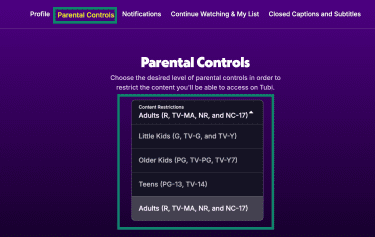
Parental controls allow an account holder to restrict available content by rating. The controls use standard U.S. content rating categories (for example, G/TV-Y for little kids, PG/TV-PG for older kids, and PG-13/TV-14 for teens), and the account holder can select the maximum rating allowed. Only titles at or below the chosen rating level are accessible when these controls are active.
To set parental controls on Tubi:
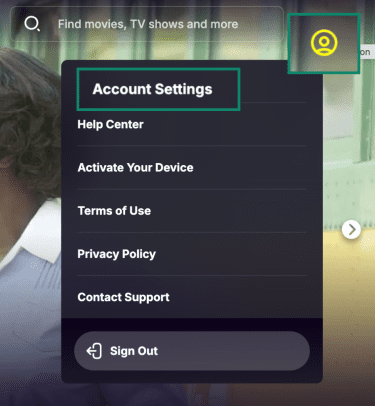
- Log into your Tubi account, select the profile icon, and open Account Settings.
- Navigate to Parental Controls and choose the desired rating level.
- Enter your account password to confirm the change.
Once configured, parental controls apply to all profiles under that account and restrict access to content above the selected rating level. These controls provide a structured way to limit what content is shown to children while using Tubi.
FAQ: Common questions about Tubi safety
Is Tubi really free and safe?
Yes, Tubi is free to use because it operates as an ad-supported streaming service. You don’t need a subscription or payment details to watch movies and TV shows on the official platform.
When accessed through Tubi’s official website or apps from trusted app stores, the service is generally considered safe to use. However, as with many well-known online services, scammers may create look-alike websites or misleading links that impersonate the brand. These third-party sites are not operated by Tubi and may attempt to collect login details, request payment, or prompt downloads.
To reduce risk, users should access Tubi only through verified domains or official app stores and avoid links or pop-ups that ask for payment information, credentials, or software downloads.
What company is Tubi owned by?
Tubi operates under Tubi Media Group, a Fox Corporation division responsible for the company’s digital businesses.
What are the downsides of using Tubi?
As a free, ad-supported streaming service, Tubi includes advertisements that appear during content playback, which may interrupt viewing compared to subscription-based platforms that offer ad-free options.
In addition, Tubi collects certain information about device usage and viewing activity, as outlined in its privacy policy, to operate the service and support advertising and measurement. Users who prefer minimal data collection or uninterrupted viewing may want to take these factors into account.
What is the safest site to watch free movies?
The safest sites to watch free movies are official, licensed free streaming services. These platforms have formal content agreements and publish clear legal and privacy policies, which make it easier to understand who operates the service and how it funds itself. Using a licensed, legal streaming service also helps users avoid common risks linked to piracy sites, such as deceptive downloads, malicious redirects, and fake prompts.
Does Tubi work outside the U.S.?
Yes, Tubi is officially available in some other countries as well, including Canada, Mexico, Australia, and several countries in Latin America.
Can kids use Tubi safely?
Yes, kids can use Tubi safely by sticking to the Tubi Kids section. It filters content to be age-appropriate and limits exposure to mature shows and movies. Parents can further protect children by creating separate profiles, using device parental controls, and supervising viewing habits.
Does Tubi have a lot of ads?
According to Tubi, users can expect about 4–6 minutes of ads per hour.
What precautions should I take when using Tubi?
Use the official Tubi app or website, and avoid third-party “Tubi” links, add-ons, or downloads that claim you need an extra player or an update. If something asks for payment details, remote access, or credentials outside the normal sign-in flow, treat it as suspicious and exit. For privacy, assume ads come with tracking, so limit what you share in profiles and permissions, and use the service’s opt-out and privacy choices options to reduce targeted advertising where available.
Take the first step to protect yourself online. Try ExpressVPN risk-free.
Get ExpressVPN