Is Quora safe? A simple guide for everyday users


If you have questions and want answers from real people rather than AI or search engine results, Quora can be an excellent resource. The social media network hosts all kinds of questions and answers from its global user base, giving a unique perspective that you won’t find elsewhere.
However, there are some real security concerns. Like most large social platforms, Quora gathers identifiable information and uses it to personalize your experience. It also relies on user reporting and automated content moderation to flag posts, but it can’t catch every harmful link or misleading post.
In this guide, we take a look at Quora from a security and privacy angle. We’ll explain how Quora works, look at some common threats, and share advice on how to stay safe when you use the platform.
What is Quora, and how does it work?
Quora is a social media network with a specific focus. Instead of posting updates or sharing personal stories, people use it to ask questions and receive answers from a global community. It has a large archive of user-generated explanations, opinions, and personal experiences.
Quora pages frequently rank well on major search engines like Google, which makes the platform valuable for visibility. Many marketers and website owners use Quora to reach wider audiences.
Understanding Quora as a Q&A platform
Quora is built on a simple premise: if you have a question, someone else has an answer. When you create your profile, you choose topics you’re interested in or knowledgeable about, and Quora uses that information to match you with relevant discussions. The system may also show you questions where your input could help others.
Each question can receive multiple responses, and the conversation evolves as new users add perspectives. This sets Quora apart from traditional reference sites, which update far less frequently. Once you’re logged in, you see a personalized feed based on your activity and the topics you follow, giving the platform a social-media feel while keeping the focus on questions and answers.
All content comes from individual contributors, so accuracy can vary, with each response reflecting the writer’s own understanding. If you don’t have an account, the only way to view content is by clicking on specific Quora links from search engines. This lets you see that particular question and a few related questions on the same page and some answers or snippets of answers, but you can’t browse for other questions, post questions or answers, or vote on content.
Quora removed the option for anonymous posting in 2021, but it doesn’t require users to use their real names, so in effect this allows anonymous participation for users who prefer not to attach their names to their posts.
How user interactions and upvotes shape content
Quora uses engagement signals to decide which answers appear first. Upvotes are one of the key signals Quora uses to determine which answers to show. Comments also play a role, because they signal that the answer sparked discussion or added value to the thread. These signals help Quora highlight answers that appear useful, but they don’t guarantee accuracy.
What’s more, voting can skew results in topics where personal preference plays a strong role. In areas like sports, politics, or other highly debated subjects, users often upvote answers they agree with rather than those that present the most reliable information.
What makes Quora different from other forums?
Many Gen Z and Millennials avoid Google and prefer using social media as a search tool. With its large user base of over 400 million monthly unique visitors, Quora is uniquely positioned to provide better answers than many other online forums. Questions can receive a wide range of perspectives and remain active long after they're posted.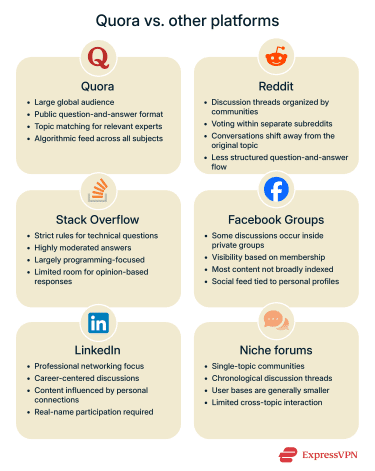
Quora also structures its platform around matching questions with people who may have relevant experience. When you follow topics or consistently contribute in certain areas, Quora may recommend questions aligned with your background. This helps organize the conversation around answers rather than long, open-ended threads.
Here’s how Quora compares with other popular platforms:
- Reddit: A discussion-first platform organized into subreddits. Conversations often branch off into debates, commentary, or unrelated tangents. Visibility comes from voting within each community rather than a unified ranking system across the entire platform.
- Stack Overflow: A focused Q&A site for programming and technical topics. Strict moderation keeps answers short, factual, and on-topic. Quora’s broader subject matter and more flexible answer style contrast sharply with Stack Overflow’s narrow ruleset.
- Facebook Groups: Community discussions take place inside groups that may be public or private, but many operate with restricted visibility. Content isn’t indexed in the same way, and discoverability depends on group settings rather than search engines.
- LinkedIn: Although users ask questions and share professional advice, discussions revolve around personal updates, networking, and industry news. Content often appears in connection-based feeds and remains tied to real identities, while Quora combines named participation with optional anonymity.
- Niche forums: Topic-specific communities such as travel, finance, parenting, or gaming forums rely on chronological threads and generally have smaller audiences. Quora differs by bringing all subjects onto a single platform and using an algorithmic feed to shape what users see.
Is Quora owned by Google or another major company?
Quora is a privately held company and is not owned by any of the major tech companies, like Google, Meta, or Microsoft.
- Quora was founded in 2009 by two former Facebook employees, Adam D’Angelo and Charlie Cheever. D’Angelo is currently the Quora CEO.
- It’s operated by Quora, Inc., an independent, privately held company headquartered in Mountain View, California.
- Quora’s investors have included firms such as Benchmark Capital, Tiger Global Management, and Matrix Partners.
- There’s no public record indicating ownership or controlling interest by Google or any other large platform.
Is Quora really safe to use?
Quora is generally considered safe to use, but like any large social platform, your experience depends on how much information you share, how carefully you manage your settings, and whether you take steps to protect your account.
Is Quora secure for personal information?
Quora collects your name and email address when you create an account (though you don’t need to use your real name). It also collects technical information automatically from anyone who views or uses the platform; according to its Privacy Policy, this includes details like your device, browser, IP address, and general interaction data. The policy states that the company uses technical, administrative, and physical controls to protect the information it stores.
The platform was the victim of a data breach in 2018, which affected over 100 million accounts. The compromised data contained personal information like names, email addresses, and encrypted (hashed) passwords. The bad actors also got access to data imported from linked networks, questions, answers downvotes, and upvotes. In response to the breach, Quora upgraded its security posture, and no other breaches have been reported since then.
Does Quora sell or share user data?
Quora says it doesn't sell personal information to third parties. It does share information with various partners as part of running the platform, for example, service providers like hosting and payment, as well as Quora’s own affiliates. Some data is also disclosed when required by law or as part of business transfers. When the platform shares information with advertisers or research partners, it states that the data is provided in an aggregated or anonymized form, meaning it’s grouped with data from other users rather than tied to you individually. If you delete your Quora account, the Quora servers save that data for a limited time before deleting it.
How safe is your account from cybercriminals?
There haven’t been any reported Quora hacks or data breaches since 2018. However, that doesn't mean that cybercriminals aren’t still trying, so it’s important to secure your account properly. As on any website, weak credentials, password reuse across multiple sites, and staying signed in on shared devices can put your account at risk.
Quora offers two-factor authentication (2FA), but it’s limited to email-based verification. This is better than relying solely on a password, but it’s not as strong as phishing-resistant authentication methods like hardware keys.
Common risks and threats on Quora
User participation is Quora’s key strength, but it’s also its biggest weakness. Anyone can create a post that includes harmful links, misleading claims, and other inappropriate content. There are automated and human moderators, but they don’t catch everything, especially in real time. Understanding the most common threats can help you navigate the platform more safely.
Spam
Spam messages on Quora can clutter conversations and make it harder for users to find reliable information. Some common spam posts are:
- Repetitive promotional content: Automated accounts publish the same comment under multiple questions to increase reach without answering the question or contributing to the conversation.
- Embedding links in unrelated answers: Spammers insert links into answers that have little to do with the original question to drive traffic to a website.
- Fake expertise: Some accounts present themselves as specialists to gain credibility before promoting their product or service.
Scams and phishing
Scammers sometimes use Quora to appear helpful while secretly trying to collect personal or financial information. These phishing attempts can show up in questions, answers, comments, or private messages, and often follow similar patterns:
- Posing as professionals or experts: Attackers adopt authoritative personas to build trust before steering users toward actions that compromise their data.
- Using emotional or urgent language: Posts may push readers to “act now,” making them more likely to overlook red flags.
- Sharing deceptive links: Scammers may direct users to off-platform pages (sometimes disguised as legitimate resources) that ask for logins, payments, or other sensitive information.
- Offering “proof,” documents, or extra context: Messages claim to provide helpful background but actually encourage users to click unsafe links.
- Impersonating well-known individuals or organizations: This boosts credibility and increases the likelihood that someone will engage with harmful content.
- Prompting users to reveal details directly: Some questions are phrased to encourage oversharing, giving attackers easy access to personal data.
Is Quora safe for kids and teenagers?
The official minimum age to create a Quora account is 13. However, when you create an account, it doesn’t ask for your birthdate or birth year.
There’s a filter in the account settings to allow adult content in your recommendations. It’s off by default, but in most countries it can be enabled simply by toggling it on. The U.K. is the exception: under the U.K. Online Safety Act, all Quora users based in the UK must complete an age-assurance process before they can enable adult content.
However, even with this option disabled, there’s plenty of content that parents may not want their teens to see. Quora’s definition of adult content is limited to “content that is pornographic, depicts a sexual act, or is otherwise overtly sexual.” If a question doesn’t specifically meet that criteria, it can still be served to your teen.
Like any other Quora user, teens are able to use the settings to mute or block conversations and other accounts. However, since there is no “teen account” and nothing that links your child’s account to yours, there’s no real possibility for parental oversight.
All that said, if your teen is on Quora, here are tips for keeping them safe:
- Review their profile details: Encourage them to limit identifiable information and keep public profile visibility to a minimum.
- Discuss how to evaluate online information: Teach them to be skeptical of claims without sources.
- Set expectations about messaging: Explain why they should avoid private conversations with strangers.
- Check in regularly: Treat Quora like any other social platform that requires oversight.
How to stay safe on Quora
Here are some tips to enhance your privacy and safety on Quora.
Adjusting Quora privacy settings step-by-step
Quora doesn’t have a lot of privacy settings, so it shouldn’t take more than a few minutes to ensure your account is as safe as it can be.
- Click on the account icon on the menu bar.
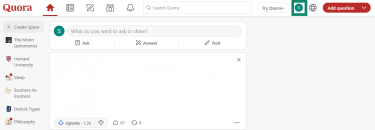
- Select Settings.
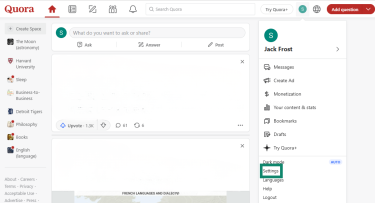
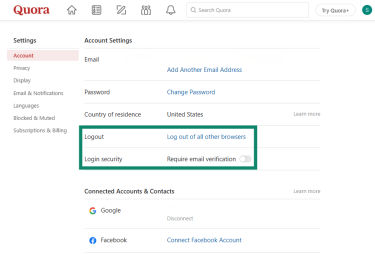
- Toggle on Require email verification next to Login security. This is Quora’s two-factor authentication; it sends a code to your email each time you want to log in. If you’re logging out and want to make suire you’re logged out across all browsers, you can select Log out of all other browsers. This is especially useful if you suspect your account has been compromised.
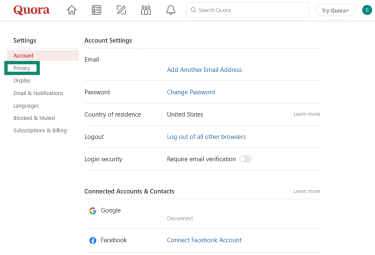
- Next, click the Privacy tab.
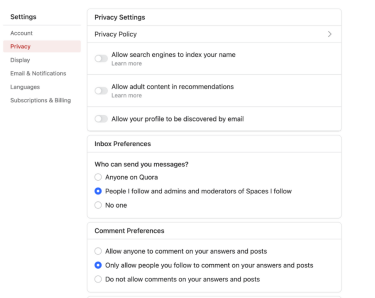
- To improve the privacy settings from the default options, do the following:
- Disable Allow search engines to index your name.
- Disable Allow your profile to be discovered by email.
- Choose your inbox preferences: the default is People I follow and admins and moderators of Spaces I follow, and this works well for most users.
- You can use Comment Preferences to stop receiving comments from people you don’t follow, but that will limit the potential knowledge base.
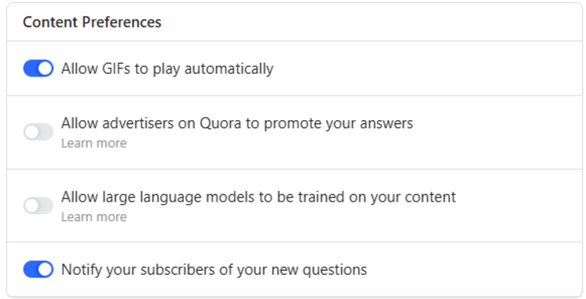
- Scroll down to the Content preferences and disable Allow large language models to be trained on your content. You can also disable Allow advertisers on Quora to promote your answers if you want to keep a low profile or are concerned with how advertisers will use your answer for their benefit.
How to block or report suspicious users
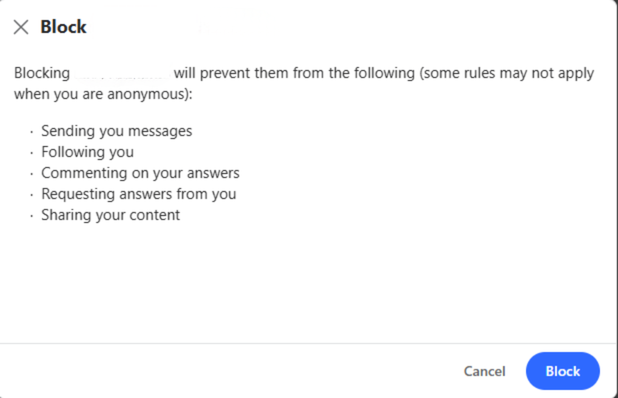
There are two ways to stop seeing a user's posts: you can block or mute them. Blocking is the stronger action. When you block someone, they can’t follow you, comment on your answers, or send you messages. This is designed to stop unwanted contact and reduce online harassment and toxicity. Reporting is also an option if you feel the account has posted inappropriate or malicious content.
Muting is a lighter option focused on reducing noise, not restricting access. When you mute someone you stop seeing their answers and posts in your feed and no longer receive notifications about their activity. However, they can still follow you, comment, and send messages.
Blocking
You can block someone by following these easy steps.
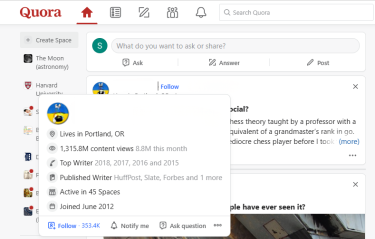
- Hover your mouse over the user name, and the profile box window will open.
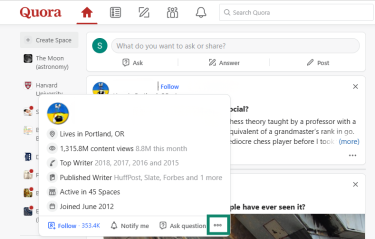
- Click on the three dots on the bottom left of the profile box.
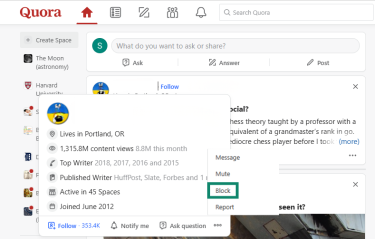
- A smaller menu window will open. Select Block.
- When prompted, confirm you want to block the user.
Muting
Follow these steps to mute an account.
- Follow steps 1-2 above.
- A smaller menu window will open. Select Mute.
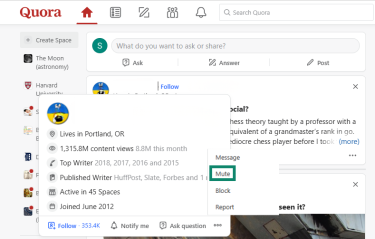
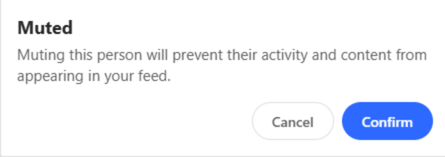
- Confirm you want to mute the user.
Reporting
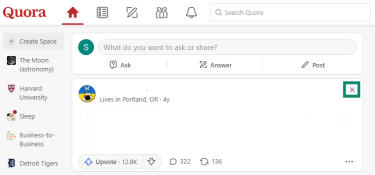
You can report a post that you don’t like. The report will be sent to a moderator for review, and Quora will try to show you less content like it in your feed. To report a post, follow these steps.
- Click the x in the top right corner of the offending post.
- Click Report.
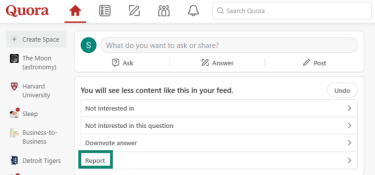
- A window will open with a list of reasons why you want to make a report. Select the one that’s appropriate for your report, add extra detail if you want to, then click Submit.
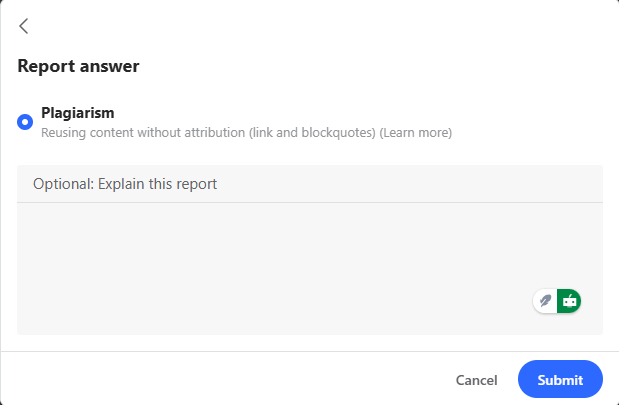
- The Quora moderators review all reports, and if a post isn’t removed within 48 hours, you can appeal the decision.
Using Quora without revealing your identity
You don’t need to use any personal identifiers on Quora. We created our account using a brand new email address, fake name, school, and job, and said our location is the moon. The system doesn’t verify any of the information, apart from the email address.
That said, if you want to remain anonymous on Quora you should be careful not to connect third-party apps or social media accounts. It’s an easy thing to forget, but if your Facebook account is affiliated with your Quora account, your real identity is just a few clicks away.
Quora does have access to your IP address, but if you use a virtual private network (VPN) while on Quora, it will hide your real IP address and keep that part of your identity a secret. However, it won’t prevent Quora from seeing the metadata and device information that it collects.
How Quora handles misinformation
For the most part, Quora empowers its users to deal with online misinformation. People can downvote an answer if they don't think it’s reliable. Readers can see the downvotes on a response, which can be a useful indicator, but it’s no guarantee of factual inaccuracy.
Can you trust answers on Quora?
Quora is an open platform that allows all members to answer questions however they want. You can look at their stated credentials, see what other answers they give, and decide if you find them trustworthy. However, note that there’s no third-party verification to determine whether an answer is correct.
How effective is Quora’s moderation system?
Quora uses a mix of automated tools, community reporting, and human moderators to handle rule violations. The automated system scans for content that breaks the platform’s policies, while users can report posts, comments, or profiles that appear inappropriate. There are also some human moderators who review and remove content within their communities.
However, this system has limitations. Automated tools are designed to detect policy violations rather than factual accuracy, and the volume of user-generated content can make it difficult for human moderators to keep up. As a result, some users report inconsistencies in enforcement or delays in action, especially in busy threads or controversial topics.
What are the community guidelines, and do they work?
Quora’s Platform Policies outline what users can and can’t post on the platform. They’re designed to keep conversations safe, authentic, and legal. The rules prohibit spam, harassment, hate speech, impersonation, sexually exploitative material, and any content involving violence, self-harm, or illegal activity. They also ban deceptive links, malicious behavior, adult content that violates policy, and any attempt to manipulate engagement or impersonate individuals or organizations.
These rules set clear expectations, but they only work when harmful content is identified. Enforcement depends on user reports and automated detection.
Because moderation happens after content is posted, some misinformation or harmful material may appear before it’s reviewed and removed. The guidelines help shape behavior, but their effectiveness relies on community reporting and the accuracy of Quora’s automated systems.
Should you use a VPN when browsing Quora?
Using a VPN when you’re on Quora can improve your privacy, but it’s important to understand the limitations. A VPN encrypts your internet connection and hides your real IP address, including from Quora itself, which normally logs IPs as part of account activity.
However, a VPN can’t hide information you choose to share on Quora. Any personal details you post or accounts linked to your profile remain visible to other users, and Quora still collects and logs other data, such as device information and activity, and may disclose it if required by law.
In short, a VPN like ExpressVPN is a helpful tool for securing your network activity, but careful posting and account management are equally important for protecting your personal information on Quora.
FAQ: Common questions about Quora
Can I use Quora without creating an account?
You can view some Quora content without an account, but your access is limited. If you follow a Quora link from a search engine, you can read related questions and some answers on that specific page. However, to browse questions, post questions and answers, upvote content, and fully interact with the platform, you need to create an account.
What are the main risks of using Quora?
The biggest risks come from Quora’s open, user-generated format. Scams and misleading promotions sometimes appear on the platform, and inaccurate information can also circulate because credentials aren’t verified, and anyone can respond to questions. Privacy is another concern if you share personal details on your profile or in posts.
Is Quora good for privacy-conscious users?
Quora collects a range of data, including IP addresses, device data, and activity logs, and may disclose this information when required by law. It also builds a personalized feed based on what you view and interact with. Privacy-conscious users can reduce visibility by limiting what they share on their profile, avoiding unnecessary account connections, adjusting privacy settings, and using a VPN.
Can you stay anonymous on Quora?
You can be partially anonymous on Quora. The platform lets you choose any display name, so you don’t have to use your real name. However, Quora still tracks your activity, including device information and IP addresses, and even posts made anonymously are linked to your account internally.
Take the first step to protect yourself online. Try ExpressVPN risk-free.
Get ExpressVPN














 Support Center
  FAQ
FAQ  VPN Setup Tutorials


