Is Dailymotion safe? Risks and safety tips explained


Dailymotion is a popular video-sharing platform used across many countries for news clips, entertainment, and creator-uploaded videos. Because anyone can upload content and the site relies on ad revenue, many viewers wonder: Is Dailymotion safe to use?
The platform is legitimate and run by an established company, Canal+. However, like many other open video-sharing sites, it can occasionally host misleading content, unsafe links in descriptions, or intrusive ads from external networks. Knowing how these issues arise and how to avoid them helps you stream videos more securely.
This guide explains how Dailymotion works, what risks you may encounter, and what steps you can take to watch videos safely on any device.
What is Dailymotion, and why does its safety matter?
Dailymotion is a video-sharing platform founded in 2005, currently owned by Canal+ Group. Similar to YouTube, Vimeo, and other platforms, it allows anyone to upload, share, and watch videos. It covers various categories, including news, music, sports, gaming, and entertainment.
Why safety is a concern with video-sharing sites
While Dailymotion is safe to use, it, like many other video-sharing platforms, depends on user-generated content and ad revenue. This can introduce risks beyond the platform’s direct control. In rare cases, bad actors exploit these systems by uploading misleading videos or including malicious links in descriptions and comments.
Even though Dailymotion moderates uploads and removes harmful material, automated systems and manual review can’t catch everything instantly. That’s why even legitimate websites can occasionally host unsafe ads or deceptive content.
Is Dailymotion legal and legitimate?
Dailymotion is a legitimate video-sharing platform and is legal in most countries. However, laws vary by jurisdiction, and the site has faced blocks or restrictions in India, Kazakhstan, and Russia. It’s best to consult current local laws before accessing the service. Using Dailymotion to share pirated, copyrighted content is always illegal.
Potential risks when using Dailymotion
Dailymotion can expose users to certain risks depending on how videos are accessed and where external links lead. These issues often stem from third-party content or advertising rather than the platform itself.
Malware and phishing threats
There haven’t been any confirmed cases of Dailymotion itself distributing malware. However, attackers may sometimes place unsafe links in video descriptions or comments that lead to phishing pages. These pages may imitate login pages, file downloads, or “update” prompts designed to collect personal data or install unwanted software.
Inappropriate and pirated content
Because Dailymotion allows user uploads, some videos may contain content that violates copyright or community guidelines. Uploaders are asked to fill out a form for each video they upload, including marking them as suitable for adults only. However, those rules aren’t always followed. Although the platform removes flagged material once detected, automated systems may not filter every inappropriate upload immediately.
Third-party ad risks
As an ad-supported service, Dailymotion uses external advertising networks. Most ads are legitimate, but third-party systems can occasionally deliver intrusive or misleading banners. In rare cases, unsafe ads (often referred to as malvertising) may appear if a compromised ad network slips through automated filtering.
Data breaches
Data breaches can be a risk for any platform that stores user account data, since exposed emails, usernames, or passwords can be used for phishing or password-reuse attacks on other services.
For example, Dailymotion was affected by a major breach in October 2016, which exposed more than 85 million user accounts. Reports indicated that the leaked data included email addresses, usernames, and hashed passwords. While this incident isn’t new, it highlights the broader risk that comes with maintaining an account on any large online platform.
Dailymotion security and privacy policies
To protect your privacy and use Dailymotion safely, it helps to understand what privacy policies and security procedures the platform has in place for its users and creators.
Privacy policy and data handling
According to its privacy policy, the platform may collect personal data you supply when creating an account (such as name, email, age, or gender), and for partners, some billing or payment-processing details (but not credit card numbers).
During use of the service, Dailymotion may collect device details (IP address and system information), browser information, and logs of your activity (such as the videos you watch and how you interact with them). It may also collect the payment information of members of the Dailymotion Partner Program.
It may use this data to personalize recommendations, operate the service, measure performance, and support its advertising model. The policy states that some data may be shared with service providers, analytics partners, and advertisers, but only in accordance with regional privacy laws.
Dailymotion’s privacy practices must follow the laws that apply in each market it operates in. For example, all EU and European Economic Area (EEA) users are protected by the General Data Protection Regulation (GDPR). In the U.S., data collection may also fall under state-level privacy laws such as the California Consumer Privacy Act (CCPA).
As a result, EU and EEA users can manage their cookie options for data-processing purposes related to their consent, and users from the State of California can opt out of having their information sold to third parties.
Account and platform security
Dailymotion uses secure HTTPS connections. This means that information you send to the site (like your login details or account actions) is encrypted while it’s in transit. This means outsiders on the same Wi-Fi network, your internet provider, or anyone trying to intercept traffic can’t easily see or tamper with what you’re doing on the site.
As for account security, Dailymotion accounts rely on a standard username-and-password login. Because the platform doesn’t support two-factor authentication (2FA) (using a one-time code each time you log in), the strength of your account protections largely depends on using a strong password.
Content creators with paid Dailymotion Pro accounts can get extra security features for their content. Depending on the plan you go with, you get features like password-protected content, geo-based restrictions, domain-based restrictions, and app-based restrictions. There’s also an option that gets you features that help reduce the risk of copyright infringement and piracy.
Content moderation and platform abuse
Dailymotion is an open video platform and, like many similar platforms, relies on a mix of policy-based enforcement, automatic detection, and community reporting to identify content that violates its policies.
This means that enforcement may happen after the content is already posted on the site and videos that violate policies may remain live until they are flagged by the system or reported by a user.
If Dailymotion finds that a video or content has violated its rules, it may apply moderation actions that affect the content’s visibility, accessibility, availability, or monetization. This can include removal, age restriction, or geo-blocking. It may also demonetize the content if it decides that it isn’t suitable for advertising purposes.
How to use Dailymotion safely
Adopting a few simple habits can further reduce exposure to misleading links, intrusive ads, or privacy risks. These practices focus on browsing hygiene, device security, and using built-in tools that help block unsafe behavior.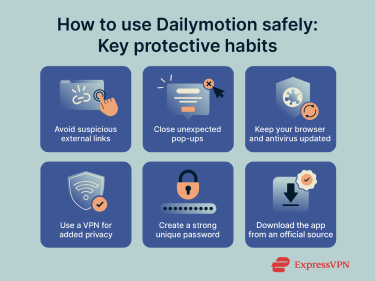
Safe browsing practices
Avoid suspicious links and pop-ups
Unsafe activity on Dailymotion typically originates from elements surrounding the video, rather than the video stream itself. Links placed by users in various locations (such as descriptions and comments) can lead to unrelated external pages, including spam pages, phishing attempts, or misleading offers.
To stay safe, treat any link that takes you away from Dailymotion with caution. Close unexpected pop-ups immediately and ignore external “download” prompts. Also, avoid interacting with links that claim to offer premium access, updates, or additional video features, as these are most likely spam.
Keep antivirus and browser updated
Updated software plays a key role in blocking unsafe behavior before it becomes a problem. Modern browsers often include built-in protections that automatically warn users about deceptive pages, unusual redirects, or known phishing pages. Regular browser updates not only add new protections but also patch security vulnerabilities that attackers might exploit, helping to maintain a safer browsing experience.
At the same time, antivirus programs work alongside your browser by monitoring files and network activity for threats that might slip through. With real-time scanning, antivirus software can detect suspicious behavior such as unauthorized downloads or malicious scripts. By regularly updating both your browser and antivirus software, you ensure you have the latest defenses against evolving online threats.
Use a VPN
When you visit Dailymotion, your IP address and general location are visible to the platform. The same applies to third-party advertisers that deliver ads or collect analytics. A virtual private network (VPN) replaces your IP address with one from its server, so external trackers or advertisers can’t associate your viewing activity with your real information.
A VPN also helps protect your privacy while watching videos by encrypting (scrambling) your internet traffic. This limits how much information advertisers and external trackers can collect during playback. Although a VPN doesn’t block unsafe links directly, it strengthens overall privacy and reduces exposure to unnecessary tracking.
ExpressVPN’s Advanced Protection helps further reduce exposure to unsafe sites and hidden trackers. It blocks known malicious domains, prevents access to phishing pages, and improves your browsing experience by blocking some types of ads.
Use a strong, unique password
Good password hygiene is also important when it comes to preventing unauthorized access. Since Dailymotion relies solely on password-based logins, using a strong, unique password is one of the most effective ways to prevent unauthorized access.
A strong password uses a long combination of letters, numbers, and symbols and is not shared with any other online account. A password manager can generate and store passwords for you, helping keep login details protected across all your devices.
Download the app from an official app store
The official Dailymotion app is available on the Google Play Store and iOS App Store. If you use Android, you should avoid unofficial app installation files (APKs) from the web, as those may include altered permissions or hidden code.
How to report unsafe content
Dailymotion offers reporting options for videos, comments, and channels that appear to be misleading, unsafe, or inappropriate. Reporting helps the platform remove harmful content more quickly, as user reports are reviewed by Dailymotion’s moderation team instead of automated moderation systems.
Here’s how to report unsafe content:
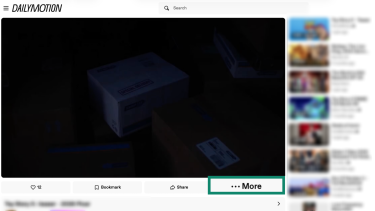
- While the video you wish to report is playing, click the More button (bottom-right corner of the video playback screen).
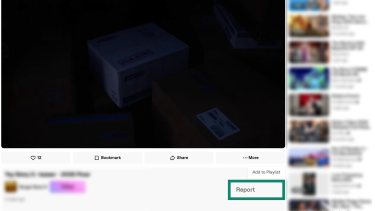
- Select Report and a pop-up window will show.
- Pick a specific part of the video if what you wish to report appears at a specific time/duration of the video. Otherwise, select Entire Video.
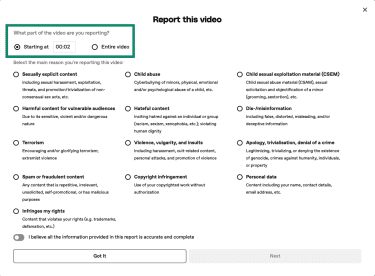
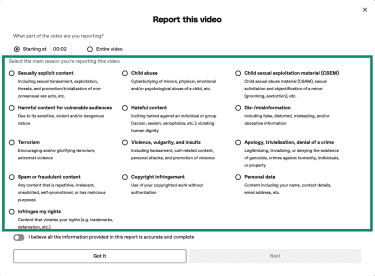
- Select the primary reason you’re reporting the video. Dailymotion gives you plenty of categories, including misinformation, violence, copyright infringement, and more.
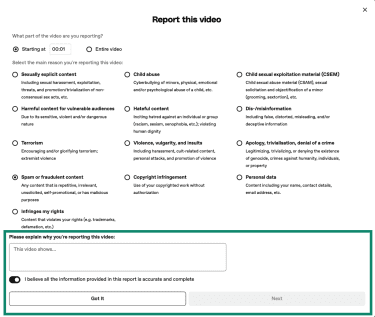
- Fill out any additional information at the bottom and click Next.
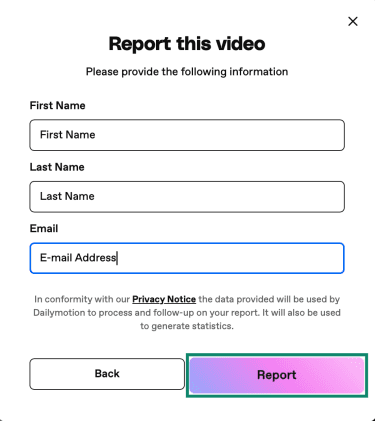
- Dailymotion will now ask for your first and last name. Finally, click Report.
Dailymotion vs. other platforms
Dailymotion, YouTube, and Vimeo are three of the most widely used online video platforms. Each has a different approach to content moderation, advertising, and privacy. While they all provide safe streaming experiences, the level of user protection and data handling practices varies.
Dailymotion vs. YouTube
| Category | Dailymotion | YouTube |
| Ownership | Canal+ (France) | Google LLC (USA) |
| Content moderation | Partly automated
Human review |
AI moderation
Human review |
| Ad model | Ad-supported
Limited personalization |
Google Ads
Personalized tracking |
| Data collection | Personalization and ad data | Tracking tied to Google account |
| Account requirement | Not required for most videos | Not required for most videos |
| Privacy options | Region-based personalization options | Managed in Your Data in YouTube settings |
Dailymotion and YouTube use similar moderation approaches, combining automated detection tools with human review teams and user reports. That means both platforms rely on automated systems to identify potential violations, such as harmful or prohibited content. However, they also provide reporting tools for users to flag issues for review.
That said, neither platform publishes a full technical breakdown of how their moderation systems work. YouTube provides general explanations of its enforcement methods in its Help Center, while Dailymotion offers summaries of how prohibited content is identified and escalated.
Both platforms allow many videos to be viewed without creating an account. They use advertising to fund free viewing, which means exposure to ads is part of the experience. The biggest difference is that you can eliminate ads on YouTube by subscribing to YouTube Premium. Dailymotion has ad-free options, but they’re only for businesses and creators via Dailymotion Pro.
Privacy models differ in how account data is used. YouTube integrates with Google’s broader account system, which may affect content recommendations and data personalization unless users disable those features. Dailymotion allows browsing without account-linked personalization. Logging in allows subscribing to channels and better content personalization.
Dailymotion vs. Vimeo
| Category | Dailymotion | Vimeo |
| Ownership | Canal+ (France) | Vimeo Inc. (USA) |
| Content moderation | Partly automated
Relies on user reports as well |
Creator-focused policies, reporting, and enforcement |
| Ad model | Ad supported | Ad-free |
| Data collection | Limited tracking | Minimal tracking
Business analytics only |
| Account requirement | Not required for most videos | Required for uploaders, may be required for viewing based on privacy controls |
| Privacy options | Basic
Fewer personalization costs |
Advanced
Limited data collection |
Dailymotion and Vimeo differ primarily in their upload rules, account requirements, and monetization methods. Dailymotion accepts general user uploads, while Vimeo uses a more controlled system with stricter guidelines around what creators can upload. For example, Vimeo prohibits unlicensed TV content, commercial broadcasts, and some gameplay footage.
Moderation also differs in structure. Vimeo doesn’t provide a detailed breakdown of its automated moderation tools, but it provides reporting mechanisms for viewers to flag violations. The platform’s stricter upload policies and creator-focused community reduce the amount of unexpected and rights-restricted content compared to open video platforms.
Dailymotion also has limited privacy controls compared to Vimeo. While the latter only enables a sensitive content filter, Vimeo lets you pick specific types of content to hide, such as nudity, violence, profanity, or mature content as a whole.
Unlike Dailymotion, Vimeo doesn’t run ads. This eliminates exposure to ad network tracking or advertising-based security risks. Dailymotion, as an ad-supported platform, displays third-party ads as part of its viewing model.
Dailymotion also allows most videos to be viewed without signing in. Vimeo generally allows watching videos without an account, but some creators may restrict viewing based on privacy settings. Uploading to both Vimeo and Dailymotion requires an account and a valid, verified email address.
Dailymotion for children: Is it safe?
Dailymotion isn’t designed for children, and users are supposed to be 13 or older to create an account. The platform doesn’t use strict age-verification methods beyond self-reported age, which means younger users could technically sign up without parental oversight.
Its content library includes general-audience videos and material intended for older viewers. Children should use Dailymotion under supervision or with appropriate restrictions enabled, as it relies on content moderation.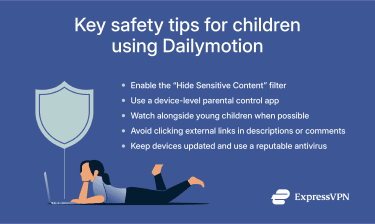
Age-restricted content and parental controls
Dailymotion’s rules require uploaders to indicate whether their videos are created for kids. However, the video platform is well aware that not all uploaders respect this rule and that sensitive content might slip past its moderation systems. That’s why all Dailymotion accounts have a “Hide Sensitive Content” filter enabled by default.
To check if this filter is enabled, look at the bottom-left side of Dailymotion’s website. It should say Hide Sensitive Content: ON, which means the platform won’t show content unsuitable for children.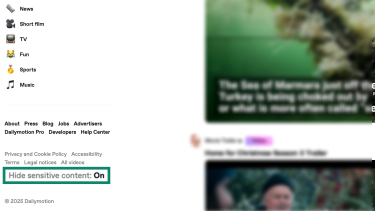
Safety tips for parents
Younger viewers often explore videos quickly, follow recommendations automatically, or interact with links without realizing they lead off-platform. These habits make consistent guidance important. Here are some of the most effective safety tips for parents:
- Watch alongside younger children and review their viewing history to better understand what they’re engaging with.
- Use built-in parental-control tools on phones, tablets, and smart TVs. Apple’s Screen Time and Google’s Family Link let parents block app installs, limit screen time, restrict browsing, and set age-based filters.
- Avoid links in video descriptions or comments; explain to children why links shouldn’t be clicked.
- Encourage open communication, so children feel comfortable asking questions about any inappropriate content they come across.
- Keep the device secure by using updated software, a reputable antivirus program, and (if the device is shared) a supervised profile that can be accessed by default.
FAQ: Common questions about Dailymotion’s safety
Can I get a virus from Dailymotion?
There isn’t any evidence that Dailymotion hosts malware. However, risks can arise from external links embedded in video descriptions, comments, or pop-ups that redirect users away from the site. Sticking to the official website or app, avoiding unfamiliar links, and keeping your browser and antivirus tools updated significantly reduces the chance of encountering unsafe content.
Is it safe for kids under 13?
Dailymotion isn’t intended for children; users are supposed to be 13 or older to create an account, but this only enforced by self-reporting and is easily bypassed. The platform does hide sensitive content by default, but automated systems aren’t perfect and may miss inappropriate content. Younger viewers should use the platform under supervision, with device-level parental controls enabled.
What to do if you see inappropriate content?
Dailymotion allows users to report videos, comments, and channels that appear misleading, unsafe, or unsuitable. Click “…More” while playing a video, pick “Report,” and then choose the relevant category. The moderation team reviews flagged content and removes material that violates platform rules.
Why does Dailymotion show sketchy ads?
Dailymotion is ad-supported, which means that you may sometimes see intrusive or misleading banners. It can remove ads when detected, but the filtering process isn’t instantaneous. Using a reputable ad blocker and watching through the official mobile app could help reduce exposure to unwanted ads.
Is Dailymotion still relevant?
While smaller than YouTube, Dailymotion is still relevant and widely used. It continues to host content from major publishers, news outlets, and independent creators.
Take the first step to protect yourself online. Try ExpressVPN risk-free.
Get ExpressVPN











 Support Center
  FAQ
FAQ  VPN Setup Tutorials


