How to delete your WeChat account (complete guide)



This step-by-step guide will show you how to delete your WeChat account without hassle. We’ll also cover what you should consider before going through with the process and what happens to your data after your account is deleted.
Things to consider before deleting your WeChat account
Deleting your WeChat account is a permanent action, so it’s worth understanding what it means for your account and connected services, especially if you heavily rely on its ecosystem of Mini Programs and payment features. You may wish to take the time to evaluate what third-party services you may lose access to before deletion.
Here are some other important points to consider:
Note: It’s worth highlighting that WeChat calls this process account “cancellation,” not deletion.
Can you recover it later?
No, you cannot recover a WeChat account after cancellation. According to WeChat's official support, once you request cancellation, you’ll have 15 days (Android) or 60 days (iOS) to cancel your request, which can be done by logging back into your account. After the grace period ends, your account and all your information are permanently deleted and cannot be retrieved.
What will be lost?
Cancelling a WeChat account deletes nearly all data associated with it. Only aggregated registration data is retained for security and spam prevention purposes. Login data is also retained for up to 90 days from collection.
This means that you’ll lose all your WeChat messages, Moments content, and photos. Other information like your alias, profile photo, and QR code card will also be deleted permanently.
What happens with WeChat Pay or linked services?
If you use WeChat Pay, you have to ensure that all outstanding payments have been settled and any remaining balance has been cleared. You cannot delete your WeChat account before you delete your WeChat Pay account.
If you’ve linked your WeChat account with any third-party services, like Tencent Games or JD.com, all related data records can no longer be retrieved after account closure, and you’ll be unable to log into or use these services. Note that you’ll also lose top-up balances, memberships, points, or anything else associated with these services.
How to back up your WeChat conversations and data
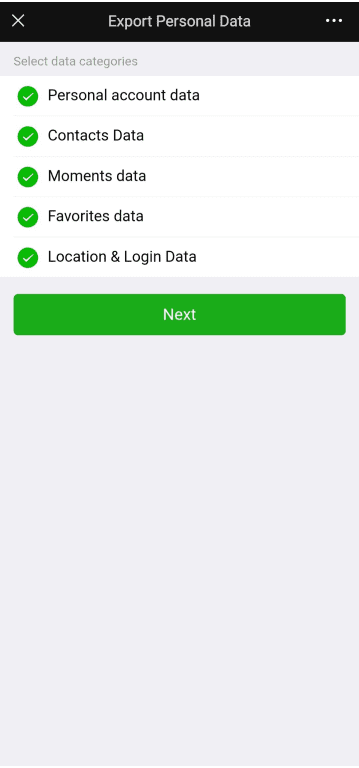
WeChat provides chat backup and data export features. The former lets you back up your chat history, while the latter lets you back up information such as personal account, contacts, Moments, Favorites, and location and login data. You may wish to back up both data sets before canceling your WeChat account.
Accessing the chat backup feature
- Open the WeChat app on your Android or iPhone and tap the Me icon at the bottom right.
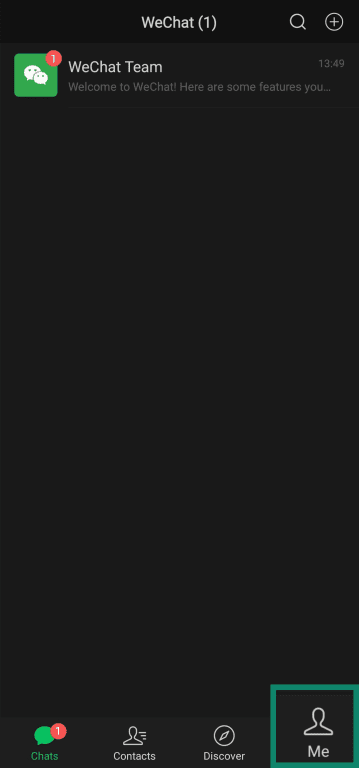
- Tap Settings.
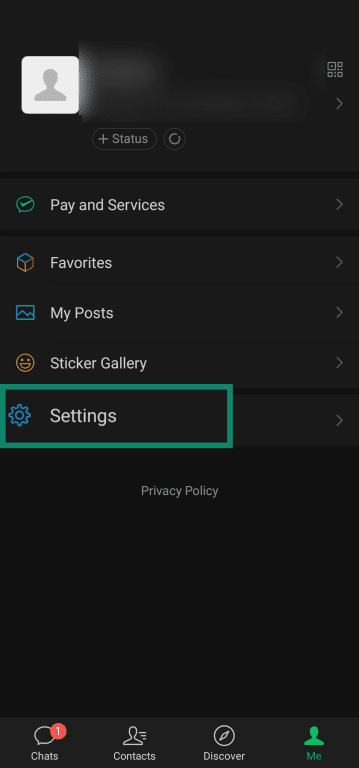
- If you’re using an Android device, tap Chats. If you’re using an iPhone, tap General.
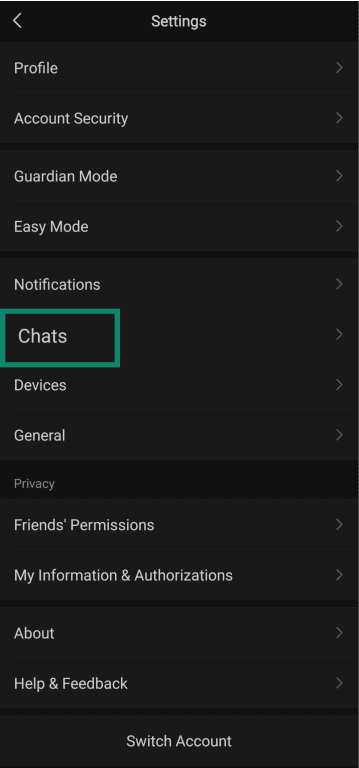
- Tap Manage Chat History.
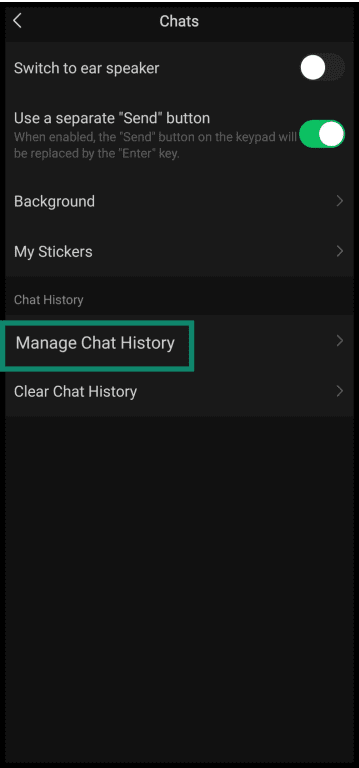
- Tap Backup & Restore. From here, you can choose to back up your chats to a computer or an external storage device. Follow the guide immediately below if you’d prefer the former, or jump ahead to our remote storage backup guide.
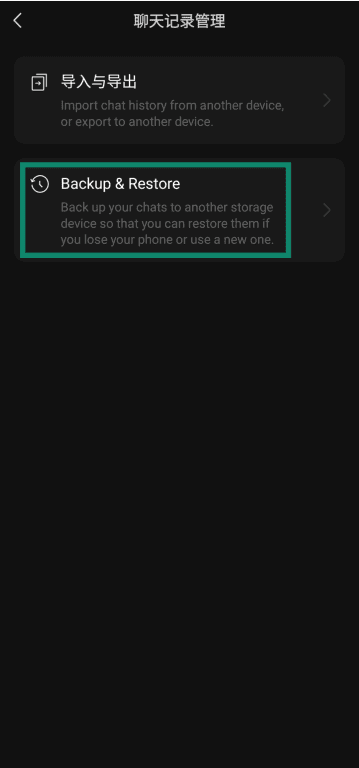
Backing up chats to a computer
- Tap Back up to computer.
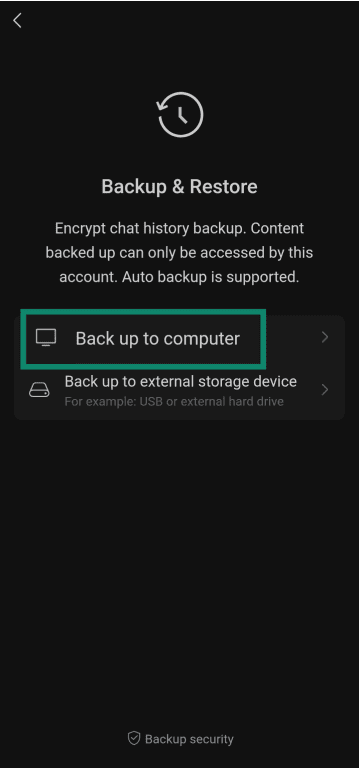
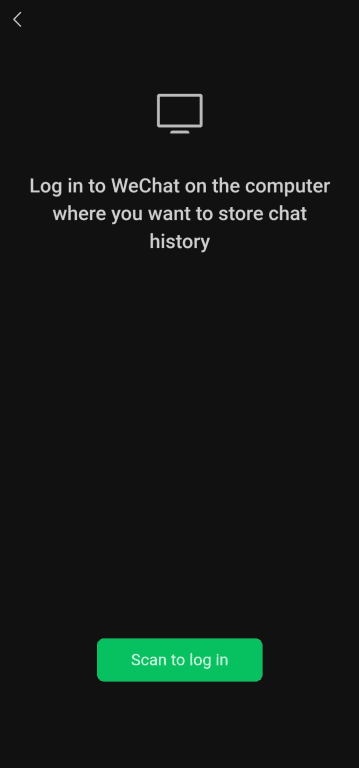
- If you’re not already logged into the WeChat desktop app, tap Scan to log in and scan the QR code shown on the WeChat desktop login screen.
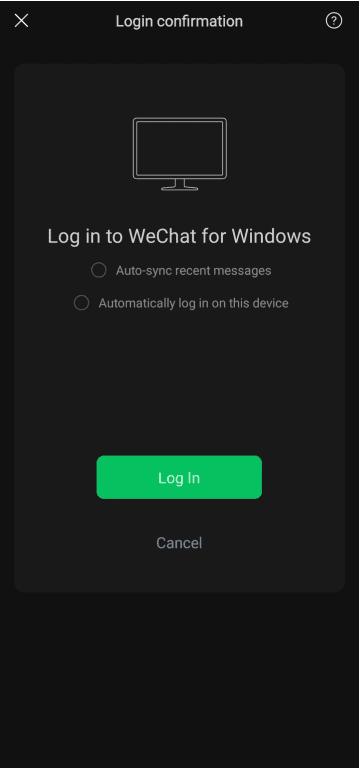
- Tap Log In to confirm.
- Tap Back up to “Computer Name.”
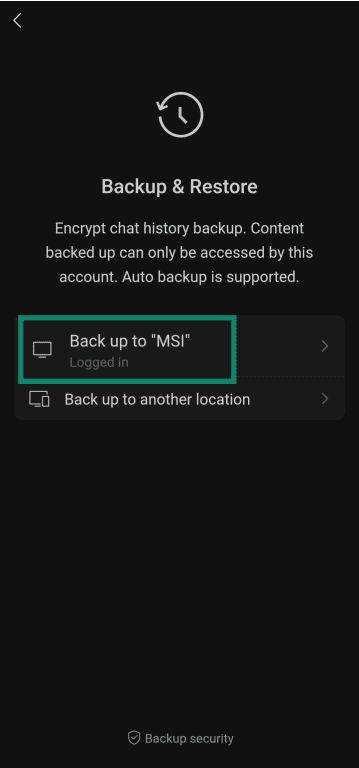
- Tap Back up to start backing up your chats.
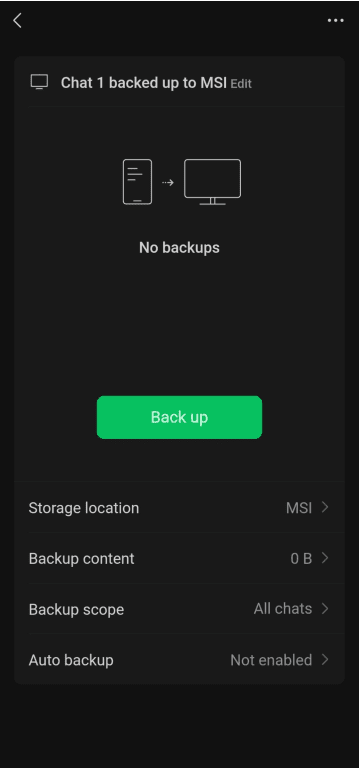
Backing up chats to external storage
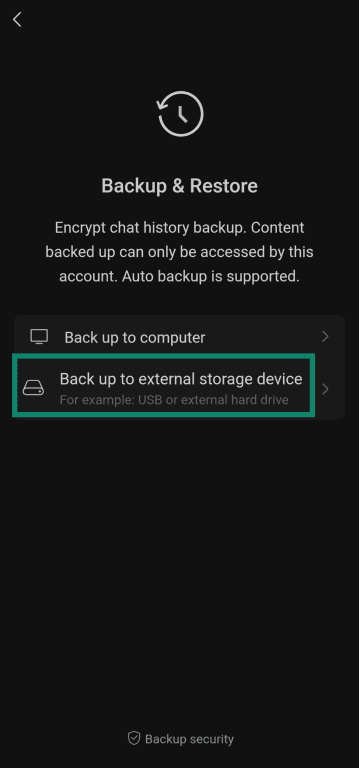
- Tap Back up to external storage device.
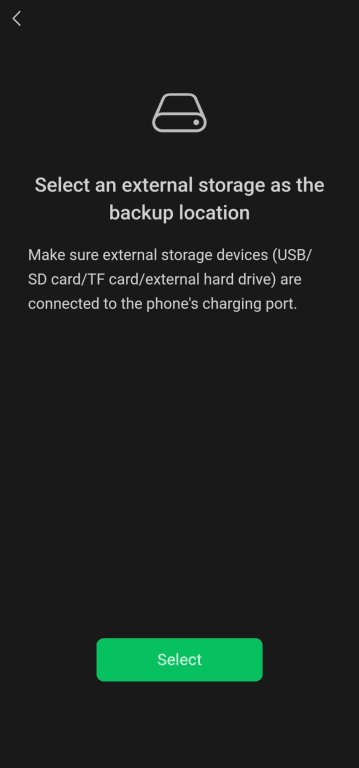
- Connect an external storage device to your phone, then tap Select.
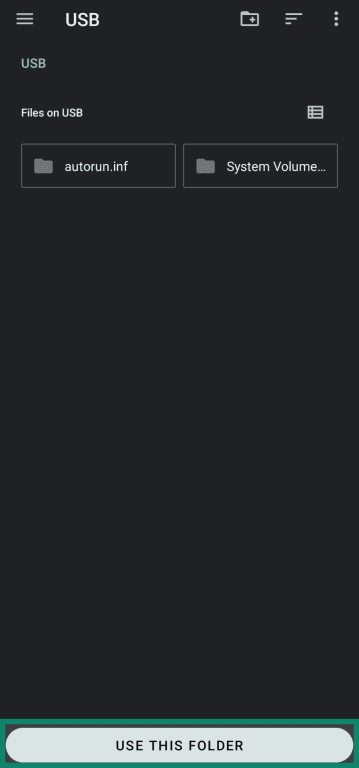
- Once WeChat navigates you to the file manager, select the folder on the external storage device where you’d like to store your WeChat chat history. Then tap USE THIS FOLDER.
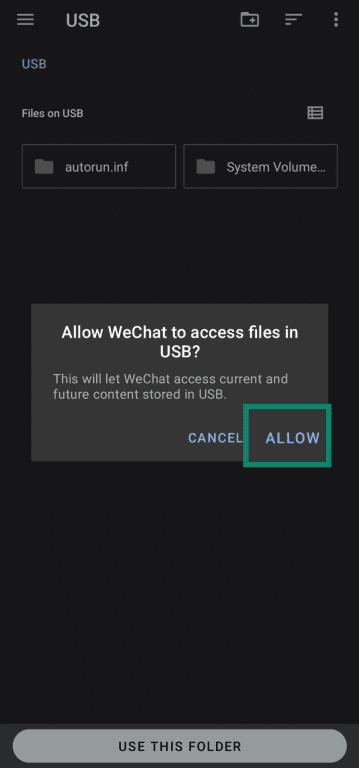
- Tap Allow when WeChat requests access to the external storage device.
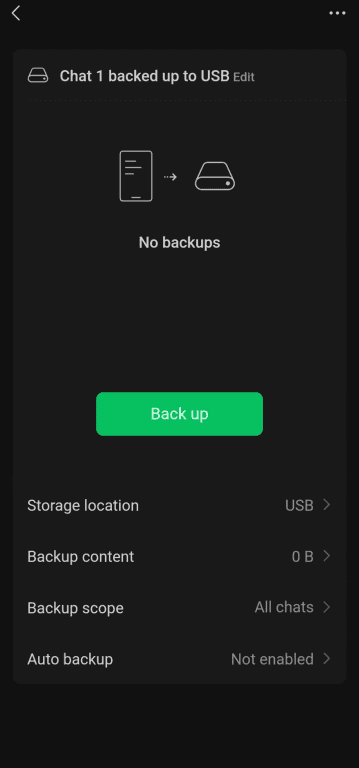
- Tap Back up to start backing up your WeChat messages to the external storage device.
Data export
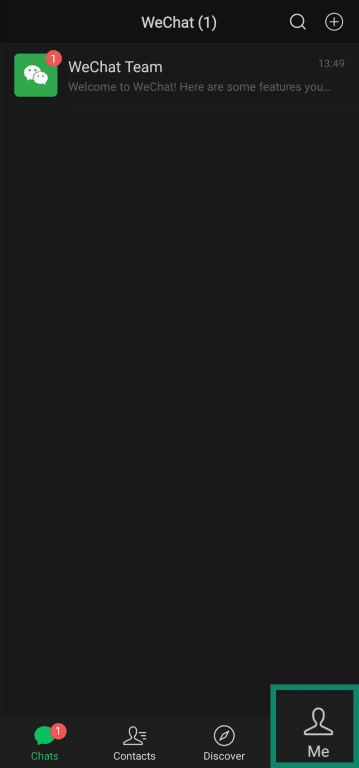
- Tap the Me icon at the bottom-right of the WeChat Android or iOS app.
- Tap Settings.
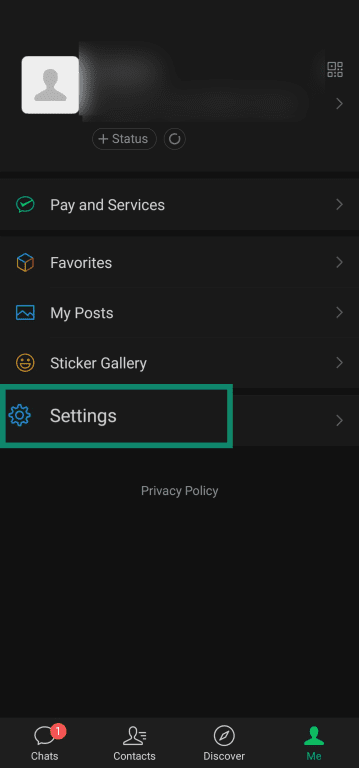
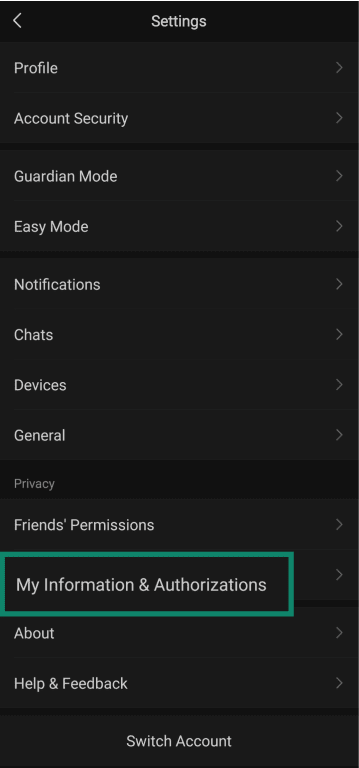
- Tap My Information & Authorizations.
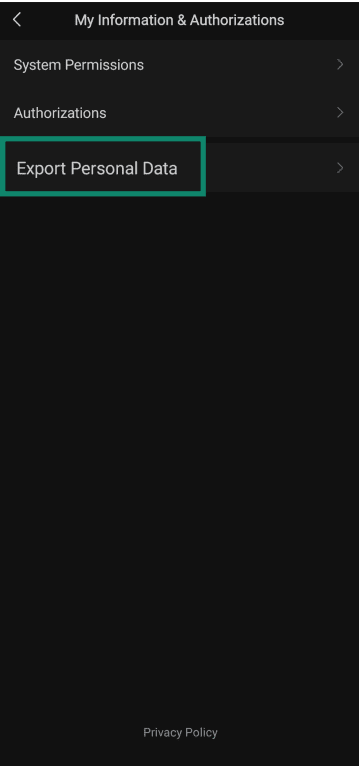
- Tap Export Personal Data.
- If you haven’t added an email address to your WeChat account yet, you’ll be prompted to do so.

- Once you’ve linked a valid email address, select the types of data you want to export, then tap Next.
- You should see a message saying Request accepted. Tap OK to complete the process. You should receive an email containing a download link to your data within 72 hours. After clicking the link, you’ll be prompted to verify your identity by scanning a QR code with the WeChat app. Once done, you can download the data file and unzip it with the password provided by WeChat.

Step-by-step: How to delete your WeChat account
Note that these steps are for Android, but the process is nearly identical on iOS. Note that you cannot delete your WeChat account via the Windows, Mac, or web app.
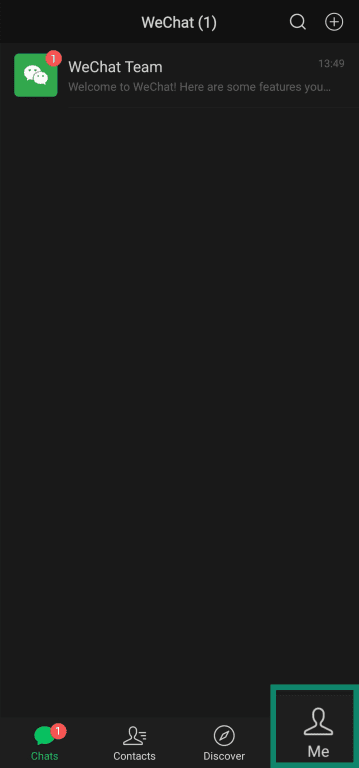
- Tap the Me icon on the bottom right.
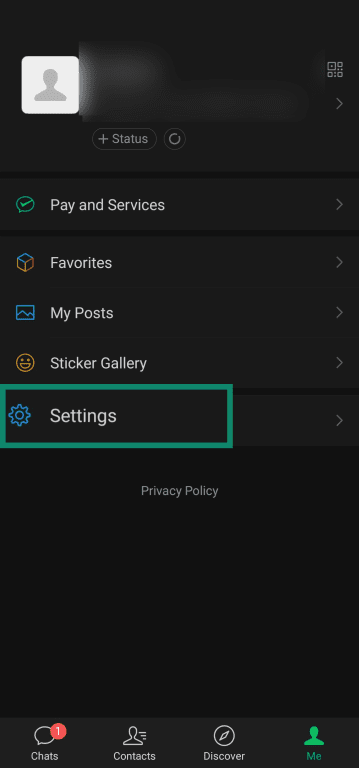
- Tap Settings.
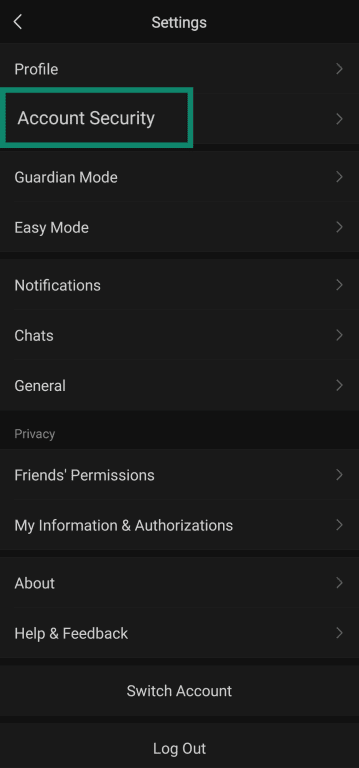
- Tap Account Security.
- Tap WeChat Security Center. If you’re on iOS, you can skip the next step as it’s only relevant to Android users.

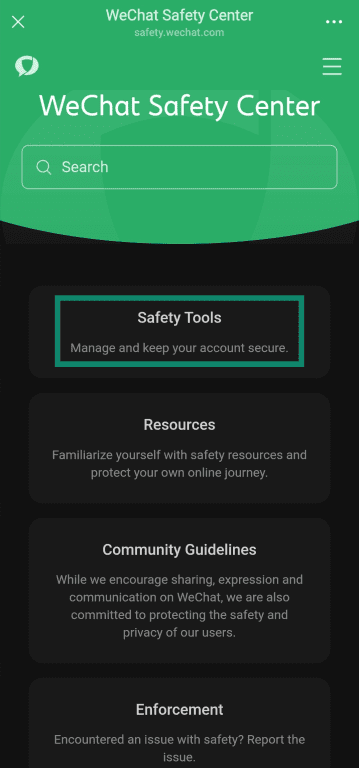
- Tap Safety Tools.
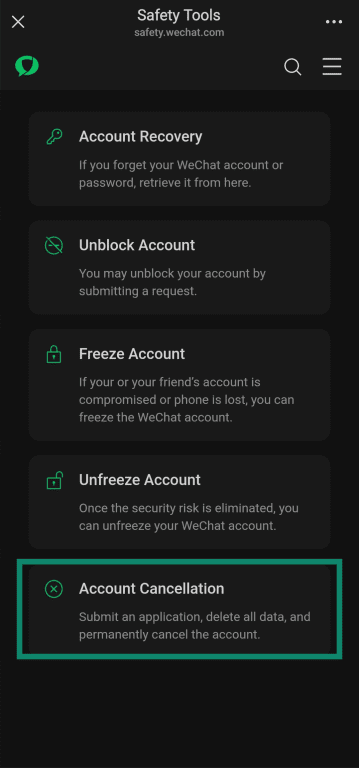
- Tap Account Cancellation.
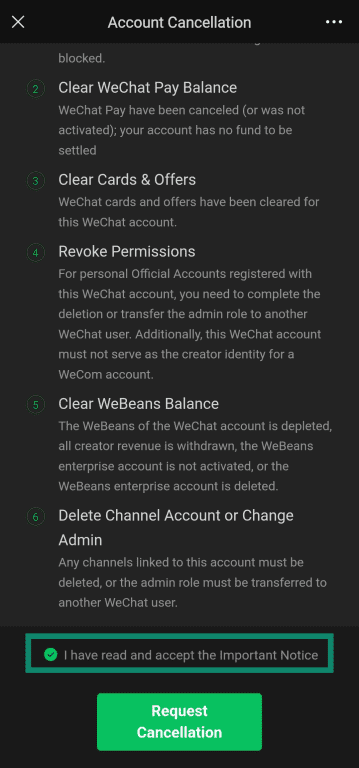
- Carefully read the notes given and ensure you’ve fulfilled all the requirements for cancellation. You may also tap the Important Notice link for information covering what happens to your account after deletion. When you’re ready, scroll to the bottom and tap the I have read and accept the Important Notice checkbox, followed by Request Cancellation.
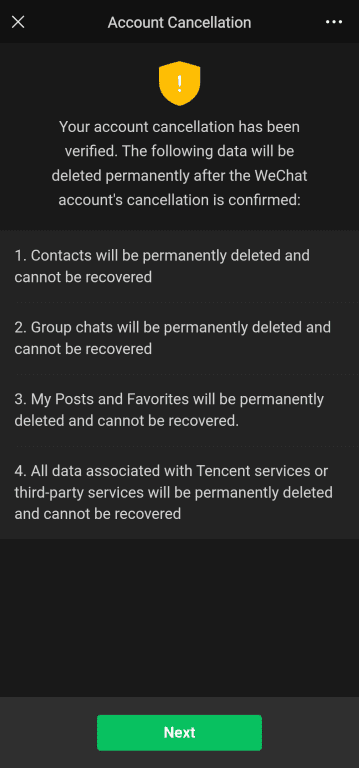
- You’ll now see a message saying your cancellation request is verified while highlighting what data will be permanently deleted upon confirmation. Read the message carefully and tap Next.
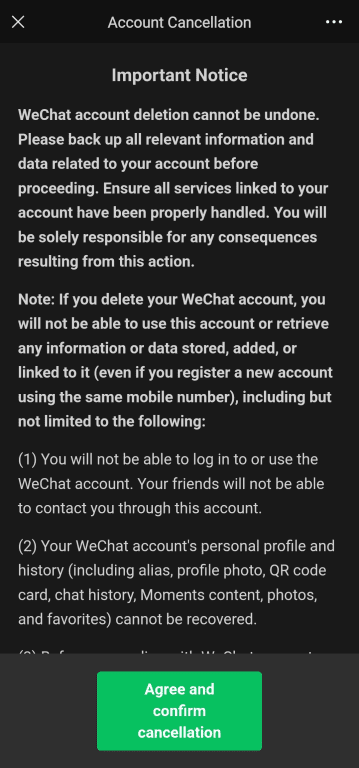
- You’ll now be shown the Important Notice text; if you’ve already read this, there’s no need to read it again. Once you’re ready, tap Agree and confirm cancellation to finalize the cancellation request.
Alternatives to deleting your account
If you’d prefer to avoid permanently deleting your WeChat account, but you’d still like to take a break from the app, take a look at these possible solutions:
Freezing your account temporarily
Freezing your account temporarily prevents anyone from using it. To freeze your account, open the Android/iOS app and go to Me > Settings > Account Security > WeChat Security Center > Safety Tools > Freeze Account (or WeChat Security Center > Freeze Account on iOS).
Once you want to unfreeze your account, you can follow the steps above and tap Unfreeze Account in the WeChat Security Center. Avoid freezing and unfreezing too frequently, as WeChat may freeze your account for security reasons. You cannot manually unfreeze your account in this situation.
Disabling notifications
If notifications are what’s bothering you, you can choose to disable them. To do so, go to Me > Settings > Notifications. Here, you can disable message and voice and video call notifications.
Control data sharing
Third-party services provided via the WeChat Open Platform have separate privacy policies and data collection practices to WeChat itself. To have more control over your data, you can revoke permissions granted to Mini Programs. In addition, if you’ve shared data with Official Accounts, which are WeChat’s version of business accounts, you can simply unfollow them to revoke their access to your data.
Removing the app without deleting the account
Simply uninstalling the WeChat app from your device is another option worth considering. If you do this, your account remains active on WeChat's servers, allowing you to reinstall the app and log back in at any time.
Troubleshooting deletion issues
You may receive the following errors while attempting to delete your WeChat account:
- Account deletion unavailable in your region: Account deletion is only available to users who registered outside of mainland China. In addition, the app’s language mustn’t be set to Simplified Chinese.
- Infrequently used device: As a security measure, WeChat doesn’t allow account cancellation requests on infrequently used devices. To avoid this error, follow the account deletion process on a device where you frequently use WeChat.
- Your account password has not been set: Your account needs a password before it can be deleted. To set a password, open the WeChat app on Android or iOS and go to Me > Settings > Account Security > Password, then follow the instructions.
- Password set or reset recently: WeChat doesn’t let you delete your account within 24 hours of the password being set or modified. Wait a day, then try again.
- Incorrectly entered password: You’ll be unable to delete your account for 24 hours if you’ve incorrectly entered the wrong password three or more times in a single day. After a day has passed, you can try again.
- WeChat Pay still enabled: You can’t delete WeChat until you’ve cancelled WeChat Pay. To do so, open the Android or iOS app and go to Me > WeChat Pay, then tap the three dots in the top-right, followed by WeChat Pay Cancellation. Follow the instructions to close your WeChat Pay account.
Contacting WeChat support
If you've tried all relevant troubleshooting steps and still cannot delete your account, contact the WeChat support team via the form on the official website. Include your WeChat ID or registered phone number, along with details about the error you're experiencing.
FAQ: Common questions about WeChat account cancellation
Can I create a new WeChat account with the same number?
Yes. After your account is deleted, you can register a new WeChat account using the same phone number. However, none of your previous account information, chat history, contacts, or linked services can be accessed on the new account.
How long does WeChat keep my data?
WeChat processes deletion requests and removes account data within 15 days (Android) or 60 days (iOS). However, aggregated registration data may be retained for security purposes and spam prevention. It’s also worth noting that WeChat's privacy policy states that login data is retained for up to 90 days from collection.
What happens to chats and files after I delete my WeChat account?
All chats, voice messages, photos, videos, and files stored in your WeChat account are permanently deleted and cannot be recovered after the grace period (15 days on Android and 60 days on iOS). Messages you've sent to others may still appear on their devices if they've saved them as a Favorite, but you'll have no access to these conversations.
Will others see my WeChat account after it’s deleted?
After the deletion is complete, your friends cannot find your account or contact you through WeChat. Your profile is completely removed from the platform. However, any messages you previously sent that the other person saved as a Favorite may still be visible to them on their devices.
Take the first step to protect yourself online. Try ExpressVPN risk-free.
Get ExpressVPN