How to delete your Pokémon GO account for good


If you’re ready to permanently delete your Pokémon GO account, the process isn’t complicated, but there are a few things you should know before you start.
In this guide, you’ll learn how to submit a deletion request, what data gets erased, how long it takes, and what to do beforehand to avoid common issues.
Things to consider before deleting your Pokémon GO account
Before deleting your Pokémon GO account, it’s important to understand what the process involves, what data will be erased, and the steps to take beforehand to avoid losing anything you might want later.
What happens when you delete your account
Deleting your Pokémon GO account removes all of your game data, including:
- All Pokémon (including shiny, legendary, and event Pokémon).
- Items and PokéCoins.
- Trainer level and XP.
- Medals and achievements.
- Friends list and friendship progress.
- Battle records.
- Raid participation.
- Avatar customizations.
- Saved settings and preferences.
Once the deletion process is complete, the account and everything tied to it can’t be restored. Should you decide to return later, you’ll need to create a new account and start from scratch.
If your goal is simply to cut back on gaming, consider alternative ways to reduce or limit your screen time.
Important: If your Pokémon GO account is linked to Niantic Wayfarer, any contributions you made to Wayfarer through that specific account will also be deleted.
What to do before you delete your account
Deleting your Pokémon GO account isn’t immediate. You need to submit a request, and there’s a processing period before the account is fully removed. Taking a few precautionary steps before deleting your Pokémon GO account helps prevent loss of data and lockouts while the request is pending.
Add a backup login method
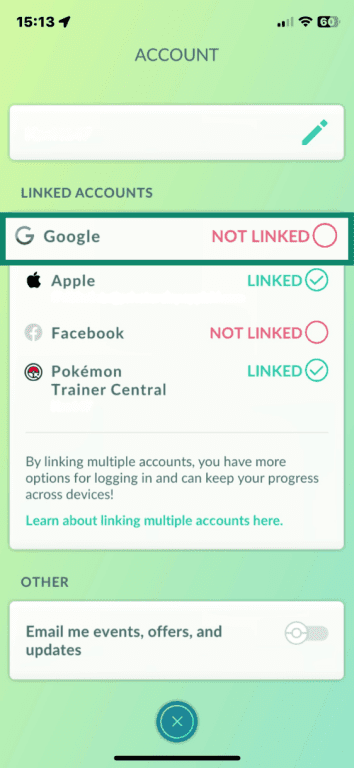
If you only have one login method linked to your Pokémon GO account and lose access to it, deleting or recovering your account can become difficult. Adding a second login method before you begin gives you a reliable fallback. Here’s how to do that:
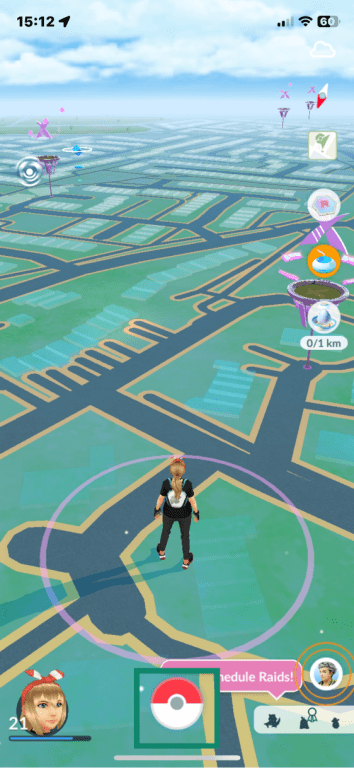
- Open Pokémon GO and tap the Poké Ball at the bottom of the screen.
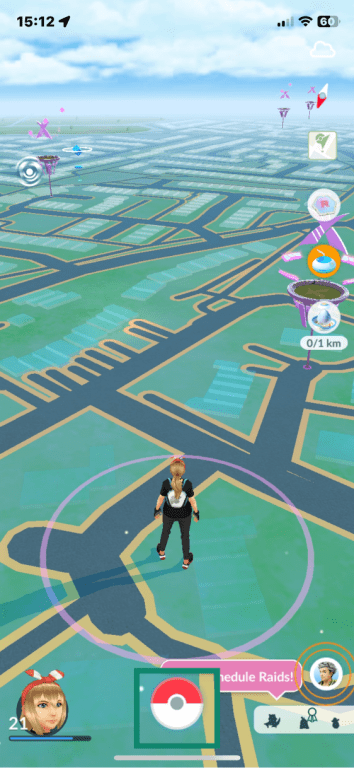
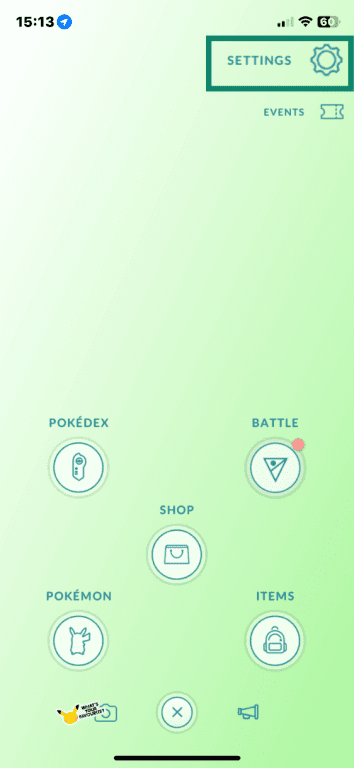
- Tap the Settings gear icon in the top right.
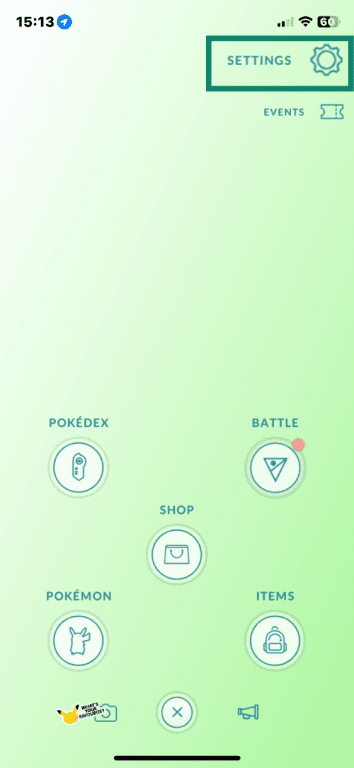
- Scroll down to Account.
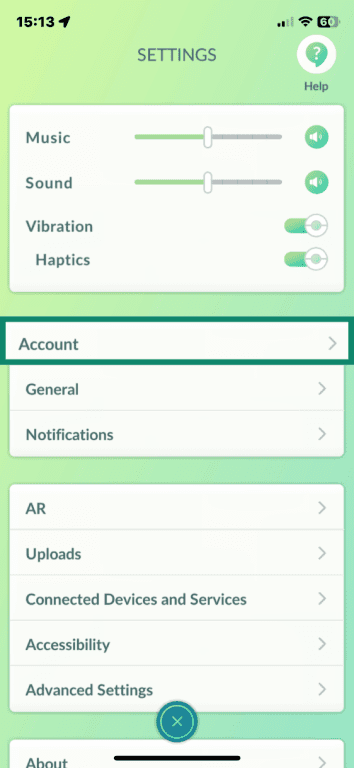
- Under Linked Accounts, choose an unlinked option and follow the prompts to sign in and link the account.
Save what you want to keep before deletion
Pokémon GO doesn’t offer a data export feature, so there’s no way to download your data yourself. However, you can reach out to its customer support via the app and request the data there.
To request data:
- Open Pokémon GO and tap the Poké Ball.
- Tap the Settings icon.
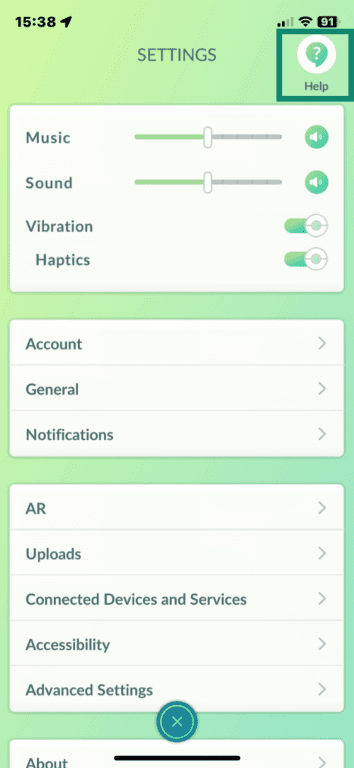
- In the top-right corner, tap the Help icon.
- When the Support page opens, tap the chat icon in the top-right corner.
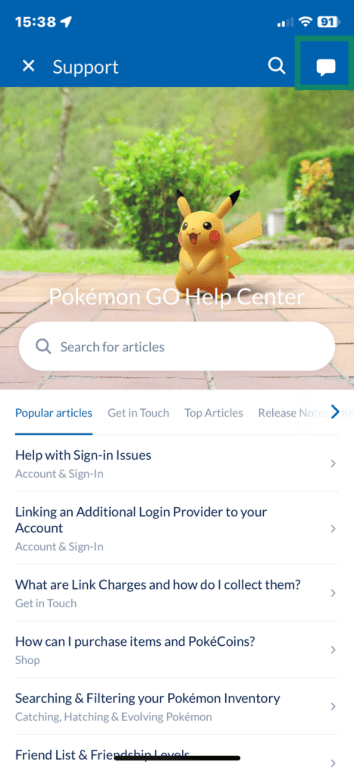
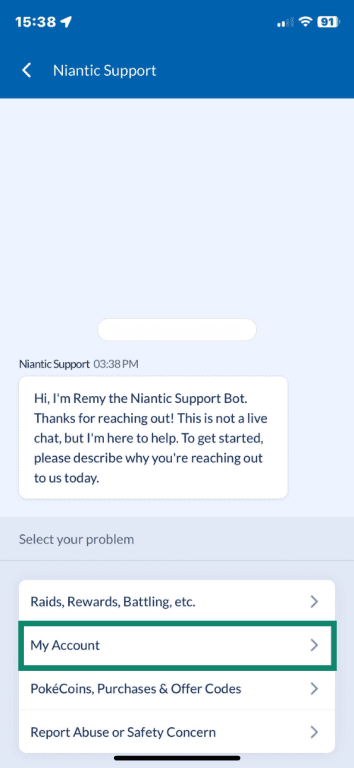
- When Niantic Support opens, choose My Account from the options.
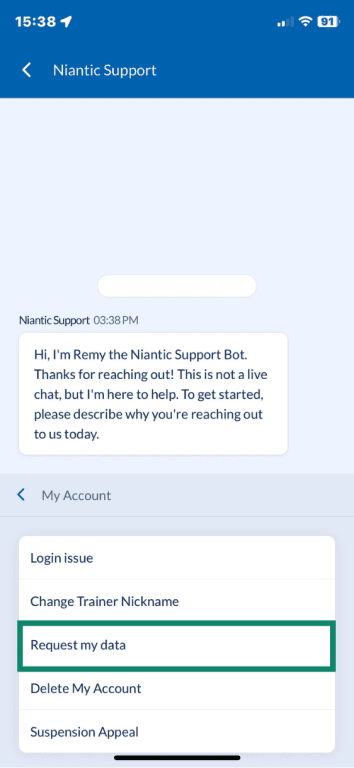
- In the next menu, select Request my data and follow the prompts to get a copy of your data.
Pokémon GO doesn’t display your friends’ Trainer Codes once they’re already on your friends list, so if you plan to return to the game with a new account and connect to any of your current friends, you’ll need to ask them to reshare their numerical or QR code before your account is deleted.
How to delete your Pokémon GO account
Deleting your Pokémon GO account requires submitting a formal request and confirming it by email.
Delete your Pokémon GO account in the app
You can start a deletion request directly from within the game:
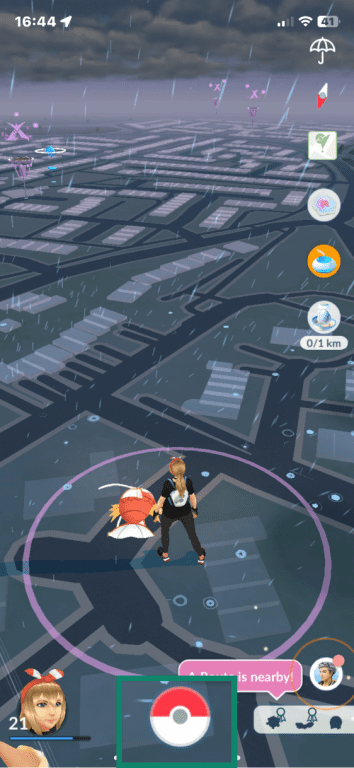
- Open your Pokémon GO app and tap the Poké Ball at the bottom of the screen.
- Tap the Settings cog icon to open the menu.
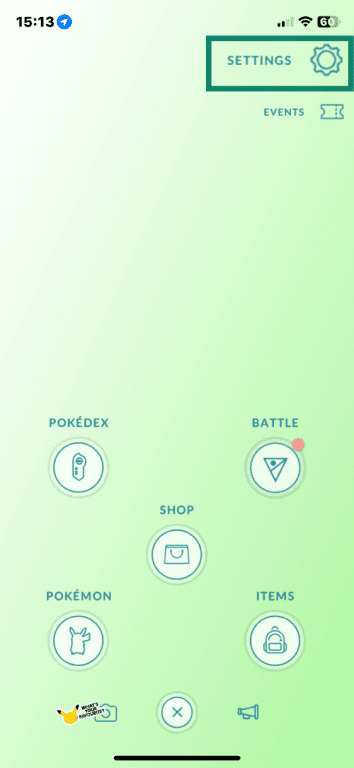
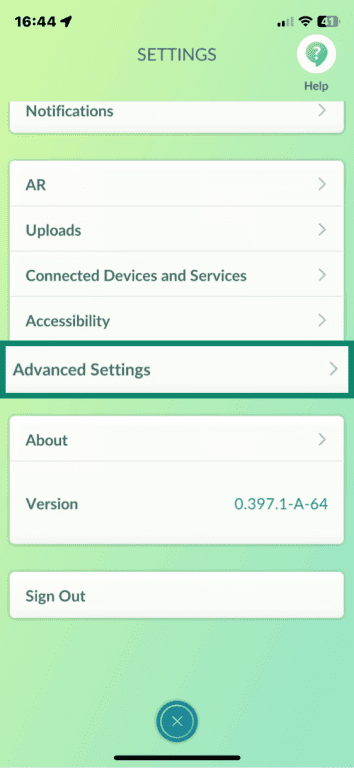
- Scroll down to Advanced Settings and tap to open.
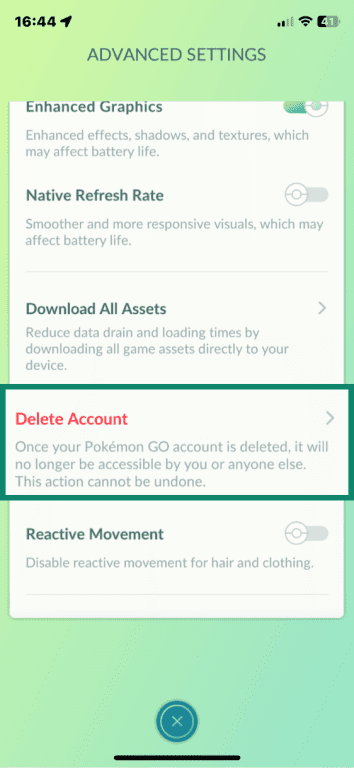
- Scroll down to Delete Account and tap to continue.
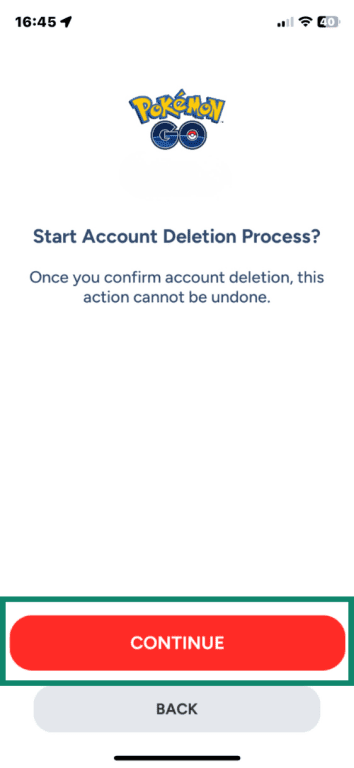
- Tap Continue. You’ll be sent an email to verify your account deletion.
Delete your Pokémon GO account using the support form
If you'd prefer not to go through the app or can't access it, you can submit a deletion request through Niantic's support page instead. You typically need your Trainer name and the email linked to your account.
- Access the Contact Us support form in the Pokémon GO Help Center. Click the Issue Category menu and choose Delete My Account.
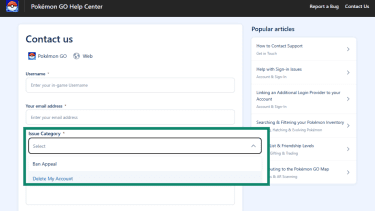
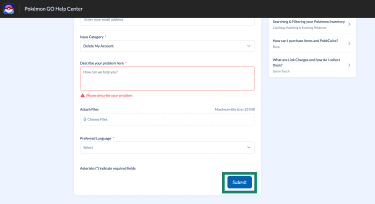
- Fill out the rest of the details, like your username and email address connected to your account. Then, scroll down to the bottom of the page and click Submit.
How long it takes for deletion to complete
After you submit a deletion request, Niantic sends a confirmation email to the address linked to your account. You must reply to that email to finalize your request.
Once the request is verified, it can take several weeks to process. During this time, your account may remain accessible until the process is finalized.
Can you cancel a Pokémon GO deletion request and how?
If you haven’t responded to the email you received, the deletion request won’t be confirmed. In that case, you can simply ignore the message, and your account will remain active.
If you’ve already entered the code and confirmed the request, the only way you may be able to stop the deletion is to reach out to Niantic Support as soon as possible. Once the deletion is fully completed, however, the account and its data can’t be recovered.
How to remove Pokémon GO from your linked accounts
If your Pokémon GO account was linked to Google, Facebook, Apple, or Pokémon Trainer Central, you may still see Pokémon GO listed in those services’ connected apps settings. Removing the connection isn’t required, but you can revoke the app’s access if you no longer want it listed in your account permissions.
If your Pokémon GO account is linked to Google
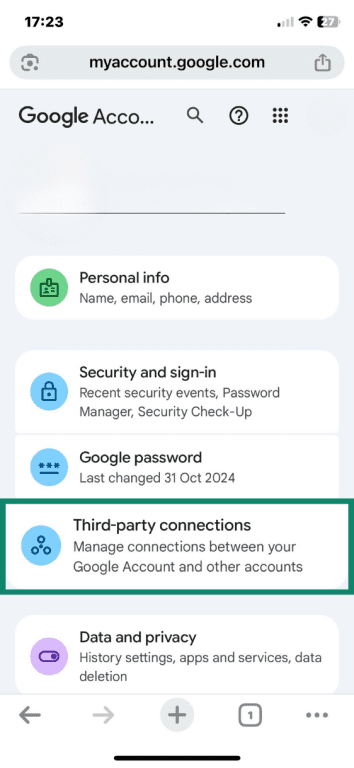
- Go to your Google Account in a browser and select Third-party connections.
- Scroll down to Pokémon GO and access it.
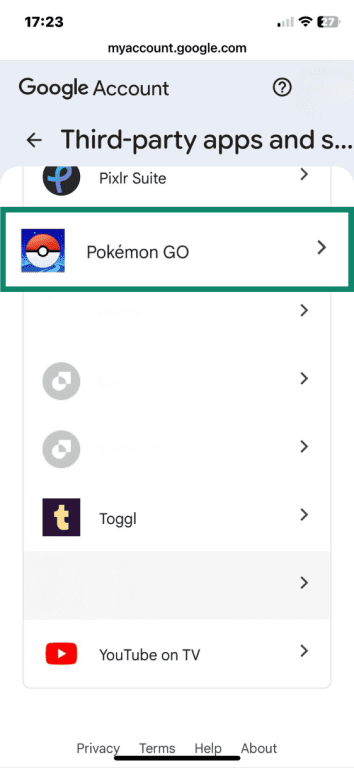
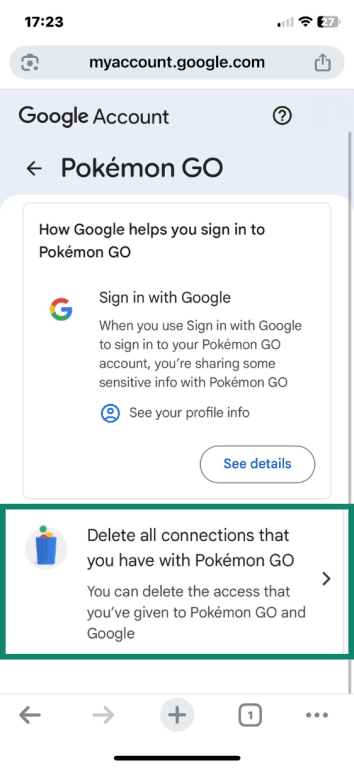
- Click or tap on Delete all connections that you have with Pokémon GO.
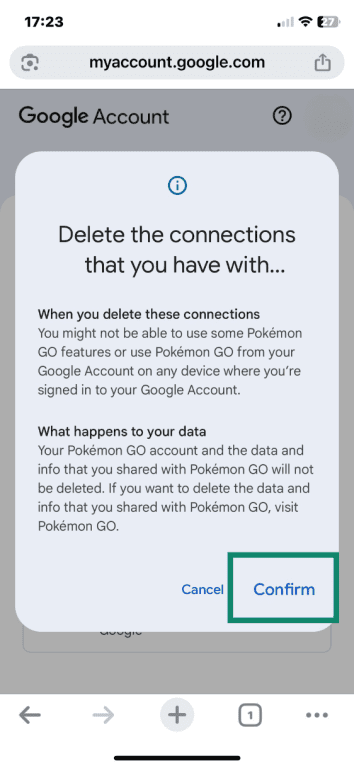
- Tap Confirm to delete your connection.
If your Pokémon GO account is linked to Facebook
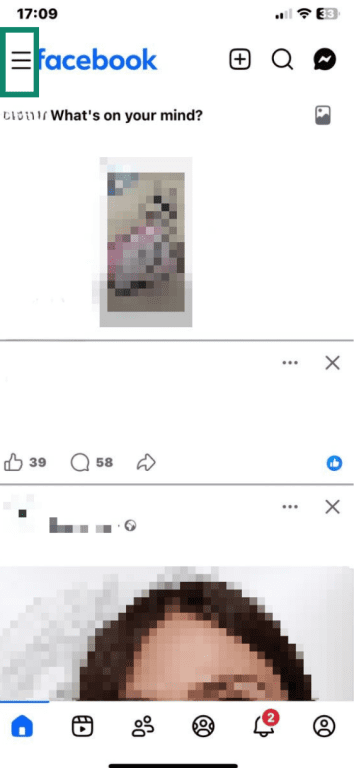
- Open Facebook and tap the three-line menu in the top-right corner.
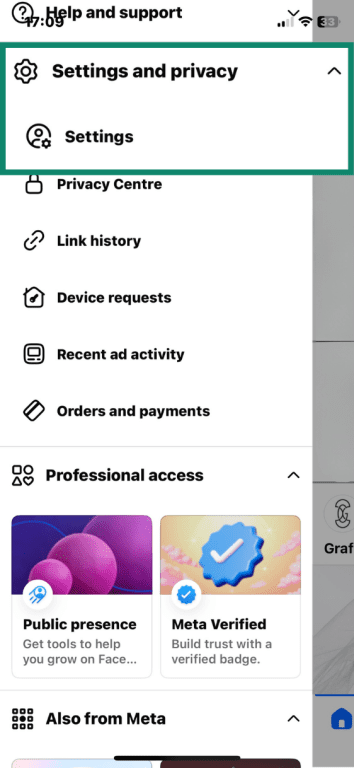
- Scroll down to Settings and privacy and tap Settings.
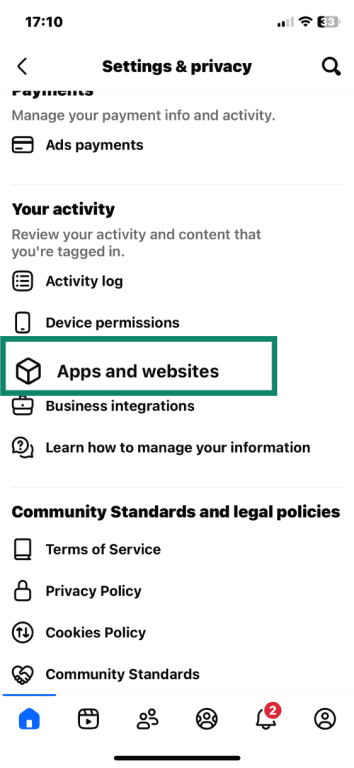
- Scroll down to Your activity and tap Apps and websites.
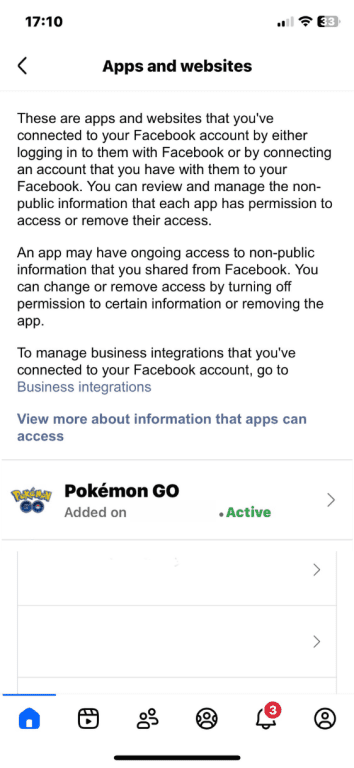
- Find and tap Pokémon GO.
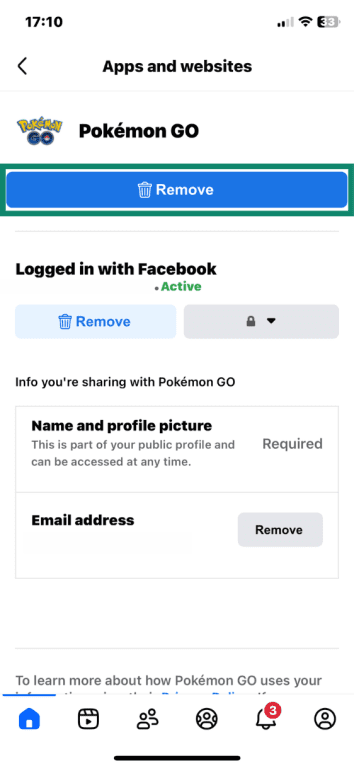
- Tap Remove.
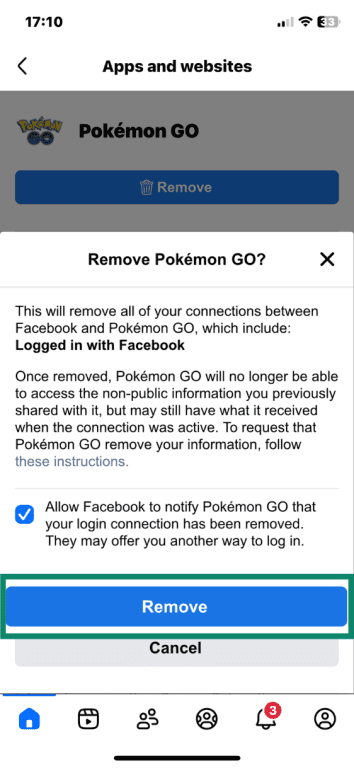
- When prompted, tap Remove again to confirm.
If your Pokémon GO account is linked to an Apple ID
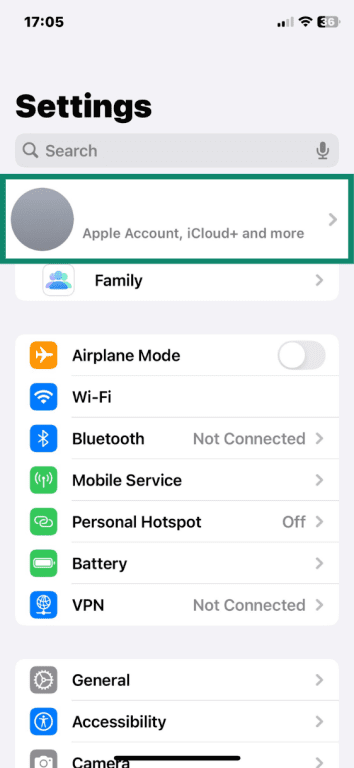
- Open Settings on your iPhone or iPad and tap your name at the top of the screen.
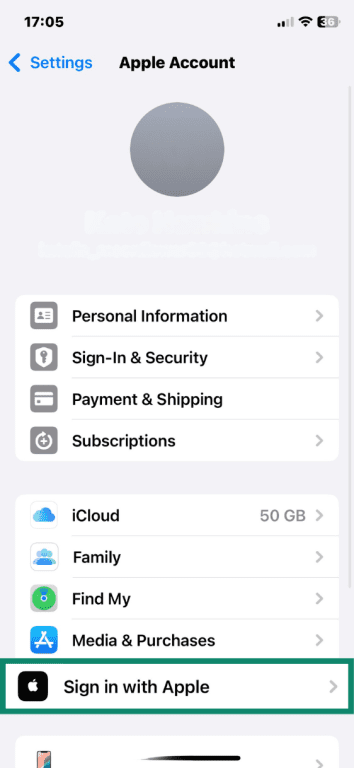
- Find Sign in with Apple and tap it.
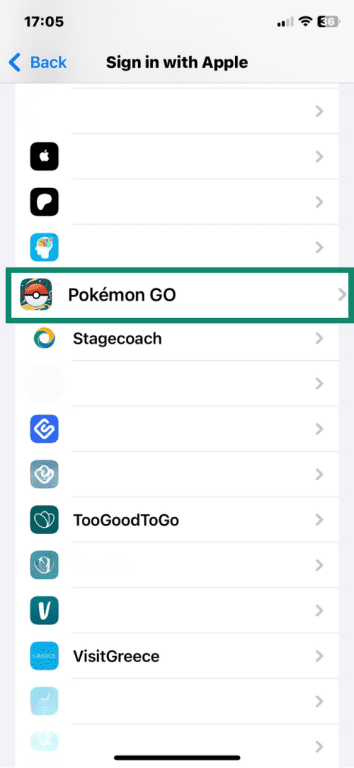
- Scroll down to Pokémon GO and tap to open it.
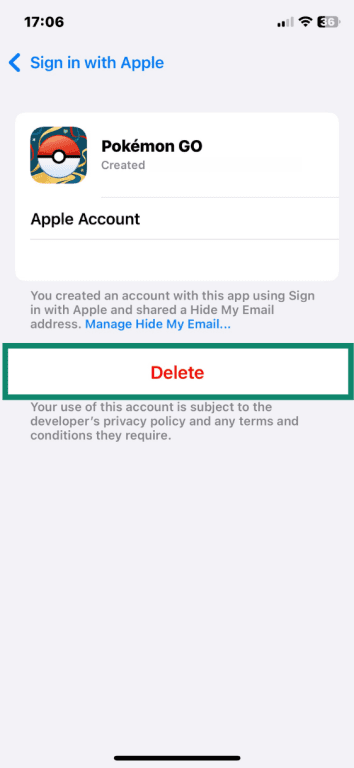
- Tap Delete and confirm that you wish to delete this linked account.
If your Pokémon GO account is linked to Pokémon Trainer Central
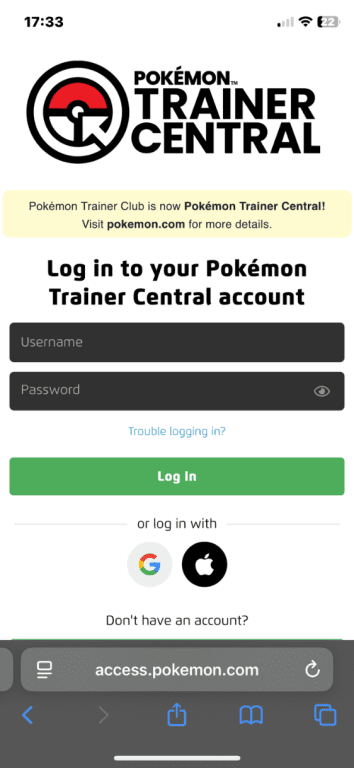
- In your browser, visit the Pokémon Trainer Central website and log in to your account.
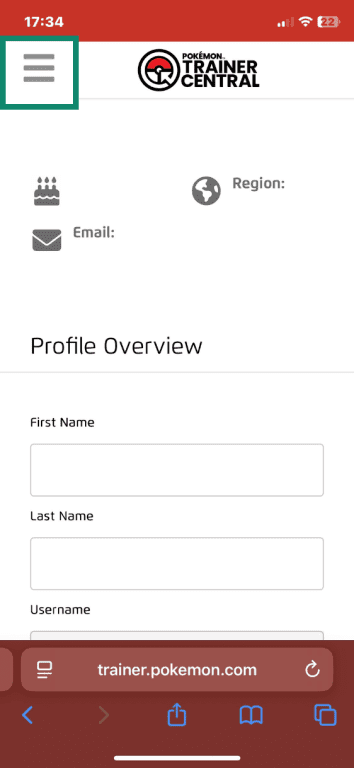
- In the top-left corner, tap the three-line icon to open your account settings.
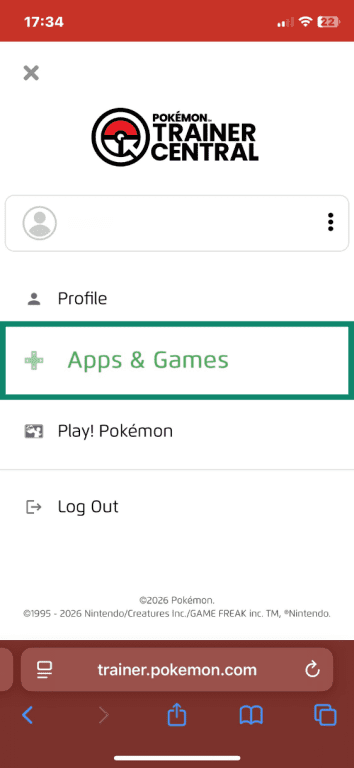
- In account settings, tap Apps & Games.
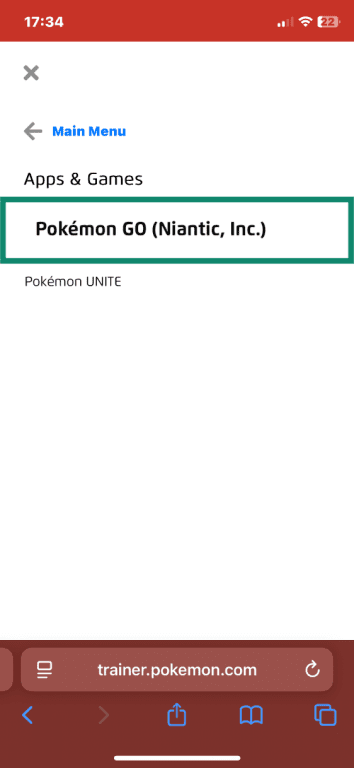
- Find and select Pokémon GO (Niantic, Inc.).
- Toggle off the option next to Pokémon GO.
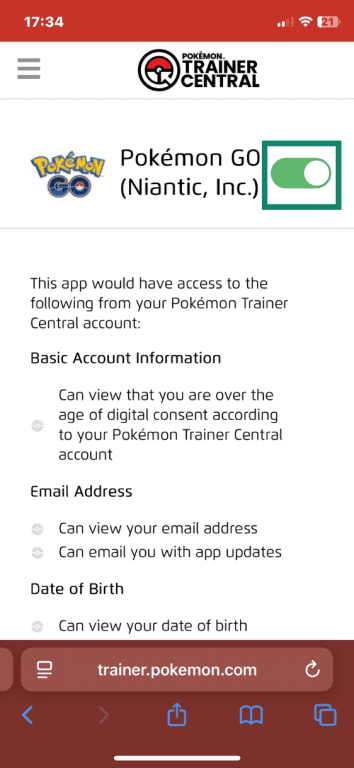
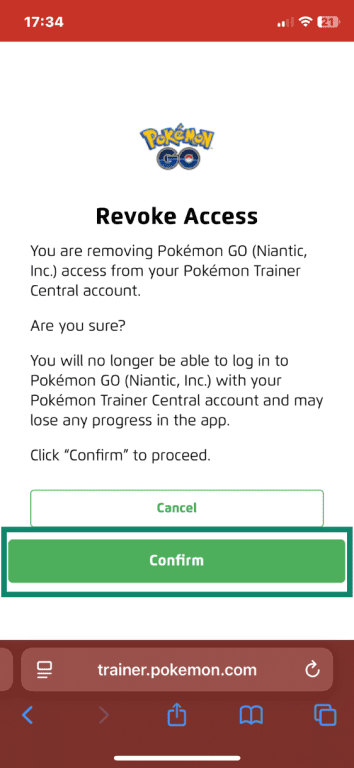
- Tap or click Confirm to delete the link.
Troubleshooting: Why you can’t delete your Pokémon GO account
If you’re having trouble deleting your Pokémon GO account, the issue is usually related to login access, missing confirmation steps, or app settings. Below are the most common problems and how to address them.
You can’t access your linked login method
To delete your account, you must have access to the email address connected to it because Niantic sends a confirmation email that must be verified before deletion is completed.
If you no longer have access to that login:
- Try recovering the account directly through the provider’s account recovery page.
- Make sure you can access the email address associated with that login.
- Check whether your Pokémon GO account is linked to multiple login methods by going to Settings > Account > Linked Accounts.
If you can’t recover the login, contact Niantic Support. Be prepared to verify account details like your Trainer nickname, approximate account creation date, last login date, or purchase history, if applicable.
The delete option is missing in settings
If “Delete account” doesn’t appear under Settings > Advanced Settings, the issue is usually related to the app or account permissions. The app may be outdated, or the account could be a child account with parental restrictions.
Start by updating the app to the latest version, then log out and back in or restart the game to refresh permissions. If the option still doesn’t appear, you can submit a deletion request directly through the Niantic Support website.
Your deletion request is still pending
Pokémon GO account deletion doesn’t happen immediately. The process only begins after you confirm the request through the verification email sent by Niantic.
If your account still appears active:
- Make sure you replied to the confirmation email.
- Check your spam or junk folder in case you missed the message.
- Confirm that your reply was successfully sent.
Once verified, the account enters a processing period that can take several weeks. If you completed all steps and significant time has passed, contact Niantic Support and reference your original deletion request.
How to start over in Pokémon GO
Starting over in Pokémon GO depends on whether you want to permanently reset your progress or simply use a different account.
Create a new account after deletion
If your goal is a clean slate to replay early challenges, rebuild your team, or start fresh alongside friends, you can register a new account. You’ll begin again at level 1 with a new Trainer Code. Note that you won’t be able to use the same player name or the same email address to create your new account.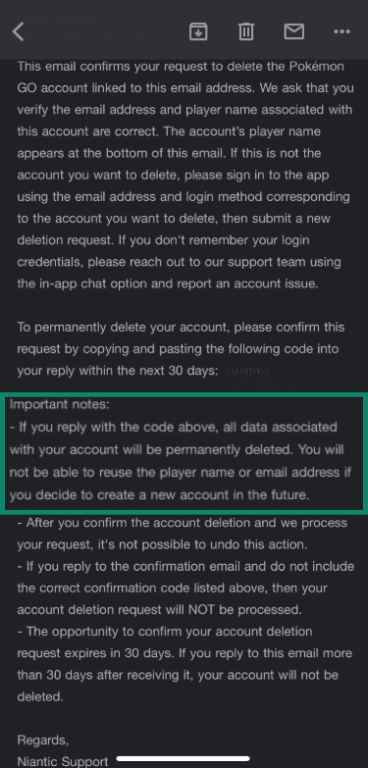
Switch accounts without deleting
If you simply want to take a break and return to where you left off, consider logging out instead. Keeping your original account lets you:
- Return later without losing your progress, Pokémon, or purchases.
- Preserve rare or event Pokémon that may no longer be available.
- Let someone else in your household start their own account on the same device.
- Avoid waiting through a deletion processing period.
FAQ: Common questions about deleting Pokémon GO account
Can I recover my Pokémon GO account after deletion?
How do I unlink a Pokémon GO account?
If your Pokémon GO account has already been deleted, or you simply want to revoke access, you must remove the connection from the login provider itself.
Is deleting the app the same as deleting my account?
What should I do before deleting Pokémon GO?
Take the first step to protect yourself online. Try ExpressVPN risk-free.
Get ExpressVPN















 Support Center
  FAQ
FAQ  VPN Setup Tutorials


