How to delete your Lyft account


If you plan to delete your Lyft account, there are a few things to consider first. These include handling your saved payment methods, managing any Lyft Pink memberships or subscriptions, and understanding what happens to your ride history and other data after the deletion request.
This article offers a full step-by-step guide on how to delete your Lyft account properly. We’ll share the exact steps needed in the app and the browser, as well as details about how to download your data and how to cancel Lyft Pink.
Should you delete or deactivate your Lyft account?
You should only delete your Lyft account if you’re confident that you’re finished with the platform and you want your information deleted. That’s because once you’ve requested deletion, the process is irreversible.
Lyft doesn’t currently offer a deactivation or partial deletion option. For example, if you have both a driver and a passenger profile, you can’t just delete one and keep the other. Full deletion is the only option.
If you’re not sure you’re ready to delete, you can simply log out or uninstall the app, but this amounts to leaving your account dormant rather than deactivating it. This option can make sense if you think you might return to the service, but if you’re unlikely to go back, deletion is a better option.
Things to know before you delete
Before you close your Lyft account, it helps to know exactly what will happen to your account and related data.
Deletion removes your profile, ride history, receipts, and settings. If you think you’ll need any information for taxes, work expenses, or personal reference, download your data before starting the deletion process.
Even after deletion, Lyft’s privacy policy states that it may retain certain information for legitimate business, legal, or regulatory purposes. This can include records needed to resolve disputes, insurance claims, or investigations. Retained data is stored in ways designed to prevent use for other purposes.
It’s important to note that deletion is final and irreversible. Once your account is deleted, your previous login details will no longer work. If you want to use Lyft again, you’ll need to create a new account from scratch.
How to delete your Lyft account (mobile and web)
Here’s how to delete your Lyft account. Note that if you have a Lyft Pink membership, it’s best to cancel it first.
Download your Lyft data (optional)
If you think you might need proof of past trips or payments, it’s worth saving a copy of your data before you delete the account. You can start this process either within the Lyft app or directly in a browser. In both cases, Lyft sends you to the same data privacy page in your web browser, where you download your data and request deletion.
Here’s what to do:
- Go to Lyft’s privacy data page and sign in.
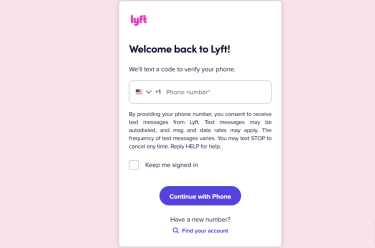
- Click on the Start button under Download data.
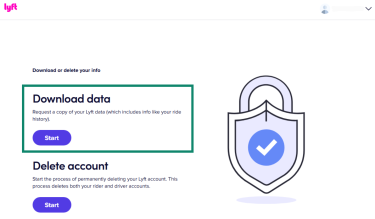
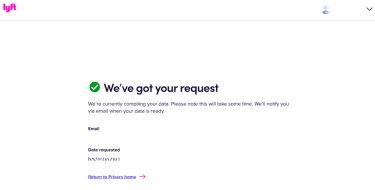
- Follow the prompts to confirm the request, and wait for Lyft to email you a download link. Note that it can take a few days for the file to be prepared and delivered to you.
Delete your Lyft account in the app (iOS and Android)
It’s easy to close your account using the Lyft app, and the steps are effectively the same on Android and iOS:
- Open the Lyft app on your phone and sign in. Tap You in the bottom-right corner.

- Scroll down and tap Help.

- Tap Profile and account.
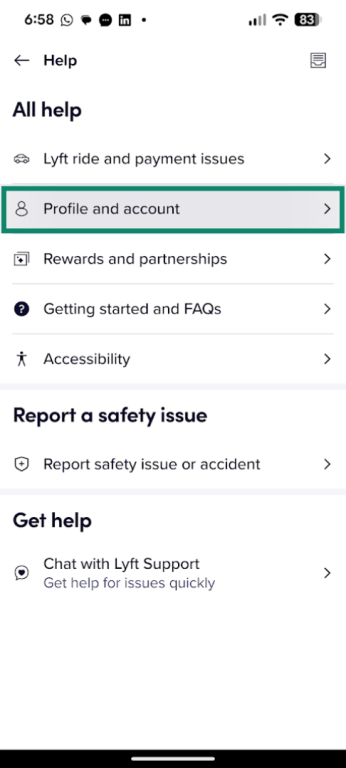
- Tap Edit profile or account.

- Select Delete my account.

- On the help page that opens, tap Delete my account under the How to delete your Lyft account section.
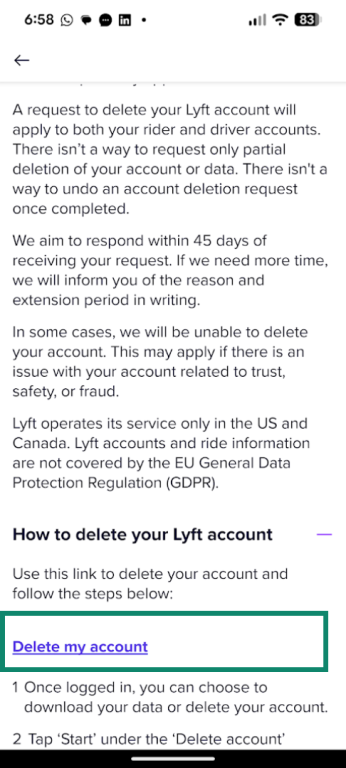
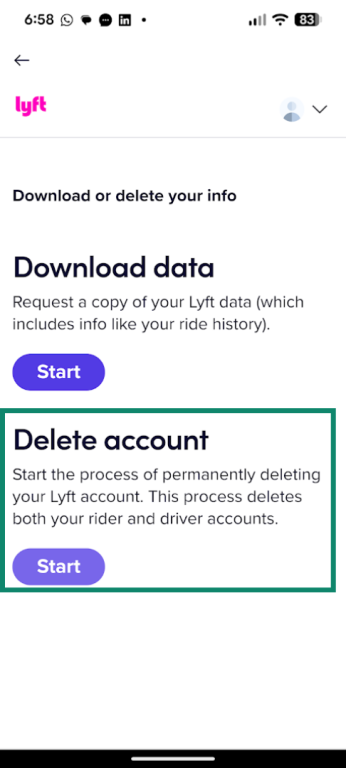
- Follow the prompts, and enter any verification codes sent to your phone. Lyft then takes you to its privacy portal, where you can tap Start under Delete account.
- Select a reason for deleting your account if prompted, then type DELETE in the box when asked. Select Delete account to confirm.
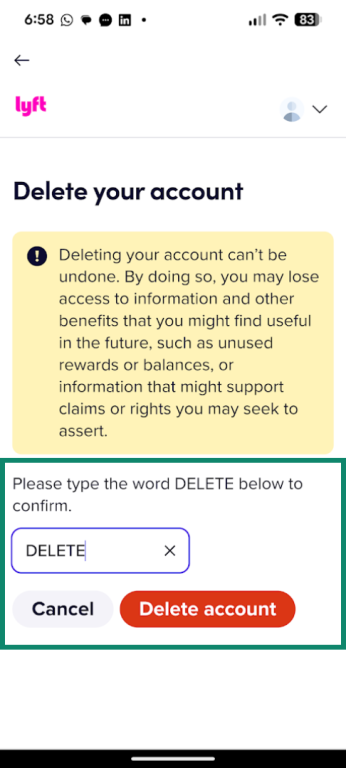
It’s important to know that once you do this, the request can’t be undone. You’ll see a confirmation on screen, and Lyft will aim to process the deletion request within 45 days. If it takes longer than this, Lyft will contact you to explain the situation and the reason for the delay.
How to delete your Lyft account using a web browser
If you prefer using a computer, you can send the same deletion request from a browser:
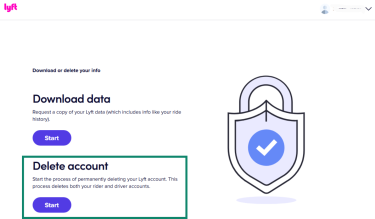
- Go to Lyft’s privacy data page, and under Delete account, click Start.
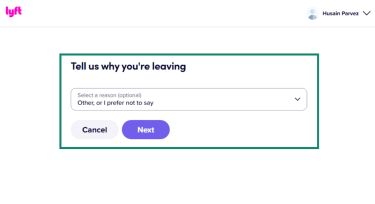
- Select a reason for deletion; if you don’t want to be specific, just choose Other, or I prefer not to say.
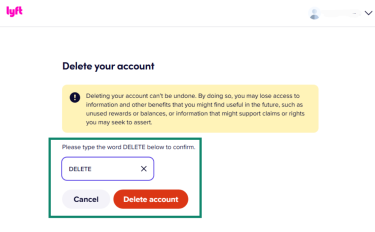
- Then, type DELETE when prompted and click Delete account to confirm.
How to remove payment methods from Lyft
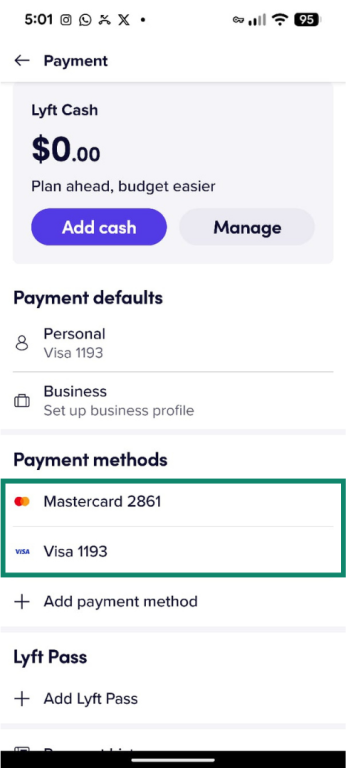
If you’ve used Lyft for a while, your account may hold several saved cards. Note that Lyft needs at least one default payment method on the account, so you won’t be able to delete every payment method on your account prior to deleting it.
However, if you want to remove any additional payment methods before deleting your account, you can manage them directly in the Lyft app:
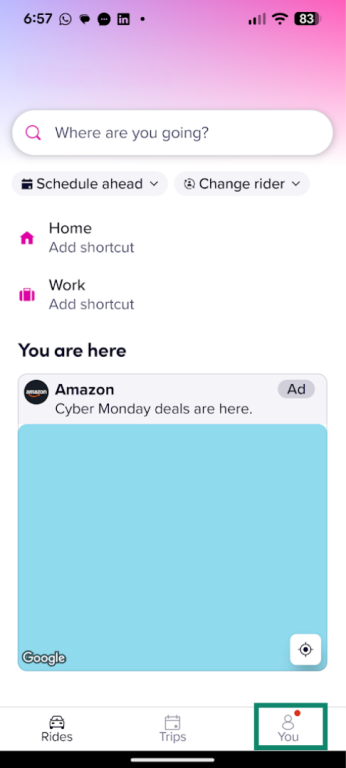
- Open the Lyft app, sign in, and tap You.
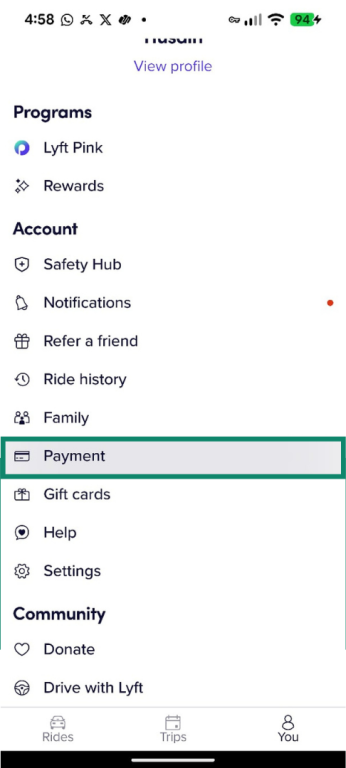
- Under Account, select Payment.
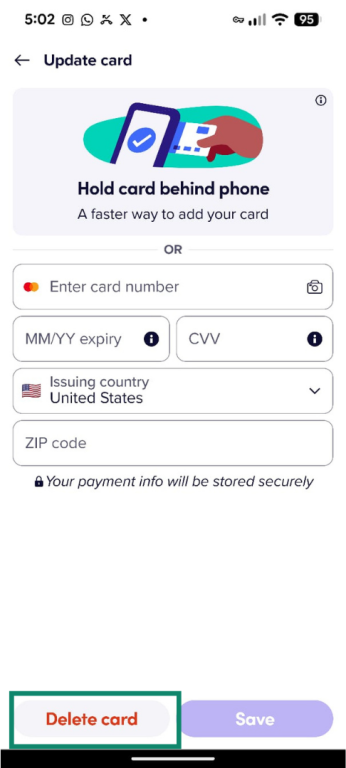
- You should see a list of your saved cards below Payment methods. Select the card you want to remove.
- Tap Delete card and confirm.
How to cancel Lyft Pink membership
If you have a Lyft Pink membership, you should cancel it before you delete your account. That way, you’ll avoid paying for benefits you won’t use.
You can cancel your Lyft Pink membership directly inside the app:
- Open the Lyft app and sign in.
- Tap your profile icon.
- Go to Lyft Pink, then tap Manage plan.
- Select Cancel plan to cancel your account.
After you cancel, you keep your Lyft Pink benefits until the end of the current billing period. You shouldn’t see new charges for the next cycle.
Why people may choose to delete Lyft
There are several reasons you might want to delete your Lyft account. Here are a few of the most common ones.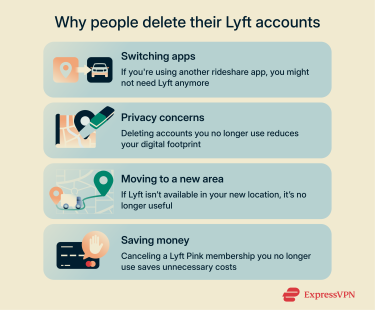
Switching apps
Another ride-sharing app might be cheaper in your area, have better driver coverage, or fit your routine better. If you now use a different service for all your trips, keeping an unused Lyft profile only adds to the number of apps on your device and the companies holding your trip and payment details.
Privacy concerns
Ride-sharing services can log sensitive information over time: pickup and drop-off locations, times of day you travel, and payment records linked to your identity. If you’re trying to reduce your digital footprint, deleting accounts you no longer need is a simple win.
Changing location
If you’ve moved to a place where Lyft isn’t available, the app won’t be useful anymore. You could ignore the account, but your information still lives on Lyft’s systems. When you know you won’t be able to use the service in your new location, deleting your account is a good idea.
Saving money
If you signed up for Lyft Pink or other paid perks and stopped riding regularly, you might be paying for benefits you no longer use. Deleting your Lyft account pushes you to review these extras. You should cancel any memberships before you close the account; then, once everything is shut down, you won’t face surprise charges from a service you no longer use.
Alternatives to Lyft
If you plan to close your Lyft account, it helps to decide what ride-hailing app you’ll use instead. There are many apps operating in this space, but availability depends on where you live.
Top ride-share apps you can try
Here are some of the main options you’ll find in many cities:
- Uber is the largest ride-hailing service and operates in thousands of cities worldwide. It offers a range of options, from basic rides to larger vehicles and premium tiers, so it’s the most common replacement when people stop using Lyft.
- Curb connects you with licensed taxi drivers through an app. You can request and pay for taxis from your phone, and it covers many major metropolitan areas in the U.S., including New York City, Chicago, and Los Angeles.
- Alto runs its own fleet of cars with employee drivers instead of contractors. It currently focuses on select U.S. cities like Dallas and Los Angeles and offers app-based rides with a more “managed” fleet experience.
Depending on where you live, you might see other regional ride apps or services. It’s worth checking which apps actually serve your home and usual routes before you delete your Lyft account.
FAQ: Common questions about deleting Lyft
Can I reactivate a deleted Lyft account?
No, once you’ve confirmed your deletion request, there’s no going back. Your account and data will be fully deleted, and if you decide to use Lyft again later, you’ll need to create a new account from scratch.
Will I be charged after I delete my Lyft account?
After account deletion, you shouldn’t be able to book new rides, and therefore you shouldn’t incur new ride charges. However, any rides taken before you requested deletion may still be billed, and if there are pending authorizations or unsettled charges, those may still be processed against your payment method, in accordance with Lyft’s Terms of Service. Before you delete your account, it’s a good idea to check your ride history and billing and to make sure there are no outstanding charges.
Could my data still be retained even after I delete my account?
Yes, while Lyft deletes personal information “to the extent required by applicable law,” the company also states that certain data may be retained to fulfill legitimate business, legal, or regulatory obligations.
Should you use a VPN to delete your Lyft account?
You don’t have to use a virtual private network (VPN) to delete your Lyft account. Lyft will process the request in the same way whether you connect over a normal network or through a VPN. The steps you follow and the result of the request stay the same.
That said, a VPN can deliver general privacy and security benefits. When you use public Wi-Fi, like in cafés, hotels, or airports, the network operator and other third parties may be able to see which domains you connect to and some unencrypted traffic. A VPN encrypts all your internet traffic, which makes it harder for anyone to monitor or interfere while you’re signing into Lyft, requesting your data, or completing the account removal process.
Take the first step to protect yourself online. Try ExpressVPN risk-free.
Get ExpressVPN
















 Support Center
  FAQ
FAQ  VPN Setup Tutorials


