How to delete an eharmony account: Everything you need to know before you click Delete


Whether you’ve found your soulmate and no longer need eharmony, or you’ve just found the dating service platform isn’t to your liking, deleting your account and canceling your subscription is a simple process.
In this guide, we’ll explain how to delete your eharmony account, the difference between deletion, cancellation, and hiding, and what happens after you click “delete.”
Quick start: Delete vs. cancel vs. hide
Before we start, here’s a quick explanation of what you can do with your eharmony account if you’ve decided you no longer need it:
- Delete: Removes your profile, including photos and connections, and deletes your account permanently from the platform. Note that if you have an active subscription, you need to cancel it first, because deleting your account won’t automatically cancel billing.
- Cancel: Stops the subscription and removes premium features, but doesn’t delete the account or hide your profile from other users.
- Hide: Hides your profile from public searches, but not from existing connections. It also doesn’t delete the account, and you can unhide it whenever you’re ready to come back.
Before you delete: What to check first
There are several things to consider before deleting your eharmony online dating account. If you have an active Premium subscription, you may need to cancel it before deleting your account. The cancellation steps will depend on where you purchased the subscription from (through the eharmony website or via a third party like Google Play Store). Make sure you cancel your subscription at least 24 hours before the renewal date to avoid a surprise renewal.
Another detail to consider is that deleting your account means losing your matches, photos, profile details, and messages. You might want to save any photos you uploaded and take screenshots of important conversations if you don’t want to lose them.
Lastly, account deletion is permanent on eharmony. This means you’ll have to create a new account from scratch if you ever want to return in the future.
What happens to your personal data after you delete your account?
Here's what happens to your personal data once you delete eharmony:
- Your profile and content are removed from active display and search visibility on the platform, and you can no longer access your account through the website or mobile app.
- Your profile stops appearing in searches and matches, and your messages and connections are no longer accessible through the service.
- The backend data may not be immediately erased, as, like most online services, eharmony reserves the right to retain information for legal, billing, fraud-prevention, or compliance purposes “for as long as necessary to fulfill the purpose for which it was collected.”
eharmony doesn’t specifically reveal how long it takes for an account to be deleted. However, after receiving a deletion confirmation, you won’t be able to access your profile, matches, or messages anymore.
How to cancel your eharmony subscription
Follow the steps below to cancel your eharmony subscription, using the same method that you subscribed with in the first place. Note that canceling stops future renewals, but it doesn’t provide a refund for the current billing period.
Cancel an eharmony subscription on the web
If you subscribed via the website, follow the steps below on your browser to cancel your subscription.
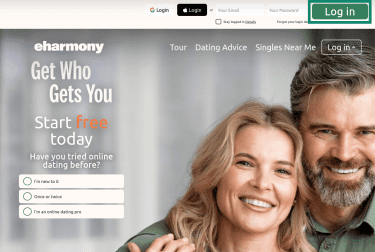
- Open eharmony’s website and select Log in.
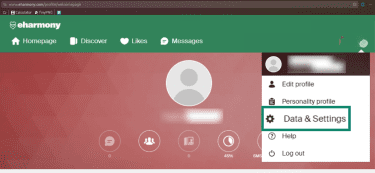
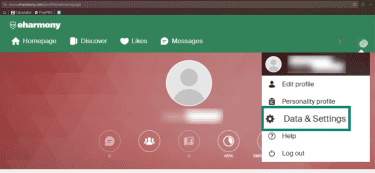
- Click on your profile picture and select Data & Settings.
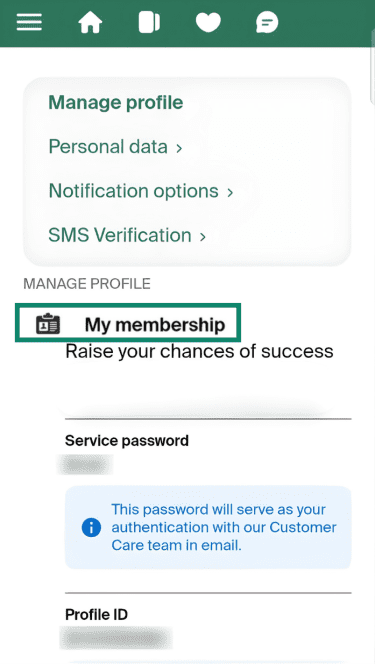
- You’ll find your subscription under the My membership section. Select it, and choose the Amend subscription option inside. Follow the steps to complete the cancellation process.
Cancel an eharmony subscription via the Apple App Store
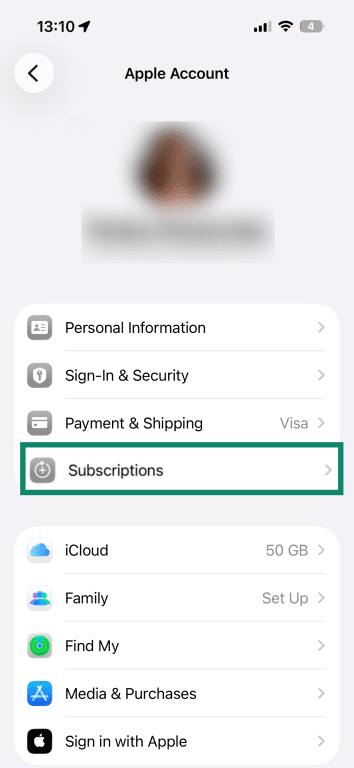
- In your Apple account settings, select Subscriptions. Then select the eharmony subscription.
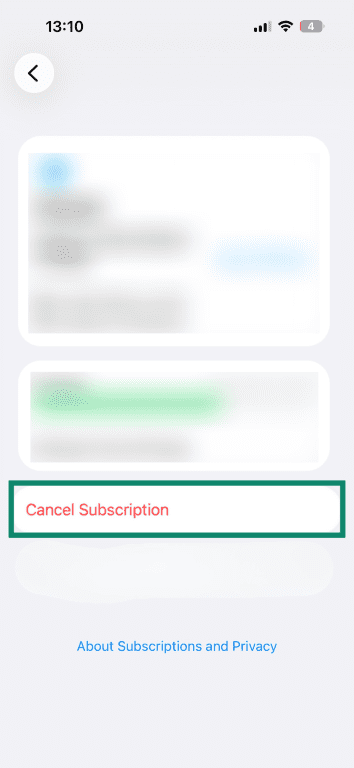
- Tap Cancel Subscription. A confirmation screen may appear, providing you with the expiration date and a confirmation button. Tap the button to confirm the cancellation.
Cancel an eharmony subscription via Google Play
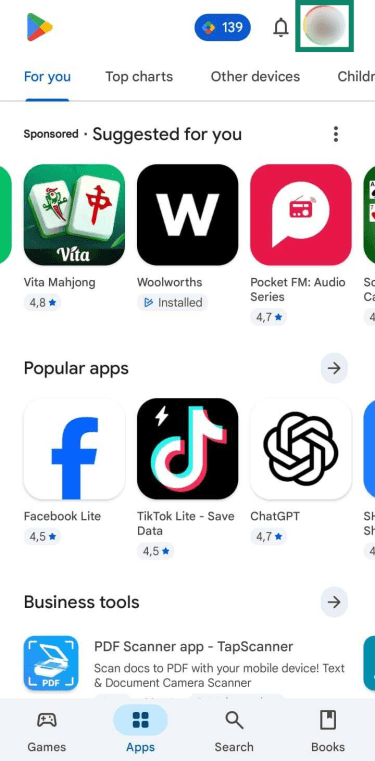
- On Google Play, tap your profile picture in the top-right corner.
- Select Payment and subscriptions.
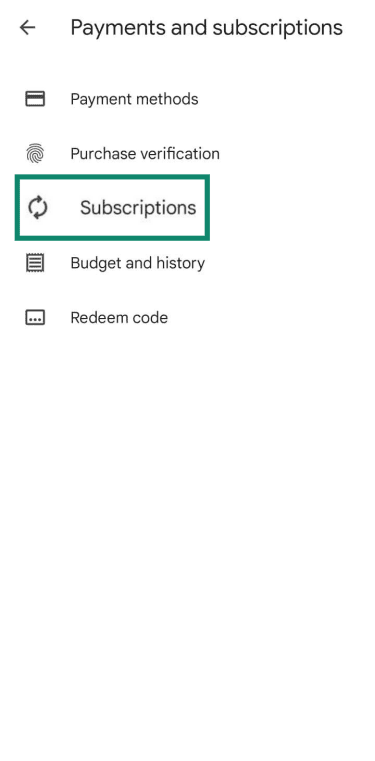
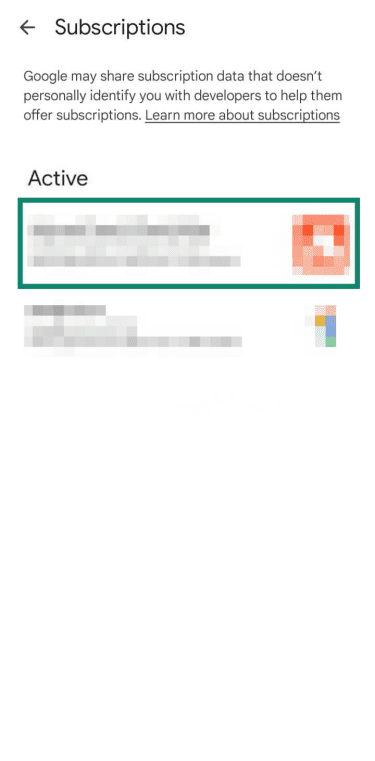
- Select Subscriptions.
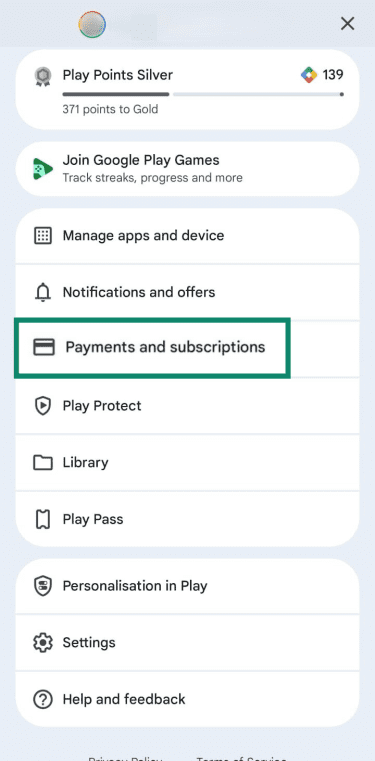
- Select your eharmony subscription.
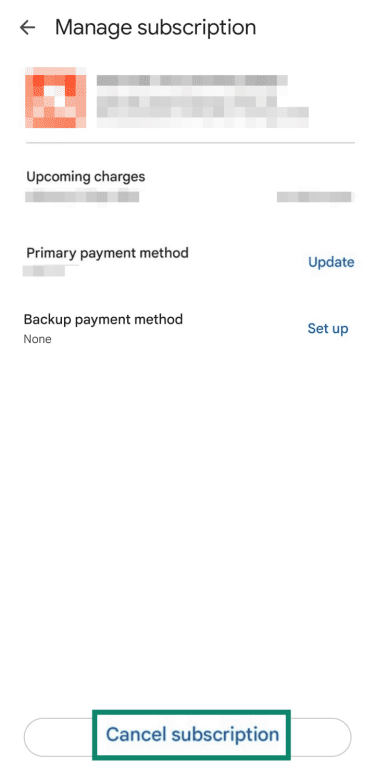
- Tap Cancel subscription.
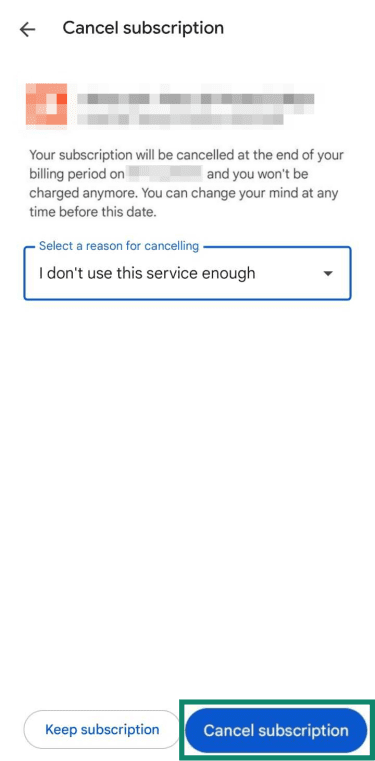
- Select a reason for canceling, and then tap Cancel subscription to confirm.
Can you get a refund after deleting your account?
eharmony’s Terms and Conditions don’t discuss refunds in connection with deleting your account. Instead, refunds are addressed in relation to canceling a premium subscription.
Refunds are generally not available. You can cancel your subscription at any time, but your access will continue until the end of the paid subscription term, and you will not receive a refund for any unused days.
If you purchased your subscription through an installment plan, cancellation also does not cancel your obligation to pay the full contractual amount. Your remaining payments will continue until the balance is paid in full.
Premium subscribers residing in certain U.S. states (including California, New York, Illinois, and others listed in the Terms) may cancel within three business days of purchase without penalty. Refunds under this policy are issued within 10 days after eharmony receives the written cancellation notice.
How to delete your eharmony account
To delete your eharmony account, follow the steps below, which are identical on your desktop computer and on the mobile app. Note that for these steps to work, you mustn’t have an active subscription. If your subscription is still active (meaning if there’s still time remaining, even if you’ve cancelled), you need to contact Customer Care to initiate the deletion process.
If your subscription has come to an end and you’re ready to fully delete your eharmony account, here’s how.
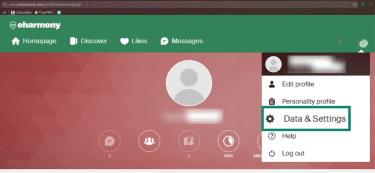
- Log into eharmony. Click on your profile picture in the top-right corner and select Data & Settings.
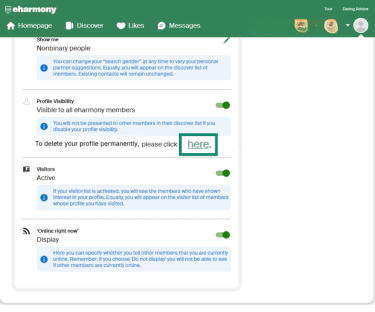
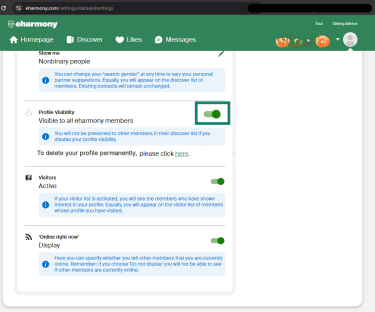
- Click here under the Profile Visibility section.
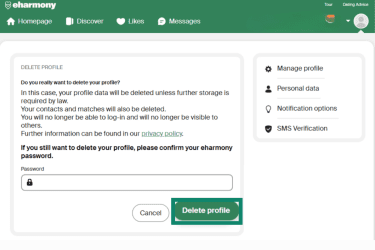
- Enter your password and click Delete profile in the Delete profile section.
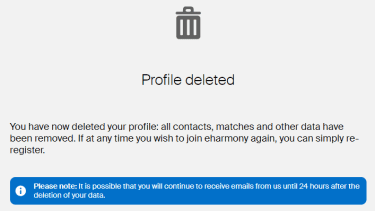
- You’ll see a confirmation of the account deletion on your screen.
Alternative to deleting: Hide your profile on eharmony
In case you don’t want to delete your eharmony account permanently, you have the option of hiding your profile from public searches and matches. This is also a good option in case you need to wait for the subscription period to end before deleting an account, but you don’t want to be publicly visible on the site.
Depending on your settings, you may continue receiving notifications from existing contacts or messages about account and billing activity. However, you won’t be publicly present and searchable on the platform anymore. Unlike with deleting your account, you have the option to return if you want to by unhiding your profile again.
How to make your profile invisible
- From your profile, click Data & Settings.
- Click the green slider under Profile Visibility to hide your eharmony profile from public users. Existing contacts will still be able to see your profile and contact you. A banner will also appear on your profile Home Page telling you that your profile is not publicly visible.
When hiding is a better option than deleting
Hiding your profile is sometimes a good option when you’re unsure about deleting the account and losing all the associated data, such as images uploaded, conversations with other people, and profile information. By hiding your profile, all your data remains intact, and your account isn’t taken down. You just won’t appear in public searches or receive any matches.
Troubleshooting: Why can’t I delete my eharmony account?
Here are some of the most common reasons you may not be able to delete your eharmony account, along with potential solutions:
- Forgotten password: If you forgot your account password, you can reset it by selecting “Forgotten password” on the login screen and waiting for a password reset email.
- No “delete” option: If you don’t see a “delete” option on the web platform or the mobile app, you may have to contact eharmony customer support and ask them to terminate your account.
- Active subscription still in place: If you’re a Premium member, you may not be able to delete your account until your subscription is no longer active. Check your membership status under “Data & Settings” and contact the Customer Care team if necessary to initiate the deletion process.
How to contact eharmony support
To contact eharmony customer support, you can use the platform’s Customer Care page, which requires you to be logged in. The official contact form is also available for any requests, and the official email address is support@eharmony.com.
Why delete eharmony?
You might consider deleting your eharmony account if you’ve found a partner or decided online dating is no longer for you. Some users also switch platforms if the matching experience doesn’t meet their expectations. But beyond dating outcomes, there’s another important consideration: your digital footprint.
Dating profiles often contain a high concentration of personal data: photos, location information, age, preferences, and private conversations. Even if you stop using the account, that data may remain stored on the platform. From a cybersecurity perspective, keeping unused accounts active increases your overall exposure surface.
Reducing your number of online accounts is a basic digital hygiene practice. Every active account represents:
- A potential target for data breaches.
- A possible entry point for account takeover attempts.
- Another dataset that could be stored, shared, or retained longer than you expect.
Online dating platforms are also frequent targets for scams and social engineering. Even inactive accounts can pose risks if passwords are reused elsewhere or if your information becomes accessible through a breach.
If your goal is to minimize long-term data retention and limit how much personal information is spread across the internet, deleting unused dating profiles can be a sensible step.
How to stay safe on dating apps like eharmony
If you’ve decided to keep your account after all (or migrate to another dating platform), taking proactive steps to protect yourself is essential:
- Hide your location: If the platform offers this feature, hiding your location can be a good precaution against stalking from other platform users.
- Block, unmatch, or report someone: The platform should let you easily unmatch, unfollow, block, or report someone who’s starting to harass you.
- Ensure the app has photo or identity verification: While there are privacy risks attached, photo and identity verification can make a dating platform safer by screening for fake profiles and ensuring user legitimacy.
- Control who can see your profile and contact you: Being able to hide your profile from public users and controlling who can contact you can often help keep you safe from unwanted contact or potential harassment on dating platforms.
- Minimize personal information on your dating profile: It might be risky to add your full name, address, location, workplace, or other sensitive information to your public dating profile. Even in private messages with potential matches, you should exercise caution about what you share. Scammers often try to collect sensitive information through seemingly harmless conversations, so it’s best to limit what you tell a new contact until you know them well.
FAQ: Common questions about deleting eharmony
How do I completely delete my eharmony profile?
Can I delete my eharmony account through a mobile app?
What happens to my personal data after I delete my eharmony account?
Can you reactivate an eharmony account?
Take the first step to protect yourself online. Try ExpressVPN risk-free.
Get ExpressVPN








 Support Center
  FAQ
FAQ  VPN Setup Tutorials


