How to protect your devices from bluesnarfing attacks


Bluetooth technology enables nearby devices to connect and communicate over short-range wireless connections. In rare cases, weaknesses in Bluetooth services or outdated implementations can allow data to be extracted from a device, an attack commonly described as bluesnarfing.
Even if it’s not an everyday threat, bluesnarfing is a useful reference point for understanding what Bluetooth can expose when security controls fail. This article outlines how bluesnarfing works, its realistic impact, and the best security practices to reduce exposure to potential Bluetooth threats.
What is bluesnarfing?
Bluesnarfing combines two words: “Bluetooth” and “snarf,” which is computer slang for copying data without the owner’s consent. It's a Bluetooth-based hack in which an attacker gains unauthorized access to a Bluetooth-enabled device, such as a laptop or phone, and extracts data without permission.
It typically exploits insecure configurations or firmware weaknesses that expose Bluetooth data services, enabling the attacker to retrieve sensitive information. Because it can occur without obvious prompts or alerts, bluesnarfing is often difficult to notice.
On modern systems, bluesnarfing is far less common thanks to stronger Bluetooth security defaults. However, it still matters in practice because legacy or unpatched devices, as well as some Internet of Things (IoT) or embedded hardware with outdated Bluetooth implementations, can remain vulnerable in real-world environments.
How bluesnarfing works
For a bluesnarfing attack to work, a device must first be Bluetooth-enabled and within wireless range. Because it is a proximity-based attack, attempts may be more feasible in places with many nearby devices (such as shopping malls, hotels, airports, and coffee shops).
Attackers scan for nearby Bluetooth devices, often those that are discoverable/connectable or (in the case of Bluetooth Low Energy (BLE)) those broadcasting via advertising, then identify potential targets based on what services or profiles appear to be exposed.
Bluesnarfing targets Bluetooth data-access features. An attacker may exploit known vulnerabilities or insecure configurations, historically often involving the Object Exchange (OBEX) protocol, which is used to transfer objects such as contact cards, calendar entries, or files between devices. When access controls are weak, these services can be abused to retrieve data without proper authorization.
If successful, the attacker typically extracts only the information exposed through those Bluetooth services (such as contact transfer or file/object sharing), rather than gaining full control of the device.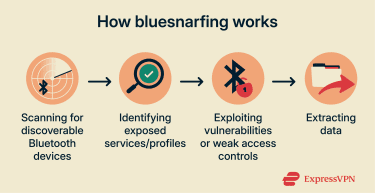
What data can be stolen?
During a bluesnarfing attack, hackers may extract various types of data exposed though Bluetooth services on the device:
- Personal communications and contact theft: This includes phone numbers, text messages, emails, and call logs. The retrieval only affects currently stored entries and doesn’t apply to deleted messages or incoming calls.
- Media files and other documents: Photos, videos, and documents may be accessible if file- or object-sharing services are exposed. In such cases, data loss can include critical information, such as scans of IDs or financial documents, which may be taken.
The extent of this data extraction depends on the type of Bluetooth device, its security settings, and device permissions.
Are Bluetooth devices vulnerable?
Vulnerability varies widely across device classes and implementations. Older Bluetooth devices dating back to around 2003, as well as long-lived embedded and IoT devices, are often higher risk because they may use outdated Bluetooth stacks, weak defaults, or permissive data-access features.
Modern smartphones, computers, and consumer gadgets generally enforce pairing, authentication, and encryption more consistently (including Secure Simple Pairing (SSP) in Bluetooth 2.1+ environments), but exposure can still increase when connecting to legacy peripherals or when settings are misconfigured.
Even current platforms have occasionally had Bluetooth flaws. For example, CVE-2020-0022 (BlueFrag) affected certain Android versions and could allow remote code execution over Bluetooth without user interaction. Apple’s CVE-2020-3843 involved a zero-click, radio-proximity memory-corruption flaw. Both issues were patched, illustrating why firmware and OS updates remain relevant.
Classic bluesnarfing is primarily a legacy issue, but the broader lesson still matters: Bluetooth security depends on device implementation and configuration. Real-world risk is often associated with older or low-cost peripherals and long-lived embedded/IoT hardware, such as some barcode scanners, knock-off wearables, GPS trackers, and inexpensive car accessories, because these devices may run outdated Bluetooth stacks, receive fewer updates, or expose data-access features more permissively.
Common symptoms of bluesnarfing
Bluesnarfing-style data theft can be difficult to spot because it may not produce obvious on-screen warnings. In many cases, there aren’t clear, Bluetooth-specific symptoms. This can mean:
- Limited visible pairing history: Some scenarios involve exposed Bluetooth services being accessed without a typical, user-noticeable pairing prompt. Depending on the device and OS, the activity may not appear as a new paired device in the usual Bluetooth list.
- No cellular data spike: Bluetooth transfers use short-range radio and don’t rely on a mobile data plan or an internet connection, so activity typically won’t appear in cellular data statistics.
- No outbound transfer history: Bluetooth history doesn’t typically include detailed logs of files sent from a device. Only an active Bluetooth notification shows the latest outgoing transfers. However, bluesnarfing doesn’t usually trigger these notifications.
- Subtle battery use: Bluetooth activity does consume power, but the impact may be small, especially with BLE configurations, making it hard to distinguish from normal background variation.
If information is exposed, the first noticeable indicators are often account- or transaction-related rather than Bluetooth-specific. Password reset emails, unexpected login alerts, repeated one-time code prompts, or accounts becoming inaccessible can indicate credential misuse. Unrecognized transactions or new payees can indicate attempted fraud using stolen personal or financial details.
These signs are not unique to Bluetooth-based attacks; similar outcomes can also result from phishing, malware, credential stuffing, or other forms of data theft.
How to protect against Bluetooth attacks
Several basic security practices can reduce your exposure to Bluetooth threats, especially if any devices in use are older, unpatched, or receive infrequent updates.
1. Disable Bluetooth when not in use
Keeping Bluetooth enabled, particularly in public places, can increase your exposure to Bluetooth-borne exploits. A simple risk-reduction step is to turn Bluetooth off when you don’t need it and switch it on only for specific tasks, like connecting headphones or other trusted accessories.
Disabling Bluetooth on Android
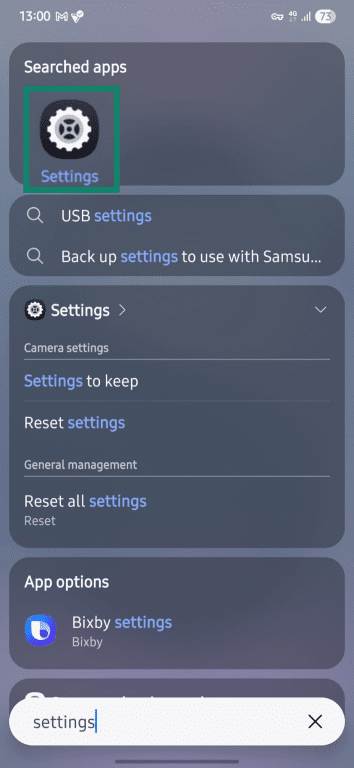
- Open Settings. You can swipe up and use the search bar.
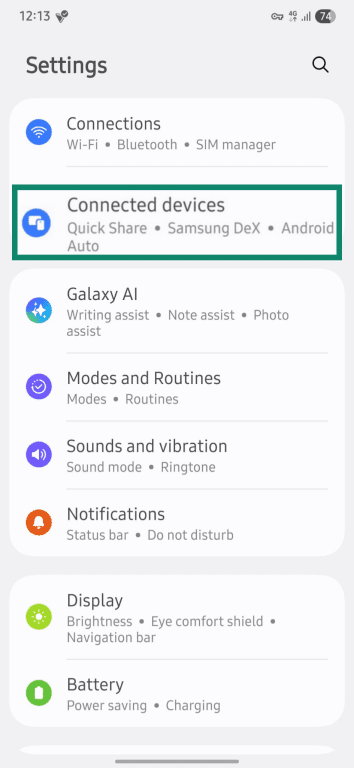
- Find the Connections or Connected devices option.
- Select the Bluetooth option from the list.
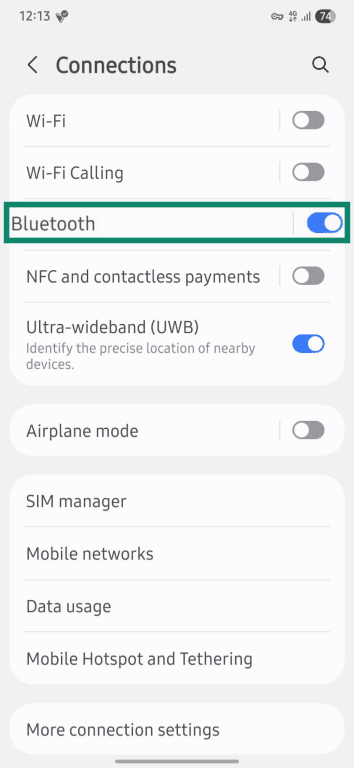
- Toggle Bluetooth off.
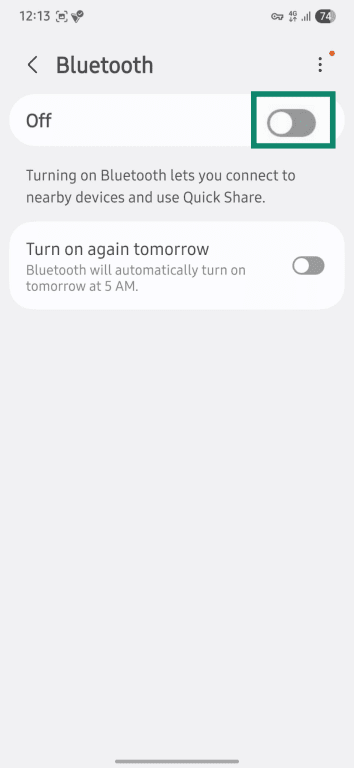
Disabling Bluetooth on iOS
- Open Settings. You can swipe down on the home screen and look it up.
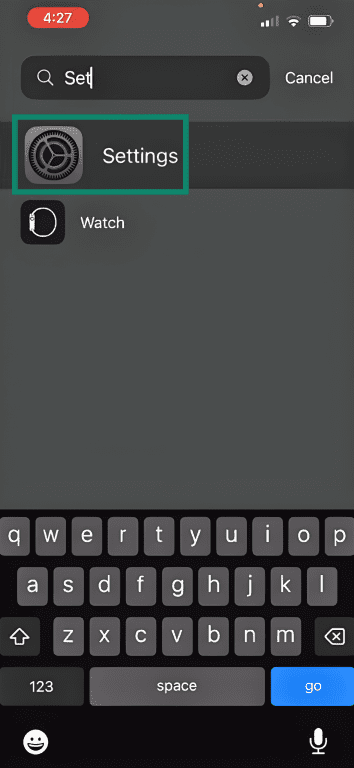
- Tap the Bluetooth option from the list.
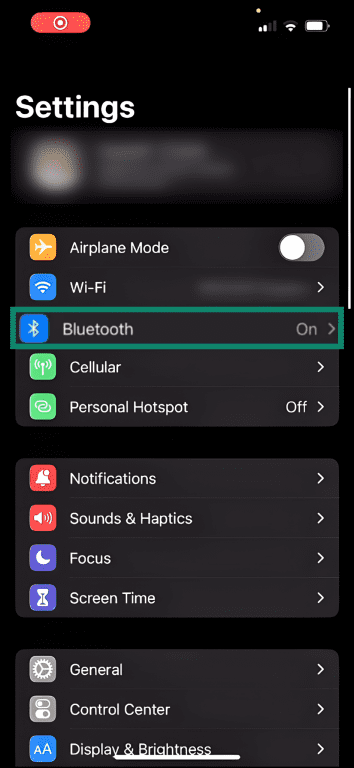
- Toggle off the setting so that it’s grayed out.

2. Avoid pairing in public
Public spaces are among the most common starting spots for Bluetooth and Wi-Fi attacks. Attackers choose high-traffic areas because of the high number of potentially vulnerable devices passing by.
On iPhone, the device is generally only discoverable for new Bluetooth connections while the Bluetooth settings screen is open (Apple instructs keeping the Bluetooth screen open to remain discoverable). On Android, visibility behavior varies by model and version, but devices are typically most visible during active pairing or sharing flows.
When pairing a new device for the first time, it’s best that you do so in a secure, private location. If pairing is needed in a public setting, treat any unexpected pairing request as suspicious and decline it unless it was initiated and the device is recognized.
3. Keep firmware updated
Periodic device updates help patch security vulnerabilities, including those in Bluetooth implementations. This extends to smartphones, gadgets, and computers. Regularly checking for or enabling automatic updates helps ensure the latest security fixes are in place, lowering the risk of Bluetooth, Wi-Fi, and other exploits.
4. Secure accounts with multi-factor authentication
Multi-factor authentication (MFA) turns login into a multi-step process, requiring not only a password but also two or more authentication methods (for example, fingerprints, PINs, security questions, or one-time codes). Many banking apps, cloud storage solutions, and mobile device accounts all have MFA options.
5. Use security apps
Bluetooth attacks that target radio or protocol-level weaknesses may not show up as a typical antivirus alert, especially if no traditional malware is dropped. Even so, authenticator apps and password managers can limit downstream damage by reducing reliance on SMS codes and by storing credentials in an encrypted vault with autofill. Avoid keeping passwords in notes, documents, or screenshots where they can be easily reused if exposed.
Real-world examples of bluesnarfing
One of the earliest documented examples of bluesnarfing happened in 2003, when security researchers Adam and Ben Laurie published findings about serious flaws in the authentication and data-transfer mechanisms of certain Bluetooth-enabled phones. Their work showed that some mobile phones at the time could expose phonebooks and other data without normal user interaction or pairing.
Subsequent research in 2004 by Martin Herfurt of Salzburg Research Institute highlighted the potential impact of public bluesnarfing attacks. In a CeBIT technology exhibition in Germany, Herfurt tested the safety of mobile phones; a total of 1,269 Bluetooth devices were successfully detected. Nokia 6310/6310i and Sony Ericsson T610 phones proved particularly vulnerable.
At the time, mainstream outlets also reported on the risk. In 2004, ABC News cited a Nokia spokesperson saying certain models, including the Nokia 6310, 6310i, 8910, and 8910i, could allow unauthorized Bluetooth data access under specific conditions.
These examples established bluesnarfing as a potential security risk. However, because such activity can be difficult to observe and verify externally, publicly documented incidents are limited, and many discussions rely on experimental research and white hat testing rather than confirmed real-world cases.
Bluesnarfing vs. other Bluetooth threats
Bluesnarfing vs. bluejacking
Bluesnarfing is a Bluetooth-based data theft technique that aims to extract sensitive information and may be difficult to notice. Bluejacking is more visible.
A bluejacking attack relies on anonymous, unsolicited messages sent to Bluetooth-discoverable phones. These spam messages might include inappropriate comments, pictures, phishing attempts, or malicious links. Data theft isn’t always involved, but hackers might still use this method to spread malware and extract information.
Bluesnarfing vs. bluebugging
Bluesnarfing typically targets data exposed through Bluetooth services (e.g., messages, calendar entries, call logs, or shared files).
Bluebugging uses Bluetooth vulnerabilities to gain command-level access over the targeted device. It takes control of multiple phone systems, allowing the attacker to intercept communications, initiate calls, and send messages. This hack is similar to a backdoor, because the attacker can also issue unauthorized commands to modify phone settings or enable services.
It’s worth noting that the classic bluebugging attacks that enabled this level of control are tied to very old Bluetooth implementations and aren’t considered a real-world threat on modern, fully patched devices.
FAQ: Common questions about bluesnarfing
What are the clear signs of a bluesnarfing attack?
Bluesnarfing attacks are typically undetectable, so there aren’t usually any unique signs to spot this hack. As the primary goal is data theft, the aftermath of a bluesnarfing incident is similar to that of other forms of data exposure.
Depending on what information was compromised, hackers may gain access to a victim’s online or banking accounts and attempt unauthorized logins and transactions. Sudden, unexpected texts or calls may also suggest data or identity theft.
How often should I secure my Bluetooth settings?
It’s a good idea to always stick to the most secure Bluetooth settings where possible. This includes turning Bluetooth off when idle and avoiding pairing in public spaces. Modern devices use the latest encryption standards to ensure strong connections. But installing new device updates regularly patches previously overlooked vulnerabilities for added protection.
Are older devices more vulnerable to bluesnarfing?
Yes, older devices are more vulnerable to bluesnarfing-style attacks, especially early Bluetooth-enabled phones from the early 2000s that exposed data services with weak or missing authentication. Newer devices typically implement stronger Bluetooth security standards, but may still carry other vulnerabilities, such as unpatched software or misconfigured security settings.
Can a virtual private network (VPN) protect you from bluesnarfing?
No, VPNs can’t protect against bluesnarfing. VPNs encrypt internet traffic between a device and the VPN servers, whether on Wi-Fi or cellular, but it doesn't secure Bluetooth connections or stop Bluetooth-based attacks. To reduce your exposure, keep Bluetooth off when you’re not using it and install device/firmware updates. Security tools like password managers and authenticator apps won’t stop bluesnarfing itself, but they can help limit downstream damage by protecting your accounts if sensitive information is exposed.
What are the legal risks of Bluetooth attacks?
Bluetooth attacks can create criminal and civil exposure because many legal systems treat them as unauthorised access to computer material/data and, depending on what the attack does, may also treat them as unlawful interception or unauthorised interference/modification. This can apply even when the attacker is only nearby, and no malware is installed. Exact definitions and penalties vary by country, so local law matters.
Take the first step to protect yourself online. Try ExpressVPN risk-free.
Get ExpressVPN

















 Support Center
  FAQ
FAQ  VPN Setup Tutorials


