How to identify and prevent backdoor attacks



A backdoor is a way to access a system outside normal login processes. It may be created intentionally for maintenance or troubleshooting, or unintentionally through insecure or flawed code.
A backdoor attack occurs when that access is used to bypass authentication and gain control of a system. Because it avoids standard login checks, this access can be reused to move through a network, retrieve data, or maintain a foothold over time.
This guide explains how backdoors operate at a high level, highlights common signs of unauthorized access, and outlines practical ways to reduce risk and limit exposure.
How backdoor attacks work
Backdoor attacks rely on a hidden access path that allows attackers to re-enter a system without going through normal authentication. Because this access bypasses standard security checks, it can be reused over time and may be harder to detect during routine monitoring.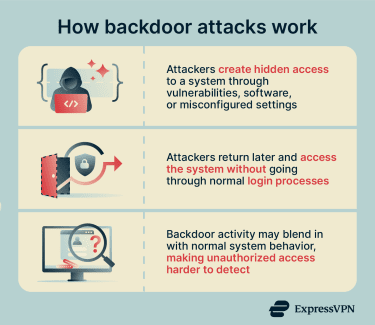
Attackers may introduce backdoors through malware or by exploiting vulnerabilities. Common techniques used in backdoor deployment include:
- Compromised updates or supply-chain attacks: Attackers insert backdoors into legitimate software updates or third‑party libraries, causing users to install them unknowingly.
- Stolen or hardcoded credentials: Attackers use leaked passwords, default logins, or credentials embedded in software to gain hidden access that appears legitimate.
- Web shells and server scripts: Small scripts are uploaded to compromised servers, allowing remote command execution through a browser or command line.
What attackers can do with a backdoor
Once a system is backdoored, attackers can interact with it without relying on normal access controls. They may access files, monitor activity, install additional tools, or use the system as a stepping stone to reach other devices.
Risks and impact of backdoor attacks
Backdoor attacks can have serious consequences for both individuals and organizations.
- Data theft and privacy breaches: Backdoor access can be used to copy databases, emails, credentials, and financial records. Because the access is hidden, large amounts of sensitive data may be exposed.
- Cyber espionage: Backdoors may be used for long-term monitoring of systems or communications without requiring direct access.
- Critical infrastructure disruption: In some cases, backdoors can be used to interfere with essential services such as power grids, water systems, transportation networks, or industrial control systems.
- Legal, financial, and reputational damage: Organizations may face regulatory penalties, lawsuits, operational downtime, and loss of customer trust, especially when sensitive data is exposed.
Types of backdoor attacks
Backdoor attacks come in several forms, depending on where the hidden access is placed and how it’s created. Some backdoors are introduced intentionally, while others appear due to mistakes or malicious actions. Each type poses unique challenges and can be harder to detect than traditional security threats.
Software-related
- Malicious software backdoors: Installed by attackers through harmful programs. They’re designed to remain hidden and blend in with normal system activity.
- Application-level backdoors: Embedded within specific software applications, granting unauthorized users access to or control over that particular program.
- AI backdoors: Allow attackers to introduce malicious trigger patterns that activate malicious or biased outputs, such as false predictions and erroneous decisions. They remain hidden within the AI model’s learning mechanism, making them difficult to detect.
System configuration
- Administrative backdoors: Often implemented as maintenance hooks or hidden administrative interfaces used for testing, troubleshooting, or recovery. These legitimate features can become critical vulnerabilities if left in production or discovered by attackers, as they typically bypass normal authentication and grant elevated privileges.
- Accidental backdoors: Result from incorrect system setup. Examples include default passwords, exposed services, or vital security settings that were never changed. While not intended to provide secret access, these mistakes can have the same effect.
- Cryptographic backdoors: Weaken encryption systems in ways that allow attackers to bypass protections. This may involve predictable keys, flawed implementations, or intentionally weakened algorithms that make protected data accessible without normal authorization.
Hardware and firmware
- Hardware backdoors: Exist below the operating system level and are embedded in physical components. These backdoors can be introduced during manufacturing or maliciously modified, potentially by insiders.
- Firmware backdoors: Reside between hardware and the operating system. These are malicious modifications made to the low-level software that controls hardware behavior, such as BIOS and UEFI. Because firmware loads before the operating system, these backdoors can be difficult to detect or remove.
How to detect a backdoor on your system
Detection typically involves reviewing anything out of the ordinary and looking beyond simple error messages or pop-ups.
The methods below can help identify potential backdoors. However, note that advanced or well-hidden backdoors may require specialized security tools to detect them.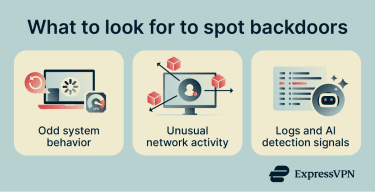
Look for odd system behavior
Unusual system behavior can be an early warning sign. Your device may experience high CPU load for no clear reason, freeze often, or restart unexpectedly. You may also notice malware-like behavior when programs open or close on their own or when system settings change without your input. Security features being disabled or blocked can also be a red flag.
Analyze network traffic for suspicious activity
Network traffic refers to data moving in and out of your system. A backdoor may communicate with external systems in the background, sending or receiving data without obvious user involvement.
Signs of trouble include constant data transfers when the device is idle or connections to unfamiliar locations. Tools that show basic network usage can help spot these patterns.
Review system logs and unauthorized processes
System logs are records of what your device does behind the scenes. They can show repeated login attempts, unexpected errors, or services starting without explanation.
Unauthorized processes are programs running in the background that you don’t recognize. If something is active but you can’t trace it back to software you installed, it may be worth a closer look.
Use AI-powered detection methods
Some security systems use machine learning to identify patterns that may indicate hidden access or malicious activity. Instead of relying only on known signatures, these tools look for behavior that deviates from normal system activity.
They can help surface subtle anomalies that traditional tools might miss, but their effectiveness depends on data quality, ongoing tuning, and how they’re integrated with other security controls.
Use tools for backdoor detection
Specialized security tools help detect backdoors by scanning files, processes, and system behavior for suspicious patterns. Many also monitor activity in real time and alert you when something unusual happens. Common tools used for backdoor detection include:
- Antivirus and anti-malware software: Checks files and programs on your device for known backdoors and suspicious behavior, including hidden processes or unauthorized access.
- Endpoint detection and response (EDR): Monitors endpoint behavior to identify hidden access, persistence mechanisms, and abnormal activity.
- Network intrusion prevention systems (NIPS): Analyze network traffic to detect suspicious connections, command-and-control (C2) activity, or data exfiltration.
How to remove a backdoor
Removing a backdoor means cutting off hidden access and restoring control of your system. Most backdoor detection tools also have features to remove the backdoor (or at least mitigate its effects). However, handling sophisticated backdoors may require manual methods to ensure full removal.
Steps to manually remove a backdoor
Manual removal is a hands-on approach and should be done carefully, as mistakes can cause data loss or leave the backdoor in place. It generally involves these steps:
- Disconnect the system: Temporarily cut off internet and network access to stop the backdoor from communicating or spreading, and take note of any active programs or connections.
- Look for persistence mechanisms: Check for anything that allows unauthorized access to restart automatically, such as unusual startup items, scheduled tasks, services, or unknown accounts and access keys.
- Stop and remove malicious components: End suspicious programs, remove related files or scripts, and revoke any unauthorized access.
- Update and scan the system: Apply all security updates and run full antivirus or endpoint security scans to catch anything that was missed.
- Verify the system is clean: Monitor system and network activity for a few days and perform another scan before reconnecting the system to normal use.
When a full system reinstall is necessary
If a backdoor affects core system components, such as through rootkits, kernel-level changes, or long-term compromise, it may not be possible to fully trust manual cleanup. In these cases, rebuilding the system from a known clean state is often the safer approach.
This is especially important for critical systems or environments with strict security requirements. Start from a trusted image, restore only verified data, and reset all passwords, keys, and credentials to reduce the risk of re-entry.
How to prevent backdoor attacks
Preventing backdoor attacks is mainly about reducing opportunities for hidden access. By focusing on basic protection habits and consistent oversight, individuals and organizations can make it much harder for attackers to slip in.
Harden your operating system and network
Hardening focuses on reducing your attack surface, meaning the number of ways a system can be accessed or interacted with. This includes turning off features you don’t use, removing unnecessary software, and limiting background services.
On a network level, it involves securing routers and firewalls so that only trusted connections are allowed. Reducing and controlling these entry points makes it harder for unauthorized access to be established or maintained.
Secure configuration and patch updates
Secure configuration means setting up systems correctly from the start. Default settings are often designed for convenience rather than security, so they should be reviewed and adjusted to minimize unnecessary access or exposure.
Regular patching and updates of all software, firmware, and hardware are equally important. Updates fix known vulnerabilities that attackers commonly exploit, reducing the number of exposed weaknesses in a system. Staying current with the latest patches helps reduce the risk that outdated software can be exploited for unauthorized access.
Train employees about social engineering
People are often the weakest link in security. Social engineering attacks trick users into giving access or installing harmful software without realizing it. Training helps employees recognize suspicious emails, links, and requests. When people understand common tricks, they’re less likely to make mistakes that open the door to backdoor access.
FAQ: Common questions about backdoor attacks
What is the purpose of a backdoor attack?
How can I tell if my device has been backdoored?
What is an example of a backdoor vulnerability?
Nullam interdum sapien nec neque egestas auctor?
What tools detect backdoor infections?
Take the first step to protect yourself online. Try ExpressVPN risk-free.
Get ExpressVPN