




2026 April 30
Version: 1.8.1
Our team’s been busy making meaningful improvements across the app. As of this release:
New features
- Alphabetical index bar on the logins list — tap any letter to jump directly to entries starting with that letter.
- Import your passwords from Dashlane, Bitwarden, and 1Password directly on iOS.
Improvements
- Search algorithm improvement.
- The X (formerly Twitter) icon is now displayed for X login entries.
- The app now shows a clear error message when you try to import a file in an unsupported format.
- Camera permission handling for adding 2FA to a login is now more reliable.
- Improved sign-in error messages.
- Minor text polish on the Settings screen.
Bug fixes
- Fixed a potential hang during biometric unlock.
- Fixed inconsistent navigation after changing your vault password.
- Fixed biometrics not being reset properly after changing your vault password on another device.
- Fixed an error that appeared when permanently deleting items already removed by another device or a previous sync.
- Fixed a login issue that could cause sign-in to fail.
- Fixed a crash that could occur during app startup.
- Misc. bug fixes and performance improvements.
2026 April 23
Version: 1.7.3
Our team’s been busy making improvements behind the scenes. As of this release:
- We’ve improved overall performance for a smoother experience.
- We’ve fixed authentication issues that could occur on certain networks.
2026 April 16
Version: 1.6.2
We’re continuing to refine your ExpressKeys experience. As of this release:
- You’ll now see website favicons for your saved logins, making it easier to find what you need at a glance.
- You can now choose your preferred app language in Settings.
We’ve also made a number of fixes and improvements:
- Improved biometric unlock reliability.
- TOTP codes are now properly imported from other password managers.
- Various performance improvements.
2026 April 10
Version: 1.5.6
Our team’s been busy making improvements and adding new features. As of this release:
- Accidentally deleted a login? No problem. Deleted entries are now moved to a Recently Deleted section, where you can recover them at any time.
- You can now use Swipe Actions to quickly manage your vault entries with new gesture controls.
- You can now back up your vault by exporting it as an encrypted ZIP file, and restore it whenever you need.
We’ve also made a number of fixes and improvements:
- Fixed crashes that could occur during autofill
- Fixed an issue where the app could get stuck while importing logins
- Improved biometric authentication reliability
- Fixed links not opening in the correct language
- Various small UI fixes and performance improvements
2026 March 27
Version: 1.4.3
We’ve got a packed release for you this week, full of fixes and quality of life improvements. Let’s start with the latter:
Improvements
- You can now browse your vault entries alphabetically with the new A-Z (and Z-A) sorting option. Just tap the A-Z icon for that alphabetical ordering.
- We’ve refreshed the look of the auto-lock settings screen for a cleaner layout.
- We’ve spruced up the in-app illustrations for a cleaner, friendlier look.
- Any handy hints you’ve dismissed will now stay out of the way when you relaunch the app.
- We’ve made some improvements to the color balancing in dark mode.
Fixes
- We’ve fixed an issue with the camera scan prompt not appearing when adding a credit card on a fresh install.
- We’ve fixed an issue with time-based one-time passwords and authenticator codes not importing correctly from third-party vaults.
- We’ve fixed an issue where the subscription expiry banner would appear incorrectly.
- We’ve fixed an issue where the biometric unlocking wouldn’t re-prompt you after a failed attempt.
- Squashed a few other minor bugs.
2026 March 21
Version: 1.4.0
In this release, we’ve:
- Fixed a rare bug that caused an incorrect “subscription expired” message to appear for some users.
- Made some general stability and performance improvements to the app.
2026 March 17
Version: 1.3.1
In this release, we’ve:
- Added in-app messages to provide handy hints on how to use ExpressKeys.
- Added the ability to delete multiple login items, secure notes, or credit cards at the same time. Tap Select in the top-right to use multi-select mode.
- Added context menus. Long press any login item, secure note, or credit card to see a quick menu of actions you can take, such as editing or deleting items.
- Implemented a handful of performance improvements.
2026 March 12
Version: 1.2.0
We’ve got a large release for you this time, with several new features and a host bug fixes and improvements.
What’s New
- Card Scanning: You can now scan your credit and debit cards with your iPhone’s camera to fill in card details automatically.
- PIN Storage for Cards: You can now save a PIN alongside your credit cards.
Fixes and Improvements
- Fixed an issue where Face ID was triggered twice when reopening the app.
- Fixed an issue with auto-lock not triggering correctly for timed options (e.g. 1 minute, 5 minutes).
- Fixed the biometric setup prompt reappearing after a user had already declined it.
- Fixed the authenticator card disappearing when the device was offline.
- Fixed a generic error message shown when entering an incorrect vault password.
- Improved autofill compatibility with web-based apps.
- The ExpressKeys app now works even if you’re offline.
- Various performance and stability improvements.
2026 February 21
Version: 1.1.2
- We’ve fixed an issue with the authenticator action button.
2026 February 20
Version: 1.1.1
Today’s release brings a wave of improvements, including:
- A new dedicated section on the home screen for viewing and managing 2FA codes. Login entries with TOTP secrets appear in the Authenticator category with live countdown timers.
- A revamp of the vault refresh algorithm.
- A redesign of the Appearance settings menu.
- Performance improvements and minor bug fixes.
2026 February 12
Version: 1.0.5
In this release, we’ve:
- Fixed a display issue with Secure Notes.
- Improved the color coding of the logins.
- Made some general improvements to the UI.
- Made general performance improvements.
2026 February 5
Version: 1.0.3
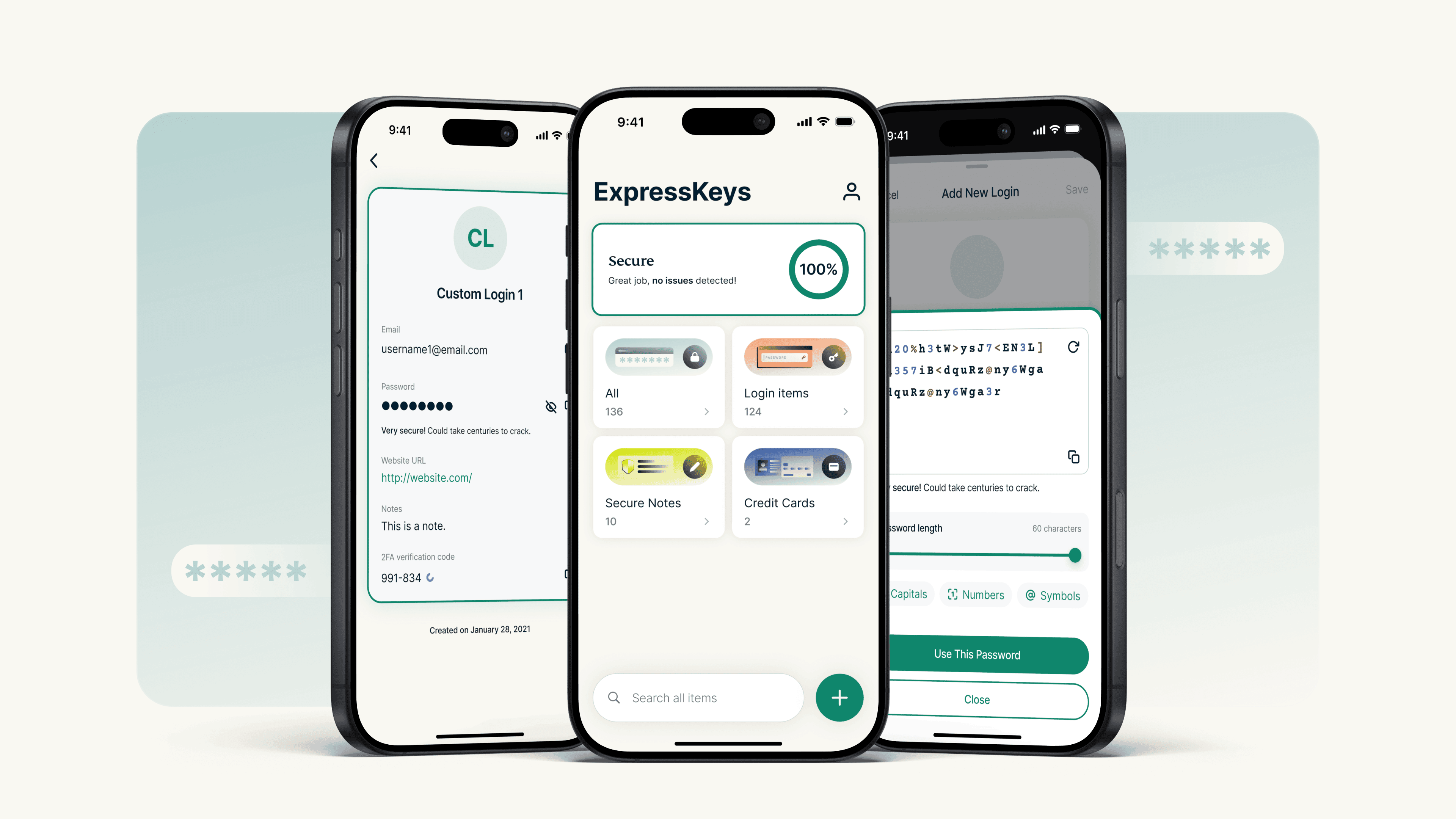
Meet ExpressKeys. We’ve moved your passwords into their own dedicated app. It’s the same security you trust, now with a home designed purely for your logins.
Here’s what’s new:
- New standalone app: A dedicated space for your credentials, separate from your VPN, for faster access and better organization.
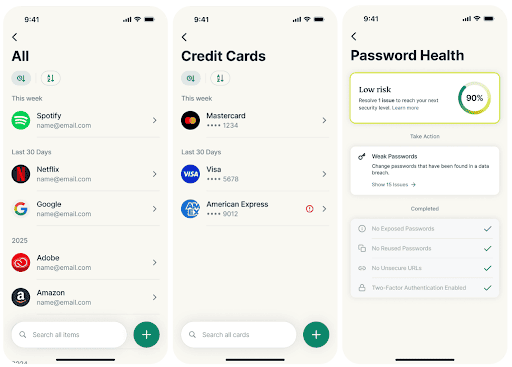

- Redesigned interface: A clean, new dashboard built specifically for managing logins, credit cards, and secure notes.
- Seamless migration: Log in with your ExpressVPN account, and your existing vault (passwords, credit cards, and notes) will sync instantly.
- Password health: A new dashboard that identifies weak, reused, or compromised passwords and helps you fix them.
- Easy import and export: Quickly bring in stored logins from other password managers or export your information whenever you need.
- Protection beyond passwords: Securely store more than just logins—save your credit cards and private notes in your encrypted vault.
- Biometric unlock: Securely access your vault in seconds using FaceID or Fingerprint.
- Built-in authenticator: Generate 2FA codes directly within the app for supported accounts.
- Smart autofill: Automatically detects and fills password fields across apps and websites.
- Password generator: Create strong, unique passwords with customizable options directly from the new home screen.
Need help? Learn more about the ExpressKeys standalone app and how to migrate your data in the ExpressKeys Support Center.