Expressvpn Glossary
Web server
What is a web server?
Web servers are a vital component of the internet. Their main function is to make websites and online services accessible to the general public. They achieve this by hosting website data and responding when clients (such as browsers and apps) request information.
How does a web server work?
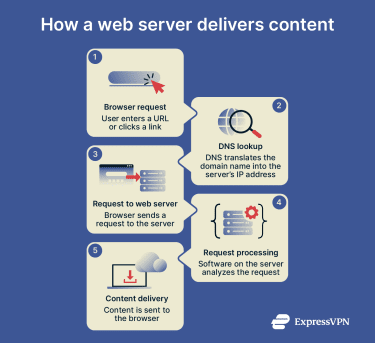 Here’s what happens when a user visits a website, and how web servers fit into that process:
- Browser request: A user types a website address into their browser or clicks a link.
- Domain Name System (DNS) lookup: The browser queries the DNS, which translates the relevant domain name into an IP address.
- Request to web server: The browser sends a request to the web server’s IP address, specifying the desired content. If HTTPS is used, this request (and the eventual web server response) is protected in transit with encryption.
- Processing the request: The web server’s software receives the request and identifies the requested data. Static data like HTML is prepared for direct delivery, while dynamic content is forwarded through an application server, which may interact with a database.
- Response sent to browser: The web server responds with the requested content, sending it back through to the user’s browser.
Why are web servers important?
Web servers play a critical role in keeping the internet accessible and efficient, and they contribute to online security. Here’s how:
- Provide access to online content: Web servers play a key role in delivering websites, applications, and cloud-based services to users.
- Manage traffic efficiently: Capable of handling thousands of simultaneous requests, web servers are able to maintain consistent performance even during high-traffic periods.
- Protect sensitive data: Web servers help keep sensitive information private by encrypting data in transit with HTTPS.
- Control access to resources: By managing user permissions and interactions, web servers can control what data and systems are accessible to each user.
- Support scalability: Web servers are able to share workloads across multiple servers, making them highly scalable and capable of supporting busy websites.
Types of web servers
Web servers come in various forms, with each type having its own strengths:
- Apache: Open-source servers notable for their modular design, wide compatibility, and flexibility.
- Nginx: Lightweight and efficient servers that can handle high traffic volumes while minimizing latency.
- Microsoft IIS: Windows-based web servers that integrate with other Microsoft technologies.
- LiteSpeed: Performance-optimized server software designed for efficiency and compatibility with Apache configurations.
Web server security best practices
To mitigate the risk of cyber attacks and maintain consistent performance, reputable organizations with web servers may follow these practices:
- Up-to-date software: By installing the latest security patches for their servers’ OS, web server, and any other installed software, organizations can ensure known vulnerabilities are closed before they are exploited.
- Firewalls and distributed denial-of-service (DDoS) protection: Firewalls can be combined with DDoS mitigation tools to block unauthorized traffic and prevent the network from being overloaded with malicious traffic.
- Transport Layer Security (TLS) encryption: This measure protects data as it travels between users and web servers, preventing sensitive information from being intercepted.
- Disabling of unused ports and modules: Network entry points can be reduced by keeping only essential services active and disabling the rest.
- Access controls: Admin access can be limited to trusted users, while complex passwords and multi-factor authentication (MFA) can protect against brute-force and credential-stuffing attacks.
Further reading
- What is cybersecurity? A simple guide for beginners
- What is a firewall & how does it work
- VPN vs. antivirus: Key differences and which one you need
FAQ
What is the difference between a web server and an application server?
Application servers come into play when dynamic content like shopping carts, real-time feeds, or API responses is requested. It’s common for a web server to forward a request for such content to an application server, which then processes the request and prepares the content. This is then usually sent back to the web server, which forwards it on to the user.
 Support Center
  FAQ
FAQ  VPN Setup Tutorials


