
Expressvpn Glossary
Web filter
What is a web filter?
A web filter is a software tool or service that monitors and restricts access to websites or online content based on predefined rules. Web filters can block specific websites by address or entire categories of content, such as adult material, gambling sites, social media platforms, or known sources of malware.
How does a web filter work?
When a user attempts to visit a website, the web filter intercepts the request before it reaches the destination server. It checks the destination against a set of rules, blocklists, or content categories. If the site is flagged, access is denied, and the user typically sees a block page. If it is permitted, the request goes through normally.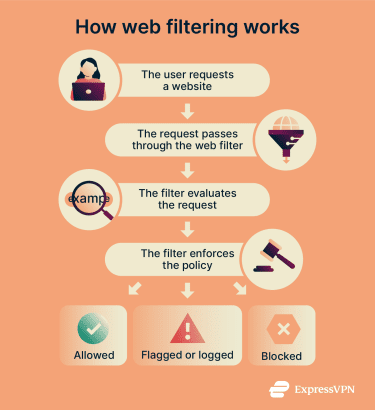
Types of web filtering
Web filtering can work at different layers of the network stack, including:
- Domain Name System (DNS) filtering: Blocks or alters responses to DNS lookups, which translate domain names to IP addresses, to prevent access to websites.
- Reputation-based filtering: Blocks or restricts access to domains or websites based on threat intelligence and reputation databases that track known malicious or suspicious sources.
- URL filtering: Controls access to specific web addresses or pages.
- Keyword filtering: Allows or denies access based on keywords found in URLs or pages.
- Proxy-based filtering: Uses an intermediary server to evaluate requests and enforce access rules.
- Content filtering: Analyzes webpage content, metadata, or reputation data, often using algorithms or AI, to detect and restrict non-compliant material.
Why is a web filter important?
A web filter can be a defense against web-based threats. By blocking access to known phishing domains, malware distribution sites, and suspicious content, web filters reduce the likelihood of ransomware infections, credential theft, and data breaches.
Beyond security, web filtering helps enforce acceptable use policies, reduce legal liability, and maintain network performance by limiting access to high-risk or bandwidth-heavy services. In regulated environments, it can also support compliance requirements by restricting access to inappropriate or unlawful content.
Where is it used?
Many businesses, institutions, and individuals use web filters. The most common use cases include:
- School networks: Learning institutions use web filtering to ensure students don’t access distracting or inappropriate websites.
- Workplace environments: Companies enforce web filters to boost employee productivity, support compliance, and protect internal networks from cyberattacks.
- Home setups: Parents use web filtering, often through parental control tools, to block inappropriate content and manage children’s screen time.
- Public networks: Publicly available Wi-Fi networks use web filters to help protect guest users and optimize network performance.
Risks and privacy concerns
While web filters improve security, they can introduce important trade-offs:
- False positives: Web filtering tools may sometimes block access to safe and legitimate websites.
- Privacy issues: Some enterprise filters decrypt and inspect HTTPS traffic, which can expose personal data and reduce the privacy normally provided by encrypted connections.
- Data collection: Certain filtering solutions log detailed browsing activity, and depending on policy or jurisdiction, that data may be stored or shared beyond simple enforcement purposes.
Further reading
- How to control internet access at home
- How to block a website on any device or browser
- DNS security: How to protect your network from DNS threats
- The ultimate guide to phishing detection







