Expressvpn Glossary
Remote Desktop Protocol (RDP)

What is Remote Desktop Protocol?
Remote Desktop Protocol (RDP) is a protocol created by Microsoft that allows one device to connect to and control another over a local network or the wider internet.
How does Remote Desktop Protocol work?
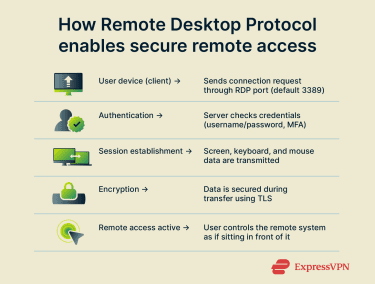 To use RDP, a user opens an RDP client and connects to a remote device by entering its IP address or hostname. The remote device then verifies the user’s credentials. Once authentication is complete, the RDP client establishes a dedicated Transmission Control Protocol (TCP) / Internet Protocol (IP) channel over port 3389 (if the default port is used).
Through this channel, the client and the remote device exchange screen, keyboard, and mouse data, allowing the user to operate the remote system. This communication is encrypted with Transport Layer Security (TLS) to protect sensitive information and prevent unauthorized access.
Common uses of RDP
- Accessing workplace computers from home or while traveling: RDP enables hybrid and remote work by allowing employees to remotely connect to and control their workplace computer and other important devices needed to perform their duties.
- Providing remote IT support and troubleshooting: IT staff can use RDP to diagnose and resolve issues on a user’s device remotely, allowing for faster and more agile support systems.
- Managing servers or cloud-based virtual machines (VMs): System administrators can maintain servers or cloud-hosted VMs remotely, enabling off-site updates, performance monitoring, and configuration.
- Collaborating with colleagues: Team members can have access to shared applications or systems from any location, supporting real-time collaboration across remote workforces.
Common RDP vulnerabilities
- Exposed RDP ports open to the internet: The default RDP port is widely known, and leaving it accessible from the public internet increases the likelihood of malicious scanning or probing attempts.
- Weak or reused passwords: Insufficient password strength or credential reuse increases the risk of successful brute force and credential stuffing attacks.
- Unpatched vulnerabilities: Unpatched or legacy RDP versions can contain critical vulnerabilities. This can include BlueKeep (CVE-2019-0708), an exploit that allows for remote code execution on a system without the need for user authentication.
Security and privacy considerations
To keep RDP connections secure and private, individuals and organizations may employ the following practices:
- Network Level Authentication (NLA): Enabling NLA means users must log in before the RDP session starts. This ensures only authorized users can initiate a session.
- Use of a remote-access virtual private network (VPN): By keeping the remote devices on the same local network, and then deploying a remote-access VPN server to secure that network, it’s possible to ensure that remote devices aren’t exposed to the public internet. This prevents cybercriminals from being able to scan for the network’s open RDP ports and stops them from brute-forcing or credential-stuffing RDP logins. It also requires users to use a remote-access VPN client to connect, which further secures their RDP connection with another layer of encryption.
- Enforcing strong passwords and multi-factor authentication (MFA): To minimize risk, RDP passwords can be made long, unique, and difficult to guess. Enabling MFA adds an extra layer of protection that can help keep remote devices secure even if the relevant password is compromised.
- IP restrictions and RDP port management: A firewall can be used to block incoming traffic from unknown IP addresses on the RDP port, only allowing trusted IPs through. It’s also possible to disable the port entirely when it’s not in use.
- Monitoring of RDP logs: Failed connection and/or login attempts can indicate suspicious behavior. Taking proactive steps to action such behavior can be beneficial to overall RDP security.
- Regular operating system and RDP client updates: Updates often close security gaps that could otherwise be exploited by cybercriminals.
Alternatives to RDP
- Virtual Network Computing (VNC): A cross-platform screen-sharing system designed to let users view and control another computer remotely.
- Secure Shell (SSH): SSH is a secure, encrypted protocol for remote command-line access, commonly built into Linux and macOS and often used to manage servers and network devices.
- TeamViewer / AnyDesk: Commercial remote-access tools that provide built-in encryption, low-latency connections, and features like file transfer, session recording, and remote printing.



