Expressvpn Glossary
Random Access Memory (RAM)
What is Random Access Memory (RAM)?
Random Access Memory (RAM) is a type of volatile computer memory that temporarily stores the data devices need to perform tasks like running apps and loading web pages. Though mostly associated with computers, RAM is also used in phones, gaming consoles, smart TVs, and other electronic devices.
How does RAM work?
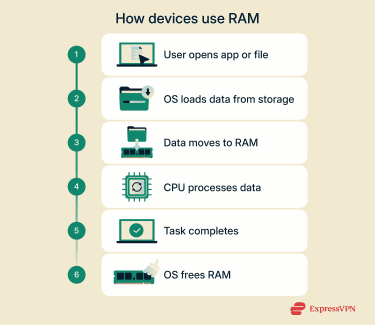 When a device opens a program or file, the operating system loads the necessary data into RAM so the processor can access it quickly. Compared to other forms of data storage, RAM delivers information at vastly faster rates. By using RAM, apps and tasks can run more smoothly.
RAM temporarily holds the data a processor needs. This facilitates better performance as data does not need to be constantly retrieved from storage. The more RAM a device has, the more tasks it can handle simultaneously and the quicker it can do them.
Because RAM is volatile memory, all stored information disappears when the device is turned off or restarted.
Types of RAM
There are different varieties of RAM designed for specific uses. The main types include:
- Dynamic RAM (DRAM): The baseline variety of RAM, DRAM stores each bit of data in a capacitor that must be refreshed thousands of times per second to retain information.
- Static RAM (SRAM): Faster, more reliable, and more expensive than DRAM, SRAM doesn’t need to be constantly refreshed and is generally used in smaller quantities.
- Synchronous DRAM (SDRAM): Standard in newer devices, SDRAM works in sync with the CPU’s clock speed, which supports more efficient data transfer.
- Double Data Rate (DDR) RAM: A modern version of SDRAM, DDR RAM transfers data on both the rising and falling edges of the clock signal, doubling throughput. Versions like DDR4 and DDR5 are standard in most computers and devices today.
Why is RAM important?
RAM is essential for fast, efficient computing. It determines how many applications a system can run at once and affects how quickly programs open, respond, and switch between tasks.
Sufficient RAM improves performance in memory-intensive activities like gaming, video editing, and data processing. It also helps browsers and operating systems run smoothly by keeping frequently used data ready whenever it is needed.
Modern operating systems use features like memory encryption and isolation to protect sensitive data stored in RAM. Memory encryption prevents unauthorized parties from reading data directly from memory, while isolation keeps applications separated so that they can’t be read or modified by each other.
RAM vs. ROM: What’s the difference?
While RAM handles short-term data for active processes, Read-Only Memory (ROM) stores permanent instructions that help devices start up and function properly.
| RAM | ROM | |
| Function | Working memory for running programs and loading data | Permanent memory for startup and system software |
| Volatility | Volatile, erased when power is off | Non-volatile, retained between shutdowns |
| Read/Write | Data can be both read and modified by the system | Read-only during normal operation |
| Speed | Much faster, supports multitasking | Slower, designed for persistence |
| Capacity | Larger (usually measured in GB) | Smaller (usually measured in MB) |
Security and privacy considerations
RAM may temporarily contain sensitive information while a device is running, so it can be a target for threat actors. In everyday use, a device’s RAM may contain passwords, encryption keys, and other kinds of sensitive information.
Restarting or shutting down a device clears this data from memory. It may be technically possible for a skilled person with the right tools to recover RAM data around the time of shutdown, but this is not a concern on modern devices. Many newer systems also use features like memory encryption and secure shutdown processes to protect information stored in RAM from such attacks.
Further reading
- VPN vs. antivirus: Key differences and which one you need
- What is a firewall, and how does it work?
- What is cybersecurity? A simple guide for beginners
FAQ
What does “random access” mean?
The ”random access” in Random Access Memory (RAM) refers to the fact that a computer can quickly find and use any information stored in this type of memory in a roughly equal amount of time. This makes RAM much faster at reading and writing data than other types of memory.
How much Random Access Memory (RAM) do I need for my computer?
The amount and type of RAM needed depend on what the computer is used for. Around 4GB is enough for basic tasks such as general browsing and video streaming. 8GB might be suitable for multitasking, but intensive tasks like gaming or video editing could require as much as 32GB to run smoothly.
Is RAM a type of storage?
Yes, but it’s different from the long-term storage used by hard drives or SSDs. RAM holds data temporarily while a device is running and erases it when powered off. This is known as volatile memory.
Can Random Access Memory (RAM) affect internet speed or performance?
RAM doesn’t directly change internet speeds, but having more memory improves overall system performance. Sufficient RAM allows multiple applications, browser tabs, and background services to run smoothly without slowing down. It also helps memory-intensive tasks perform more efficiently, such as gaming or video editing.