Expressvpn Glossary
IP packet
What is an IP packet?
An IP packet (or datagram) is the fundamental unit of data transmitted by the Internet Protocol (IP) between hosts. It contains a source and a destination IP address to identify the data’s origin and target.
The IP treats each packet as an independent unit and transmits it inside link-layer frames, such as Ethernet frames, across networks.
IP packet structure
An IP packet consists of a header and a payload. The header is used for routing and control information, and the payload carries the data. Although IPv4 and IPv6 share this basic format, they are structured and handled differently.
| IPv4 | IPv6 | |
| Address size | 32-bit | 128-bit |
| Header size | 20–60 bytes (variable) | 40 bytes (fixed) |
| Length specification | Total length (header and payload) | Payload length (payload only) |
| Upper-layer identifier | Protocol | Next Header |
| Lifetime field | Time to Live (TTL) | Hop Limit |
| Checksum | Present (header only) | Removed |
| Optional fields | Options in the main header | Separate extension headers |
| Fragmentation | By the sender and routers | By the sender only (routers drop oversized packets) |
How does an IP packet work?
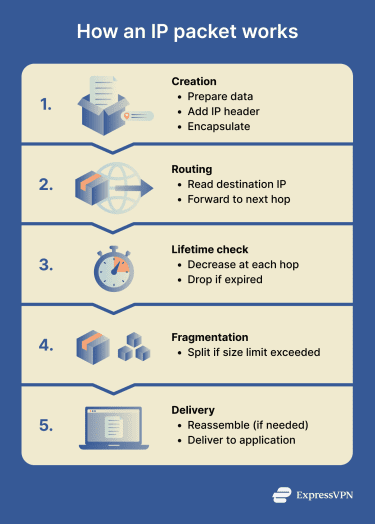 Creation: The sending host's IP layer adds header fields and encapsulates transport-layer data, such as the Transmission Control Protocol (TCP) segment or the User Datagram Protocol (UDP) datagram. It then passes it to the link layer.
- Routing: During routing, a router inspects the destination IP address in the incoming packet, searches its routing table for a matching entry, and forwards it to the next hop.
- Lifetime check: Routers decrement TTL (IPv4) or Hop Limit (IPv6) by 1 (or more); if it reaches 0, the packet is dropped.
- Fragmentation: If the packet exceeds the path’s Maximum Transmission Unit (MTU), IPv4 allows routers to fragment (if the Don’t Fragment (DF) flag is unset); IPv6 requires the sender to fragment using Path MTU Discovery.
- Delivery: The receiver reassembles fragments (if any) and passes the payload to the indicated upper-layer protocol.
Types of IP packet delivery models
- Unicast: Delivered to one specific interface.
- Multicast: Delivered to all interfaces in a group (one-to-many).
- Anycast: Delivered to the nearest of several interfaces sharing the same address (one-to-nearest, based on routing metrics).
Why is an IP packet important?
IP packets enable communication across networks by providing:
- Interoperability across Ethernet, Wi-Fi, and cellular networks.
- Support for higher-layer protocols such as TCP, UDP, and Internet Control Message Protocol (ICMP).
- A standard structure for addressing and routing data between devices.
- Compatibility with security protocols such as Internet Protocol Security (IPSec), which can add encryption and authentication.
- Support for network diagnostics and troubleshooting, such as reachability tests and path discovery.
Where is it used?
Because IP packets are used to transfer data between devices across networks, they are involved in activities such as web browsing, wireless and mobile communication, network diagnostics, and real-time online applications like streaming and gaming.
Risks and privacy concerns
IP packets carry useful information, but some of that information can also be observed, analyzed, or misused under certain conditions.
- Headers can expose source and destination IP addresses, ports, and protocols.
- Traffic analysis may infer behavior from patterns (e.g., packet sizes, timing, and frequency), even if encrypted.
- Deep packet inspection (DPI) examines the data and metadata from IP packets as well as their header contents.
- Source IP addresses can be spoofed.
- Fragmentation or MTU mismatches cause packet drops or inspection complications.
Further reading
- Dynamic MTU: How we fixed a common cause of browsing problems
- What is packet loss? Everything you need to know
- What is IPsec? How this security protocol protects your network




