
Expressvpn Glossary
DNS cache

What is a DNS cache?
A Domain Name System (DNS) cache is a temporary database that stores DNS records in a browser, OS, router, or recursive DNS server to skip the full DNS lookup process. This reduces loading time on repeat site visits and reduces traffic on the network.
Where is the DNS cache stored?
DNS records, including the IP addresses of recently visited domains, are stored in local and network-level caches:
- Browser DNS cache: Web browsers (e.g., Chrome, Firefox) may maintain their own internal cache to resolve requests quickly.
- OS DNS cache: The OS (e.g., Windows, macOS, Linux) keeps a DNS resolver cache that stores the results of the last lookups.
- Router DNS cache: A local network router may cache DNS answers if it runs a DNS forwarder or resolver for the network.
- Recursive DNS server cache: An internet service provider (ISP) or a public DNS provider (e.g., Google, Cloudflare) maintains a cache to speed up requests for its entire user base.
How does a DNS cache work?
The DNS caching process follows a hierarchical sequence to connect to a website: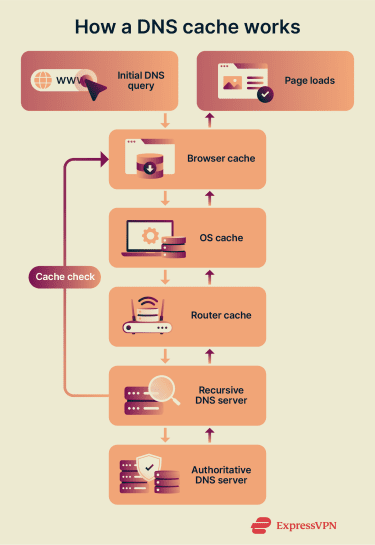
- Initial DNS query: The device sends an initial query to find the corresponding DNS record when a user enters a domain name into a browser or opens a link.
- Local cache check: The system checks the browser's cache for the DNS record. If it’s not found, it checks the OS cache, then the router's cache. If the record is found in any of these local caches, the website loads immediately.
- Recursive DNS server check: If the record isn’t found in local caches, the request moves to the recursive DNS resolver.
- Authoritative DNS server check: If the record isn’t in the recursive DNS server, it performs a full DNS lookup by contacting the authoritative DNS server to get the correct domain details.
- Retrieval and storage: The DNS record is sent back to the requesting device to load the page. As it travels, it’s saved at each cache level with a time-to-live (TTL) value that determines how long the record is stored.
DNS cache benefits and limitations
The primary advantages of DNS caching include faster website loading times, reduced network traffic, and improved reliability if external DNS servers become temporarily unavailable. By resolving requests locally or through a nearby DNS server, the system minimizes latency and load on authoritative servers.
However, DNS cache can sometimes store corrupted or outdated information if a website changes its IP address before the TTL expires. Caches can also face security risks like DNS cache poisoning, where attackers insert malicious data to redirect traffic to harmful sites.
Further reading
- How to hide your IP address and protect your online privacy
- What are anonymous proxies, and how do they work?
- What is data privacy and why it matters: A complete guide



