
Expressvpn Glossary
Default password
What is a default password?
A default password is a preset login credential assigned by a manufacturer to a device or system to allow initial access during setup.
In older devices, manufacturers often used the same credentials across many units. However, modern devices increasingly use unique passwords for each device, usually printed on the device label or included in setup instructions.
See also: Password policy, password spraying, password vault, one-time password, password protection
Where is it used?
Default passwords are most common on network-connected devices, software systems, admin panels, databases, and enterprise tools. Common examples include:
- Printers.
- Home routers.
- Gateway devices.
- Wi-Fi extenders and mesh systems.
- IP cameras and smart home devices.
- Network-attached storage (NAS) devices.
- Industrial and embedded devices (e.g., control systems and Interent of Things (IoT) hardware).
Why default passwords matter
Default credentials are designed for initial access rather than ongoing security. They typically don’t provide the same level of protection as user-defined passwords because these credentials are often widely known, shared across multiple units, or based on predictable formats.
As a result, systems that retain default login details can present a higher risk of unauthorized access compared to those that use unique, updated credentials.
Risks and privacy concerns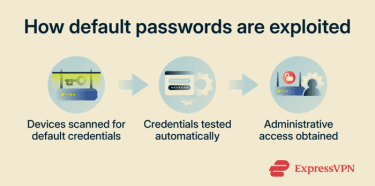
Key risks arise when default passwords aren’t changed:
- Botnet recruitment: Devices with unchanged credentials may be infected with malware and added to botnets used for distributed denial-of-service (DDoS) attacks or spam.
- Unauthorized remote control: Devices with exposed remote administration features may be controlled if default credentials are still in use.
- Lateral movement: Devices on the same network may be accessed or probed using a compromised device that was accessed with default credentials.
- Unauthorized monitoring: Devices with cameras, microphones, or logging capabilities may expose sensitive information or activity if accessed using default logins.
Further reading
- 4 tips to create a strong password and keep your accounts secure
- Brute force attack: What it is and how to prevent it
- Password hashing explained: What it is and how it works
- Password attacks: Common types and how to prevent them







