
Expressvpn Glossary
Boot sector virus

What is a boot sector virus?
A boot sector virus is malware that infects the boot code on a storage device, such as a disk's boot sector. Because this code executes early in the startup process, the malware can run before the main OS loads, helping it persist across restarts and interfere with the boot process.
Boot sector viruses typically spread via infected removable media, such as USB drives or external disks. When a computer boots from infected media, some variants of the virus can copy themselves to the computer's main storage.
There are two main types of boot sector viruses:
- Master boot record (MBR) virus: Infects the MBR, a special area on the primary storage drive that contains the partition table and code that locates and loads the OS. Removal often involves repairing or rewriting the boot code (sometimes from recovery or rescue media), and a full disk reformat is typically a last resort.
- Volume boot record (VBR) virus: Infects the boot sector of a specific disk partition rather than the disk-wide MBR. It can still prevent normal startup or load malicious code early, but remediation may be more contained depending on what’s infected.
How does a boot sector virus work?
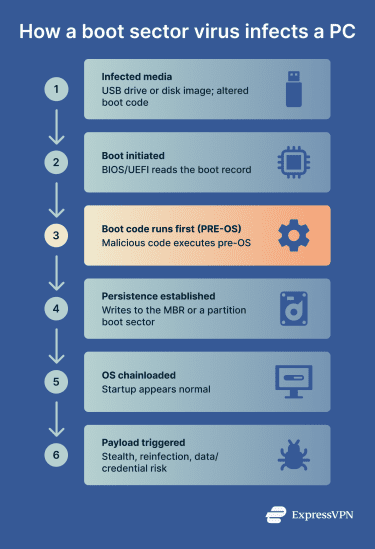 A boot sector virus injects malicious code into the boot code on the disk. When the computer powers on, the system automatically reads and executes this code before loading the OS.
This can allow the malware to load into memory and interfere with the startup process. Sometimes, control is handed back to the legitimate bootloader so that startup appears normal, which can help the infection stay hidden.
How do boot sector viruses spread?
Boot sector viruses spread when a computer boots from infected bootable media (or when malware with sufficient privileges overwrites the boot record), causing the system to execute malicious startup code before the operating system loads.
Common infection methods include:
- Infected USB drives and removable media that are booted from.
- Malicious bootable images, for example, compromised International Organization for Standardization (ISO) files or “tool” media.
- Malicious recovery or installation media.
Boot sector viruses primarily threaten older systems that use legacy basic input/output system (BIOS)/MBR boot or systems without unified extensible firmware interface (UEFI) Secure Boot enabled. Secure Boot uses cryptographic checks to allow only trusted boot components to run during startup, reducing the risk of pre-OS bootkits and similar attacks.
Modern systems use UEFI Secure Boot, often with the GUID Partition Table (GPT), which makes classic MBR/VBR boot sector infections much less common, especially when Secure Boot is enabled and boot-from-USB is restricted.
Air-gapped systems (computers isolated from networks) are also vulnerable because malware can cross the air gap through physical media, such as USB drives and other portable storage devices.
Why is a boot sector virus a threat?
Boot sector viruses are dangerous because they operate outside normal OS controls and can execute early in the boot process, before the OS kernel and many security protections are active.
Some security scans that focus on in-OS files may miss malware that hides in boot components, which is why boot-time or offline scanning is often used for deeper checks.
When symptoms appear, they may include repeated boot errors, unexpected crashes during startup, or malware reappearing after removal attempts, though many infections show no obvious signs.
Detection and cleanup may require boot sector scanning and, in more severe cases, booting from trusted rescue media to scan and repair boot records outside the normal OS environment.
Boot sector malware can also survive OS reinstallation or repair attempts if the underlying boot records aren’t rebuilt or overwritten.
Consequences of boot sector virus infections
Boot sector virus infections can cause ongoing system issues and security risks, including:
- Data theft (indirect): High-level system controls allow attackers to capture login credentials and other sensitive information.
- Data tampering or corruption: An infected boot code can interfere with how the system loads and accesses data, potentially leading to data loss or file corruption.
- Lateral spread: Infected systems can spread the virus to other devices via shared physical media such as USB drives and external disks.
- Persistent reinfection: The virus can persist in boot records across restarts and may survive some OS reinstall/repair attempts if the boot records aren’t rebuilt or overwritten.
Further reading
- Fileless malware: What it is and how to prevent it
- What’s a possible sign of malware? 11 red flags to watch for
- How to know if your computer has a virus (Windows and Mac)



