What is TrickBot malware, and how to stop it


TrickBot is a widely deployed malware toolkit associated with credential theft and the enabling of ransomware. While major disruptions reduced its operations, the infection patterns and response steps covered in this article remain relevant for legacy detections and for similar initial-access malware.
What is TrickBot malware?
TrickBot is a Trojan malware family first identified in 2016. It was originally developed as a banking trojan designed to steal financial information, but over time, it evolved into a broader malware toolkit used by cybercrime actors. It’s been used to target both individuals and organizations across many sectors
The operators behind TrickBot are tracked under different names by different security organizations. Commonly used cluster names include Wizard Spider, UNC1878, and Gold Blackburn.
TrickBot’s core capabilities
TrickBot tends to exhibit a consistent set of behaviors. It’s designed to steal information, maintain control, and support follow-on activity. Core capabilities include:
- Credential and data theft: Stealing sensitive information such as banking login details and memorable information, plus saved online account passwords. It can also collect browser data, such as cookies and web history.
- Device and network discovery: Gathering detailed information about infected devices and the surrounding network to understand what has been compromised and what else may be reachable.
- Remote control via criminal infrastructure: Connecting infected devices to malicious, criminally controlled networks over the internet, enabling ongoing remote access and control.
- Lateral movement inside networks: Spreading to other devices across a victim’s network, including trusted domains.
- Follow-on malware delivery: Downloading additional malicious files to extend the intrusion, including remote access tools, virtual network computing (VNC) clients, and ransomware.
Modular architecture
A key feature of TrickBot is its modular architecture. Instead of doing everything in one program, TrickBot is built as a multi-stage framework (typically a wrapper, a loader, and a main module) that can pull down additional modules after the initial infection.
Those modules are separate components that can be loaded as needed. This lets operators change what TrickBot does over time by adding, updating, or swapping modules, rather than reinstalling the malware. In practice, the main component communicates with the command-and-control (C2) infrastructure and uses a configuration file to determine which modules to download and run.
This modular design is one reason TrickBot has been hard to disrupt. The underlying framework can stay the same while individual modules change, allowing the malware to adapt as defenses and conditions shift.
How TrickBot spreads
TrickBot has been distributed through multiple routes. In many cases, it starts with an email-based infection, but it can also be introduced later as a second-stage payload. Once it's running in a networked environment, some components can help it spread further without additional user involvement.
Phishing campaigns and malicious attachments
Phishing has been a common entry point for TrickBot, especially through spear phishing: emails that appear legitimate and relevant, with a malicious attachment or link. Campaigns are often designed to feel routine or familiar, using themes like invoices, payment notices, shipping updates, or internal business messages.
Many campaigns have relied on malicious attachments, including Word or Excel documents that prompt the recipient to enable embedded content (such as macros). However, newer versions of Office block internet-sourced Visual Basic for Applications (VBA) macros by default.
Other campaigns direct recipients to download links, sometimes via a compromised website. In both cases, the approach depends less on exploiting a technical vulnerability and more on getting the recipient to trust the message enough to click or open the file.
Lateral movement and network propagation
Once TrickBot is running on a system, it doesn’t necessarily stay confined to that device. In networked environments, some TrickBot modules can spread laterally by abusing the Server Message Block (SMB) protocol: Windows file-sharing connections such as shared folders and network drives.
This matters because it allows an intrusion to move beyond the first infected machine. If shared access is too broad or credentials are exposed, TrickBot can reach additional systems on the same network before anyone notices.
Common signs of a TrickBot infection
TrickBot is built to operate quietly, so there is rarely a single, clear sign that confirms an infection. When indicators do show up, they’re usually indirect; either unusual account activity or changes in device and network behavior.
- Unexpected access attempts to online accounts: Unauthorised login attempts may appear after infection, including attempts against banking or other sensitive services.
- Fraudulent banking activity: Some victims have reported successful, fraudulent bank transfers and other suspicious financial activity.
- Unusual network behavior or changes: In business environments, signs may include unexpected changes to network infrastructure or unusual traffic (e.g., devices attempting to reach new/unfamiliar domains).
- Unusual system behavior: Depending on the modules involved, symptoms can include unexpected scheduled tasks or the device connecting to remote hosts without consent.
None of these signs on its own confirm TrickBot. What matters is the pattern, especially when account alerts and unusual system or network behavior show up together.
Learn more: Find out what the other signs of malware are.
History and evolution of TrickBot
TrickBot didn’t emerge as a fully developed threat. It changed shape over time, adapting to the evolving nature of cybercrime.
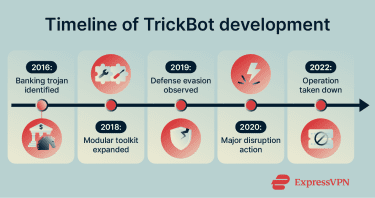
Timeline of TrickBot development
- 2016: TrickBot is first identified as a banking trojan designed to steal financial data (including banking credentials). It’s described as a successor to Dyre (an earlier banking malware strain that is commonly linked in reporting to the broader Zeus malware family) and, over time, evolves beyond a single-purpose banking trojan.
- 2018: TrickBot increasingly appeared as a modular, multi-component malware family, with separate pieces for tasks like system information gathering and stealing browser credentials. It also incorporated propagation components tied to EternalBlue/Synergy/Romance (Windows SMB-based exploit techniques used to spread across a network). In some intrusions, it was delivered after attackers exploited server vulnerabilities (for example, a Drupal remote code execution flaw).
- 2019: TrickBot was observed using defense-evasion behavior, including attempts to disable or interfere with common security tools, including Microsoft Defender Antivirus in some cases.
- 2020: Microsoft described TrickBot as a Malware-as-a-Service (MaaS) botnet that provides access to infected machines and acts as a delivery mechanism for other malware, including ransomware such as Ryuk. That year also saw a court-authorized, partner-assisted legal and technical disruption led by Microsoft, aimed at cutting off TrickBot infrastructure and limiting new infections.
- 2022: According to the U.S. Department of Justice, Trickbot was taken down in 2022.
Connection to other malware campaigns
TrickBot rarely operated alone. It was often part of a chain, where one tool helped open the door, and another delivered the next stage.
- Emotet: Emotet and TrickBot frequently appeared in the same multi-step intrusions, but not always in the same order. In some cases, TrickBot was delivered as a second-stage payload after Emotet. In others, TrickBot activity was used to deliver or enable additional malware such as Emotet.
- Ryuk: TrickBot-enabled access was repeatedly linked to later Ryuk ransomware deployment. In these hands-on intrusions, operators used TrickBot for discovery and credential theft and for supporting lateral movement before ransomware execution.
- Conti: TrickBot was also linked to Conti ransomware activity, reflecting the broader pattern of initial-access tooling feeding into later ransomware deployments.
Why the name still appears
TrickBot still shows up in enforcement and investigative reporting because takedowns tend to target delivery infrastructure and initial access tooling, not a single neat, self-contained malware program. That means older ecosystems can persist as droppers/loaders, successor groups, or related variants, even after a widely known operation is disrupted.
Two recent examples make this concrete:
- May 2024 (Operation Endgame): A coordinated international action targeted malware droppers used to get an initial foothold and then deliver follow-on payloads. The public lists of droppers included TrickBot alongside families such as IcedID, PikaBot, SmokeLoader, and Bumblebee, and included disruption actions targeting servers and botnet infrastructure.
- May 2025 (Endgame 2.0): A follow-up action week focused on successor groups and variants tied to the earlier wave of takedowns, explicitly listing TrickBot among the initial-access families targeted.
The practical takeaway is that TrickBot is increasingly useful as a reference label for an initial-access/delivery role in the ransomware supply chain, not as a reliable indicator of a single, clearly resurged botnet operating as before. What still matters is the pattern: early access, credential theft, and follow-on delivery, even when the specific family name changes.
How to remove TrickBot
Even though TrickBot’s original infrastructure was taken down, remediation guidance can still matter for legacy infections, lingering detections tied to older incidents, and similar types of initial-access malware.
How to respond to a TrickBot-style initial access infection
A typical first objective is limiting what the malware can do next. If a device stays online and connected to other systems, an active infection has more time and reach. A practical, lower-risk remediation flow often includes:
- Isolate the device: Disconnect the system from Wi-Fi or unplug Ethernet. In workplace settings, the device is commonly removed from shared networks until it has been checked.
- Run a full system scan: A full scan using an up-to-date, reputable security tool is commonly used. Quick scans are less thorough and may miss components.
- Follow remediation prompts from the tool: If TrickBot or related threats are detected, quarantine/removal via the tool is the standard approach. Manual deletion increases the chance of removing legitimate files or leaving components behind.
- Restart, then scan again: A second full scan after a restart is often used to confirm the system state.
- If detections or suspicious behavior persist: Persistent detections are usually treated as an unresolved incident. Escalating to IT or security support is generally the next step, especially in networked environments.
- If multiple devices are involved: Single-device cleanup is often insufficient in shared environments. Additional systems that share accounts, file access, or admin credentials are typically reviewed as well.

Tools for detecting and removing TrickBot
Specialized tools aren’t always required. Many mainstream security products can detect known TrickBot components when definitions are up to date, and monitoring is enabled.
- Real-time antivirus protection: Antivirus software can detect and block known malware components as they execute.
- On-demand malware scanners: Often used as a second opinion after initial remediation.
- Offline or boot-time scanning options: Used when scans from within the running OS are unreliable or when detections recur; offline scans run from a trusted environment outside the normal OS context.
- Centralized tools for organizations: In business environments, endpoint detection and response (EDR), extended detection and response (XDR), logging, and asset inventory often provide more comprehensive coverage than focusing on a single machine.
How to reduce risk from TrickBot-style intrusions
Safe browsing and email practices
Many TrickBot infections begin with some form of social engineering. That makes everyday habits an important line of defense.
- Treat unexpected emails with caution: Be wary of messages that ask you to act quickly, open attachments, or follow links to fix a problem. If you weren’t expecting the message, pause and verify it through another channel before opening anything.
- Be careful with attachments and links: If a file or website asks you to change security settings, install a plug-in, or approve something you don’t recognize, it deserves extra scrutiny. If you’re unsure, don’t open it, and seek help if needed.
- Check who sent the message: Attackers often rely on messages that look routine or familiar. A quick look at the sender address can reveal inconsistencies.
- Avoid downloading software from unofficial sources: Fake updates and installers are common ways malware is distributed.
These habits don’t eliminate risk entirely, but they significantly reduce the chances that malware delivered through email or web lures successfully runs.
Learn more: Check out the most common phishing red flags in emails.
Updating software and using security tools
Outdated systems are easier to compromise, and they can also make it harder to recover cleanly after an incident. A few basics matter most:
- Keep OS and applications up to date: Security updates help close weaknesses that malware can use to persist or spread.
- Keep security tools enabled and current: Protection is most effective when it's running normally and receiving updates.
- Use one primary real-time protection tool: Running multiple active real-time products can cause conflicts and make results harder to interpret.
- Treat repeated warnings or disabled protections as a signal: Frequent alerts, failed updates, or protections that turn off unexpectedly usually warrant follow-up.
In business environments, centralized monitoring and logging often improve detection and triage, because suspicious activity becomes easier to spot across multiple systems.
Reducing the impact of a successful infection
Even with good defenses, no system is immune. Planning for that reality limits the damage when something goes wrong.
- Use strong, unique passwords: Reusing passwords across accounts makes credential theft far more damaging.
- Enable multi-factor authentication (MFA) where possible: This can help prevent stolen passwords from being reused successfully.
- Limit access inside networks: Not every user or device needs access to everything. Smaller permission scopes can limit lateral movement.
- Back up important data regularly: Backups don’t stop malware, but they reduce pressure if an attack escalates.
- Monitor accounts and systems for unusual activity: Early detection often prevents a small incident from escalating.
Taken together, these measures help defend against the broader class of phishing-led credential-stealing attacks that remain common today.
FAQ: Common questions about TrickBot malware
How does TrickBot usually infect a system?
Most TrickBot infections begin with phishing. Attackers rely on emails that look routine, such as invoices or account notices, and trick users into opening a malicious attachment or clicking a link. In other cases, TrickBot is introduced later as a follow-on payload after an initial compromise. Once executed, TrickBot can be installed quietly in the background.
Can TrickBot be removed manually?
In theory, yes, but it’s not recommended for most people. The TrickBot botnet often uses multiple components and persistence methods, which makes manual cleanup easy to get wrong. Using trusted security tools to scan and remove the malware is safer and more reliable. Manual removal increases the risk of leaving parts of the infection behind or damaging the system.
How dangerous is TrickBot compared to other malware?
TrickBot can be more dangerous than single-purpose malware because it functions as a modular, multi-stage toolkit that can support multiple stages of an intrusion, such as credential theft, system and network discovery, lateral movement, and delivery of additional payloads. In many incidents, the most severe damage is caused by what follows (for example, ransomware), but TrickBot’s value to attackers is that it helps establish and expand access and reduces uncertainty before those later steps.
Compared with standalone ransomware, TrickBot is generally less “immediately destructive” on its own, but it is often more dangerous as an enabler because it increases the likelihood and scale of follow-on compromise.
Is TrickBot still a threat today?
According to the U.S. Department of Justice, Trickbot was taken down in 2022. At the same time, recent international disruption efforts have continued to target successor groups and related variants in the initial-access malware ecosystem, explicitly listing TrickBot by name, indicating that the label still appears in current enforcement actions even after the botnet’s peak.
What should I do if I think TrickBot-like malware stole my credentials?
The typical response treats it as an account-compromise risk rather than just a device-cleanup issue. A safer approach is to reset passwords from a known-clean device, prioritize email and any accounts that can reset other logins, enable multi-factor authentication (MFA) where available, and review recent account activity for unfamiliar logins or changes (such as inbox rules that forward mail to unknown addresses).
Can a VPN prevent TrickBot-style infections?
A virtual private network (VPN) generally doesn’t prevent the most common TrickBot-style entry paths, such as phishing emails, malicious attachments, or users running a disguised file. A VPN can help protect traffic on untrusted networks, but it doesn’t stop malware from executing on an endpoint or stealing credentials once a system is infected.
Take the first step to protect yourself online. Try ExpressVPN risk-free.
Get ExpressVPN








 Support Center
  FAQ
FAQ  VPN Setup Tutorials


