How to ensure NFC security for safe transactions


Near-field communication (NFC) security depends on a small number of technical controls. When these controls work as intended, NFC payments and taps are difficult to intercept or misuse. When they’re misconfigured or misunderstood, they create predictable risks.
This guide explains how NFC transactions are secured at the protocol and device level, what realistic threats exist (and which are overstated), and which settings and usage patterns meaningfully reduce risk in everyday scenarios.
How NFC technology works (and why security matters)
NFC is a short-range wireless technology designed for quick, low-power data exchanges. Because of how it works, its security model relies less on user configuration and more on physical proximity, cryptographic protections, and device-level controls.
Key features of NFC technology
NFC is defined by a small number of technical properties that control how devices connect, exchange data, and end communication.
Short range and frequency
NFC is a subset of radio-frequency identification (RFID) technology designed for very close-proximity communication. Standards-based proximity cards are designed for a maximum distance of roughly 10cm, but most real-world phone-to-terminal taps occur within a few centimeters.
NFC operates on a standardized radio frequency of 13.56MHz, which is used for short-range communication and is shared across NFC and other proximity-based RFID systems. This proximity requirement is enforced at the radio level. Devices outside this range can’t participate in the exchange, and NFC doesn’t attempt to discover or connect to distant devices.
Initiator and target roles
Every NFC interaction has a clear initiator and target. The initiator is an active device, such as a phone or terminal. The target responds to that field and may be either active or passive. Passive targets, such as contactless cards or simple NFC tags, don’t have their own power source. They only respond when powered by the initiator’s field and cannot initiate communication on their own.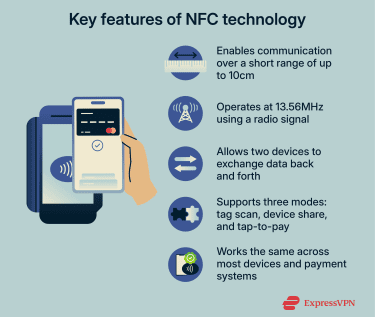
Operating modes
NFC supports three distinct ways of being used:
- Reader/writer mode: A device reads data from or writes data to an NFC tag.
- Peer-to-peer mode: Two active devices exchange data.
- Card emulation mode: A device behaves like a contactless card for payments or access control.
Standards-based protocols
NFC radio behavior is not vendor-specific. It follows fixed international standards, primarily those published by the International Organization for Standardization and the International Electrotechnical Commission (ISO/IEC), including ISO/IEC 14443 and ISO/IEC 18092. These standards define how devices detect one another, establish a connection, encode data, transmit messages, and terminate communication.
Because these rules are predefined, NFC interactions are predictable across devices. Phones, cards, and terminals all follow the same low-level communication rules, removing variability from how connections are formed.
How NFC communication works
NFC communication relies on electromagnetic induction to transmit data. When you bring two NFC devices or a device and a tag close together, here’s what happens:
- The active device (such as a payment terminal or phone) generates a magnetic field by running current through a coil antenna. This field induces a small electric current in a nearby coil, powering a passive chip (such as a contactless card or sticker).
- Once the connection activates, the two devices exchange data using electromagnetic coupling. They use a predefined protocol to send data back and forth.
- NFC’s data rates are modest (usually 106 to 424Kbit/s), but that’s plenty for small data exchanges like sending a website URL, a contact info packet, or a payment token.
- NFC usually requires deliberate proximity, and OSs display prompts or require user confirmation before completing higher-risk actions such as paying or opening links from tags. Payments also typically require device verification, such as a PIN, passcode, or biometric unlock.
What is NFC security?
NFC security refers to the set of technologies and design practices that protect NFC-based communication from unauthorized access, interception, or manipulation.
Core principles of NFC protection
The security of NFC systems rests on a few fundamental principles that work together:
- Short-range communication: NFC only works at extremely close distances, which significantly reduces the risk of remote eavesdropping or unauthorized access.
- Intentional interaction model: NFC interactions require deliberate physical alignment between devices. Unlike longer-range wireless technologies, NFC does not support background discovery or passive scanning at a distance, which reduces accidental activation and large-scale exploitation.
- Mutual device authentication: Before any meaningful data is exchanged, the devices verify each other’s legitimacy. This prevents rogue readers or fake devices from participating in the transaction.
- Constrained data exchange: NFC sessions are brief and purpose-specific, limiting how much data is exchanged and for how long. This naturally caps exposure even before additional protections are applied.
Encryption and tokenization in NFC
If the NFC communication involves sensitive interaction, such as authorizing payments, granting access to secured spaces, or verifying digital credentials, the NFC systems usually apply encryption and tokenization to protect that data.
Encryption is a process that converts the data exchanged over NFC into a coded form that can only be understood by systems holding the correct cryptographic keys. This prevents unauthorized parties from reading or reusing intercepted information, and it also enables integrity checks, allowing systems to detect whether data has been altered during transmission.
Tokenization reduces risk even further by minimizing the value of the data being transmitted. Instead of exchanging real credentials, such as account numbers, identifiers, or access secrets, NFC systems often rely on substitute values known as tokens. These tokens represent the underlying data without revealing it and are typically constrained to a specific device, session, or time window. If a token were intercepted, it would be unusable outside its intended context.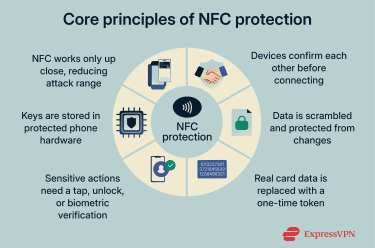
How modern smartphones secure NFC communication
The final layer of NFC security is platform enforcement, where modern smartphones use a combination of dedicated hardware and OS controls to reliably enforce NFC protections in real-world use. Here are some of the key ways Android and iOS devices secure NFC transactions:
Secure elements and trusted execution environments
Smartphones store sensitive NFC credentials inside a secure element or trusted execution environment that is isolated from the main OS. This hardware executes critical NFC operations internally and prevents apps, malware, or the OS itself from directly accessing cryptographic keys or credentials.
NFC controller and hardware-level controls
A dedicated NFC controller manages all communication between the antenna, secure hardware, and OS. It enforces conditions such as proximity, session timing, and device state, and can require the screen to be on or the device to be unlocked before allowing certain NFC interactions.
User authentication
For high-risk NFC actions, smartphones require explicit user authentication, such as a passcode, fingerprint, or facial recognition. This ensures that possession of the device alone isn’t enough to authorize sensitive transactions.
OS-level restrictions and user prompts
Mobile OSs strictly regulate how apps and NFC tags can interact with the device. Android prompts users before allowing NFC-triggered actions that could affect the system, while iOS limits NFC access to approved use cases and prevents third-party apps from directly controlling NFC hardware.
Firmware and OS updates
Manufacturers regularly update NFC firmware and OS components to fix vulnerabilities and strengthen enforcement rules. These updates ensure NFC security evolves alongside new threats.
Additional device security features
Beyond NFC-specific controls, general device protections such as full-disk encryption, secure boot, and app sandboxing strengthen NFC security by hardening the platform NFC runs on and limiting the impact of broader device compromise.
Understanding risks and threats of NFC technology
NFC is well-protected by design and by layered security, but in certain conditions, specific attack scenarios are still possible.
Although NFC attacks have been reported in the past, some of the risks are primarily theoretical or apply only to poorly protected NFC tags or legacy implementations, and they are unlikely to affect most everyday NFC payments or modern smartphones.
NFC security risks
Here are some of the most commonly cited NFC security risks that users and organizations should keep in mind:
- Eavesdropping: Eavesdropping involves attempting to listen in on NFC communication between two devices. But due to NFC’s short operating range, an attacker would need to be extremely close to even attempt it.
- Data tampering or modification: Data tampering occurs when an attacker actively interferes with NFC communication by introducing a nearby device that attempts to alter data in transit. This requires precise timing and physical proximity, so it’s unlikely in a consumer context.
- Unauthorized tag reading (skimming): Sometimes referred to as “digital pickpocketing,” it refers to reading data from an NFC tag or card without authorization. This is only viable when tags or cards expose readable data and lack additional protections.
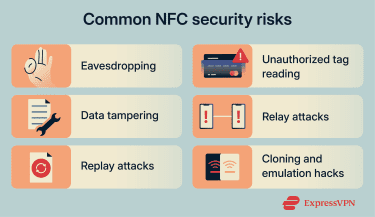
- Cloning and emulation hacks: Attackers may use NFC writer tools to clone NFC tags or keycards that aren’t well protected. For instance, using a specialized device or even some phone apps, they can read data from an NFC keycard (if not encrypted) and write the same data to a blank card or sticker.
- Relay attacks: Relay attacks extend NFC communication using intermediary devices, allowing attackers to bypass physical proximity requirements. These attacks depend on real-time coordination between devices, and are extremely hard because NFC devices detect timing irregularities and have anti-relay provisions.
- Replay attacks: Replay attacks involve capturing valid NFC data and attempting to reuse it later. These attacks rely on systems accepting repeated or static data.
Device-level NFC vulnerabilities and real-world cases
In recent years, a few notable vulnerabilities and attacks have emerged that target NFC. These cases illustrate both the creativity of attackers and the robustness of defenses in place (as many were thwarted or required unlikely circumstances). Here are some highlights:
- Android NFC app sharing issue: Researchers reported a flaw tied to Android’s default NFC privileges that could weaken some of the usual friction around installing an app during NFC-based sharing. It still required close proximity and user interaction, and it was fixed through Android’s October 2019 security updates. The takeaway is that NFC risks often come from insecure defaults or missing checks, and updates matter.
- Android tag-handling permission check issue: Another reported issue involved a missing permission check in Android’s tag-handling component. Although this isn’t an issue with NFC security, it highlighted a common mobile security pattern: if a malicious app is already on a device, it may be able to trigger misleading system behavior and push the user toward unsafe actions.
- NFC misuse in mobile fraud: Security researchers have also reported Android malware that abuses NFC-related functionality as part of payment fraud. These cases typically depend on social engineering (getting someone to install an app or approve prompts) rather than silent, remote NFC attacks.
Dangers of fake NFC tags, malicious URLs, and app triggers
NFC tags are widely used for convenience: tapping a poster for event info, launching an app, or pairing a device. But their simplicity is also a weakness: some NFC tags are unencrypted and unverified, which means they could be rewritten.
This weakness opens the door to spoofing and malicious redirects. Attackers can place rogue NFC stickers in public places (on top of official ones or in high-traffic spots) that trigger harmful actions when scanned.
One common tactic is URL redirection: the tag leads to a phishing site that mimics a login page or pushes a fake app. Although OS-level safeguards usually prompt users before such actions, the attacker often relies on social engineering (for example, a tag that looks legitimate and prompts a link or action).
How to secure NFC
Securing NFC is mostly about reducing unnecessary exposure, confirming prompts, and keeping the phone and payment apps protected.
Best practices for everyday NFC users
For most people using NFC on smartphones or contactless cards, a few simple habits can greatly enhance mobile security:
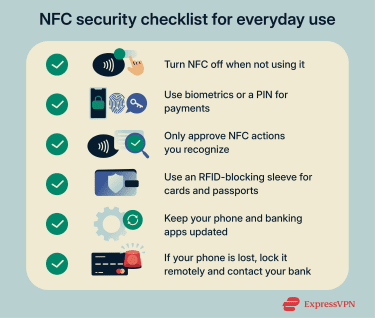
- Enable NFC only when needed (if possible): On some Android phones, you have an option to toggle NFC off. On iPhones, NFC for Apple Pay is always enabled, but it’s dormant until you authenticate or use it for a specific purpose, like a transit card.
- Keep your phone locked and use biometric or a PIN for payments: Ensure you have a strong lock screen PIN/password and biometric unlock enabled for your wallet apps. Phones will then require your fingerprint, face, or PIN to authorize NFC transactions.
- Verify prompts and sources: When your phone does react to an NFC tag or reader, read the prompt on screen. If it’s asking to open a website, check the URL carefully (just like you would with an email link) for legitimacy.
- Use RFID-blocking sleeves or wallets: If you carry tap-to-pay cards or an NFC passport, consider a wallet or sleeve with RFID-blocking material. This is typically a metal-lined product that prevents any radio signals from reaching your cards
- Disable NFC when the device is lost or stolen: For phones, use Find My (Apple) or Find My Device (Android) to remotely lock or wipe it. Also, consider calling your bank to disable cards on mobile wallets.
Preventing NFC-enabled cyberattacks
NFC-enabled cyberattacks often involve scams or malware that try to misuse NFC to steal data or authorize payments, so these steps help reduce the risk:
- Avoid installing unknown apps: Only download apps from official stores like Google Play or the App Store to reduce malware risk.
- Treat unexpected NFC requests as suspicious: Do not tap your phone or card if you are told to do so by an unknown message, call, or email.
- Secure your apps: Enable strong authentication and use extra verification options when available.
- Keep your OS and apps updated: Consider setting your OS and apps to update automatically to make sure you get the latest security updates.
- Avoid risky developer changes: USB debugging, rooting, jailbreaking, or NFC logging tools can weaken NFC security.
- Be careful with NFC tags and automation: Set your own tags to “read-only,” so no one can rewrite them.
NFC skimming protection tips
NFC skimming is uncommon, but if you want to reduce the risk as much as possible, the goal is to make close-range scanning difficult and to catch suspicious activity quickly if it ever happens.
In practice, the biggest factor is physical proximity. If someone tried to skim a contactless card, it would most likely happen in a crowded environment where standing close to you would not seem unusual. Keeping your wallet in an inside pocket, a zipped bag, or behind other items makes it harder for anyone to get a reader close enough to pick up a signal.
Finally, it’s smart to pair prevention with quick detection. Enabling transaction alerts and regularly checking your statements ensures that, even in the unlikely event that something slips through, you notice it immediately.
FAQ: Common questions about NFC security
Is near-field communication (NFC) on a smartphone safe?
Yes, NFC is generally safe to use on modern smartphones. Both iOS and Android use built-in NFC safeguards like screen locks, biometric prompts, and secure hardware elements to ensure NFC transactions or scans can’t be completed without your approval. As long as you keep your device secure and stay aware of what you’re tapping, NFC is low risk.
What are the biggest NFC security threats?
The most realistic threats include accidental taps on rogue near-field communication (NFC) tags, exposure to phishing links triggered by malicious tags, and unauthorized transactions if a phone is lost and left unlocked. Less common but still possible are relay attacks or misuse by shady apps with unnecessary NFC access.
Can someone steal my data through near-field communication (NFC)?
Not easily. NFC’s short range and device protections make it difficult to extract sensitive data without physical access and your cooperation. Most phones won’t process NFC commands unless they’re unlocked, and payment data is protected by tokenization. That said, scanning unknown tags can lead to phishing sites or unwanted actions, so it’s best to be cautious.
What are the dangers of NFC-enabled devices?
The risks mostly come from poor configuration or inattentive use. For example, enabling near-field communication (NFC) without a screen lock, tapping unknown tags, or granting NFC access to sketchy apps can increase exposure. In rare cases, outdated devices without modern protections may also be more vulnerable to scanning or spoofing attacks.
Can near-field communication (NFC) be hacked or intercepted?
Intercepting NFC data is technically possible but very difficult in practice. NFC only works over a few centimeters, and modern phones encrypt transactions and block unauthorized communication. The more likely risk is social engineering (tricking someone into tapping a tag or approving an action) rather than someone “hacking” the signal in transit.
How do I protect myself from near-field communication (NFC) skimming?
To deter NFC skimming attempts, use a lock screen, enable biometric protection, and don’t store payment cards in apps that don’t offer secure handling. And if you carry contactless cards, a radio-frequency identification (RFID)-blocking wallet can add an extra layer of physical defense.
Take the first step to protect yourself online. Try ExpressVPN risk-free.
Get ExpressVPN
















 Support Center
  FAQ
FAQ  VPN Setup Tutorials


