How to delete your Bumble account: Step-by-step guide


You might want to delete your Bumble account for various reasons. Maybe you’ve found a new relationship, you’re taking a break from dating apps, or you prefer to limit the amount of personal data you keep online. Whatever the reason, the process is quick once you know where each setting is.
This guide walks you through every way to delete your Bumble account, including what to do if you can’t log in. It also explains how Bumble handles your data after deletion, how recovery works, and the alternatives available if you want to pause your profile instead of removing it permanently.
Before you delete: Key considerations
How Bumble handles your data and profile
When you delete your Bumble account, your profile is removed from public view immediately. Bumble then keeps your account data for 28 days in case you request restoration. During this period, your information remains stored on Bumble’s servers but is no longer visible in the app.
After this retention window, Bumble begins deleting your personal data. Some minimal data may be retained by Bumble when required to fulfill legal or safety obligations. If you want your data erased sooner, you can submit a request through Bumble Support. However, this process can take up to 30 days.
If you’re thinking more broadly about reducing your online footprint, you can also review our guide on removing personal data from the internet.
Can you recover a deleted Bumble account?
Yes. Bumble can restore a deleted account only during the 28-day retention period if you contact Support and verify ownership. After that window closes, the stored data is removed, and recovery is no longer possible. This means you’d need to create a new account to return.
How to delete your Bumble account from the app
The deletion process is straightforward and works the same on both the iOS and Android Bumble apps:
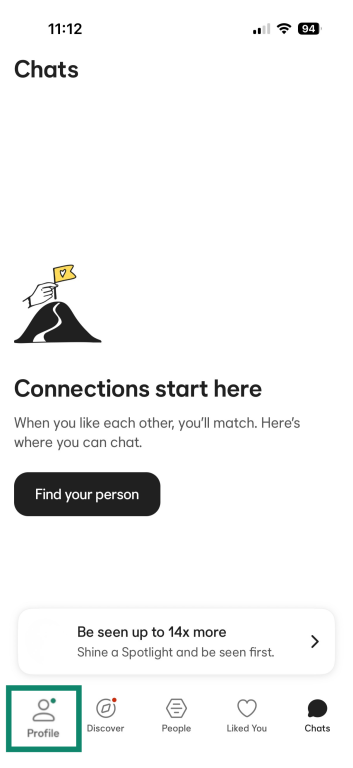
- Open Bumble and tap your profile icon in the bottom-left corner.
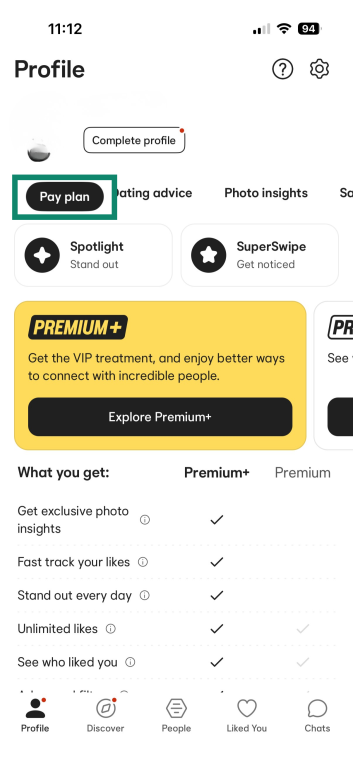
- If you have a Bumble Premium or Boost subscription, note that deleting your account may not cancel it automatically, so it’s best to cancel it now. Tap Pay plan, then Cancel Subscription.
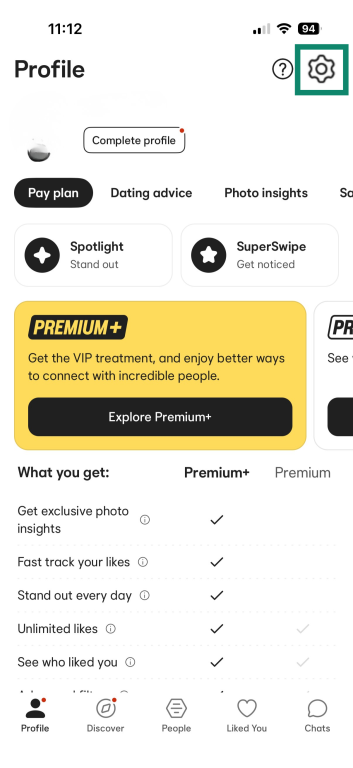
- Tap the gear icon to open Settings.
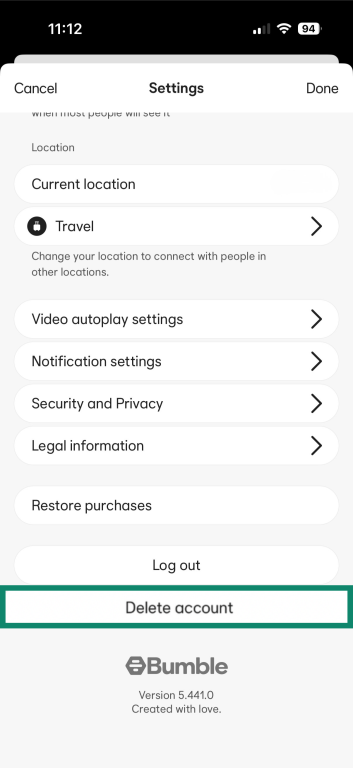
- Scroll to the bottom of the menu and tap Delete account.
- Choose any reason when Bumble asks why you’re leaving.
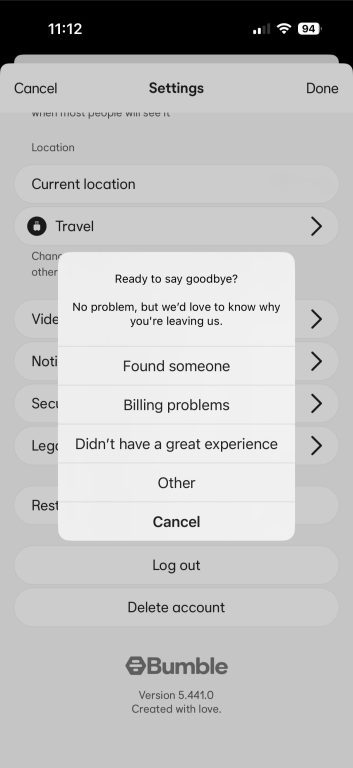
- Tap Delete account again to confirm.

How to delete Bumble if you can’t log in
If you can’t access your Bumble account, you can still delete it. The steps depend on how you originally signed in and whether you still have access to that login method.
Forgotten password or login info
Bumble accounts don’t use a traditional password. If you signed up with your phone number, Bumble sends a one-time code each time you log in. Use the “Log in with phone number” option and check your SMS for a new code.
If you created your account with Apple or Facebook, use the same service to log in again. If you can’t remember your credentials for those platforms, you can reset them through the provider. Once you regain access to that service, you can log back into Bumble and delete your account from the app.
Lost access to phone number or Facebook
If you’ve changed phone numbers or deleted the Facebook or Apple account you used to sign up, Bumble won’t be able to verify you through the login screen. In this case, you’ll need to ask Bumble Support to delete the account for you.
Contacting Bumble support for help
If you can’t log in on any device, you’ll need to use this contact form on Bumble’s website. In your message, clearly state that you can’t access your original login method and want the account deleted, and include any details that help them locate it (such as the phone number you used, the login option you picked, and any profile information you remember).
The support team will need to confirm you’re the account owner; after which they should be able to delete the account on your behalf.
What happens after deletion?
After you hit that delete button and confirm, you might wonder what exactly happens next. Here are answers to some common questions about the aftermath of deleting your Bumble account:
Will your profile be immediately removed?
Yes. As soon as you delete your account, your profile disappears from the app. You won’t show up in anyone’s swipe deck, and your matches will no longer see your profile or past conversations. This removal is instantaneous and doesn’t rely on the 28-day retention period.
Can you start over with the same email or number?
Yes, you can start over on Bumble with the same credentials, but it will be as a brand new account. Deleting your Bumble account doesn’t blacklist your phone number from the service. In fact, Bumble explicitly allows users to come back and create a new account after deletion (they treat the old account as gone).
If you return to Bumble, you can use the same phone number, Facebook, or Apple Account (formerly Apple ID). This will create a fresh profile with no connection to your past one.
What if I forgot to cancel my Bumble Premium or Boost subscription?
If you didn’t cancel your premium subscription in the Bumble app during the account deletion process, you can check if it’s still active through your device or app store settings.
How to cancel Bumble Premium or Boost on iOS
- In Settings, select Apple Account, then Subscriptions.
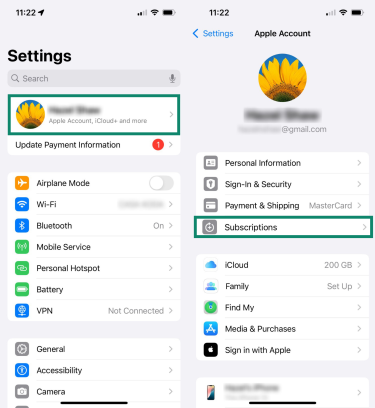
- If Bumble is listed under Active, select it and tap Cancel Subscription.

How to cancel Bumble Premium or Boost on Android
- Open the Google Play Store, tap your profile icon, then choose Payments and subscriptions.
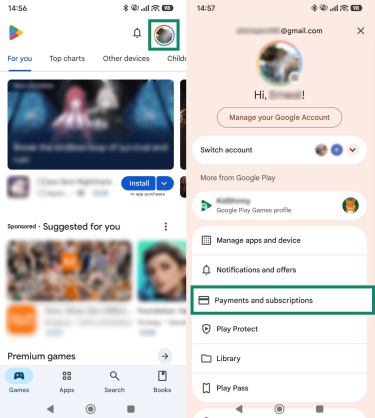
- Select Subscriptions to open a list of your active subscriptions. If Bumble appears, tap anywhere on the text or icon.
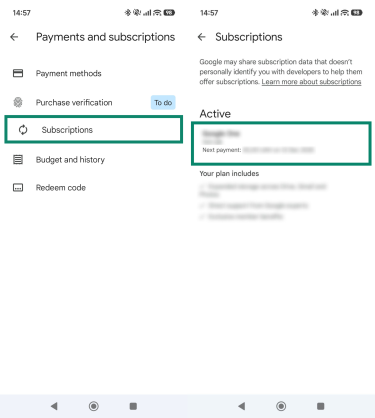
- Select Cancel Subscription.

Should you delete or take a break?
Deleting your account isn’t the only way to step back from Bumble. The app has built-in tools that let you pause your profile or turn off specific modes without losing your matches. These options make sense if you want a break but aren’t ready to remove your account permanently.
What happens if you only delete the Bumble app?
Removing the app from your phone doesn’t remove you from Bumble. Your account stays active in the background, which means your profile can still appear in the swipe deck and your existing matches can still view your conversations. Nothing about your visibility changes; you simply won’t receive any notifications or see any activity until you redownload the app.
Related: What you should do when deleting an app from your phone
Difference between deleting, snoozing, and switching modes
Deleting your account
Deleting your account removes your profile from Bumble completely, but it allows you 28 days to restore it if you change your mind. You immediately disappear from the swipe deck, and after the 28-day window, your account data, matches, and conversations are deleted. Once that window passes, you can’t recover anything and would need to create a new account if you return.
Snooze mode
Snooze mode lets you step away from Bumble without deleting anything. When Snooze is on, your profile stops appearing in the swipe deck, so new people can’t match with you. Your existing matches and conversations stay exactly as they are, and you can return at any time by turning Snooze off. It’s a way to pause activity without losing your profile, matches, or messages.
To use Snooze mode, follow these steps:
- Go to your Profile, and tap the Settings icon.

- Look for Snooze mode in the settings list and select it.

- Choose how long you want to snooze.
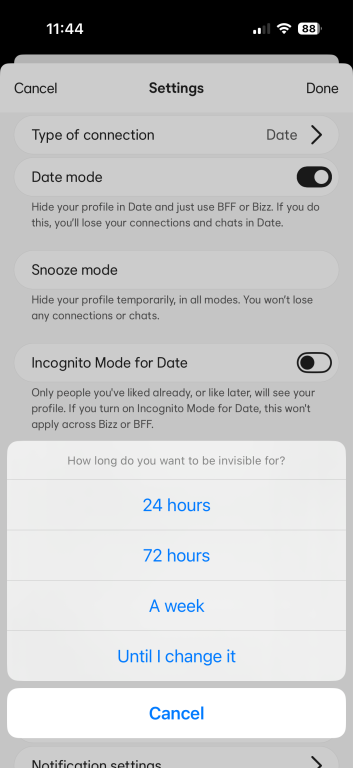
- If you pick 24 hours, 72 hours, or a week, you can also choose to show a status to your matches.

- Your profile will enter Snooze mode immediately after you make your selection.
Switching between Date and BFF
Bumble has a couple of different ways to meet people, and each mode has its own purpose. Bumble Date is meant for romantic connections, while Bumble For Friends (BFF) is for people who want to make new friends or expand their social life without any romantic intention. These modes exist inside the same app, but they function separately.
You can switch between them in your settings. If you turn off Date mode, Bumble removes your dating profile along with your connections and chat history, but it leaves your BFF profile untouched. This is not a full account deletion. It simply removes the mode you no longer want to use and lets you keep the others active.
Pros and cons of permanently deleting your Bumble profile
If you’re unsure whether deletion is the right move, these pros and cons can help you decide.
Pros
- Stronger privacy: Once you delete your account, your profile disappears from the app, and most of your information is removed from Bumble’s servers, reducing your digital footprint.
- No ongoing visibility: You stop appearing in the swipe deck, and existing matches no longer see your profile. If you want to step away completely, this is the only option that ensures you’re not discoverable.
- Less distraction: Deletion removes all notifications and removes the temptation to check the app, creating a clean break.
- Committed break from dating apps: If you’re stepping into a new relationship or simply want to step away from dating apps entirely, deletion removes any lingering digital presence.
Cons
- Loss of all connections: Matches and conversations are erased, and you won’t be able to recover them later.
- Irreversible after 28 days: Once the retention window closes, Bumble permanently deletes your account. If you regret the decision a month later, you’ll have to build everything from scratch.
- Rejoining requires a full setup: Returning means uploading photos again, rewriting your bio, re-verifying your profile, and redoing all settings.
- Subscription time is lost: If you have an active Bumble Boost or Premium subscription, deleting your account ends your ability to use those features. If you delete the app before the billing cycle ends, you may waste paid time during the remaining days.
Related: Apps that may put your privacy at risk
FAQ: Common questions about deleting your Bumble account
How do I delete a Bumble account without logging in?
If you can’t sign in, you’ll need to contact Bumble Support and ask them to delete the account for you. Use the Contact us form on Bumble’s Help Center and provide the details you remember, such as the phone number or email linked to the account. Once Support verifies ownership, they should be able to remove the account.
Does deleting the app delete your profile?
No. Uninstalling the Bumble app only removes it from your device. Your profile stays active on Bumble’s servers and may still appear in the swipe deck unless you Snooze or delete your account from inside the app.
Can I delete my Bumble account and start over?
Yes. Once your account is deleted, you can create a new one at any time using the same phone number, Facebook login, or Apple ID. Just keep in mind that the new account will be a completely fresh profile with no matches, messages, or previous settings.
What happens to my data after I delete my account?
Your profile disappears from the app immediately. Bumble keeps your account data for 28 days in case you request restoration. After that window, your personal data will be removed according to Bumble’s retention policy. Note that some data may be retained by Bumble for legal or safety reasons.
How do I cancel my Bumble subscription?
You can cancel your paid subscriptions within the Bumble app in your profile, under “Pay plan.” Alternatively, you can also cancel your subscriptions via iOS device settings or your Google Play Store settings.
What if I change my mind after deleting my account?
You can request a restoration within 28 days of deletion. Contact Bumble Support and confirm your identity. If your data is still within the retention window, they can reactivate your profile. After 28 days, recovery isn’t possible.
Can I use the same email or phone to make a new account?
Yes. Once your old account is deleted, you’re free to create a new one with the same email, phone number, or login method. The new account won’t carry over any previous information.
What if Bumble won’t let me delete my account?
If the in-app deletion isn’t working, make sure you’re using the most recent version of the app. If it still fails, contact Bumble Support through their Help Center. They can remove the account manually once they verify you’re the owner.
How long does it take for an account to be fully removed?
Your profile is removed from public view immediately after deletion. Bumble keeps your account data for 28 days in case you request restoration. After that period, the platform deletes your personal data from its servers.
Take the first step to protect yourself online. Try ExpressVPN risk-free.
Get ExpressVPN










 Support Center
  FAQ
FAQ  VPN Setup Tutorials


