EternalBlue explained: What it is and how to stay safe


You may have heard of WannaCry and NotPetya, two ransomware outbreaks that caused widespread disruption around the world. What these attacks share in common is the use of an exploit called EternalBlue.
In this article, we’ll explain how EternalBlue works, examine real-world cyberattacks that used it, and outline the steps you can take to protect your devices.
EternalBlue exploit explained
EternalBlue is an exploit that targets a flaw in Windows’s Server Message Block version 1 (SMBv1), a file-sharing protocol that was used by Windows operating systems, including Windows Vista, Windows 7, and Windows 10. The exploit gave cybercriminals unauthorized access to devices and was abused to install malware, steal data, and perform other malicious actions.
How it was discovered and leaked
EternalBlue isn’t a bug that a bad actor or security researcher accidentally stumbled upon. It’s an exploit that was intentionally created. EternalBlue became publicly known after it was leaked online by the Shadow Brokers hacking group as part of a large archive of stolen cyber tools. The group claimed to have stolen the tools from the Equation Group, a threat actor that, based on findings by cybersecurity company Kaspersky, is alleged to have ties to the U.S. National Security Agency (NSA).
In a series of online posts starting in 2016, the group said they had hacked into Equation Group systems and were offering the stolen cyberweapons for sale or public release. Shadow Brokers eventually released the tools publicly in April 2017. This public dump, known as the “Lost in Translation” leak, included a wide range of tools.
Among the leaked material were several SMB-focused exploits that researchers later grouped under the informal “Eternal” family: EternalBlue, EternalRomance, EternalSynergy, and EternalChampion. EternalBlue became the best-known of these once it started appearing in widespread attack campaigns.
Microsoft patch for EternalBlue (MS17-010) and the aftermath
Microsoft addressed the Windows SMBv1 vulnerabilities exploited by EternalBlue in the MS17-010 security update. Installing this update removed the underlying weakness EternalBlue relies on, which prevents the exploit from working against patched systems.
However, EternalBlue continued to be abused after the patch was released because many devices remained unpatched for weeks or months, especially in large environments with slow update cycles or older systems still running SMBv1.
This resulted in the exploit being used in major global cyberattacks. Some cybercriminals even incorporated EternalBlue into exploit kits (automated tools used to scan for and exploit vulnerabilities in unpatched systems). These were sold online, allowing less‑skilled attackers to launch large‑scale attacks against Windows systems.
How EternalBlue works
At a technical level, EternalBlue targets a weakness in SMBv1. If a vulnerable system has SMBv1 enabled and reachable over the network, an attacker can send specially crafted SMB traffic that triggers the flaw. When successful, this can lead to remote code execution (RCE), meaning the attacker can run unauthorized code on the target device.
In real-world attacks, EternalBlue is often used as an entry point to deploy additional malware or tools. Because SMB is commonly used inside local networks, attackers can also use the same technique to move from one vulnerable machine to another.
Technical breakdown for non-experts
You can think of SMB as a service that listens for network requests related to file sharing. EternalBlue abuses bugs in how SMBv1 handles certain requests, allowing an attacker to send data that the system processes incorrectly. That mistake can be used to force the system to execute attacker-controlled instructions.
What is the SMB protocol?
Server Message Block (SMB) is a Windows protocol that allows devices to share resources such as files, folders, and printers over a network. It’s what allows you to access a shared folder on another Windows machine or a network drive at work.
It’s commonly used in homes and businesses for shared drives and internal file access. SMBv1 is an older version of the protocol that has known security weaknesses and has been phased out in many modern environments.
Understanding remote code execution
A RCE vulnerability allows an attacker to run code on a device remotely, without needing physical access. In the case of EternalBlue, the attacker doesn’t need the victim to open a file or click a link; the exploit can work purely through network communication if the vulnerable service is exposed.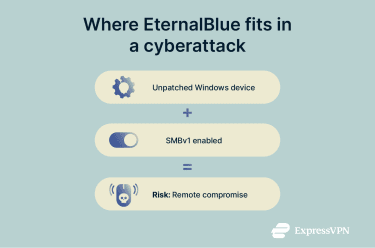
How malware propagates across networks
When malware uses EternalBlue to compromise one device, that system can become a launching point for further attacks.
Computers on the same network, such as those in an office or school, are often configured to communicate with each other for file sharing and other routine tasks (e.g., by using the SMB protocol). This connectivity makes networks convenient to use, but it can also make them vulnerable.
One way this connectivity is exploited is through network propagation. From an infected device, malware can identify other computers on the same network that are vulnerable to the same exploit and spread to them automatically. The type of software flaw that enables malware to propagate across networks without user interaction is called a wormable vulnerability. EternalBlue exploits a wormable vulnerability.
Another way attackers can expand their reach is through lateral movement. Lateral movement is when an attacker who already has access to one device moves through the network to access other systems. For example, in a corporate network, an attacker might start with an infected employee’s laptop and then move laterally to reach a file server containing confidential documents.
Real-world cyberattacks using EternalBlue
Once the exploit was leaked, cybercriminals were quick to abuse it, launching several large-scale ransomware and malware campaigns. Below, we examine some of the most prominent attacks.
WannaCry: The global outbreak
One of the most significant cyber incidents involving the EternalBlue exploit was the WannaCry attack in May 2017, which spread malware to hundreds of thousands of computers across more than 150 countries.
The WannaCry malware was a ransomware worm, meaning it combined two capabilities in one threat. As ransomware, it encrypted files and demanded payment for a decryption key. As a worm, it could automatically copy itself to other vulnerable devices over a network, allowing it to spread quickly without requiring each victim to click a link or open a file.
Victims included not just individual users but also major organizations, such as FedEx, LATAM Airlines, and the U.K. National Health Service (NHS). The attack caused billions of dollars in losses worldwide and disrupted critical services, including ambulances at some affected hospitals.
Despite the devastating consequences, the WannaCry attack was stopped relatively quickly. On the same day that it struck, Marcus Hutchins, a security researcher, discovered a “kill switch” in the malware. Once activated, the kill switch prevented WannaCry from executing its functions, which was critical in halting the outbreak.
NotPetya
In June 2017, a new malware outbreak emerged that used the EternalBlue exploit, which security researchers later named NotPetya because it looked similar to the earlier Petya ransomware.
NotPetya initially appeared to be a typical ransomware attack; as it encrypted critical parts of infected machines and spread aggressively across networks, it was eventually assessed as a destructive “wiper.” This was because the perpetrators of NotPetya had no intent of extracting a ransom from their victims: the affected systems were disabled permanently with no hope of recovery.
The NotPetya attacks impacted at least 2,000 organizations in over 100 countries, with the majority of them being organizations from Ukraine. It’s believed that it caused over 10 billion dollars in losses worldwide.
Unlike WannaCry, NotPetya didn’t include a kill switch. Organizations had to install Microsoft’s MS17-010 security update, which addressed the EternalBlue exploit, to prevent further infections.
Is EternalBlue still active today?
The specific exploit known as EternalBlue isn’t “active” in the sense of being a new or evolving threat, as Microsoft fixed the exact vulnerability it targeted many years ago, and modern patched Windows systems aren’t vulnerable to it.
That said, EternalBlue hasn’t disappeared from the real-world threat landscape. Attackers can still scan for it because many organizations continue to run older or unpatched Windows systems, and those legacy machines can still expose the vulnerable SMBv1 protocol.
The underlying class of vulnerability that EternalBlue exploited, specifically critical flaws in network-facing protocols like SMB, continues to exist in various forms, too, and attackers still look for and weaponize similar bugs today.
For example, SMBGhost (CVE-2020-0796) was a critical vulnerability in the newer SMBv3 protocol that could allow remote attackers to execute code without authentication, similar in concept to how EternalBlue worked, and attracted major attention when it was discovered and patched in 2020.
How to protect against EternalBlue
Protecting against EternalBlue requires patching vulnerable systems, disabling legacy SMBv1 where possible, and using network controls to prevent SMB-based lateral movement.
Check if your system is still vulnerable
EternalBlue affects Windows systems that are missing the MS17-010 patch and still have SMBv1 enabled. If your device is running Windows 11 or has received this update through regular Windows security updates, it’s not vulnerable to EternalBlue.
To confirm your device is protected, check Windows Update and install any pending security updates. In business environments, it’s also worth verifying that SMBv1 is disabled unless it’s needed for legacy compatibility.
Patch management best practices
To prevent EternalBlue and similar vulnerabilities from putting your organization at risk, it’s important to adopt good patch management practices. Patch management is the process of keeping software and operating systems up to date with the latest security fixes and optimizations while minimizing downtime.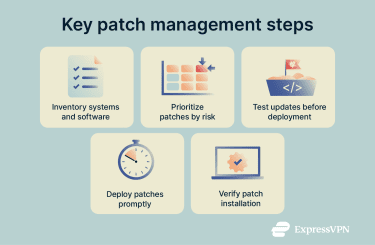
Here are some best practices:
- Maintain a complete inventory of systems and software: Know what devices and applications are in your environment so no systems are overlooked during updates.
- Prioritize patches by risk level: Evaluate your systems to determine which vulnerabilities pose the highest risk, and address those before applying less urgent updates.
- Test updates before full deployment: Verify that patches work correctly in a controlled setting to avoid disrupting essential operations.
- Deploy patches promptly: Ensure updates are rolled out quickly across all relevant systems to reduce the window of exposure.
- Verify patch installation: After deploying updates, confirm that patches have been successfully applied and are functioning as intended.
It’s important to understand the limitations of patch management, too: The most dangerous exploits are often zero-days, meaning there is no patch available yet. In those cases, you can’t “patch your way out” of the original attack, as patching only becomes possible once the vulnerability is exposed and the vendor releases a fix.
Endpoint protection and firewalls
Endpoint security and firewalls reduce the chance that an exploit attempt succeeds or spreads, especially if one device is missing updates.
Endpoint protection includes software that’s installed on a device to detect and block malware before it causes any damage, like antivirus or Endpoint Protection Platform (EPP) and endpoint detection and response (EDR) tools. These help by:
- Detecting exploit-related behavior, for example, suspicious SMB activity or abnormal processes.
- Blocking known malware payloads that are often delivered after exploitation, like ransomware or droppers.
- Alerting security teams when a device shows signs of compromise or lateral movement.
Firewalls help by limiting who can reach SMB in the first place. EternalBlue is a network-based exploit, meaning it requires the attacker (or malware) to connect to the SMB service on a device. If SMB traffic is blocked or restricted, the exploit can’t easily reach vulnerable systems.
A common defensive step is restricting SMB traffic on Transmission Control Protocol (TCP) port 445 (the port where SMB listens for traffic) to block inbound SMB from the internet entirely.
Enterprise-level strategies for IT teams
For organizations managing multiple devices and complex networks, IT teams can implement additional strategies to further reduce risk and limit potential damage:
- Segment networks: Divide the network into smaller subnets so that if one device is compromised, the attacker can’t easily move laterally to other systems.
- Plan incident response and train employees: Train staff to recognize potential signs of compromise, and set up clear procedures to quickly isolate and fix affected devices. This limits the potential impact of exploits like EternalBlue.
- Manage legacy systems: Establish rules for how older or unsupported devices are handled, whether that’s isolating them on separate network segments, restricting their access to critical systems, or retiring them entirely. This prevents outdated devices from becoming entry points that attackers could exploit.
- Apply the principle of least privilege: Ensure all systems and services run using non-administrative accounts whenever possible. This limits what an attacker can do if a vulnerability like EternalBlue is exploited, preventing full system compromise.
FAQ: Common questions about EternalBlue
What makes EternalBlue so dangerous?
EternalBlue is dangerous because it allows the attacker to execute code remotely on a device. This means that the attacker could install malware, steal data, or take over the system. Additionally, EternalBlue exploits a wormable vulnerability, meaning it enables malware to spread automatically to other vulnerable devices on the same network, potentially compromising entire organizations.
Can EternalBlue be used on phones or tablets?
No, EternalBlue only works on devices that use Server Message Block version 1 (SMBv1), a Windows file-sharing protocol. The operating systems of iOS and Android phones or tablets don’t use SMBv1; therefore, they’re not vulnerable to this exploit.
How do I scan my system for this vulnerability?
The easiest way to see if your system is vulnerable to EternalBlue is to check Windows Update. If there are no updates available, your device is protected, because the fix for this vulnerability was included in the MS17-010 update, which is installed through regular Windows updates.
What's the difference between EternalBlue and other exploits?
EternalBlue is an exploit that specifically targets a flaw in Windows’s file-sharing protocol, Server Message Block version 1 (SMBv1). Other exploits target different vulnerabilities in software or operating systems.
How did the NSA create EternalBlue?
The U.S. National Security Agency (NSA) has never publicly confirmed creating EternalBlue. Based on later analysis by security researchers, the exploit appears to have been intentionally developed to take advantage of a flaw in how Windows handled certain Server Message Block (SMB) requests, allowing remote code execution (RCE) over a network. EternalBlue became publicly known after it was leaked by the Shadow Brokers, who claimed the tools were stolen from the Equation Group, a threat actor that cybersecurity researchers have alleged has ties to the NSA.
Take the first step to protect yourself online. Try ExpressVPN risk-free.
Get ExpressVPN
















 Support Center
  FAQ
FAQ  VPN Setup Tutorials


