ExpressVPN
    • No-Logs Policy
    • Servers in 105 Countries
    • Use on Multiple Devices
    • High-Speed VPN
    • Access Online Services Securely
    • VPN for Gaming
    • 30-Day Money-Back Guarantee
    • Explore All Features
    • About ExpressVPN
    Sign Up For Expressvpn

    One subscription gives you access to a fast-growing suite of privacy and security tools that work seamlessly together to improve your digital life.

    View all products
    • Lightway VPN Protocol
    • Internet Kill Switch
    • Split Tunneling
    • Private, Encrypted DNS
    • Avoid ISP Throttling
    • Threat Manager
    • Ad Blocker
    • Parental Controls
    • Dedicated IP
  • Download VPN
    • Windows new
    • MacOS new
    • Linux new
    • iPhone / iPad
    • Android
    • Apple TV
    • Fire Stick
    • Android TV
    • VPN for Routers
    • Aircove Routers
    • Chrome
    • Firefox
    • Edge
  • Pricing
    • What Is a VPN?
    • VPN for Beginners
    • How To Use a VPN
    • VPN Encryption Explained
    • Blog
    • Glossary
    • IP Address Checker
    • DNS Leak Test
    • WebRTC Leak Test
    • Password Generator
    • Support Center
    • FAQ
    • Live Chat
    • VPN Setup Tutorials
    • Redemption Code
  • Icon10VPN for Teams
  • Products
    Icon11

    ExpressVPN for Teams Get fast, secure VPN protection for growing teams. Easy to deploy, simple to manage, built to scale.

    Img2
    • ExpressVPN

      ExpressVPN Industry-leading, ultra-fast VPN with secure servers in 105 countries.

    • ExpressMailGuard

      ExpressMailGuard Private email relay service to protect your inbox and identity.

    • ExpressKeys

      ExpressKeys Secure password management, multi-factor authentication, and more.

    • ExpressAI

      ExpressAI The first consumer AI powered by confidential computing for privacy-led intelligence.

    • Identity Defender

      Identity Defender Powerful suite of ID protection, monitoring, and data removal tools

    Other products from the family behind ExpressVPN

    • holiday.com eSIM

      holiday.com eSIM Unlimited data with a single eSIM across 150+ destinations.

    • Intego

      Intego Award-winning macOS antivirus, firewall, system tools, and more.

  • My Account
Get Started
ExpressVPN
    • No-Logs Policy
    • Servers in 105 Countries
    • Use on Multiple Devices
    • High-Speed VPN
    • Access Online Services Securely
    • VPN for Gaming
    • 30-Day Money-Back Guarantee
    • Explore All Features
    • About ExpressVPN
    Sign Up For Expressvpn

    One subscription gives you access to a fast-growing suite of privacy and security tools that work seamlessly together to improve your digital life.

    View all products
    • Lightway VPN Protocol
    • Internet Kill Switch
    • Split Tunneling
    • Private, Encrypted DNS
    • Avoid ISP Throttling
    • Threat Manager
    • Ad Blocker
    • Parental Controls
    • Dedicated IP
  • Download VPN
    • Windows new
    • MacOS new
    • Linux new
    • iPhone / iPad
    • Android
    • Apple TV
    • Fire Stick
    • Android TV
    • VPN for Routers
    • Aircove Routers
    • Chrome
    • Firefox
    • Edge
  • Pricing
    • What Is a VPN?
    • VPN for Beginners
    • How To Use a VPN
    • VPN Encryption Explained
    • Blog
    • Glossary
    • IP Address Checker
    • DNS Leak Test
    • WebRTC Leak Test
    • Password Generator
    • Support Center
    • FAQ
    • Live Chat
    • VPN Setup Tutorials
    • Redemption Code
  • VPN for Teams
  • Products
    • ExpressVPN

      ExpressVPN Industry-leading, ultra-fast VPN with secure servers in 105 countries.

    • ExpressMailGuard

      ExpressMailGuard Private email relay service to protect your inbox and identity.

    • ExpressKeys

      ExpressKeys Secure password management, multi-factor authentication, and more.

    • ExpressAI

      ExpressAI The first consumer AI powered by confidential computing for privacy-led intelligence.

    • Identity Defender

      Identity Defender Powerful suite of ID protection, monitoring, and data removal tools

    Other products from the family behind ExpressVPN

    • holiday.com eSIM

      holiday.com eSIM Unlimited data with a single eSIM across 150+ destinations.

    • Intego

      Intego Award-winning macOS antivirus, firewall, system tools, and more.

    Icon11

    ExpressVPN for Teams Get fast, secure VPN protection for growing teams. Easy to deploy, simple to manage, built to scale.

    Img2
  • My Account
Get Started
Home Home » How to set a password (and an email address) for your ExpressVPN account

Manage Your Account

How to set a password (and an email address) for your ExpressVPN account

Last updated: May 26, 2026

Share in FacebookShare in TwitterShare in WhatsappShare in TelegramShare by email

This guide explains how to create an ExpressVPN account if you dismissed the initial account setup after purchasing a subscription from your app store.

When you buy an ExpressVPN subscription within the ExpressVPN app via the App Store (iOS) or Google Play (Android), you are not required to set a password (and an email address).

However, you need an ExpressVPN account:

  • To use ExpressVPN on other devices: Without an account, your subscription is tied to the device you purchased it on. To set up ExpressVPN on a PC, Mac, or any other device, you need an account.
  • To access ExpressKeys, Identity Defender, and other bundled apps: Depending on the tier you purchase, your subscription can include access to a suite of ExpressVPN’s products, including ExpressVPN, ExpressKeys, Identity Defender (U.S. users only), ExpressMailGuard, ExpressAI, and the holiday.com eSIM. You need an ExpressVPN account to access and use these services.
  • To access the ExpressVPN+ portal: Your ExpressVPN+ portal gives you an overview of your subscription, the products included in your plan, and setup guides for all your apps. You can also manage and configure all your services from one place, track ExpressAI credits, and more.

Once your account is set up, you can use the same email and password to sign into all ExpressVPN services.

Note: You will be required to create an account if purchasing a subscription within ExpressKeys or Identity Defender. However, this guide also covers what to do if you accidentally close the app and need to restore the purchase and create your account.

Jump to…

Set a password (and an email address) in the ExpressVPN app
Set a password (and an email address) in the ExpressKeys app
Set a password (and an email address) in the Identity Defender app

Set a password (and an email address) in the ExpressVPN app

To set a password and email address for your ExpressVPN account in the ExpressVPN app for iOS or Android:

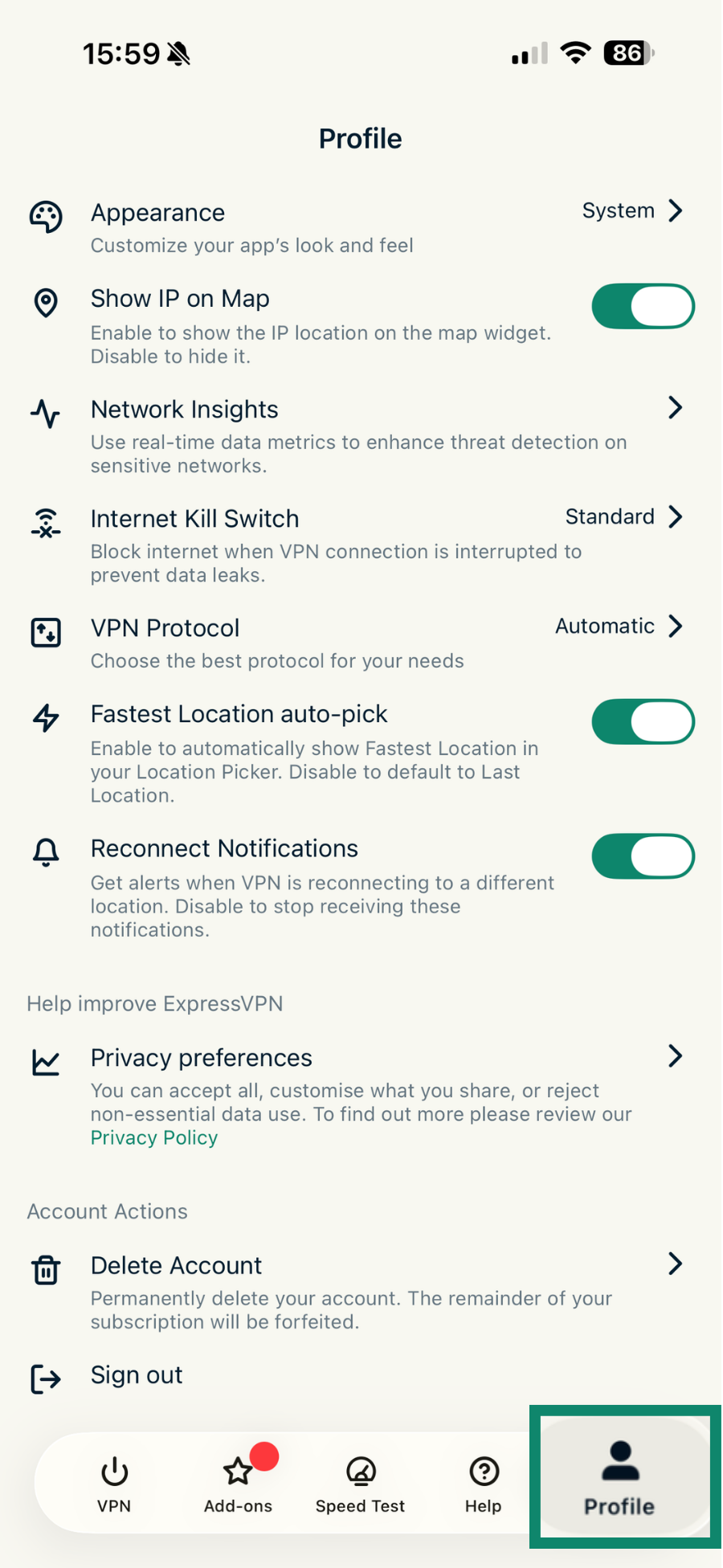
  1. Open the ExpressVPN app and tap Profile.The Profile tab in the ExpressVPN app.
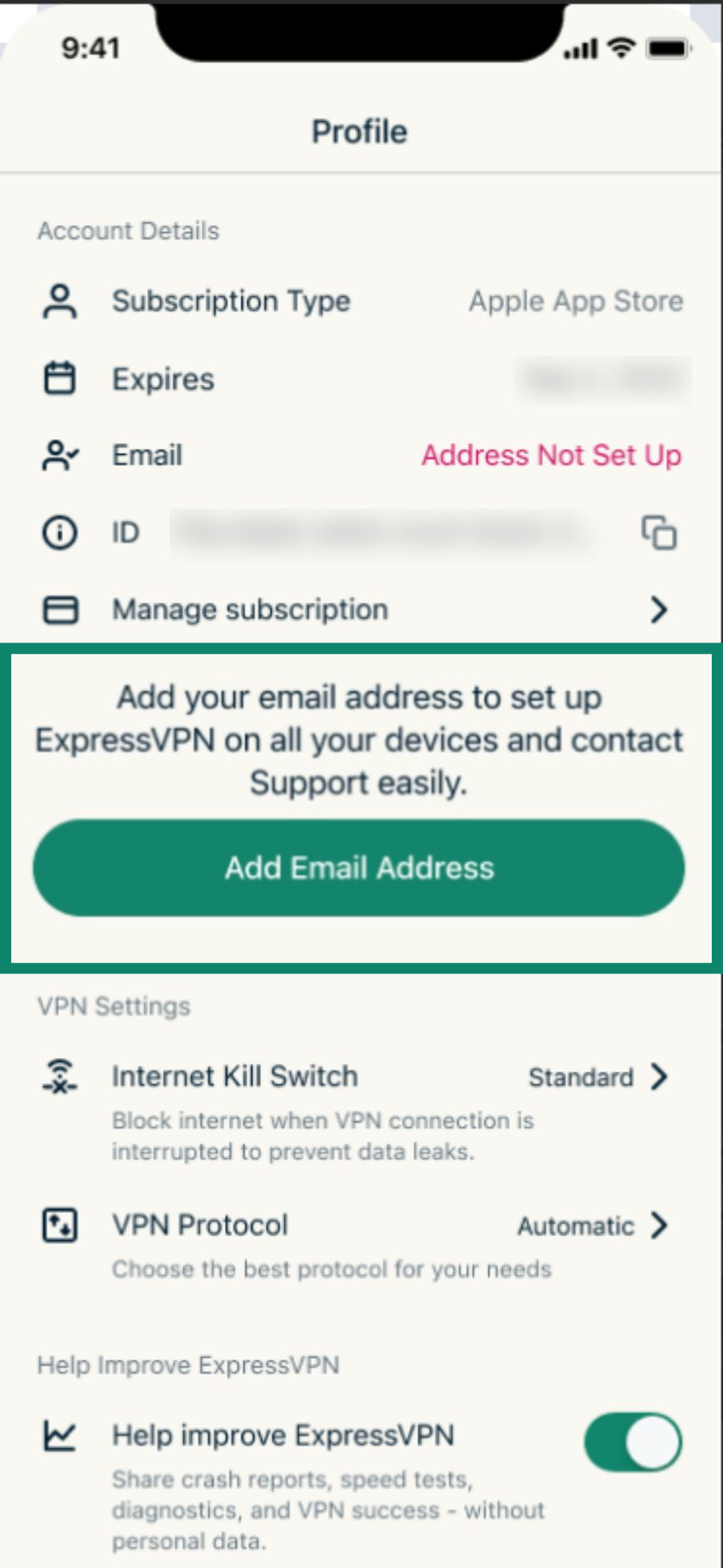
  2. Tap Add Email Address.The "Add Email Address" pop-up in the Profile tab in the ExpressVPN app.
  3. Enter an email address. Tap Add Email.
  4. Tap Confirm.
  5. A confirmation pop-up saying “Email Updated” will appear. Tap OK.
  6. You’ll receive a confirmation email, which includes a link for setting a password. Tap Set Password.
Need help? Contact the ExpressVPN Support Team for immediate assistance.

Back to top


Set a password (and an email address) in the ExpressKeys app

If you purchased an ExpressVPN subscription through the ExpressKeys app for iOS or Android, you’ll be prompted to create your account during the purchase. Learn more about in-app purchases in ExpressKeys.

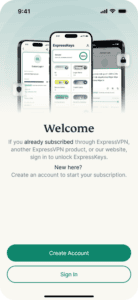
If you dismissed the account setup and need to return to it, open the ExpressKeys app and follow the same steps for purchasing a subscription. When you get to the Subscription screen, tap Restore Purchase. This tells the app store to check your purchase history and restore your subscription in the app.The subscription screen in the ExpressKeys app on mobile, with a highlighted Restore Purchase option.You’ll then be taken to the welcome screen.

  1. Tap Create Account.The Welcome screen in the ExpressKeys app, highlighting the "Create Account" button.
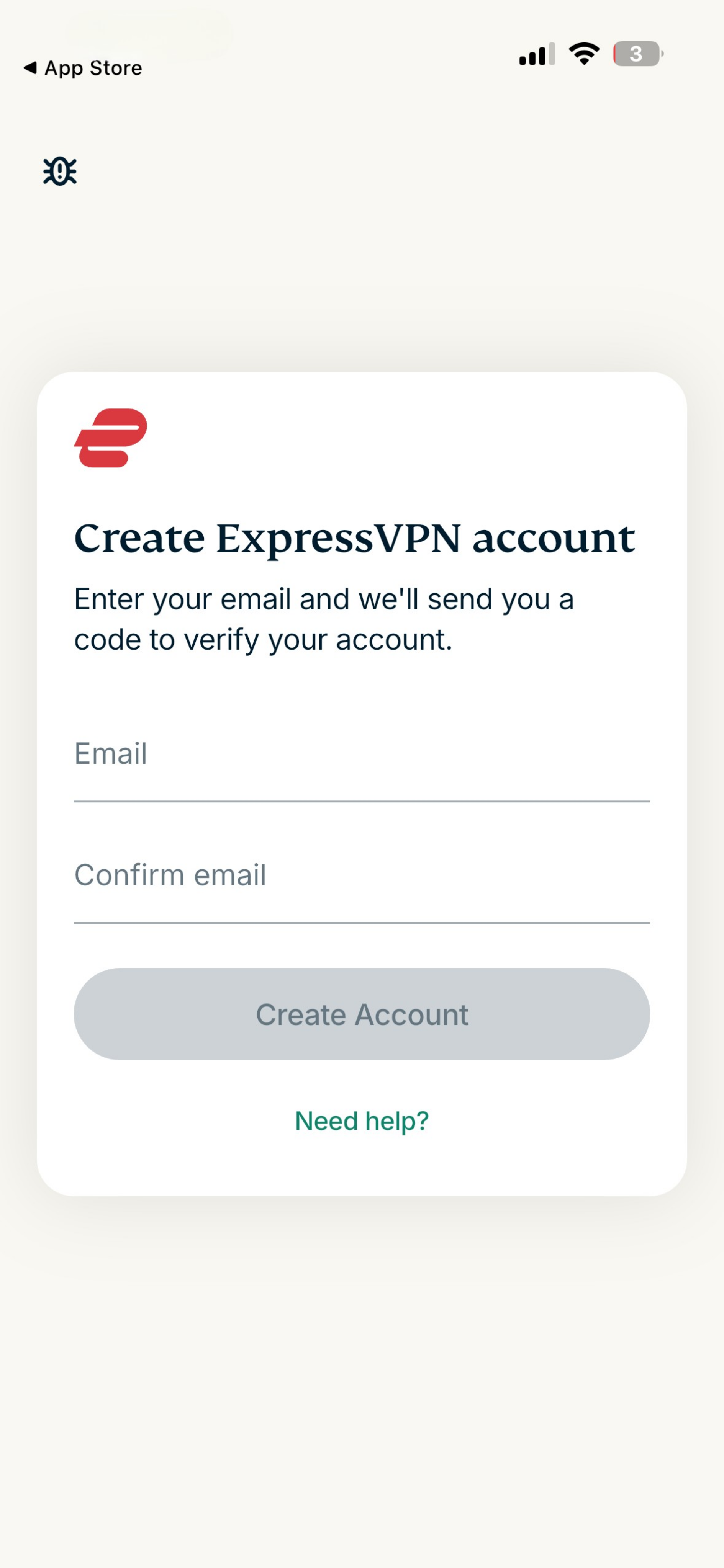
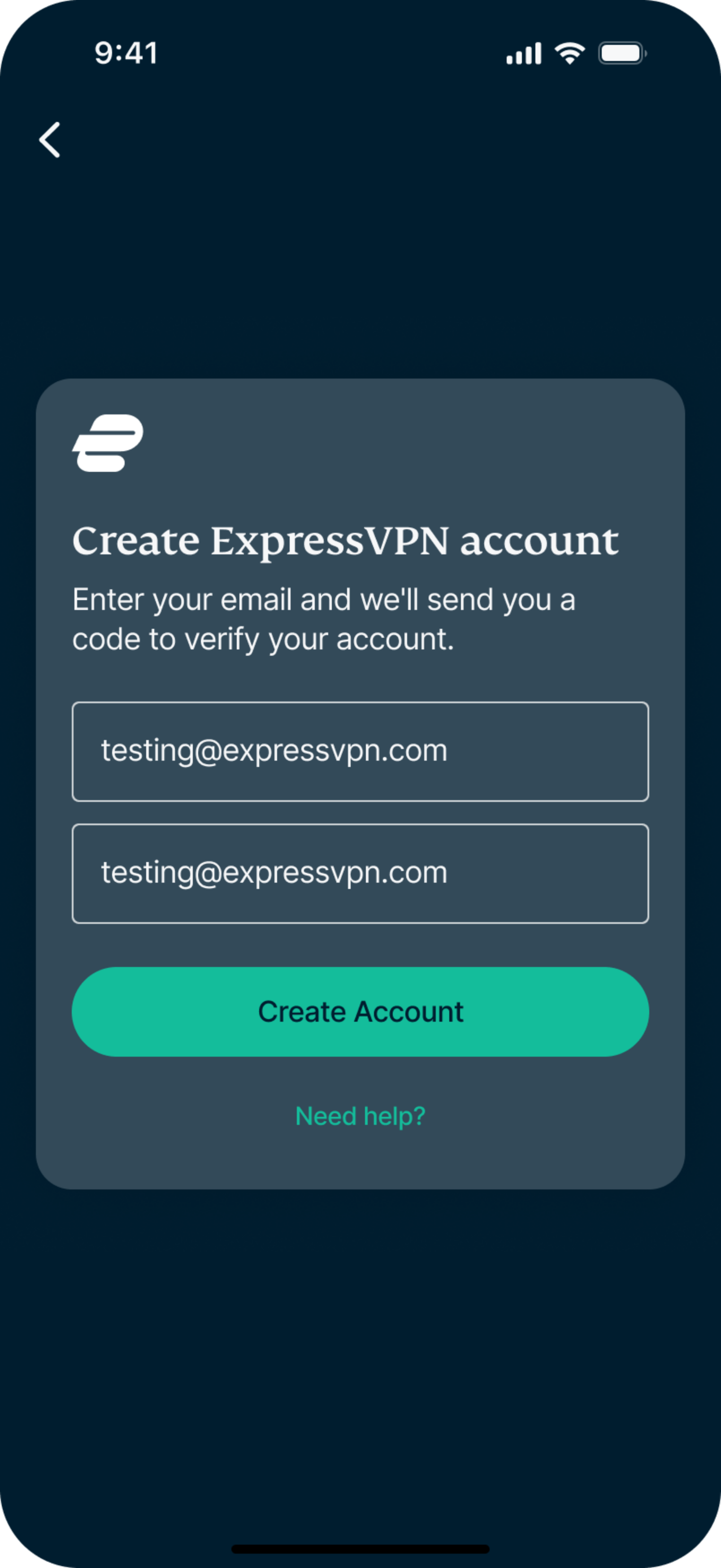
  2. When prompted, enter your email address twice and tap Create Account.The "Create ExpressVPN account" page on mobile.
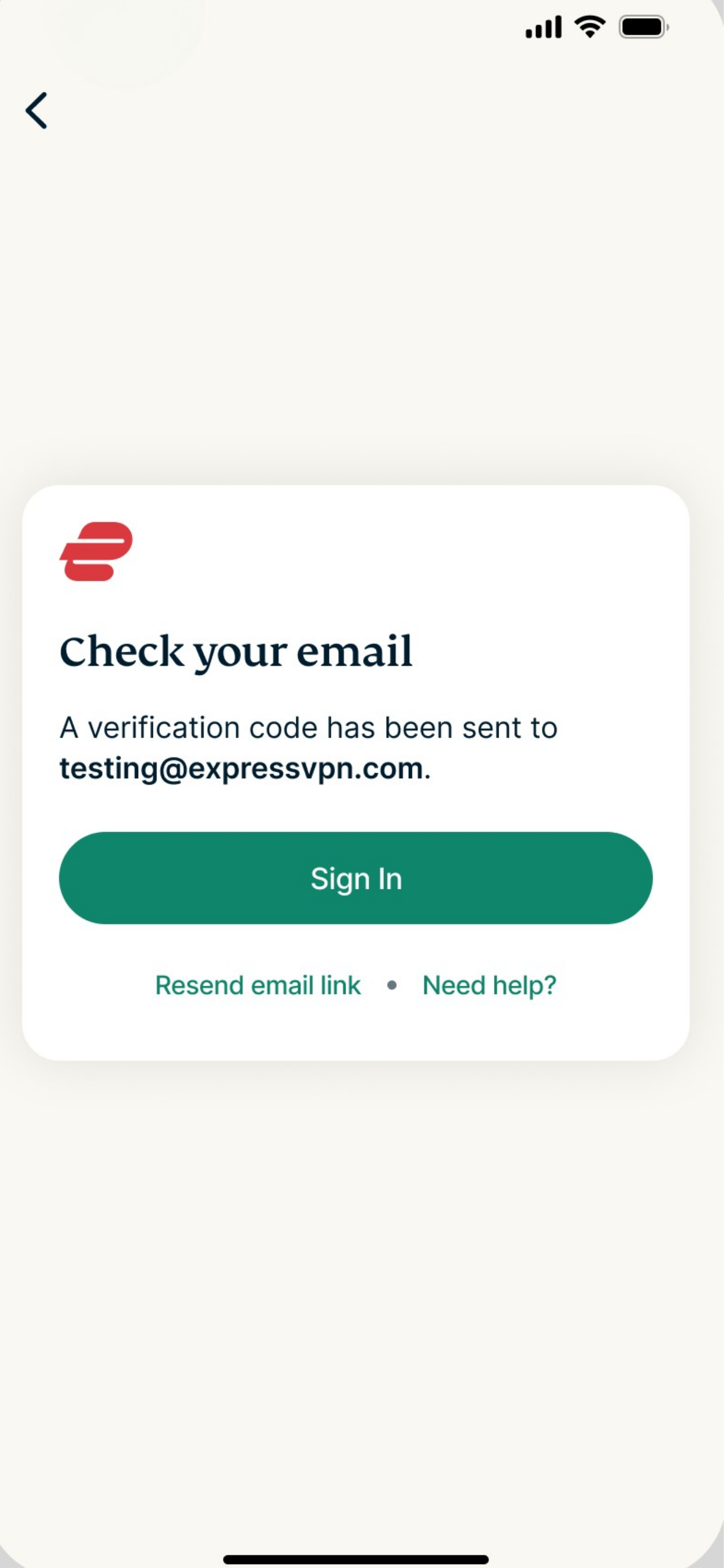
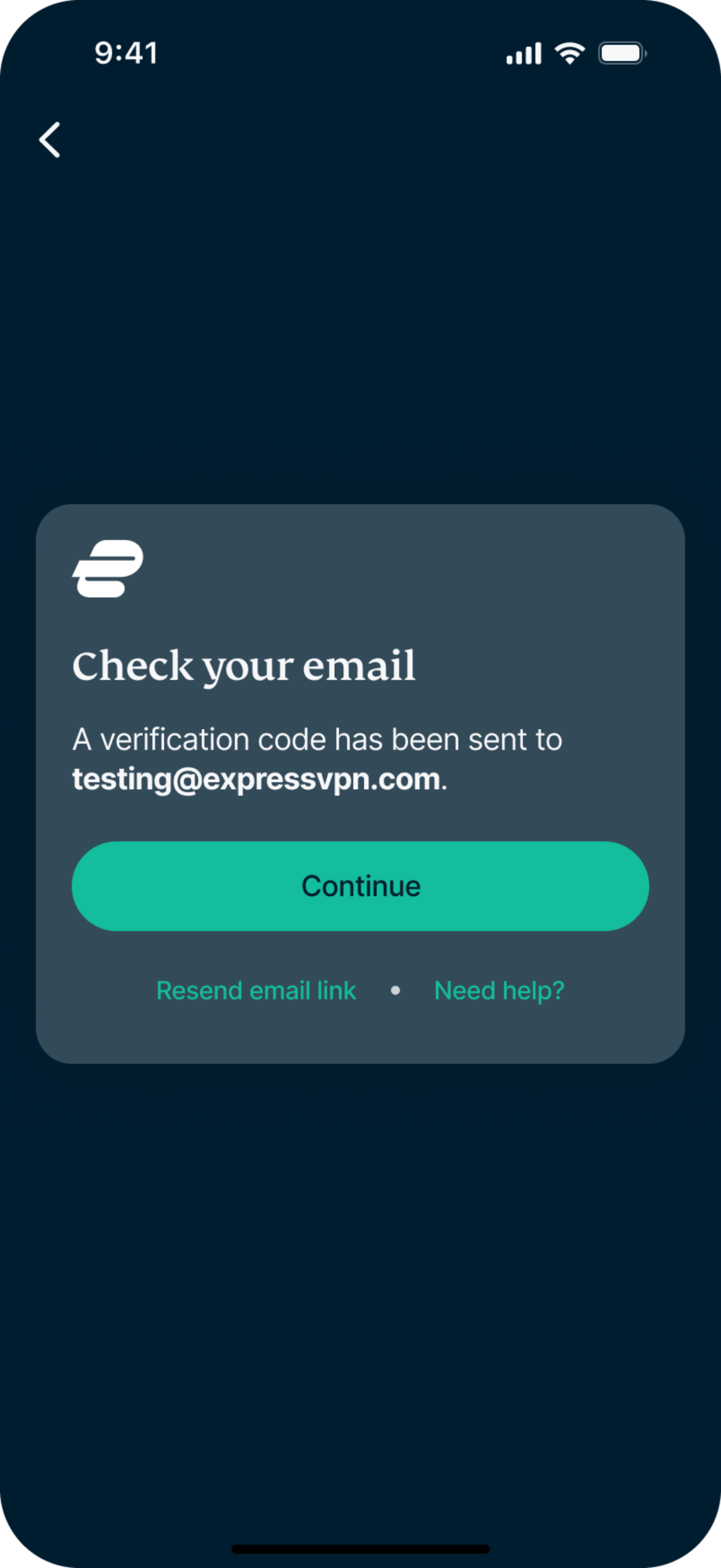
  3. A verification code will be sent to your email.ExpressVPN's "Check your email" page on mobile.
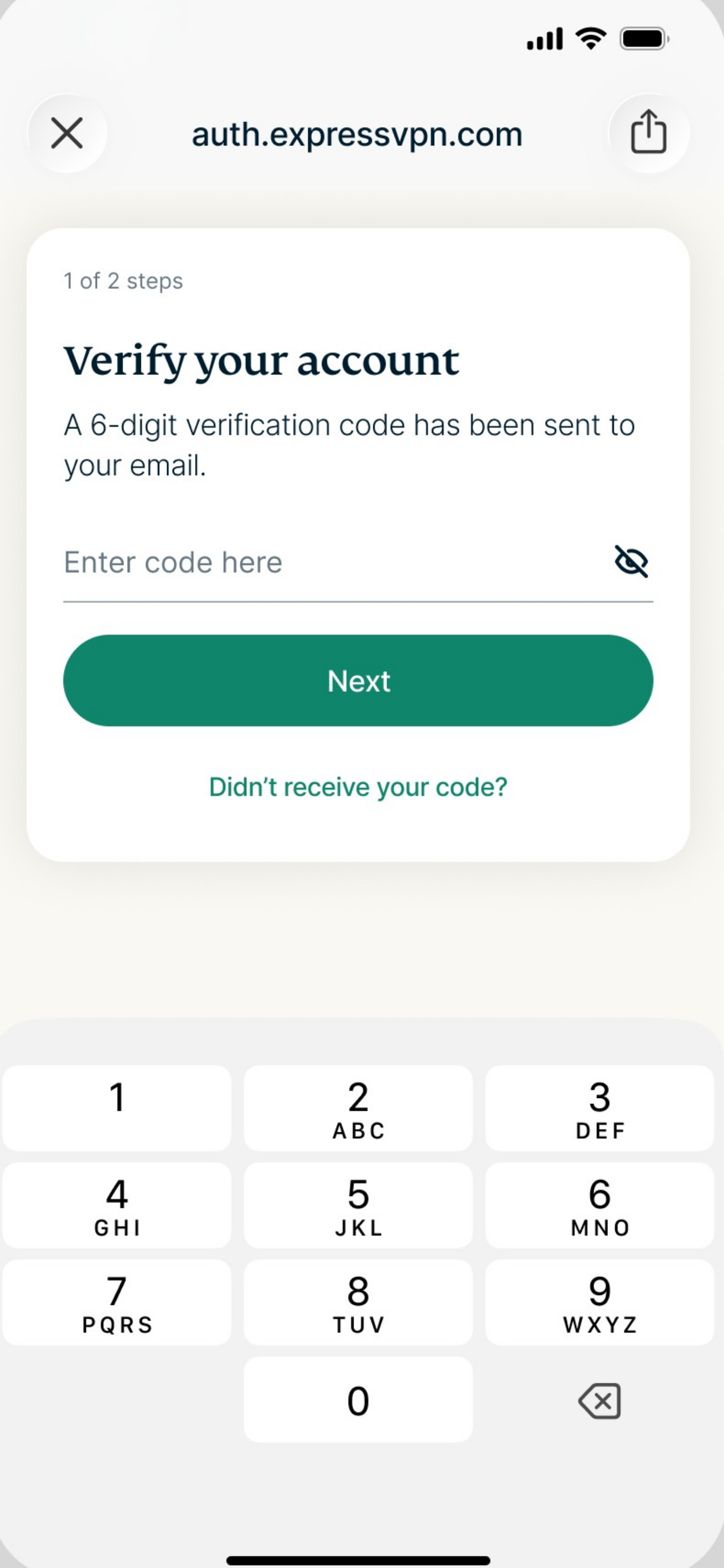
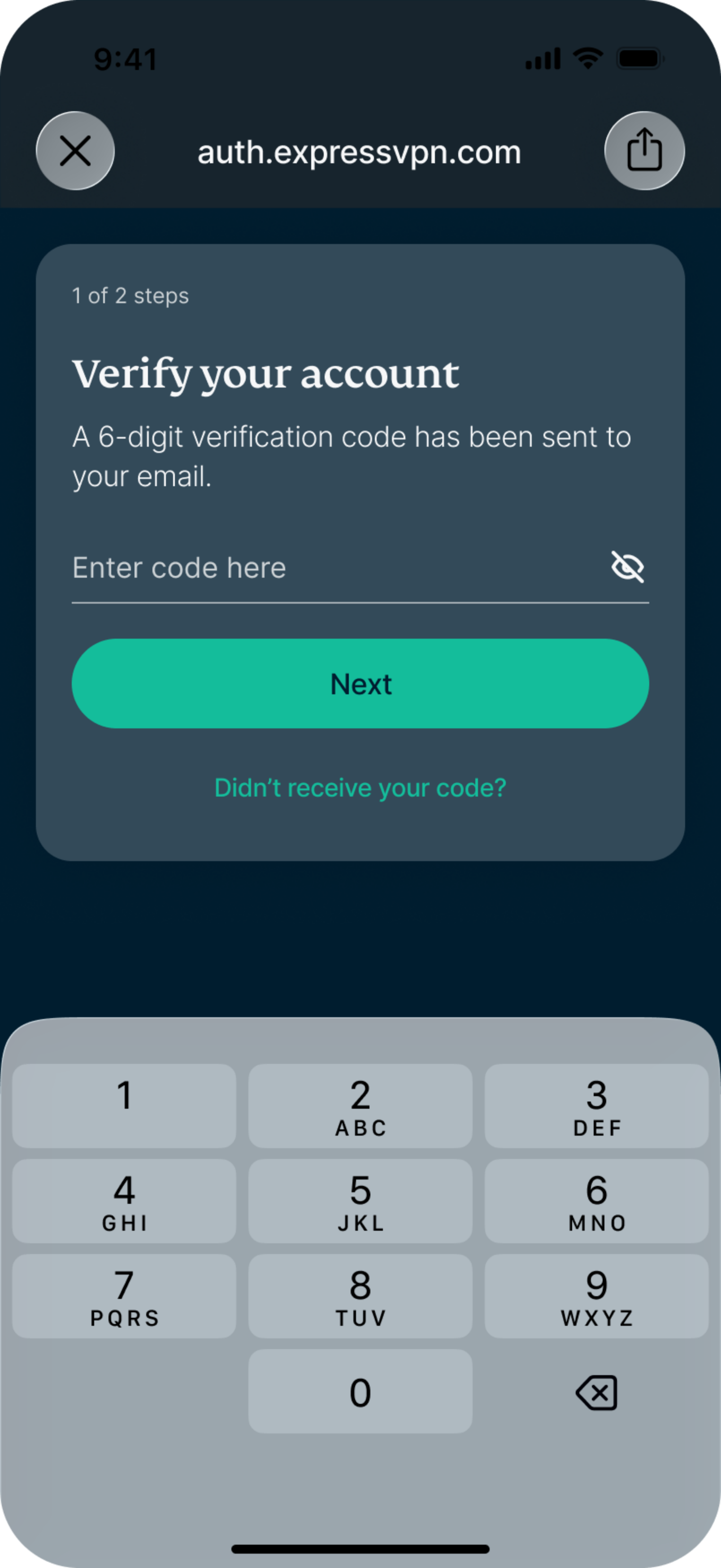
  4. Check your email for the code, enter it, and tap Next.ExpressVPN's "Verify your account" page on mobile

Need help? Contact the ExpressVPN Support Team for immediate assistance.

Back to top


Set a password (and an email address) in the Identity Defender app

Note: Identity Defender is only available to customers in the U.S.

If you purchased an ExpressVPN subscription through the Identity Defender app for iOS or Android, you’ll be prompted to create your account during the purchase. Learn more about in-app purchases in Identity Defender.

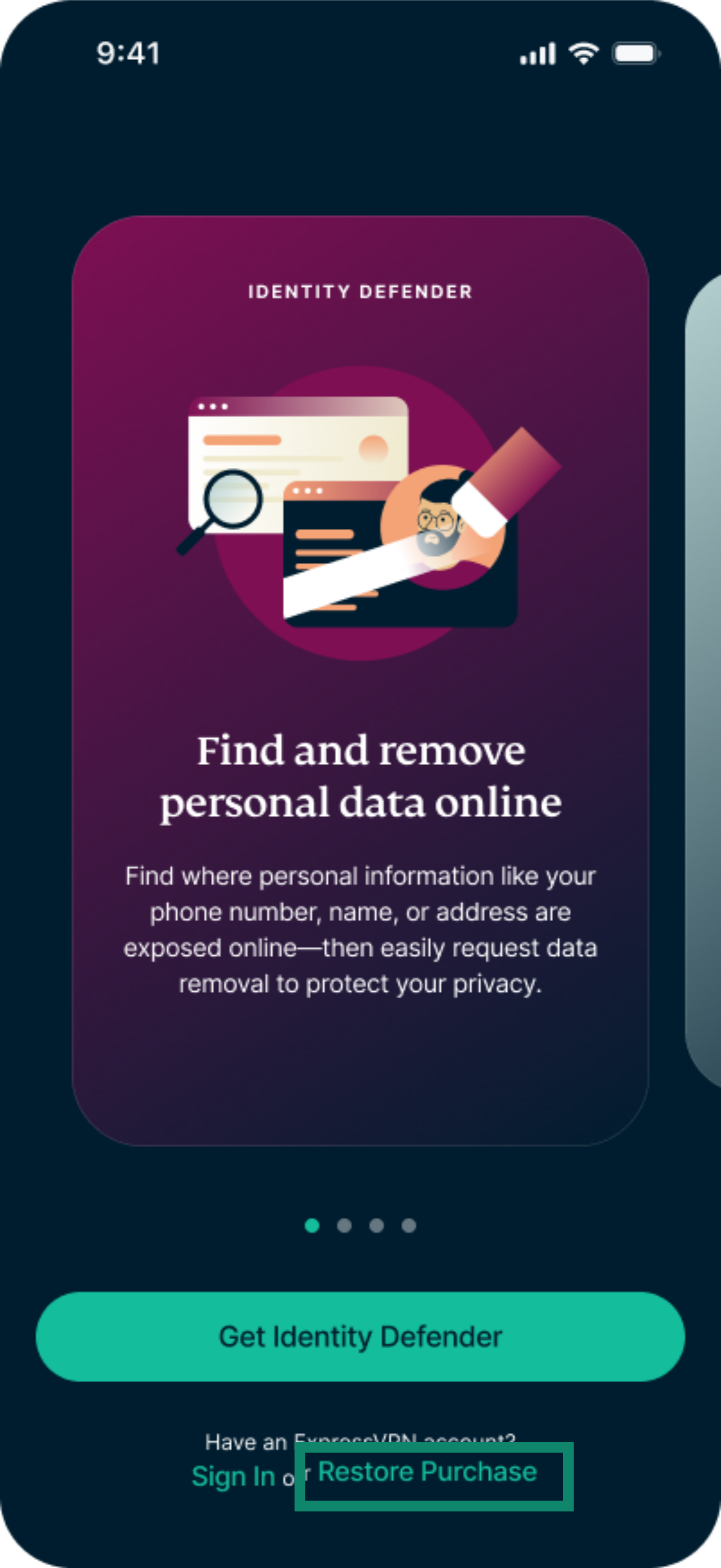
If you dismissed the account setup and need to return to it, open the Identity Defender app, and on the welcome screen, tap Restore Purchase. This tells the app store to check your purchase history and restore your subscription in the app.The welcome screen in the Identity Defender app, with a highlighted "Restore Purchase" option.You’ll then be prompted to create an ExpressVPN account.

  1. Enter your email address twice and tap Create Account.The "Create ExpressVPN account" page on mobile.
  2. A verification code will be sent to your email. Select Continue.ExpressVPN's "Check your email" page on mobile.
  3. Check your email for the code, enter it, and tap Next.ExpressVPN's "Verify your account" page on mobile

Need help? Contact the ExpressVPN Support Team for immediate assistance.

Back to top

Share in FacebookShare in TwitterShare in WhatsappShare in TelegramShare by email
Was this article helpful?

We're sorry to hear that. Let us know how we can improve.

Please enter a valid email address.

A member of our Support Team will follow up on your issue.

Share in FacebookShare in TwitterShare in WhatsappShare in TelegramShare by email

Related Articles

  • Is my ExpressVPN account secure?
Was this article helpful?

We're sorry to hear that. Let us know how we can improve.

Please enter a valid email address.

A member of our Support Team will follow up on your issue.

  • What is malware?
  • What is a network security key?
  • Are VPNs legal?
  • How to change the location on your iPhone
  • What is a digital footprint?
  • How to combine a VPN and Tor for online anonymity
  • Get the best VPN for multiple devices
VPN for All Devices
  • Download ExpressVPN
  • MacOS
  • Windows PC
  • iOS (iPhone & iPad)
  • Android
  • Linux
  • Routers
  • Apple TV
  • Fire Stick
  • Android TV
  • Chrome Extension
VPN Server Locations
  • Servers in 105 Countries
  • US VPN
  • UK VPN
  • Canada VPN
  • Australia VPN
Features
  • Explore All Features
  • Risk-Free VPN Trial
  • Plans and Pricing
Products
  • ExpressKeys
  • ExpressMailGuard
  • eSIM
  • Identity Defender
  • ExpressAI
About ExpressVPN
  • About Us
  • Trust Center
  • Rights Center
  • Security Audits
  • ExpressVPN Reviews
  • Our Experts
  • Press
  • Careers
Programs
  • Tottenham Hotspur
  • Brooklyn Nets
  • Partner with Us
  • Affiliates
  • Influencers
  • Student Discount
Get Help
  • VPN Setup Tutorials
  • FAQ
  • Buy VPN
Learn More
  • What is a VPN?
  • What Is My IP?
  • Hide My IP
  • Top 5 VPN Uses
  • Blog

© 2026 ExpressVPN. All rights reserved.

  • Privacy Policy
  • Terms of Service
  • Cookie Preferences

Choose language

    Live chat

    Need help? Chat with us!

    Online