
Expressvpn Glossary
Web protection
What is web protection?
Web protection refers to a category of security technologies that monitor and filter internet traffic in real time. Its main function is to block access to malicious websites, phishing pages, and unsafe downloads before they reach a local device or network.
These controls are often implemented in endpoint security software, network security systems, or browsers and operate as part of a broader web network or security framework.
How does web protection work?
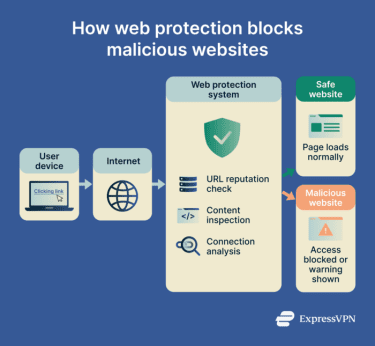
Web protection acts as the gatekeeper between the user’s device and the internet. It analyzes web requests and incoming data packets to identify markers of cyber threats.
This process usually includes several layers of monitoring:
- URL reputation filtering: Compares requested website addresses against global databases of known malicious domains linked to malware, scams, or phishing.
- Content analysis: Scans webpage elements, scripts, or downloaded files for indicators of malicious behavior.
- Secure Sockets Layer (SSL) / Transport Layer Security (TLS) inspection: Decrypts and examines encrypted traffic in controlled environments to detect threats delivered over HTTPS.
- Traffic monitoring: Detects suspicious connections or communication with known malicious servers.
- Blocking or isolation: Blocks harmful websites outright, displays a warning, or opens suspicious files in an isolated environment for further analysis.
Why is web protection important?
Web protection reduces the risk of common online threats encountered during everyday browsing. It blocks phishing pages designed to steal login credentials and blocks websites that distribute malware or trigger harmful downloads. It also helps safeguard sensitive data, including account credentials and financial details.
Where is web protection used?
Web protection is built into several security tools and services:
- Endpoint security software: Antivirus programs that monitor and filter web activity directly on individual devices.
- Secure web gateways: Enforce web access policies and threat filtering across organizational networks.
- Domain Name System (DNS) filtering services: Block access to malicious domains before a device connects to them.
- Browser security features: Warns or blocks access to deceptive or harmful websites based on built-in threat intelligence.
Risks and privacy concerns
Key limitations include the following:
- Data collection: To filter traffic, providers often log metadata or browsing history, which may raise concerns regarding data aggregation and third-party sharing.
- Detection gaps: Newly created or previously unknown threats may not yet appear in threat intelligence databases.
- Encryption weakening: Inspecting encrypted (HTTPS) traffic requires installing trusted certificates. If managed incorrectly, this can create vulnerabilities or weaken end-to-end encryption (E2EE).
- Centralized data exposure: Systems that aggregate web traffic data can become targets for data breaches.
Further reading
- What are malicious websites, and how can you safeguard yourself?
- The ultimate guide to phishing detection
- How to prevent the download of malicious code
- The safe browsing guide: 21 ways to protect yourself online







