
Expressvpn Glossary
Secure Shell (SSH)
What is Secure Shell (SSH)?
Secure Shell (SSH) is an encrypted protocol used for securing communication between networked systems. It enables authenticated connections for command execution, system administration, and data transfer across untrusted networks, forming a secure channel for remote operations and service access.
SSH was designed to replace older and less secure remote access protocols like Telnet.
How does SSH work?
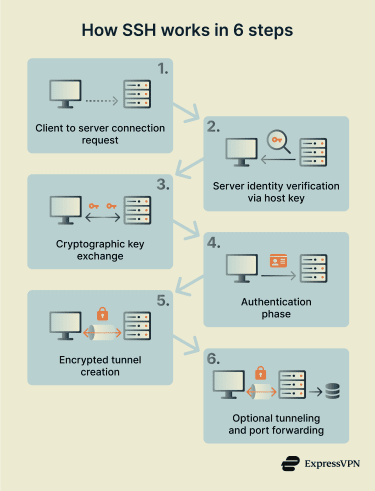
SSH establishes a secure connection through a multi-step cryptographic process:
- A client initiates a connection to an SSH server, typically over Transmission Control Protocol (TCP) port 22.
- The server proves its identity using a host key.
- A key exchange process establishes shared session keys.
- The user or system authenticates using a password or cryptographic keys.
- An encrypted tunnel is created for commands and data.
- Optionally, port forwarding or SSH tunneling is enabled to route other network traffic through the SSH connection.
 This process ensures confidentiality, integrity, and authentication throughout the session. Encryption protects the data from interception, while authentication mechanisms verify the identity of the server, the user, or both.
Where is SSH used?
SSH has many use cases, including:
- Remote server administration and maintenance.
- Secure file transfers using Secure Copy Protocol (SCP) and SSH File Transfer Protocol (SFTP).
- Developer access to Git repositories.
- Network device management, including routers and switches.
- Secure tunneling for internal services and applications.
Because SSH supports both interactive sessions and automated connections, it’s commonly integrated into scripts, deployment pipelines, and infrastructure automation tools.
Why is SSH important?
SSH provides foundational security for remote access and system communication. It prevents data interception on untrusted networks, protects authentication credentials from exposure, and reduces the risk of man-in-the-middle (MITM) attacks. By enabling encrypted remote control of systems and services, SSH also supports secure administration, automation, and infrastructure management across distributed environments.
Risks and privacy concerns
Despite the secure design of SSH, configuration and operational practices can introduce risks. For example:
- Weak or reused passwords can enable brute force attacks.
- Publicly exposed SSH ports attract automated scanning.
- Compromised private keys can allow unauthorized access.
- Agent forwarding (allowing a remote host to use local SSH keys to authenticate onward connections) can leak credentials between systems.
- Misconfigurations, for example, enabling outdated ciphers or exposing SSH to unrestricted public access, can weaken encryption or access controls.
Best practices
- Key-based authentication: Replaces passwords with cryptographic keys that are more resistant to brute-force attacks.
- Restricted root access: Prevents direct root logins, reducing the impact of credential compromise and limiting privileged access.
- Multi-factor authentication (MFA) support: Adds an extra verification step beyond keys or passwords.
- Network-level access controls: Limits which IP addresses or networks can reach SSH, reducing attack exposure.
- Ongoing OpenSSH maintenance and hardening: Keeps SSH secure by applying updates, disabling weak algorithms, and regularly reviewing configurations.
Further reading
- How to port forward: Complete step-by-step guide
- What is SSH? An introduction to secure shell protocol
- Encryption protocols explained: What they are and how they work



