Expressvpn Glossary
Password vault
What is a password vault?
A password vault is an encrypted digital space for passwords and other sensitive information, like credit card numbers, typically accessed via a password manager. It can only be unlocked with a master password or biometrics (like a face scan). Its purpose is to keep passwords secure but also accessible for the end user.
How does a password vault work?
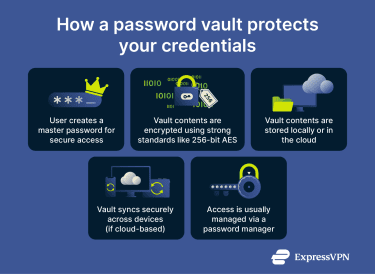 A password vault is unlocked with a master password and stores passwords and other sensitive data in encrypted form, either locally or in the cloud, usually using a strong standard such as 256-bit Advanced Encryption Standard (AES) encryption.
Vaults can be hosted locally on a device or in the cloud, depending on the provider and user preference. Local vaults keep all encrypted data on the user’s hardware, while cloud-based vaults store it on remote servers to enable syncing across multiple devices.
Many password vault providers use zero-knowledge architectures, meaning they can’t access the stored information.
Password vault vs. password manager
A password manager is the software that manages and interacts with the password vault. The manager provides features such as autofill, secure password generation, and automatic saving of new credentials. These features are part of the manager, while the vault is the secure storage component it relies on.
In short, the vault is the secure encrypted storage of your credentials, while the password manager is the software that helps you access and manage that storage.
Security and privacy considerations
To maximize security, always use a strong, unique master password for your vault, as it is the key to all stored credentials. Enabling two-factor authentication (2FA) adds an extra layer of protection, making it harder for attackers to gain access even if the master password is compromised.
Keep your vault software up to date to ensure the latest security patches and vulnerability fixes are applied. When syncing credentials across devices, using a virtual private network (VPN) adds a layer of network encryption to help protect your data as it travels between devices, making it harder for attackers to intercept on unsecured Wi-Fi networks.
Common password vault features
Password vaults provide secure storage and management of sensitive credentials, often including features such as:
- Strong encryption: Protect stored data using algorithms like 256-bit AES.
- Local or cloud storage: Store encrypted vault data on the user’s device or securely in the cloud.
- Synchronization: Securely sync encrypted data across multiple devices when cloud-based.
- Offline access: Access locally stored passwords without needing an internet connection.
- Zero-knowledge architecture: Providers cannot access or decrypt your stored data.
Further reading
- What is a password manager and why should you use one
- How to change your Google password (step-by-step guide)
- 4 tips to create a strong password and keep your accounts secure
 Support Center
  FAQ
FAQ  VPN Setup Tutorials


