
Expressvpn Glossary
Offensive security
What is offensive security?
Offensive security is a proactive approach to cybersecurity that involves experts simulating attacks under controlled conditions. By acting like threat actors, security teams can find weaknesses in networks, applications, or systems before cybercriminals do.
How does offensive security work?
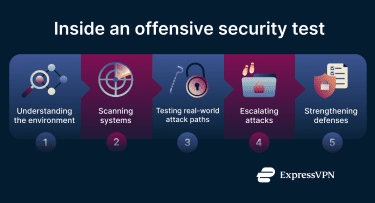 Offensive security follows a structured sequence of actions that mimics real attacks. It typically moves through the following stages:
- Information gathering: Testers collect details about the target’s systems, networks, and environment to understand the overall attack surface.
- Scanning for weak points: Security experts identify open ports, active services, and exposed interfaces to map out potential vulnerabilities.
- Vulnerability analysis: Teams assess whether the systems are susceptible to known vulnerabilities.
- Executing attacks: Specialists deploy or simulate various attacks, escalating privileges to see how far they can probe and what data can be exposed.
- Reporting and mitigation: Testers document their discoveries and provide clear, practical steps to improve security.
Types of offensive security testing
- Penetration testing: Experts launch controlled, simulated cyberattacks on parts of a network or application to uncover technical flaws.
- Application security: Testers evaluate the security of apps, APIs, and web apps by identifying and attempting to exploit weaknesses.
- Red teaming: Security teams mimic real-world, persistent attacks to test how well detection and response systems hold up under sustained pressure.
- Vulnerability assessment: Automated or semi-automated tools scan a system to identify possible vulnerabilities.
- Social engineering testing: Security staff simulate phishing attempts to see how susceptible an organization is to deception.
Why is offensive security important?
Offensive security enables organizations to:
- Find weaknesses early: Offensive security helps organizations identify and fix vulnerabilities before real attackers can exploit them.
- Strengthen response readiness: Simulated attacks allow teams to practice detection and response, improving readiness.
- Test security tools: Firewalls and intrusion detection systems (IDSs) are probed for weaknesses.
- Boost long-term resilience: Continuous testing helps organizations stay ahead of new threats and improve their security over time.
- Improve compliance: Regulations may require that organizations practice offensive security (and provide documentation).
- Support long-term security: Offensive security can inform and strengthen secure development practices throughout the software development life cycle (SDLC).
Security and privacy considerations
As offensive security operations mimic real attacks, the practice comes with certain risks. IT leaders need to take the following into account:
- Risk of unintended exposure: Penetration testing can accidentally expose or alter sensitive information. Safeguards must be implemented to avoid leaks and real damage.
- Dynamic environments and configuration drift: Modern IT environments change frequently. If offensive testing doesn’t stay in sync with adapting circumstances, it’s less effective.
- Need for a safe testing environment: Teams can avoid running destructive tests directly on live systems by using controlled, isolated environments.
- False positives: Automated tools may report insignificant issues, which can waste time and lead to unnecessary changes. Organizations may wish to incorporate human reviews to keep efforts focused.
- Potential ethical or legal issues: Offensive testing can run afoul of regulations or internal policies. It must follow strict rules and have full authorization to avoid ethical or legal problems.
Common offensive security tools
To perform offensive security, professionals rely on a number of tools and systems. These include:
- Penetration testing frameworks: Using frameworks like Metasploit, testers simulate real-world attacks.
- Network and port scanners: Tools like Nmap can scan a network to discover which devices are online, which ports are open, and which services are running.
- Web application testing tools: Burp Suite, Zed Attack Proxy (ZAP), and other tools can check web applications for security weaknesses.
- Network analyzers: Monitoring a network’s data flows with analyzer software like Wireshark allows specialists to inspect packets.
- Password-cracking tools: Hashcat and other crackers are used to try to break password hashes using brute force or dictionary attacks.
Further reading
FAQ
Is offensive security legal?
Offensive security is legal when ethical hackers work with explicit permission from the system’s owner and stick to a defined scope and agreement.
How is offensive security different from defensive security?
Defensive security involves creating systems that can block and detect threats. Offensive security is more proactive and involves simulating real-world attacks to find hidden weaknesses in an organization’s infrastructure.
Do organizations use offensive security regularly?
Yes, many organizations perform regular offensive security tests. Offensive security plays a vital role in confirming that defensive measures are sufficient. The more frequently tests are carried out, the greater confidence an organization can have in its overall security.
Can individuals learn offensive security?
Yes, individuals can learn offensive security through training and certifications that teach ethical hacking and penetration testing skills.



