Expressvpn Glossary
Monitoring software
What is monitoring software?
Monitoring software tracks system behavior or performance over time. It collects and analyzes logs, metrics, traces, and security events. By tracking how this data changes, it can provide insights into application and infrastructure performance.
How does monitoring software work?
Most monitoring and observability solutions follow these core steps:
- Data collection: Monitoring software collects data about system activity and performance, such as logs, metrics, traces, and security events.
- Data processing: The collected data is organized and prepared so it can be stored, searched, and used for analysis.
- Analysis: The software examines the data to identify patterns, detect unusual behavior, and track changes over time.
- Alerts and response: When issues or unusual activity are detected, the system sends alerts or triggers actions so teams can investigate and respond.
Types of monitoring software
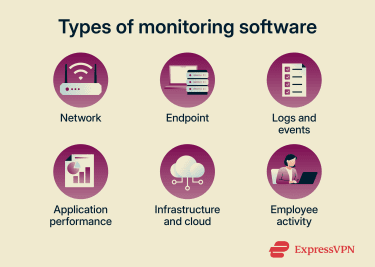
- Network monitoring: Tracks bandwidth usage, packet loss, latency, and other metrics to identify connectivity issues.
- Endpoint and device monitoring: Observes activity on servers, desktops, laptops, and virtual machines (e.g., process launches, file changes, and system-level events).
- Log and event monitoring: Collects and searches system and application event records (e.g., user sign-ins, configuration changes, and system errors).
- Application performance monitoring: Measures response times, traces (how requests move through app components), exceptions, and system resource usage.
- Infrastructure and cloud monitoring: Provides data on operational health, resource utilization, and performance across cloud and on-premise environments.
- Employee activity monitoring: Records device and app usage (e.g., login times and website access) to provide visibility into activity.
Where is monitoring software used?
Monitoring software is deployed wherever systems, networks, or devices require ongoing visibility. Common examples include:
- Businesses: Manages systems, maintains operations, supports oversight.
- Educational institutions: Manages and supports large numbers of student and staff devices remotely.
- Home and Internet of Things (IoT) networks: Monitors home networks and connected devices.
Benefits of monitoring software
- Detects performance drops, service failures, or error spikes by tracking defined thresholds and generating alerts.
- Identifies suspicious activity that may indicate attacks (for example, credential stuffing).
- Provides long-term log retention and preserves unaltered evidence for audits, incident investigations, and regulatory compliance.
- Delivers ongoing insight into assets, threats, vulnerabilities, operational health, resource utilization, and performance to support informed risk management.
- Accelerates diagnosis and resolution by correlating metrics, logs, and events in dashboards.
- Threshold-based alarms trigger automatic actions, which reduce mean time to resolution (MTTR) and mean time to detection (MTTD).
- Logs changes and events to trace actions, initiators, and impacts, boosting transparency.
Risks, limitations, and privacy concerns
Uncontrolled collection, access, or retention of monitoring data can expose organizations to technical, privacy, and legal risks. For example:
- Logs sometimes capture passwords, keys, tokens, or personal information.
- Intrusive monitoring of user activity can negatively affect workplace culture.
- Poor authentication lets attackers gain access or allows insiders to abuse systems.
- Storing unnecessary data increases exposure in a data breach.
- Processes that handle personal data must comply with applicable data protection laws.
Further reading
- What is bossware? Your guide to employee monitoring tools
- What is stalkerware, and how to remove it from your phone
- What is spyware? Types, examples, and how to prevent it
FAQ
Is monitoring software the same as spyware?
No, monitoring software openly checks system status to spot deviations from expected behavior, while spyware secretly gathers information without the subject’s knowledge.
Can monitoring software see encrypted virtual private network (VPN) traffic?
It depends on where the monitoring occurs. VPNs encrypt traffic between the device and the VPN server. So, if the monitoring software is network-level, it will see metadata like the VPN IP address, timing, and traffic volume. However, if the monitoring software is installed on the device, it could record screen activity, application usage, or system events before traffic is encrypted.
What data does monitoring software typically collect?
Monitoring software collects records of system events and performance data, such as sign-in attempts, configuration changes, software errors, CPU and memory usage, and network connections.
How can I detect unwanted monitoring software?
Run security scans to check for unknown or suspicious programs on the device. Review startup and login items to see which applications launch automatically, as unwanted monitoring tools often configure themselves to start with the system.
Is monitoring software the same as observability tools?
No. Observability refers to the broader goal of understanding a system’s internal state by examining its outputs. Monitoring software is one way to achieve that goal, as it gathers and analyzes system data to track performance and behavior.




