
Expressvpn Glossary
Mandatory access control (MAC)

What is mandatory access control?
MAC (not to be confused with Media Access Control) is a security mechanism that restricts access to resources based on security labels and user clearances. It’s enforced at the system level by a security policy that users and processes cannot override or modify.
Organizations use MAC to protect highly sensitive data and enforce strict "need to know" principles, reducing cyber risk from human error, compromise, or unauthorized sharing.
How does MAC work?
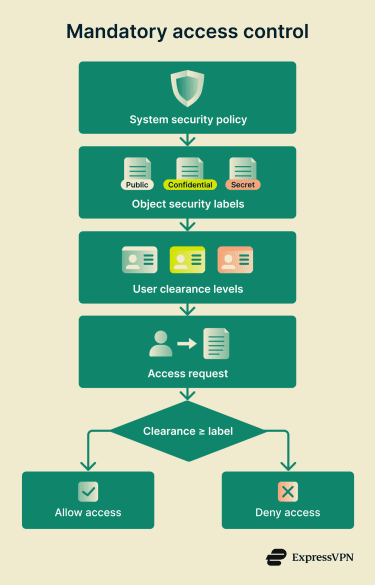 A central authority defines a mandatory policy that applies system-wide.
- Objects (files, resources, etc.) receive security labels indicating sensitivity (e.g., Confidential, Secret) and often additional categories.
- Subjects (users and processes) are assigned formal clearances that specify the sensitivity levels and categories they're authorized to access.
- When access is requested, the system compares the subject's clearance against the object's label and enforces the policy rules.
- Access is granted only if the clearance meets the required level and any additional constraints are met.
In some implementations, designated subjects may receive special privileges with strict oversight.
Types of mandatory access control (MAC)
- Multilevel Security (MLS) systems: Use a vertical hierarchy of security levels (e.g., Unclassified > Confidential > Secret). Users access data at or below their clearance level, preventing unauthorized disclosure.
- Multilateral (compartmented) security systems: Combine vertical sensitivity levels with horizontal access controls (compartments/categories, such as domains). Access requires sufficient clearance and membership in the relevant compartments, enabling finer separation beyond just hierarchy.
Where is it used?
MAC is standard in government and military organizations for protecting classified information. For example, an agency might use MLS-style labeling to determine access based on sensitivity levels, compartments, and potential damage from leaks.
It's also valuable in banking, critical infrastructure, and other sectors handling highly sensitive data, where centralized enforcement helps prevent fraud and unauthorized access.
In general, MAC suits environments that require consistent rules for all users and tight control over critical assets.
Why is mandatory access control (MAC) important?
- Enforces a uniform, organization-wide policy.
- Limits damage from compromised accounts, accidental sharing, or malicious insiders by restricting access to authorized activities only.
- Aligns with "need to know" to prevent information leaks, a principle originating in military settings and now widely adopted in regulated industries.
Challenges of using MAC
- High complexity: Policies, classifications, and access lists must be defined precisely upfront and kept accurate as the organization grows.
- Requires ongoing maintenance: Regular reviews and updates are required to align permissions with changing roles, data, and threats to prevent workflow disruptions.
- Limited flexibility: Changes require administrator intervention through the security kernel, which can delay legitimate access in dynamic environments.
- Scaling difficulties: Creating and sustaining effective policies is resource-intensive in large or rapidly changing organizations.
- Insider risk exposure: Could be bypassed by privileged administrators or through misuse of clearances.
Further reading
- What is zero-trust architecture?
- Most secure operating systems in 2026
- The 7 pillars of zero-trust security
- How to implement zero trust







