Expressvpn Glossary
IP camera

What is an IP camera?
An Internet Protocol (IP) camera is a digital video device that transmits and receives data over a local network or the internet. Its core purpose is to capture video footage and send it digitally to storage systems, monitoring software, or cloud services. This allows remote viewing and management without the need for traditional analog connections.
See also: Public IP, data breach, end-to-end encryption
How does an IP camera work?
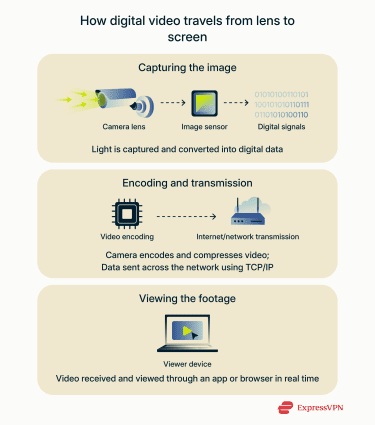 An IP camera captures video in the same way as a standard digital camera, using digital image sensors that convert light into electronic signals. This footage is then compressed and encoded with codecs like H.264 or H.265. Once that’s done, standard protocols such as Transmission Control Protocol (TCP) and IP transmit the data through a wired Ethernet or wireless Wi-Fi connection to routers, servers, or cloud platforms.
Users can access live or recorded footage remotely via dedicated mobile apps, web browsers, or integrated management software. Many IP cameras also support cloud storage and can connect with other smart home or Internet of Things (IoT) devices for motion detection and automated alerts.
IP camera vs. analog CCTV
The key difference between IP and analog CCTV systems is the signal type. IP cameras send digital signals, while analog CCTV relies on coaxial cables to transmit analog video. IP cameras are capable of delivering much higher resolutions than analog, often Full HD or 4K.
IP cameras also enable remote access from anywhere with an internet connection, while analog systems typically require on-site monitoring. However, the digital nature of IP cameras introduces additional cybersecurity risks, as unsecured networks can expose them to hacking and unauthorized access.
Why are IP cameras important?
IP cameras are essential for modern surveillance due to the following reasons:
- Quality footage: They capture high-resolution footage, allowing clear identification of faces, vehicles, and other important details.
- Instant sharing: Many IP camera systems can quickly share video clips through email, messages, or live links, improving response times during emergencies.
- Integrate with existing setups: Modern IP cameras can operate on existing network infrastructure, making upgrades easier and more cost-effective.
- Security and flexibility: Features such as motion detection, video analytics, and cloud integration enhance both security and operational flexibility.
Common use cases
IP cameras are widely used across various environments. In homes and offices, they often support smart security setups. They are relied upon for resident/employee safety, theft prevention, and property management.
Cities and towns use IP cameras in public spaces to enhance traffic control and safety. In industrial and retail settings, they help track inventory, monitor production lines, and prevent unauthorized access.
Risks and privacy concerns
Despite these advantages, IP cameras pose some privacy and security risks, especially if not set up correctly. Key concerns include:
- Weak authentication: Default passwords or poor access controls can let attackers easily take control.
- Lack of encryption: Unencrypted streams or clips can be intercepted.
- Data leaks: Poorly secured cameras may expose recorded footage or its metadata.
- Remote access vulnerabilities: Direct internet exposure increases attack risk.
Using strong passwords, trusted networks, and a virtual private network (VPN) can reduce these risks and help protect privacy.
Further reading
- Reviewed: 4 home security cameras
- What is IP whitelisting? The complete guide to secure access
- How to know if you have a hacked webcam (and how to fix it)
 Support Center
  FAQ
FAQ  VPN Setup Tutorials


