Expressvpn Glossary
Factory reset

What is a factory reset?
A factory reset is the process of restoring a device’s software and settings to the state they were in when it left the factory. This removes all user data, applications, and custom settings, leaving only the software installed by the manufacturer in its default configuration.
How does a factory reset work?
A factory reset can be performed on a wide range of electronic devices, including computers and laptops, smartphones, tablets, smart TVs, AirPods, smart home devices, and routers.
The process typically involves three steps:
- Erasing user data: Deletes files, documents, and personal information stored on the device.
- Removing apps and customizations: Uninstalls non-default applications and resets user-modified settings.
- Restoring defaults: Reinstates the original operating system configuration and preinstalled software.
Learn more: A factory reset shouldn’t be confused with System Restore, which is specific to Windows devices and reverts only system files, registry settings, and installed programs, while leaving personal files and most user settings intact. System Restore can also return a device to any previously saved system state. A factory reset, by contrast, removes all user data and reverts all custom settings to their default state.
Factory reset vs. hard reset
Some users use “factory reset” and “hard reset” interchangeably. Others define “hard reset” as a forced restart or power cycle of a device.
Using this definition, a factory reset differs from a hard reset in three key ways:
- Scope of changes: A hard reset only clears temporary system memory, while a factory reset fully restores the device to its original settings.
- Use cases: Hard resets are commonly recommended for minor issues, such as an unresponsive device or temporary glitches. Factory resets are a last-resort measure, used only when other troubleshooting steps have failed.
- Impact on stored data: Hard resets don’t delete any user data or revert any settings. Factory resets permanently delete all user data and applications.
Common use cases and benefits
Factory resets are commonly performed in the following situations:
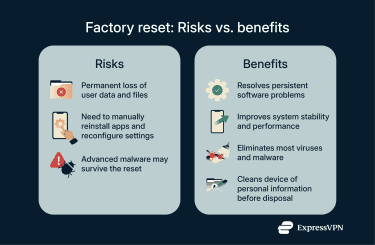
- Preparing a device for new ownership: Removes personal data, apps, and settings, ensuring that new owners will receive the device in its default configuration and be unable to access sensitive information.
- Fixing major software issues and removing malware: Resolves persistent malfunctions and eliminates harmful programs that can’t be addressed using standard methods.
- Improving device performance: Clears out old apps and files, freeing system resources and storage space.
Risks and limitations
Factory resets carry several potential risks and limitations that users should be aware of:
- Permanent data loss: Users will lose important files if they aren’t backed up beforehand.
- Reinstallation required: After a factory reset, all user apps and custom settings must be manually restored.
- Limited protection against sophisticated threats: Some forms of advanced malware or spyware may survive a factory reset.
Further reading
FAQ
Does a factory reset delete everything?
A factory reset deletes all user data, apps, and reverts any user-modified settings, but it doesn’t delete the operating system or any pre-installed apps. In other words, it returns the device to the state it was in when it left the factory.
Is a factory reset the same as a hard reset?
No, a factory reset and a hard reset are different processes. A hard reset forces the device to restart and may clear temporary data, but it doesn’t erase personal files. A factory reset erases all user data and restores the device to its original state.
When should I factory reset my device?
Consider factory resetting a device if it’s experiencing persistent software issues or is infected by malware that can’t be removed via other methods. Some people also perform a factory reset to improve device performance or to prepare a device for new ownership.
Can data be recovered after a factory reset?
In most cases, the answer is no. This is one of the major risks of a factory reset. Some third-party tools and data recovery services may be able to help depending on the situation, but there are no guarantees. For this reason, users should back up important data before performing a factory reset.