Expressvpn Glossary
DNS record

What is a DNS record?
A Domain Name System (DNS) record is a piece of data that specifies where a domain name directs internet traffic. It can point to the server hosting a domain’s website or identify which servers handle the domain’s email. It can also link one domain name to another or store data used for verification and security.
How does a DNS record work?
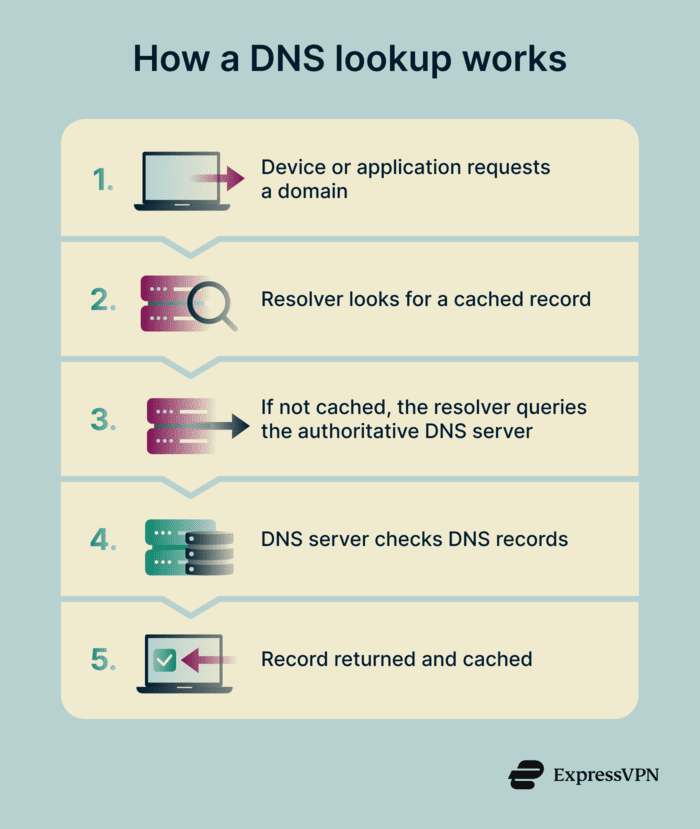 When a device or application needs to reach a domain, it sends a request to something called a DNS resolver. The resolver is a server that looks up the DNS records for that domain, sending back the required information.
If the resolver doesn't already have the answer cached, it contacts the authoritative DNS server for the domain and receives the relevant records. The resolver returns the result back to the device and caches it for a set amount of time based on the record's time to live (TTL).
While the TTL is valid, repeated lookups use the cached result. Once it expires, the resolver fetches a fresh record. This process can add delays if a DNS record is changed (for example, if a website moves to a new server or a domain’s email service is updated). Most updates take effect within a few hours to 48 hours, depending on the TTL.
Common DNS record types
- A and AAAA records: Map a domain name to an IP address. A records use IPv4 addresses (like 192.0.2.1), while AAAA records use the newer IPv6 format.
- Canonical name (CNAME) records: Link one domain name to another. This allows multiple names, such as www.example.com and example.com, to lead to the same destination without maintaining separate records for each.
- Mail exchange (MX) records: Specify which mail servers handle email for a domain and in what priority. If the first server is unavailable, email delivery falls back to the next one in the list.
- Text (TXT) records: Store text-based data associated with a domain. Common uses include verifying domain ownership or publishing email security policies that help receiving servers detect forged messages.
- Nameserver (NS) records: Identify which servers are authoritative for a domain. They tell other DNS servers where to send queries for that domain.
- Start of authority (SOA) records: Define key settings for a domain’s DNS zone. They specify which server is the primary source of the DNS data and how often secondary servers check for updates.
Why is a DNS record important?
DNS records determine whether a domain functions as expected. If records are missing or incorrect, a website may not load, emails may fail to arrive, services that rely on the domain can stop working, and security risks, such as subdomain takeover, can be introduced.
DNS records also affect how quickly updates take effect. When a record is changed, such as when a domain is moved to a new server, the update doesn't reach everyone at once because resolvers cache their results.
For domains that handle email, certain DNS records are essential for delivery. Mail servers check these records to confirm that messages come from legitimate sources. If they're missing or misconfigured, outgoing email may be flagged as spam or rejected.
Risks and privacy concerns
- Configuration errors: A wrong IP address in an A record can make a website unreachable. Incorrect MX records can prevent email from being delivered. Because many services depend on DNS, even small configuration errors can disrupt multiple systems.
- DNS spoofing: In a DNS spoofing attack, falsified DNS records cause users to be directed to fraudulent websites even though the real domain hasn’t changed.
- Email spoofing: Missing or misconfigured email authentication records can increase the risk of phishing.
- Information exposure: TXT records can unintentionally reveal information. Verification data or service identifiers published in DNS are visible to anyone who queries the domain.
Where are DNS records used?
Beyond websites and email, DNS records are used wherever domain names need to resolve to specific destinations.
- Content delivery: Content delivery networks (CDNs) use DNS to route users to the nearest server for faster load times.
- Software-as-a-Service (SaaS) onboarding: Services like Google Workspace or email platforms require DNS records to verify domain ownership.
- Enterprise networks: Organizations use internal DNS to resolve private hostnames and manage virtual private network (VPN) routing.
- Internet of Things (IoT) and Voice over Internet Protocol (VoIP): Devices like sensors, cameras, and phone systems rely on DNS to locate the endpoints they connect to.
Further reading
- What is my DNS? How to check and find your DNS server
- Types of DNS servers: Everything you need to know
FAQ
What’s the difference between A and CNAME records?
What is TTL and why does it matter?
Can mesh networking work without internet access?
Which DNS records help prevent email spoofing?
These systems publish verification information in text (TXT) records. Mail servers check this data to confirm that an email was sent by an authorized server.




